Available in: EE
The module lifecycle stage: Preview
The module has requirements for installation
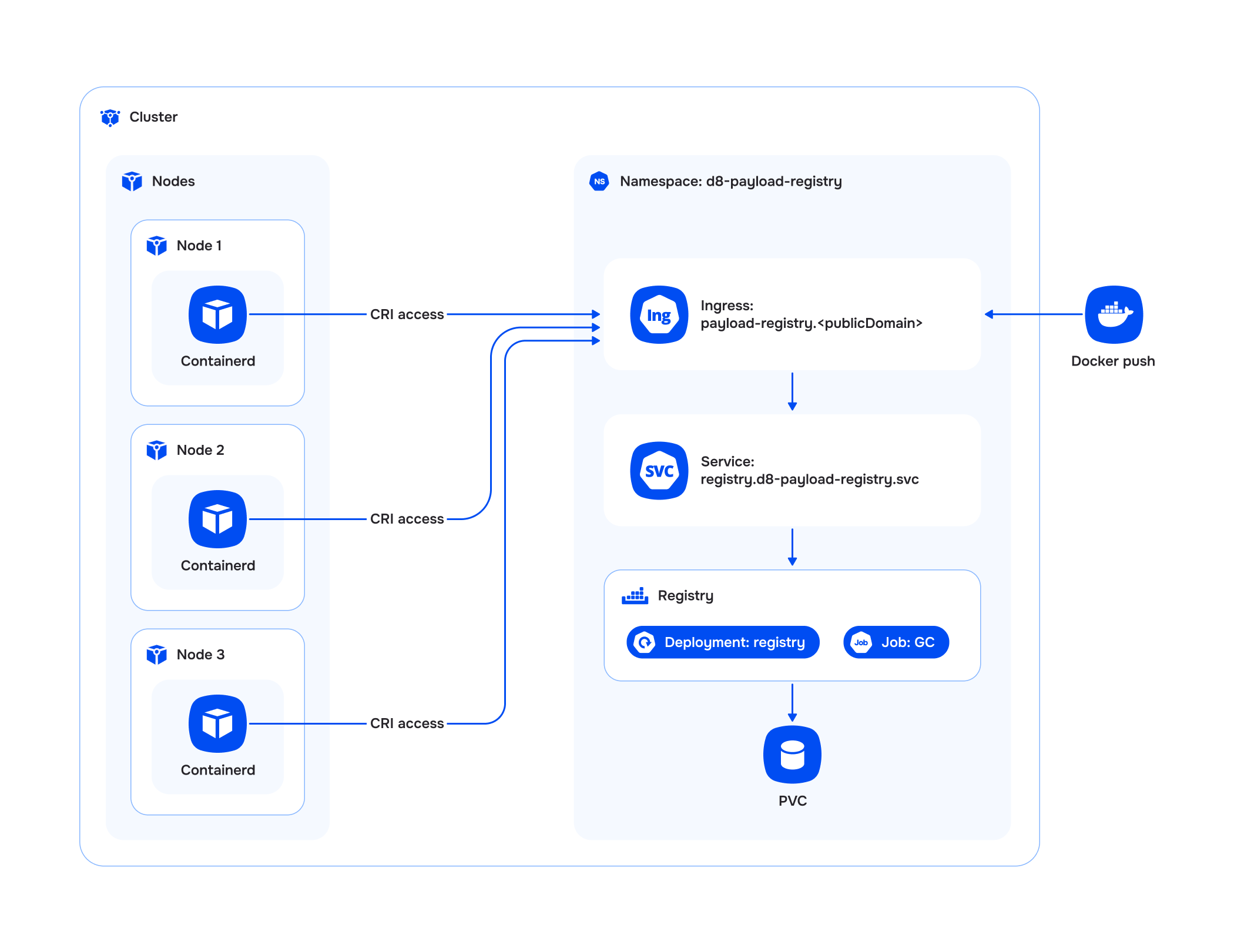
The payload-registry module implements a custom OCI container image registry within the Deckhouse Kubernetes Platform.
Users and access
The module allows authentication in the registry using Kubernetes tokens, as well as the ability to configure static authorization.
For more details, see the Authentication and authorization section.
Kubernetes API extension
The module extends the Kubernetes API, allowing you to manage tags in the registry repositories using the Deckhouse CLI (d8), kubectl, or another client.
For more details on the capabilities, see the Kubernetes API extension section.
Using images in cluster
The module allows you to use images stored in the registry to run pods in the cluster.
For configuration and usage examples, see the Using images in cluster section.
Garbage collection (GC)
The module supports the configuration of periodic garbage collection to clean up unused layers and untagged image manifests. The GC procedure is executed as a Kubernetes job and includes the following steps:
- Transition the registry to “read-only” mode.
- Execute the GC job to clean the registry.
- Return the registry to “read-and-write” mode.
GC settings are configured through ModuleConfig in the settings.gc section. For more detailed usage examples, refer to the Examples and FAQ sections.
Limitations and features
The module has the following limitations and usage features:
- The module is intended for storing custom images.
- Access to the registry is through Ingress at the address
payload-registry.${PUBLIC_DOMAIN}, wherePUBLIC_DOMAINis the value from thepublicDomainTemplateconfiguration in the global ModuleConfigglobal. - A repository in the registry can be created (via
pushof a tag) only with the prefix of a namespace that exists in the DKP cluster, and its contents are cleared when that namespace is deleted. Image address format:payload-registry.${PUBLIC_DOMAIN}/<namespace>/<image>:<tag>payload-registry.${PUBLIC_DOMAIN}/<namespace>/(<folder1>/..<folderN>/)<image>:<tag>
Architecture