Deckhouse Stronghold in a private environment

This feature is available in Enterprise Edition only.

The presentation contains an overview of the actions required to install Deckhouse Platform.

Installation scheme

This guide focuses on deploying a Kubernetes cluster using Deckhouse Platform in a private environment from which there is no direct access to the public container image registry (registry.deckhouse.io) or public deb/rpm packages repositories.

Installation in a private environment is generally similar to installation on bare metal. The only difference is in some additional settings.

Scheme of Deckhouse Platform installation in a private environment:
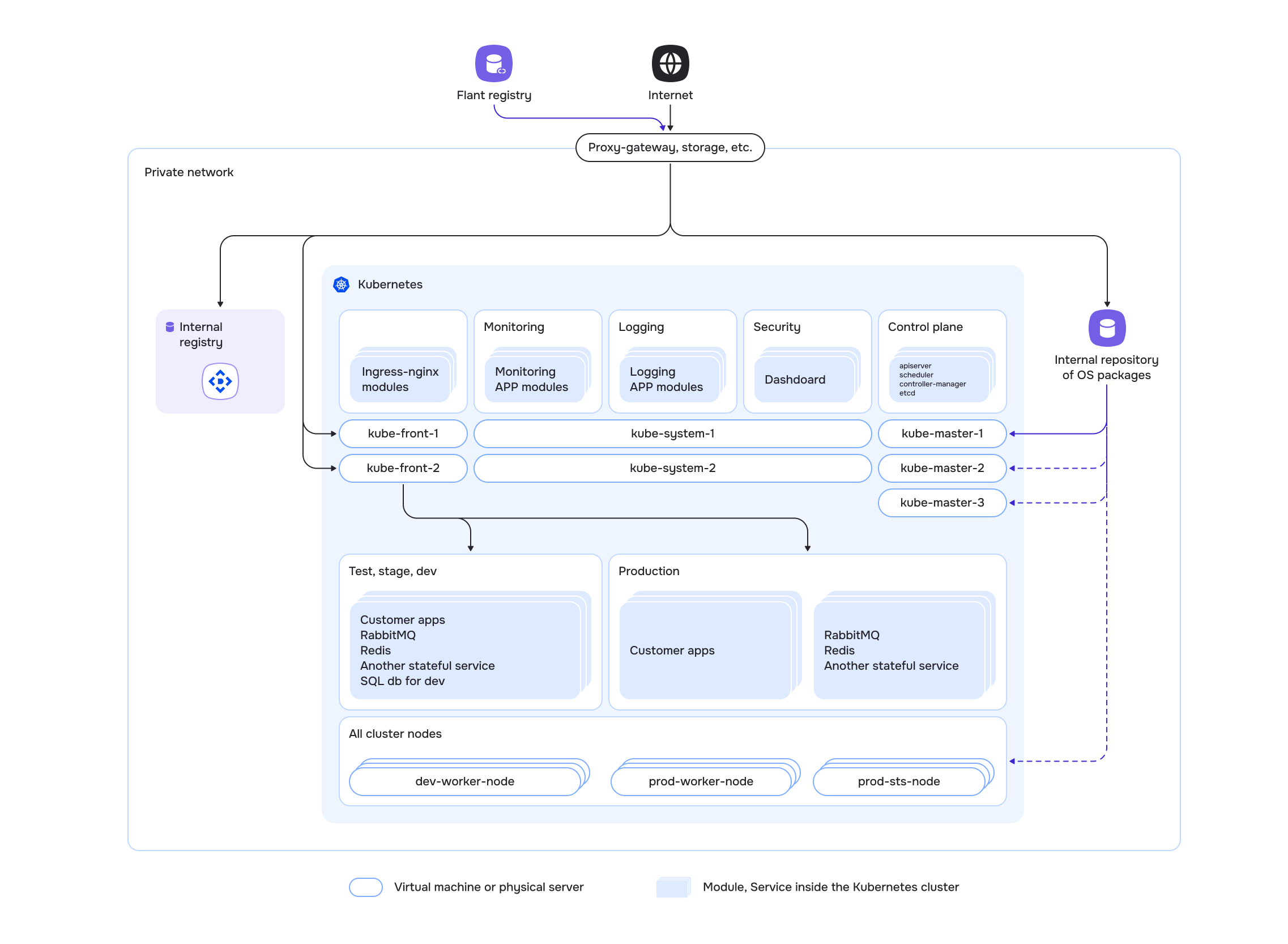
Scheme of Deckhouse Platform installation in a private environment

An internal repository of OS packages is necessary to install curl on future cluster nodes (if there is no access to the official repositories via a proxy server).

Installation requirements

  1. Personal computer. The computer from which the installation will be performed. It is only needed to run the Deckhouse Platform installer and will not be part of the cluster.

    Requirements...

    • OS: Windows 10+, macOS 10.15+, Linux (for example, Ubuntu 18.04+, Fedora 35+)
    • installed docker to run the installer (here are the instructions for Ubuntu, macOS, Windows)

    • access to a proxy registry or to a private container image registry containing Deckhouse Platform images (see air-gapped environment setup)
    • SSH key access to the node that will be the master node of the future cluster
    • SSH key access to the node that will be the worker node of the future cluster (if the cluster is to have more than one node)
  2. Physical server or virtual machine for the master node.

    Requirements...

    In the cluster configuration used in this guide, ContainerdV2 is specified as the default container runtime on the cluster nodes. To use ContainerdV2 as the container runtime on cluster nodes, they must meet the following requirements:

    • CgroupsV2 support
    • systemd version 244 or newer
    • erofs kernel module support
    • Linux kernel version not in the ranges 6.12.0–6.12.28 or 6.14.0–6.14.6 (these versions are affected by CVE-2025-37999 in EROFS)

    For more information, see the defaultCRI parameter description.

    • at least 4 CPU cores (8 CPU cores recommended)
    • at least 8 GB of RAM (16 GB of RAM recommended)
    • at least 60 GB of disk space for the cluster and etcd data on a fast disk (400+ IOPS)
    • supported OS
    • Linux kernel version 5.8 or newer
    • unique hostname within servers (virtual machines) of the cluster

    • access to a proxy registry or to a private container image registry containing Deckhouse Platform images
    • access to the default OS package repositories (via a proxy server or an internal package repository server)
    • SSH key access from the personal computer (section 1)
    • network access from the personal computer (section 1) via port 22/TCP
    • container runtime packages, such as containerd or docker, should not be installed on the node
    • cloud-utils and cloud-init packages should be installed on the node
  3. Physical server or virtual machine for the worker node.

    The requirements are similar to the requirements for the master node but also depend on the applications running on the nodes.