Deckhouse Virtualization Platform for bare metal

This guide walks you through installing Deckhouse Virtualization Platform on a minimal lab setup: one master node, one worker node, and an external NFS server for VM disks. When you finish, sign in to the web interface and explore Deckhouse Virtualization Platform.

Virtualization is available in Deckhouse Virtualization Platform (DVP) (a standalone product covered by this guide) and in the virtualization module in selected Deckhouse Kubernetes Platform (DKP) editions. For details on virtualization capabilities, see Platform editions.

The diagram below shows the architecture of the lab setup for this guide:
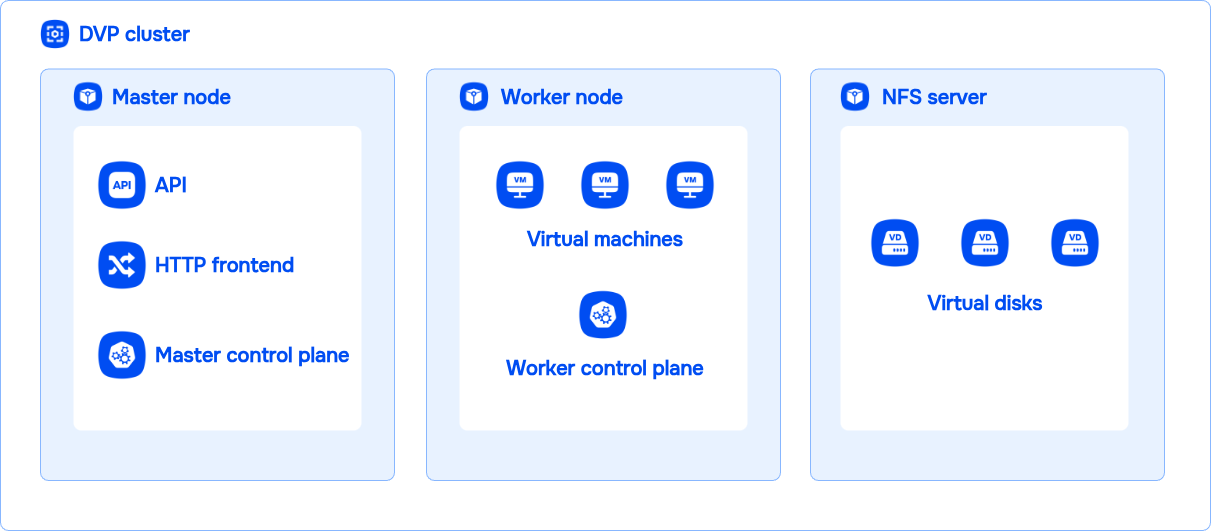
Deckhouse Virtualization Platform architecture for the getting started guide

This lab configuration is suitable for evaluation only, not for production. Read the production readiness guide and recommended architecture options to choose node types and counts for your operational needs.

When you have chosen an architecture, use Platform installation for detailed production installation steps.

If you deploy the lab on virtual machines (not bare-metal servers), enable nested virtualization on the hypervisor for the worker node. Without it, DVP cannot run guest VMs. Installation on VMs is for evaluation only; see platform requirements.

Hardware and software requirements

Installing Deckhouse Virtualization Platform requires the following components to be prepared correctly:

  1. Personal computer — the machine from which you run the installer. It is used only to run the installer and is not part of the cluster.

    Requirements...

    • OS: Windows 10+, macOS 10.15+, Linux (Ubuntu 18.04+, Fedora 35+);
    • Docker Engine or Docker Desktop installed (Ubuntu, macOS, Windows);
    • HTTPS access to the container image registry registry.deckhouse.io;
    • SSH key-based access to the future cluster master node, worker node, and NFS server.
  2. Master node — the cluster control plane node where Deckhouse Virtualization Platform system components run. It manages the cluster, schedules pods, and coordinates all nodes.

    Requirements...

    In config.yml, ContainerdV2 is the default container runtime on cluster nodes. To use ContainerdV2, nodes must meet the following requirements:

    • CgroupsV2 support;
    • systemd version 244 or newer;
    • erofs kernel module support.

    Some distributions (for example, Astra Linux 1.7.4) do not meet these requirements; bring the OS on the nodes into compliance before installing Deckhouse Virtualization Platform. See the documentation.

    • CPU:
      • x86_64 architecture;
      • Intel VT-x (VMX) or AMD-V (SVM) virtualization extensions.
    • BIOS/UEFI:
      • Hardware virtualization enabled in firmware settings.
    • Resources of the master node:
      • at least 6 vCPU (8 vCPU recommended);
      • at least 12 GB RAM (16 GB of RAM recommended);
      • at least 60 GB fast disk space with 400+ IOPS.
    • Operating system:
    • Software:
      • cloud-init and cloud-utils packages installed (names may vary by distribution);
      • no container runtime packages (such as containerd or Docker) installed on the node.
    • Networking:
      • HTTPS access to registry.deckhouse.io and OS package repositories;
      • SSH access from the personal computer on port 22/TCP for installation;
      • a unique hostname on every cluster node.

    On RHEL, Rocky Linux, CentOS, and AlmaLinux, open the required ports in firewalld (at minimum SSH 22/TCP, and later HTTP/HTTPS 80/TCP and 443/TCP on the master node) or disable the firewall for the lab environment.

    Stable live migration requires the same Linux kernel version on all cluster nodes.

    Kernel differences can cause incompatible interfaces, syscalls, or resource behavior and break virtual machine migration.

  3. Worker node — a worker node for user workloads and virtual machines.

    Requirements...

    Worker node requirements are the same as for the master node, and also depend on the workloads you run on the nodes. The worker node additionally runs virtual machines, so pick the upper bound of the recommended RAM.

  4. NFS server — an external Network File System server used for VM disks and cluster component data (metrics, logs, and so on). It provides centralized storage reachable from all cluster nodes.

    Requirements...

    • System requirements:
      • a supported OS with an NFS server package available;
      • at least 60 GB of disk space: VM images and disks, metrics, and cluster component data.
    • Access and networking:
      • NFS access (NFSv4.1 recommended) from master and worker nodes;
      • export the DVP directory with the no_root_squash option;
      • SSH key-based access from the personal computer (see item 1) for NFS server administration.

Supported guest operating systems

Deckhouse Virtualization Platform supports guest operating systems on x86 and x86-64. For paravirtualized I/O, install VirtIO drivers for efficient communication between the VM and the hypervisor.

A guest OS is considered working when it:

  • installs and boots correctly;
  • runs core components such as networking and storage reliably;
  • does not fail during normal operation.

For Linux guests, use images with cloud-init support so VMs can be initialized after creation.

For Windows guests, the platform supports initialization via unattended setup (autounattend).