Available in: Ultimate/EE
Included in extensions: AI Inference
The module lifecycle stage: Experimental
The module has requirements for installation
The module adds an AI/ML model file catalog to DKP and mounts those files into
Kubernetes applications. A user creates a Model or ClusterModel with a
model source. The controller receives files, verifies the format, packages
them as an internal OCI artifact, stores a local copy in DMCR, and exposes
progress in status.
The module does not run an inference runtime and is not limited to LLMs. It
works with model artifacts in supported formats such as Safetensors, GGUF,
and Diffusers. The application receives a model file path and decides how to
use it.
Use Cases
- Create a
Modelfrom Hugging Face, Ollama, or a local upload and receive a model file directory inside a Pod. - Create a
ClusterModelso several teams can use one prepared model by a stable name. - Attach a model to a
Deployment,StatefulSet,DaemonSet, orCronJobwith one top-level metadata annotation. - Deliver a prepared model through
SharedPVCwhen the cluster hasReadWriteManystorage. - Deliver a large model through
NodeCachewhen several workloads read it on the same nodes. - Expose cluster-wide models in the
Readyphase through a public catalog and import a local copy in another cluster.
Roles
| Role | Responsibilities | Start Here |
|---|---|---|
| Cluster administrator | Enable the module, configure object storage, choose delivery mode, expose distribution, grant catalog access, monitor runtime health. | Administration Guide |
| Namespace user | Create or import models, upload local files, attach models in the Ready phase to workloads. |
User Guide |
| Application operator | Keep workload manifests in Git and consume models through annotations. | User Guide |
Resources
| Resource | Scope | Purpose |
|---|---|---|
Model |
namespace | A model owned by one namespace. |
ClusterModel |
cluster | A shared model curated by a cluster administrator. |
ModelCatalogSource |
cluster | External ClusterModel catalog imported as local copies. |
Model supports private Hugging Face sources through a Secret in the same
namespace. ClusterModel is intended for shared remote sources and does not
reference namespaced Secrets. ModelCatalogSource references source
credentials in d8-system. Public catalog access is authorized by Kubernetes
RBAC in the publishing cluster.
What Happens After Model Creation
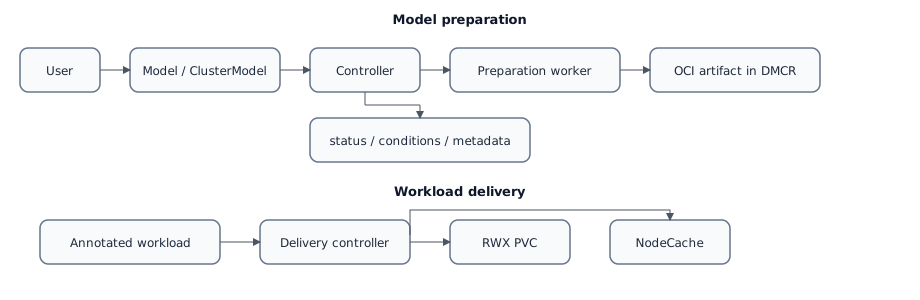
Users choose only the model source: a URL, an upload session, or an external
catalog entry. The controller chooses the internal DMCR path, verifies the
data, packages the source files as an OCI artifact, and writes the result into
status. The digest appears in status.artifact.digest after verification.
ModelPack is the module’s internal format for this OCI packaging. It is used
for verification, replay after failure, cleanup, and repeatable delivery. This
is not weight conversion: GGUF stays GGUF, and Safetensors stays
Safetensors. Users do not choose ModelPack, a digest, a tag, or a registry
path.
status.phase: Ready means the local model copy is verified and stored, and
the controller can start workload delivery or catalog import. Workloads receive
only the stable runtime contract:
- model directory:
/data/modelcache/models; AI_MODELS_MODELS_DIRenvironment variable;AI_MODELS_MODELSenvironment variable with model names, paths, digests, and families.
Delivery And Distribution
Delivery attaches a model in the Ready phase to a workload inside the
cluster.
Delivery modes:
SharedPVCis the default mode. The controller creates aReadWriteManyPVC in the workload namespace, a materializer Job downloads the model into it, and Pods mount the model read-only. A local RWO PVC is not a separate delivery mode.NodeCacheis intended for SDS-backed node-local cache. Selected nodes get a shared cache, and workloads receive a read-only CSI mount.
Distribution belongs to the catalog/import plane, not to workload delivery. It
is used for DMZ, perimeter, or external verified catalog topologies: a
publishing cluster exposes a list of ClusterModel objects in the Ready
phase, a consuming cluster imports the selected model into its local DMCR, and
only then uses normal delivery. Internal @sha256 values and OCI paths stay
inside controller-owned copy workflows.
The public distribution surface is enabled with
distribution.mode=PublicCatalog and uses the module public host from global
Deckhouse settings. The publishing administrator grants access to a Kubernetes
subject, usually a ServiceAccount, with
ClusterRole d8:ai-models:distribution:reader. The consuming cluster stores
that token in a d8-system Secret and describes the upstream with
ModelCatalogSource.
Catalog import is recoverable for source-side failures. If a token expires, CA is fixed, or the source temporarily becomes not ready, the selected catalog revision and remote digest stay frozen and the controller retries the import after the source becomes healthy again.
Components
| Component | Namespace | Purpose |
|---|---|---|
ai-models-controller |
d8-ai-models |
Manages Model / ClusterModel resources, upload sessions, delivery, and metrics. |
publish-worker |
d8-ai-models |
Reads model sources and stores verified OCI artifacts in DMCR. |
upload-gateway |
d8-ai-models |
Accepts direct file or archive uploads. |
DMCR |
d8-ai-models |
Deckhouse Model Container Registry: the module’s internal OCI registry that stores prepared models on top of the configured object storage. |
node-cache-runtime |
selected nodes | Prepares node-local cache and CSI mounts for NodeCache. |
Documentation
- User Guide — creating models and attaching them to workloads.
- Administration Guide — enablement, storage, RBAC, monitoring, and operations.
- Configuration —
ModuleConfigsettings. - Custom Resources —
ModelandClusterModel. - Examples — ready-to-use YAML manifests.
- FAQ — common questions and diagnostics.