The module lifecycle stage: General Availability
Two layouts are supported. Below is more information about each of them.
WithoutNAT
Recommended layout.
Under this placement strategy, each node gets a public IP (ElasticIP). NAT is not used at all.
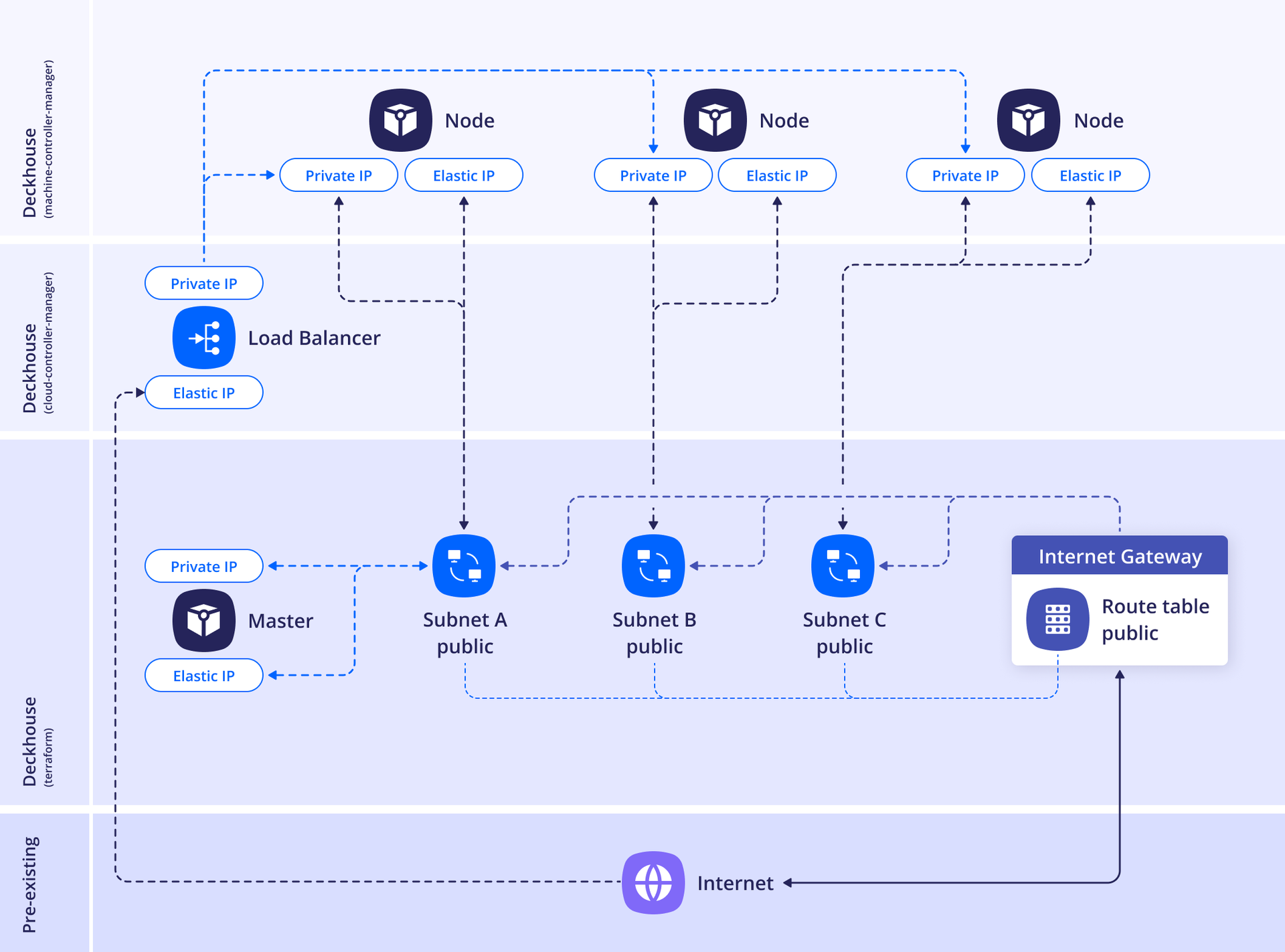
When disableDefaultSecurityGroup: false is set, the module creates default security groups when a cluster is created.
The following groups and rules will be created:
<CLUSTER_PREFIX>-node— assigned to cluster nodes:- allow any outgoing traffic to
0.0.0.0/0 - allow any incoming traffic from the
<CLUSTER_PREFIX>-loadbalancergroup - allow any incoming traffic from nodes in the same
<CLUSTER_PREFIX>-nodegroup - allow incoming traffic over the ICMP protocol from CIDRs listed in
publicNetworkAllowList(default0.0.0.0/0)
- allow any outgoing traffic to
<CLUSTER_PREFIX>-loadbalancer— used by load balancers:- allow any incoming traffic from CIDRs in
publicNetworkAllowList - allow any outgoing traffic to the
<CLUSTER_PREFIX>-nodegroup
- allow any incoming traffic from CIDRs in
<CLUSTER_PREFIX>-ssh-accessible— created whensshAllowListis set; allows incoming traffic over the TCP protocol on port22from the listed CIDRs (default0.0.0.0/0). Assigned to master nodes or to the bastion host in theWithNATlayout
When disableDefaultSecurityGroup: true is set, you must create all required security groups yourself and specify them in additionalSecurityGroups. For load balancers, set groups with the service.beta.kubernetes.io/aws-load-balancer-security-groups annotation.
Attach custom security groups (created in the cloud in advance) via additionalSecurityGroups:
- for master nodes — in the
masterNodeGroup.instanceClass.additionalSecurityGroupsparameter of the AWSClusterConfiguration resource - for static nodes — in the
nodeGroups[].instanceClass.additionalSecurityGroupsparameter of the AWSClusterConfiguration resource - for ephemeral nodes — in the
spec.additionalSecurityGroupsparameter of the AWSInstanceClass resource
Example of the layout configuration:
apiVersion: deckhouse.io/v1
kind: AWSClusterConfiguration
layout: WithoutNAT
vpcNetworkCIDR: "10.241.0.0/16"
nodeNetworkCIDR: "10.241.32.0/20"
sshPublicKey: <SSH_PUBLIC_KEY>
provider:
  providerAccessKeyId: '<AWS_ACCESS_KEY>'
  providerSecretAccessKey: '<AWS_SECRET_ACCESS_KEY>'
  region: eu-central-1
masterNodeGroup:
  replicas: 1
  instanceClass:
    # Type of the instance.
    instanceType: m5.xlarge
    # Amazon Machine Image ID
    # AMI Catalog in the AWS console: EC2 -> AMI Catalog
    ami: ami-0aad10862ade98f27
    # Master node VM disk size.
    diskSizeGb: 30
    # Master node VM disk type to use.
    diskType: gp3
nodeGroups:
  - name: mydb
    nodeTemplate:
      labels:
        node-role.kubernetes.io/mydb: ""
    replicas: 2
    instanceClass:
      instanceType: t2.medium
      ami: ami-0aad10862ade98f27
    additionalTags:
      backup: srv1
tags:
  team: rangers
WithNAT
Caution! A bastion host is required to access nodes (it can be created alongside the cluster by specifying the parameters in the section
withNAT.bastionInstance).Caution! The NAT Gateway is always created in zone
ain this layout. If cluster nodes are placed in other zones, then if there are problems in zonea, they will also be unavailable. In other words, when choosing theWithNatlayout, the availability of the entire cluster will depend on the availability of zonea.
Virtual machines access the Internet using a NAT Gateway with a shared (and single) source IP.
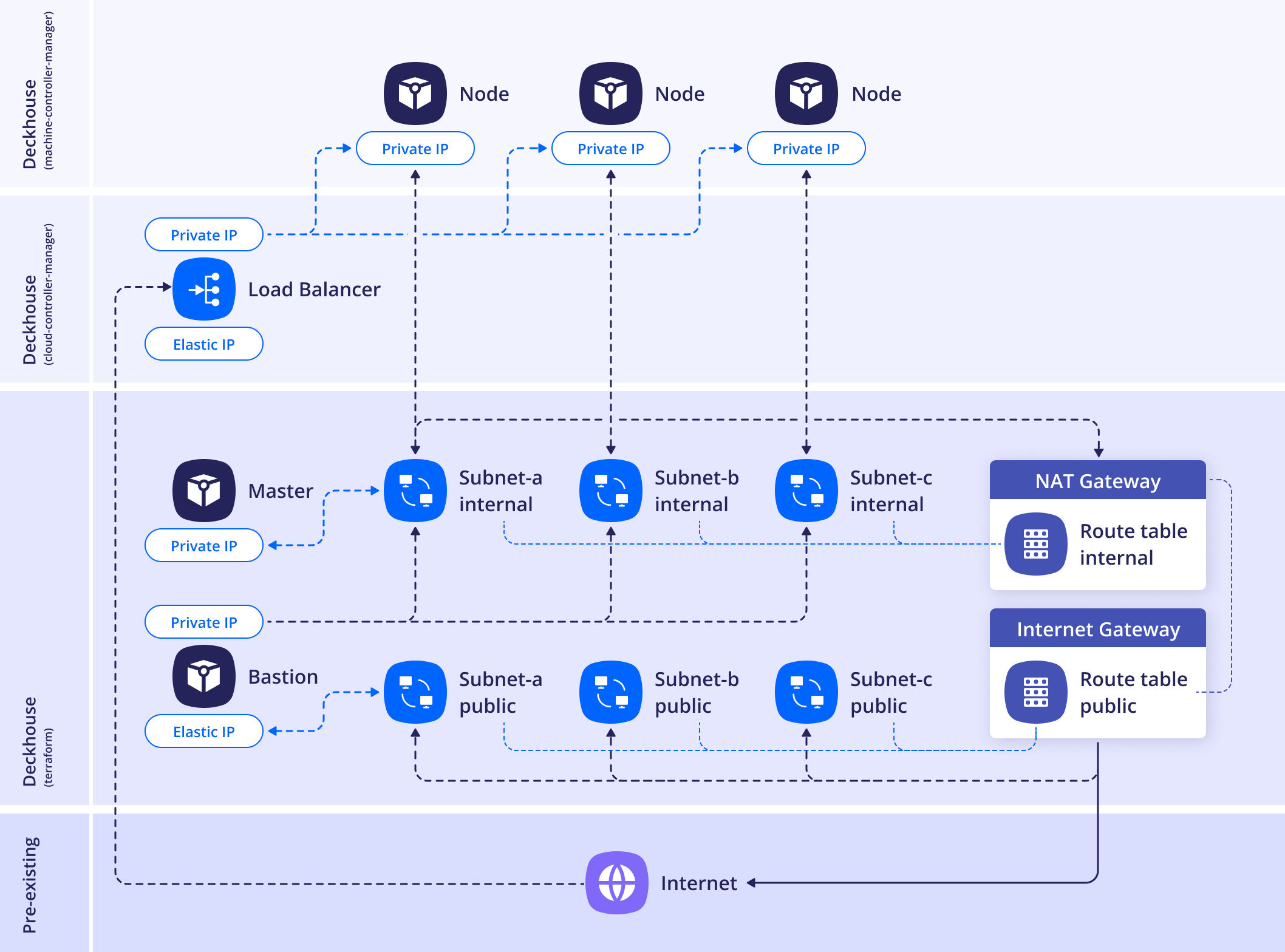
When disableDefaultSecurityGroup: false is set, the module creates default security groups when a cluster is created.
The following groups and rules will be created:
<CLUSTER_PREFIX>-node— assigned to cluster nodes:- allow any outgoing traffic to
0.0.0.0/0 - allow any incoming traffic from the
<CLUSTER_PREFIX>-loadbalancergroup - allow any incoming traffic from nodes in the same
<CLUSTER_PREFIX>-nodegroup - allow incoming traffic over the ICMP protocol from CIDRs listed in
publicNetworkAllowList(default0.0.0.0/0)
- allow any outgoing traffic to
<CLUSTER_PREFIX>-loadbalancer— used by load balancers:- allow any incoming traffic from CIDRs in
publicNetworkAllowList - allow any outgoing traffic to the
<CLUSTER_PREFIX>-nodegroup
- allow any incoming traffic from CIDRs in
<CLUSTER_PREFIX>-ssh-accessible— created whensshAllowListis set; allows incoming traffic over the TCP protocol on port22from the listed CIDRs (default0.0.0.0/0). Assigned to master nodes or to the bastion host in theWithNATlayout
When disableDefaultSecurityGroup: true is set, you must create all required security groups yourself and specify them in additionalSecurityGroups. For load balancers, set groups with the service.beta.kubernetes.io/aws-load-balancer-security-groups annotation.
Attach custom security groups (created in the cloud in advance) via additionalSecurityGroups:
- for master nodes — in the
masterNodeGroup.instanceClass.additionalSecurityGroupsparameter of the AWSClusterConfiguration resource - for static nodes — in the
nodeGroups[].instanceClass.additionalSecurityGroupsparameter of the AWSClusterConfiguration resource - for ephemeral nodes — in the
spec.additionalSecurityGroupsparameter of the AWSInstanceClass resource
Example of the layout configuration:
apiVersion: deckhouse.io/v1
kind: AWSClusterConfiguration
layout: WithNAT
provider:
  providerAccessKeyId: '<AWS_ACCESS_KEY>'
  providerSecretAccessKey: '<AWS_SECRET_ACCESS_KEY>'
  region: eu-central-1
withNAT:
  bastionInstance:
    zone: eu-central-1a
    instanceClass:
      instanceType: m5.large
      ami: ami-0aad10862ade98f27
      diskType: gp3
masterNodeGroup:
  # Number of master nodes.
  # If there is more than one master node, the etcd cluster will be set up automatically.
  replicas: 1
  instanceClass:
    # Type of the instance.
    instanceType: m5.xlarge
    # Amazon Machine Image ID.
    # AMI Catalog in the AWS console: EC2 -> AMI Catalog
    ami: ami-0aad10862ade98f27
    # Master node VM disk size.
    diskSizeGb: 30
    # Master node VM disk type to use.
    diskType: gp3
nodeGroups:
  - name: mydb
    nodeTemplate:
      labels:
        node-role.kubernetes.io/mydb: ""
    replicas: 2
    instanceClass:
      instanceType: t2.medium
      ami: ami-0aad10862ade98f27
    additionalTags:
      backup: me
vpcNetworkCIDR: "10.241.0.0/16"
nodeNetworkCIDR: "10.241.32.0/20"
sshPublicKey: <SSH_PUBLIC_KEY>
tags:
  team: rangers