Available in editions: Open/CE, BE, SE, SE+, Ultimate/EE, Core
Included in extensions: Advanced Infrastructure Security, Billing
The module lifecycle stage: Preview
The module is used to manage the pull paths for container images of Deckhouse Platform (DP) components, and for images from additional registries (vendor or your own).
The current implementation of the module and the v1 implementation, used in DP up to and including 1.77, are described below.
A cluster where the v1 implementation of this module has never run uses the current one right away. A cluster where the v1 implementation has run keeps using it until it is switched to the Unmanaged state, after which the migration completes on its own. The process is described in How does the migration to the registry module work.
Current implementation
Modes of operation
The module can run in one of the following modes (selected with the mode parameter):
Unmanaged(the default mode). In this mode the module does not manage the pull paths of DP components. Withmode: Unmanagedthe cluster keeps pulling images from the registry it was installed with (set during cluster bootstrap in thedeckhouseparameter in InitConfiguration). None of the module’s components are created in this mode.-
Managed. In this mode the module manages the pull paths for container images. The cluster administrator hands the pull path to the module by setting themode: Managedparameter.In this mode (when the module manages the pull paths) the following independent settings are used:
primary.upstream— the registry images are pulled from. If not set, the cluster is considered air-gapped: the only source becomes the in-cluster cache, filled with thed8 mirror pushcommand.storage.cache— controls the in-cluster cache on the control-plane nodes. If set, a registry is deployed on the control-plane nodes. All nodes pull images from it, with the upstream staying a fallback path while the cache is being filled.
Turning the cache on or off, changing the registry, changing credentials — each of these is an ordinary reconfiguration, possible at any time and in any order. Exactly one change has a condition attached: when the upstream is removed to go air-gapped, the module waits until the in-cluster cache holds the whole expected image set and no workload in the
kube-systemandd8-*namespaces references the upstream any more — only then do images stop being pulled from the registry set inprimary.upstream. Workloads in other namespaces are not counted: move the ones whose images reference the upstream address onto the in-cluster address before removing the upstream. While this is in progress, theD8RegistryAirGapTransitionHeldalert fires. If the switch to the in-cluster cache happened right after the upstream was removed, every node could be left with nowhere to pull images from.The cache reclaims its own disk space. Nothing else ever removes data from it — every release adds a slice of the repository — so a sweep removes the slices of releases the cluster has already passed through, keeping the deployed release and the one before it. It runs on a schedule (nightly by default), once the cache holds a new image set — after a Deckhouse Platform update, or after a module is enabled or updated — and when the store refuses writes. A sweep does not interrupt serving, but it pauses filling the replica’s store and can fail a
d8 mirror pushstarted during it, which is why it defaults to a nighttime hour. It can also be run right away with a RegistryOperation object. For details, see thestorage.garbageCollectionparameter and the FAQ section The cache keeps growing. What reclaims it.
The primary.upstream and storage.cache parameters together cover every supported configuration:
primary.upstream |
storage.cache |
What the cluster does |
|---|---|---|
| set | false |
Nodes pull images directly from the upstream. Nothing is deployed on the control-plane nodes |
| set | true |
The cache acts as a pass-through: filled from the upstream on demand and ahead of time |
| not set | true |
Air-gapped. The cache is the only source, and d8 mirror push is the only way in |
| not set | false |
The configuration is rejected: nodes would have nowhere to pull images from |
Installer behavior when no container image registry is configured
The installer creates the registry ModuleConfig with mode: Managed and primary.upstream pointing to the public Deckhouse Open/CE registry registry.deckhouse.io/deckhouse/ce, and warns about it in its output when the installation configuration specifies no container image registry in any of the following places:
- InitConfiguration
- The
registrysection of thedeckhouseModuleConfig - The
registryModuleConfig (the ModuleConfig is absent)
This applies only when the installation configuration contains a ClusterConfiguration and the container runtime is managed by Deckhouse Platform (defaultCRI is Containerd or ContainerdV2). In a Managed Kubernetes cluster (without ClusterConfiguration) and with defaultCRI: NotManaged, the installer does not create this ModuleConfig.
Under the same conditions, the installer rejects a configuration in which the registry ModuleConfig sets mode: Unmanaged (or omits mode, which means the same) or enabled: false and no registry is specified elsewhere. In this case, the nodes would have nowhere to pull images from. Specify the registry from which nodes pull images directly in one of the following ways:
- Via the
deckhouseparameter in InitConfiguration (imagesRepoandregistryDockerCfg). - By setting
mode: Managedwithprimary.upstreamin theregistryModuleConfig. A private or mirror registry populated withd8 mirror pushcan serve asprimary.upstream. To install an air-gapped cluster from an image bundle instead, setenabled: trueandmode: Managedwithstorage.cache: trueandstorage.source, withoutprimary.upstream, and pass the bundle to the installer with the--img-bundle-pathflag.
The installer also refuses a registry ModuleConfig that specifies primary or storage without mode: Managed, as the module’s schema does: in the default Unmanaged mode these settings would have no effect.
Additional registries
primary.upstream is deliberately the only registry configurable through the module. It is used for the images of DP components. Additional registries (a vendor’s, needed by some module, or your own) are declared as a separate RegistryUpstream resource. Example:
apiVersion: deckhouse.io/v1alpha1
kind: RegistryUpstream
metadata:
  name: virtualization-images
spec:
  match: images.virtualization.example.com
  upstream:
    host: vendor.example.com
    path: /virtualization
    auth:
      username: robot
      password: <PASSWORD>
This approach — declaring an additional registry as a separate resource — was chosen because a module or a user adding their own registry should not have to edit a ModuleConfig they don’t own. Such registries are always transit: pulls are routed through the node agent so that credentials and CA certificates live in one place, but nothing from them is ever cached.
Architecture
The node agent
On every node of the cluster, an agent (registry-agent) is deployed as a static pod. The container runtime is pointed at it (127.0.0.1:5001, through containerd’s _default fallback directory) and gets access to registries through it, passing the original registry name along in the request.
This achieves the following:
- Node configuration is static. Adding a registry, turning the in-cluster cache on, rotating credentials — none of this changes the configuration on any node, because the container runtime accesses registries through the agent.
- Registry credentials stay out of the runtime’s configuration files. They are held by the agent and attached to every request.
- Credentials are not stored in the module’s resources. A RegistryNode, a RegistryStorage, and the recorded effective upstream name a key in one Secret instead of carrying the credential itself. These are cluster-scoped resources, and the permission to read them is granted to every node, so a credential inside any of them would be readable through the API by every kubelet in the cluster. Each component’s access is narrowed to that one Secret by name, and the credential it resolved is kept together with its own copy of the routing.
- Pulling images works when the API server is unavailable. The agent keeps a copy of its routing on disk and falls back to it, because the images it serves include the ones needed to repair a broken control plane. A node that could not reach the API server uses the routing it was installed with.
An unconfigured registry is proxied untouched, along with whatever credentials the request already carried — so an ordinary imagePullSecret for a third-party registry keeps working, with nothing needing to be declared for it.
The in-cluster cache
With storage.cache enabled, a registry runs on each control-plane node. It stores blobs (the files an image is made of) in the cache directory: /var/lib/deckhouse/registry when the master NodeGroup has systemType: DeckhouseEngine, /opt/deckhouse/registry otherwise. One control-plane node holds the lease and fills from the upstream; the others replicate data from the leading replica (the one holding the lease) ahead of time, so losing the leader does not mean filling from scratch. For details on how the leading replica is chosen, see Leader election.
Agents reach a replica by the node’s address, not by the service name registry.d8-system.svc:5001.
registry.d8-system.svc:5001 is what every image reference in the cluster is built from, and what a request is matched against. But the agent runs in the host’s network namespace, where the cluster DNS name does not resolve.
A replica serves on port 4281/TCP of its control-plane node: the agents of every node connect to it, and so do the other replicas when they replicate. The publication endpoint behind the Ingress is port 4283/TCP of the same nodes, reached from the nodes running the ingress controller. Both are in the 4200-4299 range and are listed in “Network interaction of the platform components”. The 5001 in the service name is not the cache’s port: on every node, 127.0.0.1:5001 is the agent.
That address (which agents use to reach a replica) takes effect in two steps, and the order matters. Nodes are given it as soon as
the module starts managing the pull path, through the same bashible rollout that installs the
agent. The image references of the platform’s own components move only after every node’s agent
has applied the configuration it was given: no node resolves this address except through the agent,
so re-rendering the cluster onto it any earlier would point every workload at something that
cannot be pulled yet. Until then, references keep naming the registry the cluster was
installed with — which is also where they return if the module is set to Unmanaged or
disabled. Whether this step has happened is visible from the presence of the ConfigMap
registry-image-address in d8-system.
The Deckhouse controller pulls through the same agent — at 127.0.0.1:5001 — its own release
channel and the module sources it owns. A different address, but the same agent: the
controller is a process and has to dial a connection, whereas an image reference is resolved by
the container runtime, which a drop-in redirects to the agent, so it can
name a service that nothing ever connects to. This is exactly what makes changing the registry a single
change: the configuration is edited in one place, the agents are reconfigured, and both what the nodes pull
and what the controller fetches follow — with no registry address for the
controller written down anywhere, and so none that could be left pointing at the old one.
Use a separate disk for the cache directory and for etcd data. Sharing one disk degrades etcd while the cache is being filled.
The expected image set
The cache holds the expected image set: the images of the deployed DP release and of the previous one (for a rollback), the images of the modules the cluster runs, and the catalog of modules the module sources offer. Updates the cluster lists as pending — of DP and of modules — are copied too, ahead of time: the replicas receive an update before it is deployed, in an air-gapped cluster as soon as d8 mirror push has put it into the store. An update the source does not hold yet does not hold the cache back; it is copied when it is deployed at the latest. The replicas copy only while one of them is short of the set or a pending update has appeared; after that, nothing is copied until the set changes again.
Replication
The followers copy from the leader’s read port, the one the nodes pull through. A follower writes only into its own store, through its own write port, and no replica uses another replica’s write port, so between control-plane nodes replication needs only the read port. The leader’s write port still has to be reachable from the nodes that run the ingress controller: the publication endpoint forwards d8 mirror push to it (see Air-gapped clusters). What a follower can get from the leader’s read port depends on whether an upstream is set:
- With an upstream, the leader’s read port is a pull-through cache for the upstream’s images: an image the leader does not hold yet, it fetches from the upstream to answer the follower, and keeps. A follower therefore does not wait for the leader to finish filling. An image that a replication pass still leaves missing (
pending_on_the_leaderin the syncer’sthe replication finishedlog line) is one the leader has not got yet: for example, a module from another module source, which the leader fills from that source’s own registry rather than through the upstream, or an image the upstream could not serve at that moment. A later pass picks it up. - Without an upstream, the leader serves only what it holds. An image missing on the leader is missing at the source:
d8 mirror pushhas not brought it yet.
Only the copy ahead of pending updates is rate-limited: it reads from its source at no more than 16 MiB/s, so that it does not take a control-plane node’s CPU away from etcd and the API server. The leader’s fill of the expected set and the followers’ replication of it are not limited: until a store holds the set, nodes pull through the upstream, and a follower without the set is a replica the cluster cannot fall back on (in an air-gapped cluster, there is nothing else to fall back on). The followers replicate independently of each other, so all of them read from the leader at the same time, each copying several layers at once, on top of the nodes’ own pulls. None of this is configurable in the ModuleConfig.
Leader election
The leader fills the store and is the source the other replicas copy from, so the lease is not handed out by a plain election:
- When some replica holds the whole expected image set, a leader that cannot complete the set by itself steps aside for that replica. A leader cannot complete the set by itself when there is no upstream, when its last pass failed, when its store refuses writes, or when it has stopped renewing the lease.
- A leader that is still completing the set from the upstream keeps the lease even if a follower finishes first: the follower copies from the leader, and moving the lease would gain nothing.
- While no replica holds the whole set, as in a new cluster, the lease does not move: every move would start the fill over on another replica. If there is no leader at all, the lease goes to the replica that holds the most verified images; ties are broken by node name. A replica whose registry does not answer or whose disk refuses writes is passed over, and so is one whose store is out of room while another replica has room. A failed pass alone does not pass a replica over: what it holds is still counted from its store.
So an incomplete replica can be the leader, either while no replica is full or while it is filling from the upstream. The fields that show this are described in the FAQ.
The rule that a full replica takes over matters most in an air-gapped cluster. There the leader gets images only from d8 mirror push, which always lands on the leader, and the followers copy only what the leader holds. An incomplete leader beside a full follower (for example, a leader whose store was lost) could not complete the set, the followers would replicate its gaps, and the images on the full replica would reach nobody.
A replica whose node has been reported unreachable for a minute (about two minutes after the node stops responding) is not counted in the election, so the replicas that are left do not wait for a leader whose node is gone. A replica whose registry stops answering or whose disk stops accepting writes reports an error and hands the lease over to a replica that holds the full expected image set, if there is one; otherwise it keeps the lease and only reports the error.
After the leader’s node fails, a new leader takes over in about a minute in an air-gapped cluster and in two to three minutes in a cluster with an upstream. While no replica holds the full expected image set yet, it can take up to about three and a half minutes, and two minutes more if the replica holding the most images does not take the lease. Nodes pull from the leader only, so until the new leader takes over and the nodes’ configuration follows it, they pull from the upstream if one is configured; in an air-gapped cluster, pulls of images that are not already on the node wait for the new leader. The other replicas keep their data, so a new leader that holds the full expected image set fills nothing again.
While no replica holds the full expected image set, the replica that takes the lease may hold fewer images than another one, or none: the replica holding the most images is passed over if its node is unreachable or if it does not take the lease within two minutes. The new leader then fills what it lacks again, from the upstream, or, in an air-gapped cluster, from what is pushed again with d8 mirror push. It keeps the lease until some replica holds the full expected image set, even after the replica holding more images comes back.
A leader whose store has lost the expected image set, for example after the cache directory on its node was wiped, gives up the lease while another replica holds the whole set: it checks the deployed release and a sample of the set on its own disk about once a minute, and at startup. It reports full: false and verifiedDigests: 0, the replica that holds the set becomes the leader, and the former leader copies the set from it like any other replica. If no other replica holds the whole set, the leader keeps the lease, since it is still the one that fills the set, but reports full: false and verifiedDigests: 0 all the same: safeToDropUpstream becomes false, and the leader fills the set again from the upstream (in an air-gapped cluster, counts its store again).
A replica whose store holds at most half as many manifests as its verifiedDigests (by totalDigests) stops reporting the set within about a minute and a half of the loss: the leader as described above, and a replica that does not hold the lease by reporting full: false and reading its store again. A smaller loss on a replica that does not hold the lease is reported no later than at its next periodic check of its store, every six hours by default. After the leader’s syncer restarts, safeToDropUpstream stays false until the running syncer has read its store, normally at its first pass, within about two minutes, so a report left by the previous process cannot drop the upstream.
What protects the ports on control-plane nodes
The cache runs in the host network, so its ports are open on the address of every control-plane node, to anything that can reach that address: other nodes, pods, and hosts outside the cluster if the network lets them through. The module ships no host firewall policy for these ports (for example, Cilium host policies). Restricting who can reach a control-plane node at the network level is left to the cluster’s own firewall. Each port protects itself as follows:
| Port | Purpose | Protection |
|---|---|---|
4281/TCP |
Reading: the agents of all nodes pull through it, the other replicas replicate from it. | TLS with the module’s own certificate authority. Every request needs a token from the module’s token service. The read credentials, which every node uses to get one, are on every node, so whoever has taken them from any node and can reach this port can pull everything the cache holds. The port does not accept writes, whatever the credentials: a push or a delete is refused, in an air-gapped cluster as well, where the port serves the store itself rather than a cache in front of an upstream. The store accepts writes only on 4283/TCP, which requires a client certificate. |
4283/TCP |
Writing: d8 mirror push through the Ingress, and the replica’s own filling, replication and garbage collection. |
Mutual TLS. The connection is refused during the TLS handshake unless the client presents a certificate issued by the module’s certificate authority to the ingress controller or to the cache’s own pod. After that, the write credentials are checked. whitelistSourceRanges is applied by the Ingress only: the port does not filter by source address. A connection made directly to the port, or to the registry-push Service inside the cluster, without such a certificate fails at TLS. |
4285/TCP |
Metrics. | kube-rbac-proxy: a request needs a token of a subject allowed to get the prometheus-metrics subresource of the registry-storage StatefulSet in d8-system. The registry’s own metrics and debug listeners are behind it, on the loopback. |
The ingress controller presents its certificate for any Ingress that names the d8-system/registry-storage-ingress-client secret, not only for the module’s own. An ingress-nginx controller that lets an Ingress use a secret of another namespace (the allow-cross-namespace-resources option, enabled by default in controller versions before 1.12, 1.10 among them) therefore lets anyone who can create an Ingress and a Service in any namespace reach 4283/TCP through them, outside whitelistSourceRanges. The write credentials are still checked on that path. To close it, turn allow-cross-namespace-resources off in the controller’s configuration: the module’s own Ingress is in d8-system, beside the secret, and keeps working.
A replica whose pod was created before 4281/TCP started refusing writes still accepts a push on that port in an air-gapped cluster, until the pod is replaced. The registry-storage StatefulSet is updated with OnDelete: the module replaces the pods one at a time, each only while something else can serve the nodes in its place: another replica, the upstream, or, for the only replica of an air-gapped cache, its new images already held on its master node (see How is the cache updated?). While a replacement waits, the module records an UpdateBlocked event on the d8-system/registry-storage StatefulSet.
Do not delete the pod to hurry this along. The new pod pulls its images from the store it is itself part of: deleted before they are on its node, the only replica of an air-gapped cache stays in ImagePullBackOff, and until it is back no node of the cluster can pull any image.
Air-gapped clusters
If no upstream is set in primary.upstream, the in-cluster cache is the only source of images, and images get into it only with
d8 mirror push.
d8 mirror push writes through the publication endpoint: the registry-push Ingress in the d8-system namespace, at the registry domain built from publicDomainTemplate.
The endpoint exists whenever the cache is enabled, publicDomainTemplate is set and the cert-manager module is enabled, including while an upstream is set, so that the images can be pushed before the upstream is removed.
A push always lands on the leader; while there is no leader, it is refused.
This is the one path that can replace an image, so a push needs both credentials with write access — the account in the registry-storage-push Secret in d8-system, meant for d8 mirror push — and the client certificate the ingress presents to the storage: a leaked password alone is not enough.
The certificate is also what tells the storage that the client address passed by the ingress can be trusted. To limit who can reach the endpoint, set whitelistSourceRanges.
A push sent straight to a control-plane node, around the endpoint, is refused on either port of the cache. For what protects each port, including on a replica whose pod has not been replaced yet after an update, see What protects the ports on control-plane nodes.
If publicDomainTemplate is not set or the cert-manager module is disabled, an air-gapped cluster has no way to write into the store: 4281/TCP refuses writes, and 4283/TCP admits only the ingress controller and the cache itself. To bring images in, either set publicDomainTemplate and enable cert-manager (the endpoint appears on the next run of the module), or set primary.upstream to a registry the cluster can reach that holds the images, let the cache fill from it, and remove the upstream again.
Installing from a bundle
An air-gapped cluster can also be installed straight from a bundle made with d8 mirror pull. To do so, set
mode: Managed in the registry ModuleConfig, enable storage.cache
with its storage.size, describe the bundle in
storage.source, set no
primary.upstream, and pass the bundle to the installer with
--img-bundle-path:
spec:
  enabled: true
  settings:
    mode: Managed
    storage:
      cache: true
      size: 50Gi
      source:
        bundleRef: d8-mirror-bundle
        expectedDigests: 459
A temporary registry on the first control-plane node serves the bundle until the in-cluster cache starts on that node, and the installer then hands the node over to the cache.
Installing from a bundle has the following limitations:
- In a cloud cluster, the
cloud-controller-managermust be able to initialize the first control-plane node, which means the cloud API must be reachable from the cluster. Until the node loses thenode.cloudprovider.kubernetes.io/uninitializedtaint, the cache cannot be placed on it. The installer waits for that, and if it does not happen, it stops with an error naming the node and keeps the temporary registry, so that the node is not left with nothing to pull images from. - A master NodeGroup with
systemType: DeckhouseEnginedoes not support installing from a bundle: such a node runs none of the steps that set up the temporary registry. The installer refuses this combination before it creates any infrastructure. To install such a cluster without internet access, push the bundle withd8 mirror pushinto a registry inside your perimeter, and setmode: Managedwithprimary.upstreampointing at that registry.
Requirements for using the module
Before enabling the registry module to manage the pull paths for container images, make sure the cluster meets the following requirements:
- Nodes use containerd or containerd v2, set with the
defaultCRIparameter in ClusterConfiguration. - The cluster is fully managed by DP. The module does not work in Managed Kubernetes.
- The in-cluster cache uses disks on the control-plane nodes, in static and cloud clusters alike. In a cloud
cluster that is the control-plane node’s root disk unless another one is mounted at the cache directory
(
/var/lib/deckhouse/registrywhen the master NodeGroup hassystemType: DeckhouseEngine,/opt/deckhouse/registryotherwise). That disk must holdstorage.sizeplus the reserve the store keeps free for the node, on top of what the node itself uses. Sizestorage.sizefor three releases of the image set together with the modules and the module catalog; see What happens when the cache’s store is full?.
The v1 implementation
The v1 implementation of the module, used in DP up to and including 1.77, is described below. DP 1.78 no longer contains it; the description is kept because clusters are still running on it, and moving to the new configuration is work for the administrator that has to be done before the cluster is upgraded, not after.
Prepare the cluster BEFORE upgrading to DP 1.78: the upgrade is blocked while the cluster uses the v1 implementation and the module is running in Proxy or Local mode, or in Direct mode without a configured registry ModuleConfig.
Installing DP 1.78 or later, or upgrading to it, does not create any objects of the v1 implementation. A new
installation with Proxy or Local in the deckhouse ModuleConfig is refused by the installer: configure this module
instead. The v1 implementation’s modes are switched only by the code of DP 1.77 and earlier — so all preparation happens before upgrading to DP 1.78. Preparation has the following specifics:
- If the cluster uses the v1 implementation of the
registrymodule running inProxymode, it must be switched toUnmanagedmode. - If a cluster with the v1 implementation of the
registrymodule is air-gapped (the module runs inLocalmode), switching straight toUnmanagedmode does not work. Air-gapped clusters have a separate procedure, described in How do I migrate an air-gapped cluster from Local mode. - If the cluster uses the v1 implementation of the
registrymodule running inDirectmode, no mode switch is needed — only this module’s configuration, written before the upgrade. Its objects are kept deliberately — DP 1.77 marks them to survive the removal of the v1 implementation — and they keep serving the in-cluster address nodes pull through, until this module’s agent has taken that address over. The procedure is described in migrating from Direct mode.
In the v1 implementation of the module, working with the registry is configured not through the module’s own settings, but through the deckhouse ModuleConfig, and it works as a state machine with four modes:
Direct— direct access to an external registry through the fixed addressregistry.d8-system.svc:5001/system/deckhouse. The fixed address is what keeps Deckhouse images from being re-downloaded, and components from restarting, when registry parameters change.Proxy— an internal caching proxy registry on the control-plane nodes, reachable at that same fixed address; it reduces the number of requests to the external registry.Local— a full local copy of the registry inside the cluster, for air-gapped environments.Unmanaged— no in-cluster registry; the cluster reaches the external one directly. Comes in a configurable form, managed through thedeckhouseModuleConfig, and a deprecated non-configurable form, set at installation.
Of the four v1 modes listed above, two survive an upgrade to DP 1.78, for different reasons. Unmanaged is the
mode whose objects served nothing to begin with, so removing them takes nothing away, and the
handover happens on its own. Direct survives because the address its nodes pull images
through is also served by the registry module: DP 1.77 marks the objects behind that address
so that they outlive the removal of the v1 implementation, and they keep serving it until the
agent takes it over — meaning such a cluster needs this module’s configuration rather than a mode
switch. Both paths are described in how does the migration to the registry module work. The two
implementations never manage a cluster at the same time: whichever one is active decides what gets
created at all, so there is no state where both configure the same node.
Proxy and Local modes leave nodes in a state that DP 1.78 and later cannot correctly account for or carry over. So the v1 implementation running in these modes is switched to Unmanaged first. That switch is only possible on DP 1.77 or earlier — that is, before upgrading to DP 1.78, which no longer contains the v1 implementation.
Mode switching restrictions
The restrictions on switching modes in the v1 implementation are as follows:
- Changing registry parameters and switching modes is only available after the bootstrap phase is fully complete.
- For the first switch, migrate the user’s registry configurations first — the procedure is described in the FAQ.
- Switching to the non-configurable
Unmanagedmode is only available fromUnmanaged.
Direct mode architecture
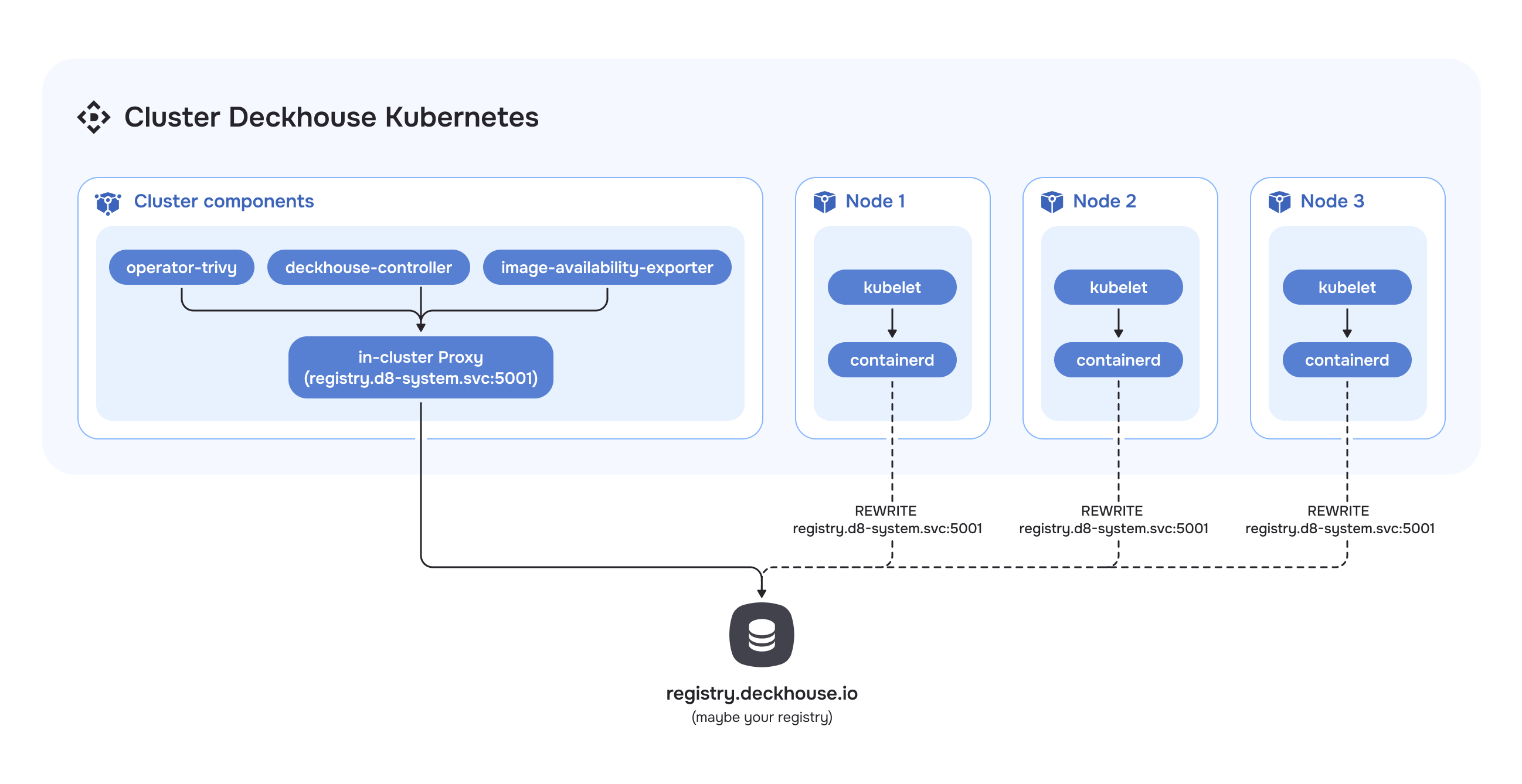
In Direct mode, requests to the registry are processed without intermediate caching. CRI requests
are redirected based on the containerd configuration. Components that access the registry
directly — operator-trivy, image-availability-exporter, deckhouse-controller, and others
— go through the in-cluster proxy on the control-plane nodes.
Proxy mode architecture
It is recommended to use separate disks for storing registry data (/opt/deckhouse/registry) and etcd data. Using a single disk may lead to etcd performance degradation while the registry is operating.
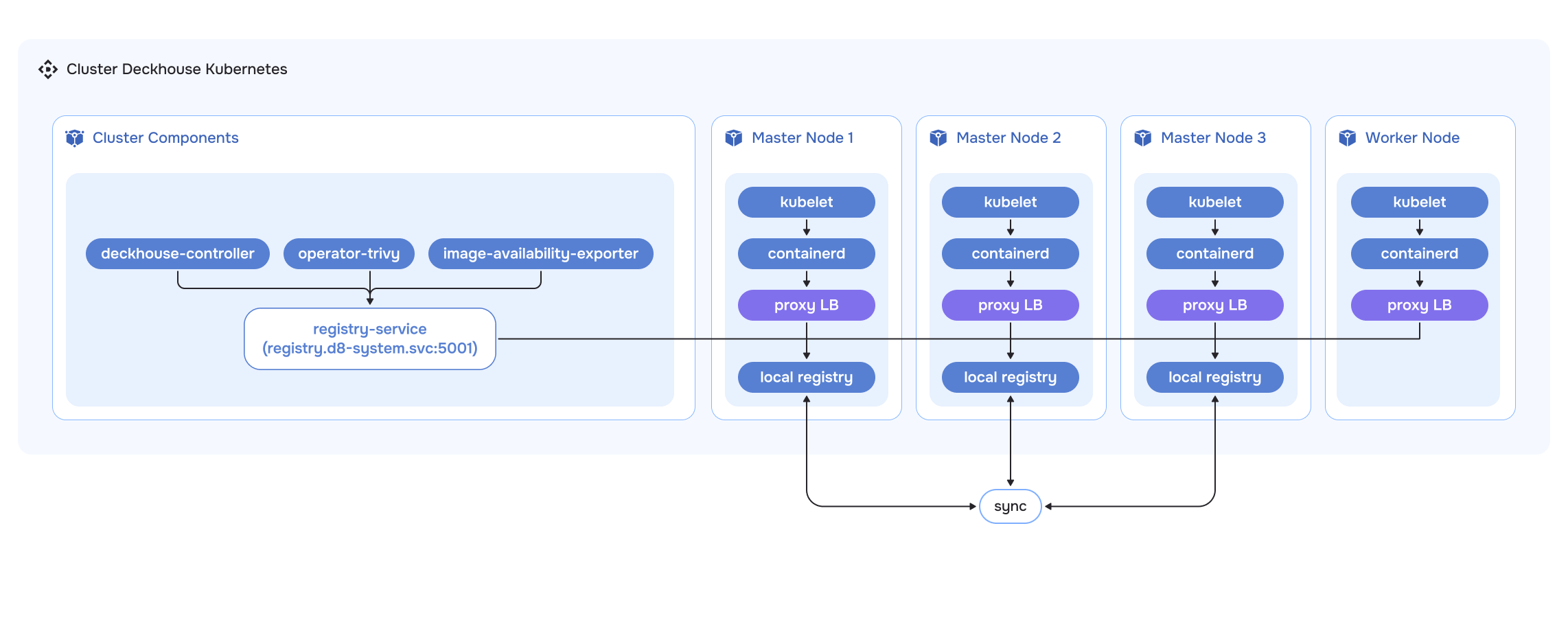
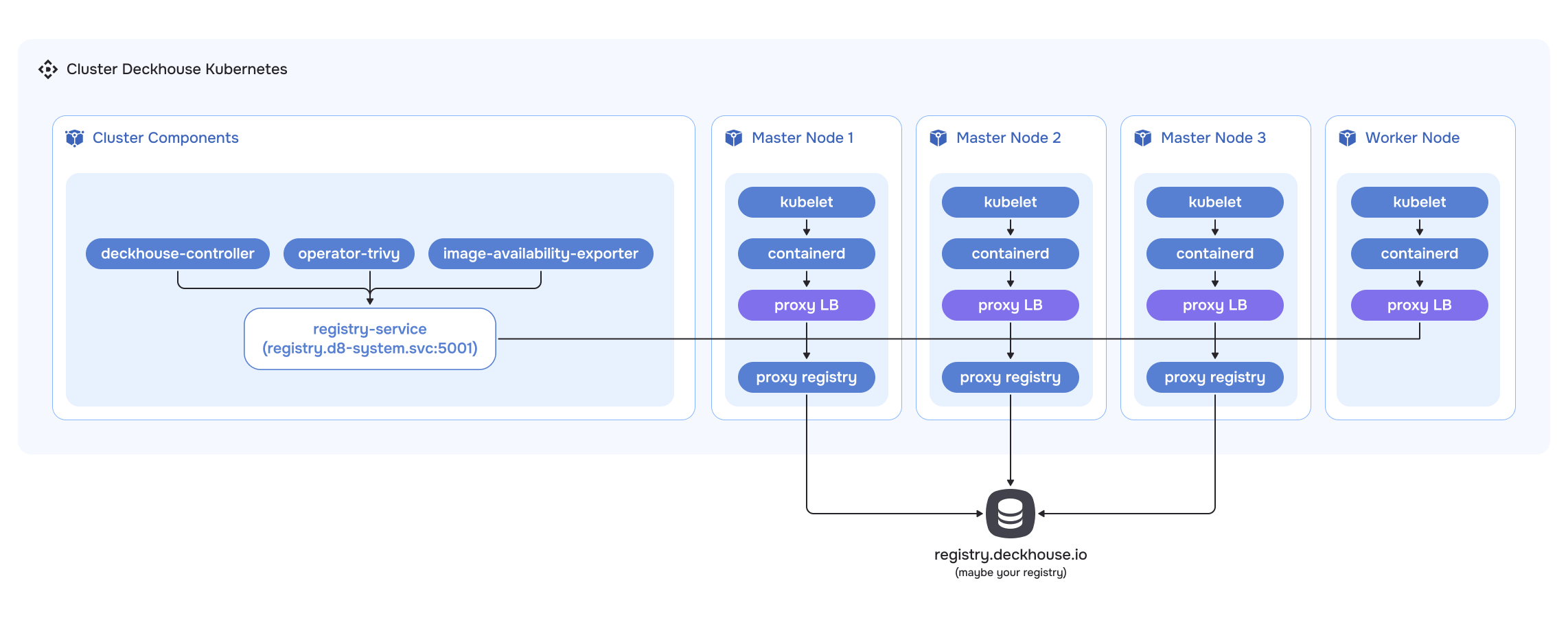
The caching proxy registry runs as static pods on the control-plane nodes and stores cached
data in /opt/deckhouse/registry. A load balancer sits in front of it on each node, and the containerd
configuration points at that load balancer. Components that access the registry
directly go through the caching proxy registry.
Local mode architecture
It is recommended to use separate disks for storing registry data (/opt/deckhouse/registry) and etcd data. Using a single disk may lead to etcd performance degradation while the registry is operating.
Local mode keeps a full copy of the registry inside the cluster, synchronized between replicas
on the control-plane nodes and populated with the
d8 tool using
d8 mirror push/d8 mirror pull. Otherwise it works the same way as the caching proxy.