Available in editions: CE, BE, SE, SE+, EE
The module lifecycle stage: Preview
Description
The module manages the registry settings for DKP components.
The module can operate in the following modes:
-
Direct: Provides direct access to an external registry via the fixed addressregistry.d8-system.svc:5001/system/deckhouse. This fixed address prevents Deckhouse images from being re-downloaded and components from being restarted when registry parameters are changed. Switching between modes and registries is done through thedeckhouseModuleConfig. The switching process is automatic — see the usage examples for more information. -
Proxy: Using an internal caching proxy registry that accesses an external registry, with the caching proxy registry running on control-plane (master) nodes. This mode reduces the number of requests to the external registry by caching images. Cached data is stored on the control-plane (master) nodes. Access to the internal registry is via the fixed addressregistry.d8-system.svc:5001/system/deckhouse, similar to theDirectmode. Switching between modes and registries is done through thedeckhouseModuleConfig. The switching process is automatic — see the usage examples for more information. -
Local: Using a local internal registry, with the registry running on control-plane (master) nodes. This mode allows the cluster to operate in an isolated environment. All data is stored on the control-plane (master) nodes. Access to the internal registry is via the fixed addressregistry.d8-system.svc:5001/system/deckhouse, similar to theDirectandProxymodes. Switching between modes and registries is done through thedeckhouseModuleConfig. The switching process is automatic — see the usage examples for more information. -
Unmanaged: Operation without using the internal registry. Access within the cluster is performed directly to the external registry. There are two types of theUnmanagedmode:- Configurable: A mode managed via the
registrymodule. Switching between modes and registries is handled through thedeckhouseModuleConfig. The switch is performed automatically (see usage examples for details). - Non-configurable (deprecated): The default mode. Configuration parameters are set during cluster installation or changed in a running cluster using the (deprecated)
helper change registrycommand.
- Configurable: A mode managed via the
Restrictions and features of using the module
The registry module has a number of limitations and features related to installation, operating conditions, and mode switching.
Cluster installation limitations
- DKP cluster bootstrap is only supported in the
DirectandUnmanagedmodes (LocalandProxymodes are not supported). Registry settings during cluster installation are configured via thedeckhouseModuleConfig. - To launch a cluster in the non-configurable
Unmanagedmode (Legacy), registry parameters must be specified ininitConfiguration.
Operating conditions restrictions
The module works under the following conditions:
- If CRI containerd or containerd v2 is used on the cluster nodes. To configure CRI, refer to the
ClusterConfigurationconfiguration. - The cluster is fully managed by DKP. The module will not work in Managed Kubernetes clusters.
- The
LocalandProxymodes are only supported on static clusters.
Mode switching restrictions
Mode switching restrictions are as follows:
- Changing registry parameters and switching modes is only available after the bootstrap phase is fully complete.
- For the first switch, migration of user registry configurations must be performed. For more details, see the Registry Module: FAQ section.
- Switching to the non-configurable
Unmanagedmode is only available from theUnmanagedmode. For more details, see the Registry Module: FAQ section. - Switching between
LocalandProxymodes is only possible via the intermediateDirectorUnmanagedmodes. Example switching sequence:Local/Proxy→Direct→Proxy/Local.
Direct Mode Architecture
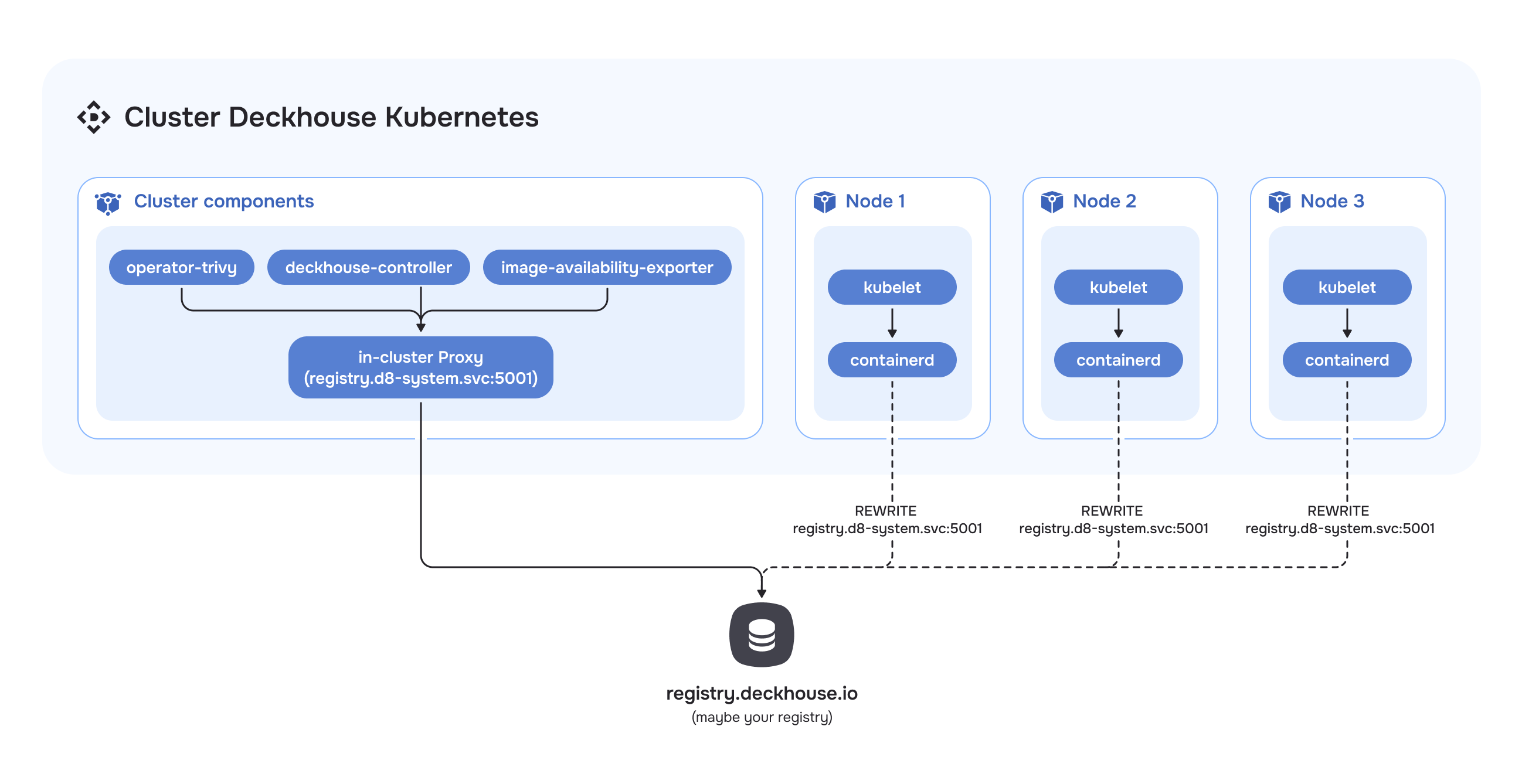
In Direct mode, registry requests are processed directly, without intermediate caching.
CRI requests to the registry are redirected based on its configuration, which is defined in the containerd configuration.
For components such as operator-trivy, image-availability-exporter, deckhouse-controller, and others that access the registry directly, requests will go through the in-cluster proxy located on the master nodes.
Proxy Mode Architecture
It is recommended to use separate disks for storing registry (/opt/deckhouse/registry) and etcd data. Using a single disk may lead to etcd performance degradation during registry operations.
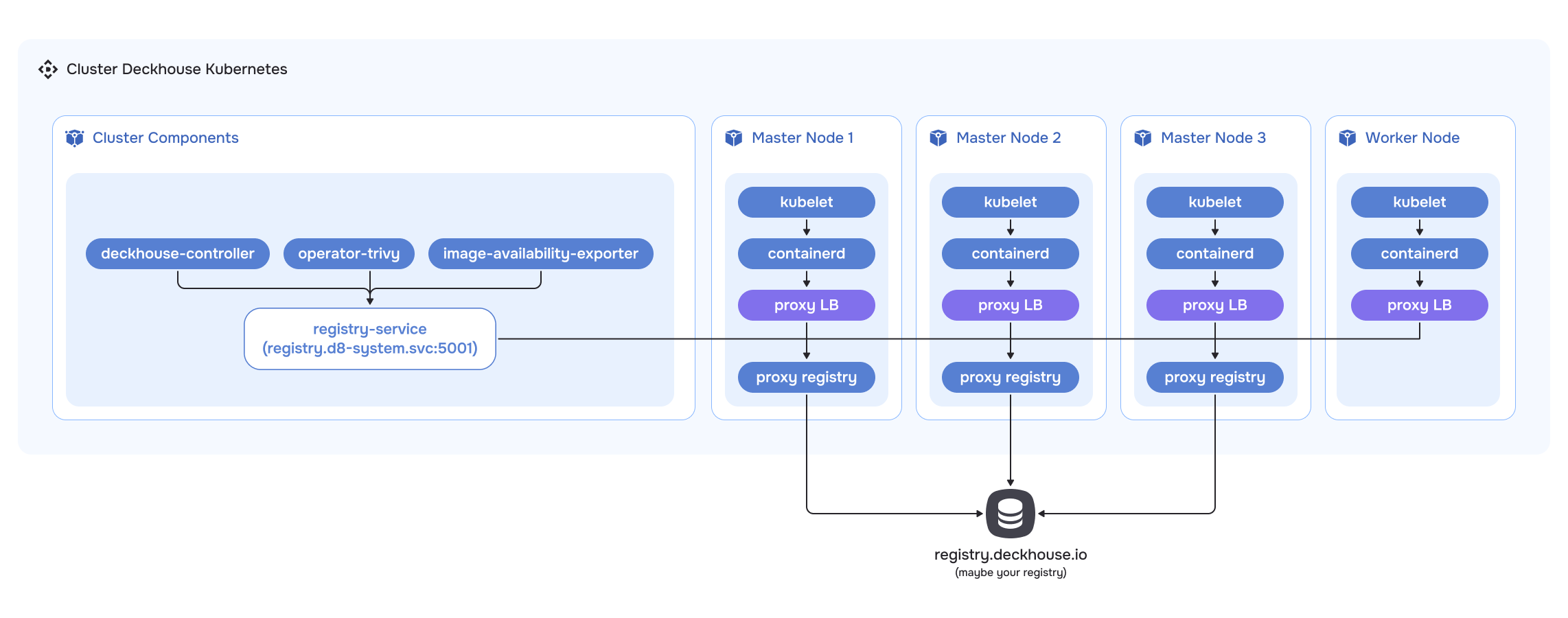
The Proxy mode allows the registry to act as an intermediate proxy server between the client and the remote registry.
The caching proxy registry is launched as static pods on control-plane (master) nodes. Cached data is stored on the control-plane (master) nodes in the /opt/deckhouse/registry directory.
To ensure high availability of the caching proxy registry, a load balancer is deployed on each cluster node. Access to the proxy registry from CRI goes through this load balancer. The configuration for accessing the load balancer is set in the containerd configuration.
For components such as operator-trivy, image-availability-exporter, deckhouse-controller, and others that access the registry directly, requests will go through the caching proxy registry.
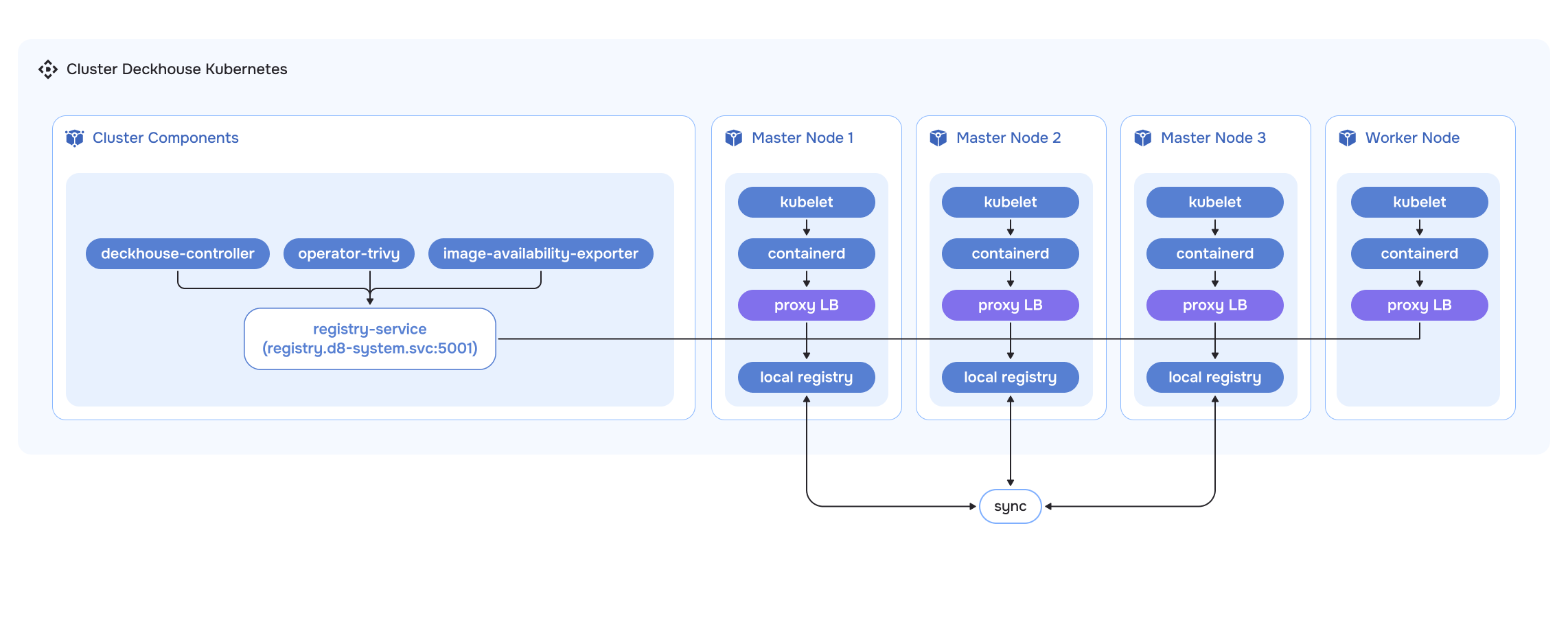
Local Mode Architecture
It is recommended to use separate disks for storing registry (/opt/deckhouse/registry) and etcd data. Using a single disk may lead to etcd performance degradation during registry operations.
The Local mode allows creating a local copy of the registry inside the cluster. Images from the remote registry are fully copied to local storage and synchronized between replicas of the local registry.
The operation of the local registry is identical to that of the caching proxy registry. The local registry is launched as static pods on control-plane (master) nodes. Registry data is stored on the control-plane (master) nodes in the /opt/deckhouse/registry directory.
To ensure high availability of the local registry, a load balancer is deployed on each cluster node. Access to the local registry from CRI goes through this load balancer. The configuration for accessing the load balancer is set in the containerd configuration.
For components such as operator-trivy, image-availability-exporter, deckhouse-controller, and others that access the registry directly, requests will go to the local registry.
The local registry is populated using the d8 tool with the d8 mirror push/pull commands. For more details, see the «Registry Module: Usage Examples» section.