Available in: Ultimate/EE
Included in extensions: Advanced Infrastructure Security
The module lifecycle stage: Generally available version
The module has requirements for installation
Overview
The module implements a runtime threats detection engine.
The module collects Linux kernel system calls and Kubernetes API audit events (by k8saudit plugin enabled by default), enrich them with metadata from Kubernetes Pods and generate runtime audit events according to conditional rules.
This module:
- Detects threats at runtime by observing the behavior of your applications and containers.
- Helps to detect CVEs exploits and cryptocurrency mining attacks.
- Improves Kubernetes security by detecting:
- Shells running in containers or Pods in Kubernetes.
- Containers running in privileged mode or attempting to mount sensitive paths, such as
/proc, on the host. - Unauthorized attempts to read confidential files such as
/etc/shadow.
Requirements
Operating system
The module uses the eBPF Falco driver to ingest syscall data. It is better suited for environments where loading a kernel module is prohibited or unsupported, such as GKE, EKS, and other managed Kubernetes solutions. The eBPF driver has the following requirements:
- Linux kernel version >= 5.8 with eBPF support.
- BPF Type Format (BTF) support enabled. You can verify it as follows:
- Run
ls -lah /sys/kernel/btf/vmlinux— if the file exists, BTF is supported. - Run
grep -E "CONFIG_DEBUG_INFO_BTF=(y|m)" /boot/config-*— if the parameter is enabled, BTF is supported.
- Run
eBPF probes may not work on some systems.
CPU and memory
Falco agents are running on every node. Therefore, the resource consumption of each Pod depends on the number of rules or ingested events.
Enabling the module
To enable the runtime-audit-engine module with default settings, apply the following ModuleConfig resource:
d8 k apply -f - <<EOF
apiVersion: deckhouse.io/v1alpha1
kind: ModuleConfig
metadata:
  name: runtime-audit-engine
spec:
  version: 1
  enabled: true
EOF
Kubernetes audit webhook
Webhook audit mode should be configured to collect audit events of kube-apiserver.
If the control-plane-manager module is enabled, settings will be automatically applied when the runtime-audit-engine module is enabled.
In Kubernetes clusters with a control plane that is not controlled by Deckhouse, you have to manually configure the webhook:
-
Create a webhook kubeconfig file with the
https://127.0.0.1:9765/k8s-auditaddress and the CA (ca.crt) from thed8-runtime-audit-engine/runtime-audit-engine-webhook-tlssecret.Example:
apiVersion: v1 kind: Config clusters: - name: webhook cluster: certificate-authority-data: BASE64_CA server: "https://127.0.0.1:9765/k8s-audit" users: - name: webhook contexts: - context: cluster: webhook user: webhook name: webhook current-context: webhook -
Add the
--audit-webhook-config-fileflag to thekube-apiservermanifest. The flag must point to the previously created file.
Remember to configure the audit policy, because Deckhouse only collects Kubernetes audit events from the system namespaces by default.
An example of configuration can be found in the control-plane-manager module documentation.
Architecture
The module is based on the Falco threat detection system. Deckhouse deploys Falco agents (which run as a DaemonSet) on every node. The agents then start collecting kernel and Kubernetes audit event data.
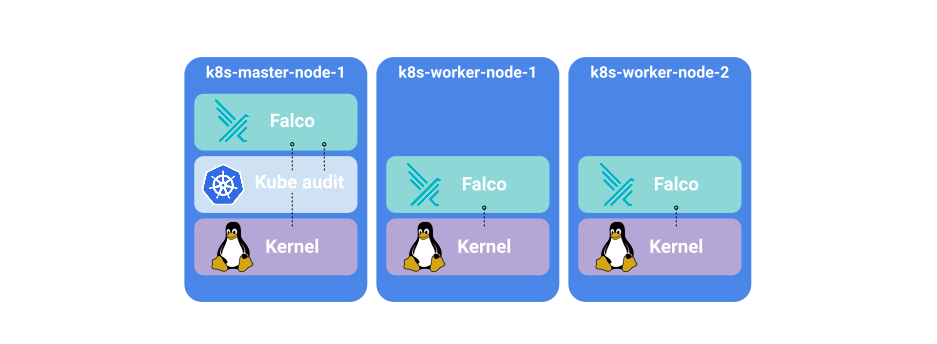
Falco developers recommend deploying Falco as a systemd unit for maximum security. However, a Kubernetes cluster with the autoscaling feature enabled makes it hard to operate. Additional security mechanisms of Deckhouse (implemented by other modules), such as multitenancy and admission policy control, provide the required level of security to mitigate attacks on the Falco DaemonSet.
There are four different containers in a single Falco agent Pod:
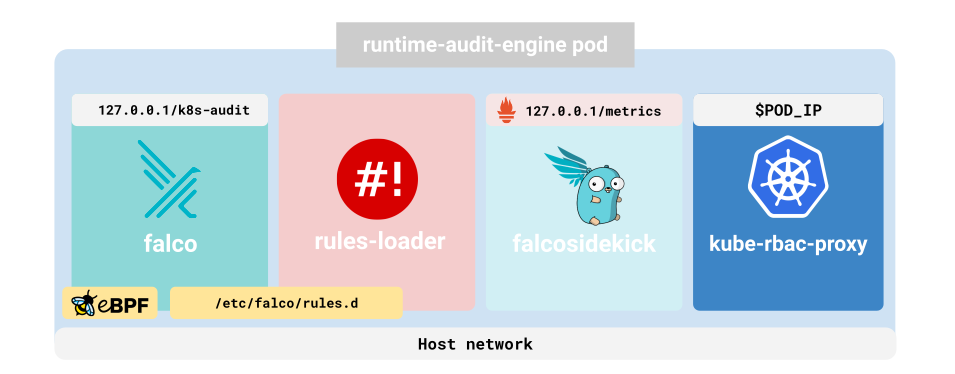
falco: Collects events, enriches them with metadata and sends them to stdout.rules-loader: Collects (FalcoAuditRules) custom resources from Kubernetes and saves them in a shared directory.falcosidekick: TakesFalcoevents and forwards them in different ways. By default, it exports events as metrics that can be used to configure alerts. For details, refer to the Falcosidekick source code.kube-rbac-proxy: Protects thefalcosidekickmetrics endpoint by restricting unauthorized access.
Audit rules
The event collection itself is a low-yielding activity because the amount of data coming from the Linux kernel is too large to be analyzed by a human. Audit rules address this problem by collecting events according to certain pattens that can help in detecting suspicious activities.
Each rule is based on a conditional expression (which uses the conditions syntax).
Embedded rules
There is a built-in set of rules that cannot be disabled.
It helps to identify problems with Deckhouse security as well as security problems affecting the runtime-audit-engine module. These are the rules for Kubernetes auditing, statically placed in the falco container along the path /etc/falco/k8s_audit_rules.yaml.
There is also an additional set of built-in rules:
- rules placed in the custom resource format FalcoAuditRules.
To list all falco audit rules, run:
d8 k -n d8-runtime-audit-engine exec -it daemonsets/runtime-audit-engine -c falco -- falco -L- With the current role-based model, executing this command requires the
PrivilegedUserrole (or higher) in thed8-runtime-audit-enginenamespace. - With the experimental role-based model, executing this command requires the
d8:manage:security:managerrole.
You can customize the list of built-in rules with settings.builtInRulesList.
Custom audit rules
Users can use a FalcoAuditRules custom resource to add custom security audit rules.
Each Falco agent Pod has a sidecar container called rules-loader (a Go binary).
This sidecar watches FalcoAuditRules custom resources, converts them to Falco rules, validates them via falco -V, and saves Falco rules in the Pod’s /etc/falco/rules.d/ directory.
A validating webhook ensures only syntactically valid rules are accepted.
Falco automatically reloads the configuration when a new rule becomes available.
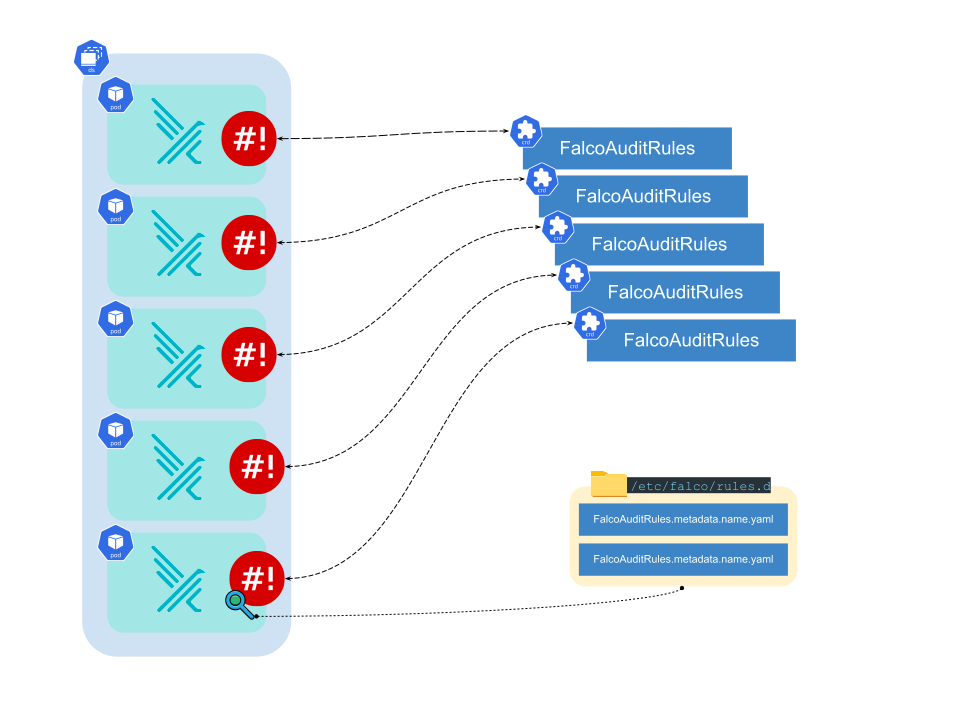
This approach allows the IaC approach to be used to maintain Falco rules.
Alerting
If a number of runtime-audit-engine Pods are not scheduled, then the D8RuntimeAuditEngineNotScheduledInCluster alert will be generated.