Available in: Ultimate/EE
The module lifecycle stage: Experimental
The module has requirements for installation
Before enabling the module, you need to allow the use of experimental modules in the deckhouse ModuleConfig. To do this, set the allowExperimentalModules parameter to true.
The security-events-manager module collects, processes, and delivers security events extracted from logs of applications and infrastructure components.
A security event is a strictly structured record of an action or fact that is significant from an information security perspective, for example:
- failed authentication (in any service);
- suspicious API access;
- critical resource changes.
The module goal is to receive log records, detect security events in them, convert events to a unified format, and send them to centralized storage.
The module functionality is based on:
- the security events concept;
- a mechanism for collecting log records from different services through the auxiliary
log-shippermodule; - a mechanism for processing (parsing) logs and extracting security events;
- a mechanism for normalization to a unified format and enrichment with additional data;
- a mechanism for filtering and delivering security events.
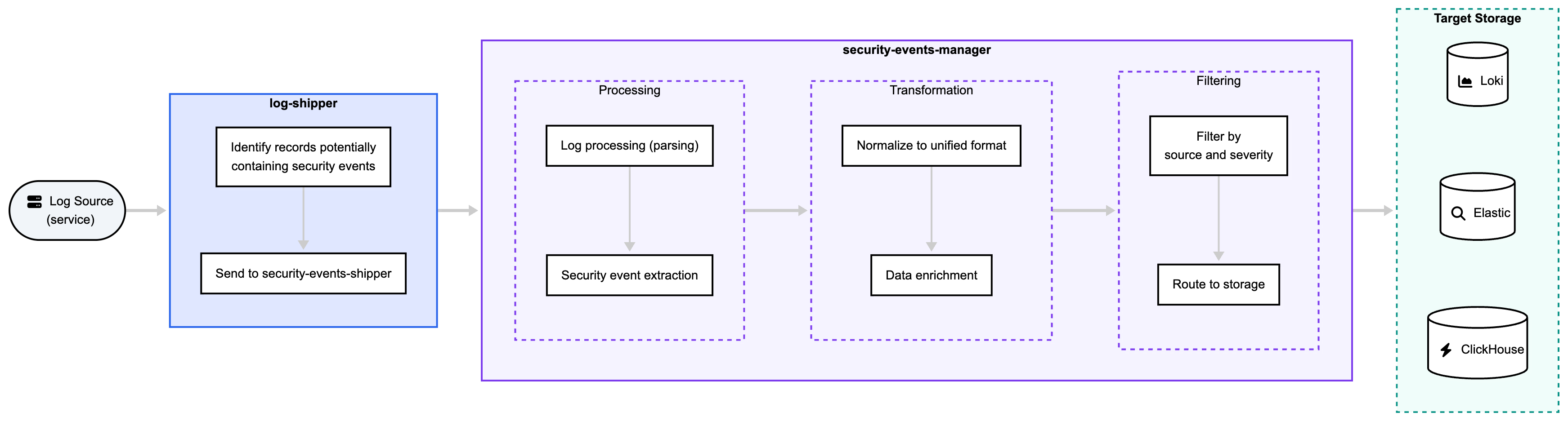
To transform a log record into a security event stored in an external system, data goes through the following processing stages:
Example of a security event:
{
  "id": "2f0de5c2-2e58-4d3f-b4fe-5ec6f1935b9f",
  "timestamp": "2026-05-10T14:21:03Z",
  "source": {
    "component": "kube-apiserver"
  },
  "event": {
    "code": "UNAUTHORIZED_ACCESS",
    "category": "Rbac",
    "severity": "High",
    "outcome": "Failure"
  },
  "eventMetadata": {
    "cluster": "prod-cluster",
    "sourceIPs": [
      "206.123.145.70"
    ]
  },
  "actor": {
    "id": "system:serviceaccount:default:demo",
    "type": "ServiceAccount"
  },
  "object": {
    "id": "/api/v1/namespaces/default/secrets",
    "type": "KubernetesResource"
  }
}
Event content may differ by source, but the structure must be uniform. The event model is described in SecurityEvent.
The event description for a specific source is defined by SecurityEventDefinition.
This resource defines required and optional fields, as well as category and severity.
Example:
apiVersion: security.deckhouse.io/v1alpha1
kind: SecurityEventDefinition
metadata:
  name: k8s-pod-created
spec:
  code: K8S_POD_CREATED
  category: Runtime
  severity: Low
  description: >
    Kubernetes pod created
  source: runtime-audit-engine
  fields:
    - name: event.code
      required: true # default - true
    - name: source.component
      required: true
    - name: metadata.extra.ka_target_name
      required: false
    - name: metadata
      required: false
Solution architecture
The module performs three work stages:
- Collection:
- collection of logs from pod sources and node files;
- primary selection of records that may contain security events.
- Processing and enrichment:
- parsing and extraction of useful fields;
- transformation to a unified model and context enrichment.
- Delivery:
- policy-based filtering and delivery to configured storages.
At the delivery stage, sending to multiple storage and analytics system types is supported (for example, Loki, Elasticsearch, Kafka, Splunk, Vector, File, Socket).
Processing stages
Log collection
Logs are delivered to the security-events-manager module through the auxiliary log-shipper module.
A two-tier scheme is used:
- the
log-shippermodule performs preliminary selection of log records using simple comparison operations (In,NotIn,Regex,NotRegex,Exists,DoesNotExist) and forwards them to the gateway; - the
security-events-managermodule (gateway) performs field recognition (parsing, serialization), further processing, and delivery.
Because log parsing is resource-intensive, it is performed only for records pre-selected as potentially containing security events, not for all incoming logs. Therefore, the initial selection stage does not perform deep field-value filtering that requires full content parsing.
Log collection and several subsequent stages are configured through PodSecurityEventShipper and ClusterSecurityEventShipper resources (depending on the source type).
Cluster log sources are sources not bound to a specific namespace, for example node files.
Because these resources configure multiple processing stages, the examples below show only the relevant manifest fragments.
Example (manifest fragment):
apiVersion: security.deckhouse.io/v1alpha1
kind: PodSecurityEventShipper
metadata:
  name: runtime-audit-engine
  namespace: d8-runtime-audit-engine
spec:
  # Log source configuration.
  - source: runtime-audit-engine
    input:
      type: KubernetesPods
      kubernetesPods:
        labelSelector:
          matchLabels:
            app: runtime-audit-engine

...

    # Select records potentially containing a security event.
    produces:
      - eventCode: K8S_POD_CREATED
        # Log example: Informational K8s Pod Created (user=system:serviceaccount:kube-system:replicaset-controller pod=example-7d6894dbd9-92hgx ns=d8-system resource=pods ...
        extract:
          field: message
          operator: Regex
          values:
            - ".*K8s Pod Created.*"

      - eventCode: K8S_POD_DELETED
        # Log example: Informational K8s Pod Deleted (user=kubernetes-admin pod=example-7d6894dbd9-92hgx ns=d8-system resource=pods ...
        extract:
          field: message
          operator: Regex
          values:
            - ".*K8s Pod Deleted.*"
...apiVersion: security.deckhouse.io/v1alpha1
kind: ClusterSecurityEventShipper
metadata:
name: kube-audit
spec:
# Log source configuration.
- source: kube-audit
input:
type: File
files:
- /var/log/kube-audit/audit.log
...
# Select records potentially containing a security event.
produces:
- eventCode: UNAUTHORIZED_ACCESS
# Log example: ... "message":"Unauthorized","reason":"Unauthorized","code":401 ...
extract:
field: message
operator: Regex
values:
- ".*\"code\":401.*"
...Manifests may configure multiple sources because spec is an array of objects.
For each item you configure:
- log source name —
sourcefield; - log source type and parameters —
inputfield; - preliminary record selection rules —
producesfield.
Example source log for the selection stage:
{
  "time": "2026-05-10T14:21:03Z",
  "kind": "Event",
  "source": "kube-apiserver",
  "level": "Metadata",
  "message": "Unauthorized",
  "reason": "Unauthorized",
  "code": 401,
  "requestURI": "/api/v1/namespaces/default/secrets",
  "user": "system:serviceaccount:default:demo",
  "sourceIPs": [
    "206.123.145.70"
  ]
}
Processing (parsing), security event extraction
After logs are delivered to the gateway component, security-events-manager performs parsing and security event extraction.
Log parsing is configured through fields of PodSecurityEventShipper and ClusterSecurityEventShipper objects. The parser field is responsible for this configuration.
The parser field specifies which container logs should be parsed (name) and by which method (nested parser field).
Supported parser types:
JSON— parse JSON logs;Regex— parse with regular expressions;Grok— parse with Grok patterns.
You can additionally define whether to keep the original log entry (drop_raw).
Example:
apiVersion: security.deckhouse.io/v1alpha1
kind: PodSecurityEventShipper
metadata:
  name: runtime-audit-engine
  namespace: d8-runtime-audit-engine
spec:
  # Log source configuration.
  - source: runtime-audit-engine
    input:
      type: KubernetesPods
      kubernetesPods:
        labelSelector:
          matchLabels:
            app: runtime-audit-engine
  # Log parsing configuration.
    parser:
      - name: falco
        parser:
          type: JSON
        drop_raw: false
...
If complex parsing is required, parsing rules can be moved into dedicated resources: SecurityEventLoggingTransformationRules (SELTR) and ClusterSecurityEventLoggingTransformationRules (CSELTR).
These resources define how logs should be parsed in the same manner.
Example:
apiVersion: security.deckhouse.io/v1alpha1
kind: ClusterSecurityEventLoggingTransformationRules
metadata:
  name: auth-log
spec:
  type: File
  file:
    paths:
      - /var/log/auth.log
    transform:
      parser:
        type: Grok
        grok:
          # First successful pattern wins.
          patterns:
            # Invalid user zju_yd from 206.123.145.70 port 33124
            - '%{AUTHLOGTIMESTAMP:ts} %{HOSTNAME:host} %{WORD:program}\[%{INT:pid}\]: %{DATA:action} %{USER} from %{SRCIP} port %{INT:src_port}'
            # Connection closed by invalid user gb 206.123.145.57 port 49356 [preauth]
            - '%{AUTHLOGTIMESTAMP:ts} %{HOSTNAME:host} %{WORD:program}\[%{INT:pid}\]: %{DATA:action} %{USER} %{SRCIP} port %{INT:src_port} \[%{DATA:context}\]'
            # Connection closed by authenticating user root 206.123.145.52 port 60078 [preauth]
            - '%{AUTHLOGTIMESTAMP:ts} %{HOSTNAME:host} %{WORD:program}\[%{INT:pid}\]: %{DATA:action} %{USER} %{SRCIP} port %{INT:src_port} \[%{DATA:context}\]'
            # Fallback: keep the raw sshd message in `msg`
            - '%{AUTHLOGTIMESTAMP:ts} %{HOSTNAME:host} %{WORD:program}\[%{INT:pid}\]: %{GREEDYDATA:msg}'
          customPatterns:
            # Matches: "Mar  6 01:08:21" (double space before 1-digit day is allowed)
            - key: AUTHLOGTIMESTAMP
              value: '[A-Z][a-z]{2}\s+\d{1,2}\s+\d{2}:\d{2}:\d{2}'
            # Minimal set of patterns (avoid dependency on a specific built-in grok pattern set)
            - key: HOSTNAME
              value: '[0-9A-Za-z][0-9A-Za-z._-]+'
            - key: WORD
              value: '[A-Za-z0-9_]+'
            - key: INT
              value: '[0-9]+'
            - key: IPV4
              value: '(?:\d{1,3}\.){3}\d{1,3}'
            - key: DATA
              value: '.*?'
            - key: GREEDYDATA
              value: '.*'
            - key: USER
              value: '(?<user>.*?)'
            - key: SRCIP
              value: '(?<src_ip>(?:\d{1,3}\.){3}\d{1,3})'
      fields:
        - name: pid
          type: Int
        - name: src_port
          type: Int
When using SELTR or CSELTR, PodSecurityEventShipper and ClusterSecurityEventShipper must reference the parser rule resource name via parserRef:
apiVersion: security.deckhouse.io/v1alpha1
kind: ClusterSecurityEventShipper
metadata:
  name: auth-log
spec:
  # Log source configuration.
  - source: auth-log
    input:
      type: File
      files:
        - /var/log/auth.log
    # Log parsing configuration.
    parserRef: auth-log
...
Transformation and enrichment of a security event
Because a security event has a fixed structure, a parsed log record must be transformed into the target event model. Two mechanisms are used:
- Field transformation (
Transform) — map values from log fields to security event fields; - Enrichment (
Enrich) — add new fields to the security event.
Both mechanisms are configured via same-name fields inside produces blocks of PodSecurityEventShipper and ClusterSecurityEventShipper.
Example:
apiVersion: security.deckhouse.io/v1alpha1
kind: PodSecurityEventShipper
metadata:
  name: user-authn
  namespace: d8-user-authn
spec:

  # Log source configuration.
  - source: user-authn
    input:
      type: KubernetesPods
      kubernetesPods:
        labelSelector:
          matchLabels:
            app: dex
...
    produces:
      # Select records that may contain a security event.
      - eventCode: USER_LOGIN_SUCCESS
        # Log example: {"time":"2026-02-16T08:24:16.296841124Z","level":"INFO","msg":"login successful","connector_id":"local","username":"testuser","preferred_username":"","email":"test.user@example.ru","groups":["admins"],"client_remote_addr":"109.191.184.154","request_id":"712c95ff-94c2-41af-ac60-766a78218ceb"}
        extract:
          field: message
          operator: Regex
          values:
            - ".*login successful.*"
        # Map log fields to security event fields.
        transform:
          # actor
          - key: actor.id
            value: username
          # metadata
          - key: metadata.actor.preferredUsername
            value: preferred_username
          - key: metadata.actor.email
            value: email
          - key: metadata.actor.groups
            value: groups
        # Enrich fields with additional data.
        enrich:
          - target: actor.type
            source: Static
            value: User
In addition to per-event transformation and enrichment, global transformation and enrichment can be configured.
This is useful when logs from one service are homogeneous and contain common fields for all events.
Global rules are configured in producesDefaults, whose structure is similar to produces.
Example:
apiVersion: security.deckhouse.io/v1alpha1
kind: PodSecurityEventShipper
metadata:
  name: user-authn
  namespace: d8-user-authn
spec:
  # Log source configuration.
  - source: user-authn
    input:
      type: KubernetesPods
      kubernetesPods:
        labelSelector:
          matchLabels:
            app: dex
...
    # Global transformation and enrichment configuration.
    producesDefaults:
      transform:
        - key: timestamp
          value: time
        - key: metadata.actor.sourceIPs
          value: client_remote_addr
      enrich:
        - target: actor.type
          source: Static
          value: User
...
    produces:
      # Select records that may contain a security event.
      - eventCode: USER_LOGIN_SUCCESS
        extract:
          field: message
          operator: Regex
          values:
            - ".*login successful.*"
        # Map log fields to security event fields.
        transform:
          # actor
          - key: actor.id
            value: username
          # metadata
          - key: metadata.actor.preferredUsername
            value: preferred_username
          - key: metadata.actor.email
            value: email
          - key: metadata.actor.groups
            value: groups
        # Enrich fields with additional data.
        enrich:
          - target: actor.type
            source: Static
            value: User
...
For transformation, a key-value structure is used where the key is the target security event field and the value is the source log field.
The source field is addressed by a dot path relative to the parsed log record: user.name reads the
name key of the user object. A key that contains a dot is a separate case — write it in brackets
and quotes. This matters for Falco, which writes the keys of output_fields flat, dots included:
transform:
  - key: actor.id
    value: output_fields["user.name"]
With such a path, actor.id of the event receives the value of the user.name key.
Written without brackets and quotes, output_fields.user.name reads as a step down into a user
object that Falco never writes: the lookup finds nothing and the target field stays unset.
The same rule applies to enrich[].args[].value. To address the event root rather than the parsed
record, prefix the path with @root..
Enrichment uses an extensible data source model.
Each enrichment item contains — target — target event field, source — data source, value — source value.
Currently supported sources:
Static— static data (fixed value substitution);Plugin— runtime lookup via the in-podenrichment-cachesidecar (see Enrichment plugins).
Enrich is applied after Transform; if target fields conflict, the value from Enrich overwrites the Transform result.
Enrichment plugins
Plugin enrichment (source: Plugin) resolves event fields that are absent from the raw log at runtime.
Each plugin is an HTTP endpoint that receives a GET request with query parameters
derived from event fields and returns a JSON object with the requested values.
Plugins are registered as ClusterSecurityEventEnrichmentPlugin (CSEP) custom resources. Two plugin types are supported:
-
Internal— served by the built-inenrichment-cachesidecar in the gateway pod. The module ships three Internal plugins:k8s-pod-info,k8s-container-info,k8s-nodeuser-info. Internal plugins cannot be created or modified by users. -
External— served by a user-deployed HTTP service in any namespace. Users createExternalCSEP resources to register custom enrichment endpoints.
Enrichment is non-fatal: if a lookup fails (missing input fields, no matching record, HTTP error), the target field is left unset and the event is not dropped.
To discover available plugins, run:
kubectl get clustersecurityeventenrichmentpluginsEach CSEP resource declares the plugin’s input arguments (spec.args) and the fields
it returns (spec.returns.fields). When a ShipperEnrichRule references a plugin,
the value must match one of the returns.fields[].name, and the args keys must
match the spec.args[].name.
At runtime, the controller generates a Lua V2 transform that makes an HTTP GET call to the plugin endpoint for each event:
- Internal plugins:
GET http://127.0.0.1:9261/api/v1/enrich?plugin=<name>&<args>(loopback-only enrichment listener of theenrichment-cachesidecar) - External plugins:
GET <spec.endpoint.url>?<args>
The response is a flat JSON object; the value field selects which key to extract.
Built-in Internal plugins
The module ships three Internal plugins.
k8s-pod-info {.anchored}
Resolves Pod fields (serviceAccountName, name, namespace) by pod name + namespace
from the in-memory Pod cache of the enrichment-cache sidecar (no API server call per event).
Required input parameters:
| Parameter | Description |
|---|---|
pod_name |
Path to the event field containing the Pod name. The KubernetesPods input puts it at the root of the event, so the path is @root.pod. |
namespace |
Path to the event field containing the Pod namespace. The KubernetesPods input puts it at the root of the event, so the path is @root.namespace. |
Available output values (value):
| Value | Description |
|---|---|
serviceAccountName |
The Pod’s spec.serviceAccountName, formatted as system:serviceaccount:<namespace>:<name>. |
name |
The Pod’s name. |
namespace |
The Pod’s namespace. |
Example enrich array element:
- target: actor.id
  source: Plugin
  plugin: k8s-pod-info
  value: serviceAccountName
  args:
    - key: pod_name
      value: '@root.pod'
    - key: namespace
      value: '@root.namespace'
k8s-container-info {.anchored}
Resolves Pod fields (serviceAccountName, name, namespace) by container runtime ID.
Runtime prefixes (containerd://, docker://, cri-o://, etc.) are stripped automatically.
Required input parameter:
| Parameter | Description |
|---|---|
container_id |
Dot path to the event field containing the container ID (e.g. output_fields["container.id"] for Falco). |
Available output values (value):
| Value | Description |
|---|---|
serviceAccountName |
The Pod’s spec.serviceAccountName, formatted as system:serviceaccount:<namespace>:<name>. |
name |
The Pod’s name. |
namespace |
The Pod’s namespace. |
Example enrich array element:
- target: actor.id
  source: Plugin
  plugin: k8s-container-info
  value: serviceAccountName
  args:
    - key: container_id
      value: output_fields["container.id"]
k8s-nodeuser-info {.anchored}
Resolves the username of a static user (nodeusers.deckhouse.io object) from its
system UID. The lookup maps spec.uid to metadata.name from the in-memory NodeUser
cache of the enrichment-cache sidecar (no API server call per event).
Required input parameter:
| Parameter | Description |
|---|---|
uid |
Dot path to the event field containing the system UID (e.g. output_fields["user.uid"] for Falco). |
Available output values (value):
| Value | Description |
|---|---|
username |
The NodeUser’s metadata.name — the static user’s login name. |
Example enrich array element:
- target: actor.name
  source: Plugin
  plugin: k8s-nodeuser-info
  value: username
  args:
    - key: uid
      value: output_fields["user.uid"]
Custom External plugins
Users can create External CSEP resources to register custom enrichment endpoints.
An External plugin is an HTTP service deployed in any namespace. The CSEP resource
declares the endpoint URL, input arguments, and return fields.
Example External plugin CSEP:
apiVersion: security.deckhouse.io/v1alpha1
kind: ClusterSecurityEventEnrichmentPlugin
metadata:
  name: my-custom-enricher
spec:
  type: External
  description: "Resolve employee info by badge ID"
  endpoint:
    url: http://my-enricher.my-namespace.svc:8080/lookup
  args:
    - name: badge_id
      required: true
      description: "Event field path containing the employee badge ID"
  returns:
    fields:
      - name: username
        type: String
        description: "Employee username"
      - name: department
        type: String
        description: "Employee department"
Example enrich array element referencing the External plugin:
- target: actor.name
  source: Plugin
  plugin: my-custom-enricher
  value: username
  args:
    - key: badge_id
      value: output_fields["user.badge_id"]
HTTP API contract
Every plugin (Internal or External) must conform to the same HTTP API contract:
-
Request:
GET <endpoint>?<arg1>=<val1>&<arg2>=<val2> -
Response:
200 OKwith a JSON body containing the declared return fields:{ "username": "jdoe", "department": "security" } -
Not found:
404— the target field is left unset, the event is not dropped. -
Error:
500— the error is logged, the target field is left unset.
The response content type must be application/json.
Filtering and delivery of security events
After a security event is formed, you must define where it should be delivered. For this, you need to:
- configure security event storages;
- configure event delivery rules to storages.
Storage configuration
Storages are configured via ClusterSecurityEventDestination.
Storage types are aligned with the log-shipper ecosystem.
For in-cluster security event storage, automatic Loki destination configuration is available when the corresponding module option is enabled.
Example:
apiVersion: security.deckhouse.io/v1alpha1
kind: ClusterSecurityEventDestination
metadata:
  name: cluster-loki
spec:
  type: Loki
  loki:
    auth:
      strategy: Bearer
      token: <EXAMPLE>
    endpoint: https://loki.d8-monitoring:3100
    tls:
      verifyCertificate: true
      verifyHostname: true
      ca: LS0tLS1CRUdJTiBDRVJUSUZJQ0FURS0tLS0t...
Delivery rule configuration
When configuring delivery rules, you need to define:
- which source events are sent;
- minimum severity level for sending;
- target storages.
For this, use ClusterSecurityEventConfig.
The resource defines sources (exact names or masks), minimum severity, and an array of storages (resources of type ClusterSecurityEventDestination) that receive selected events.
Example:
apiVersion: security.deckhouse.io/v1alpha1
kind: ClusterSecurityEventConfig
metadata:
  name: default
spec:
  defaultSeverityThreshold: Low
  enabledSources:
    - clusterSecurityEventShipper/kube-audit/kube-audit
    - podSecurityEventShipper/d8-runtime-audit-engine/runtime-audit-engine/falco
    - podSecurityEventShipper/d8-user-authn/user-authn/dex
  # OR
  # enabledSourcesMasks:
  #   - clusterSecurityEventShipper/kube-audit/*
  #   - podSecurityEventShipper/*

  destinations:
    - cluster-loki
Default module settings
If module settings are not explicitly specified, the following objects are created in the cluster:
-
ClusterSecurityEventConfig— configures security event delivery to destinations. The following settings are used by default:apiVersion: security.deckhouse.io/v1alpha1 kind: ClusterSecurityEventConfig metadata: name: default spec: defaultSeverityThreshold: Medium destinations: - cluster-loki enabledSourcesMasks: - podSecurityEventShipper/* - clusterSecurityEventShipper/*Configuration of these parameters is controlled by module setting
securityEventConfig. -
ClusterSecurityEventDestination— configures security event storage. By default, an object is generated that allows sending security events to the in-clusterlokiservice:apiVersion: security.deckhouse.io/v1alpha1 kind: ClusterSecurityEventDestination metadata: name: cluster-loki spec: type: Loki loki: auth: strategy: Bearer token: <token> # Filled automatically endpoint: https://loki.d8-monitoring:3100You can disable generation of the default CSED via the dedicated parameter
clusterSecurityEventDestination.clusterLoki.