Available with limitations in: Open/CE, Core, BE, SE
Available without limitations in: SE+, Ultimate/EE
Included with limitations in extensions: Advanced Networking
Included without limitations in extensions: Cluster Union
The module lifecycle stage: General Availability
The cni-cilium module provides a network in a cluster. It is based on the Cilium project.
Limitations
- Services with type
NodePortandLoadBalancerare incompatible with hostNetwork endpoints in LB modeDSR. Switch toSNATmode if it is required. HostPortpods only bind to one IP address. If the OS has multiple interfaces/IP, Cilium will choose one, preferringprivatetopublic.- If a node’s
ExternalIPis not assigned to any of the node’s network interfaces but is provided by external infrastructure (for example, via 1:1 NAT), traffic from the PodNetwork to thatExternalIPis not supported. As a result, Pods that do not usehostNetworkcannot access a port exposed viahostPortusing the node’sExternalIP. Use the node’sInternalIPfor such connections. - To ensure the stable operation of
cni-ciliumon cluster nodes, disable Elastic Agent or restrict its access to the Elastic management server. Elastic Agent includes an Elastic Endpoint component which uses the Extended Berkeley Packet Filter (eBPF) technology on cluster nodes and may remove critical eBPF programs required forcni-ciliumto work correctly. For detailed information and discussion of the issue, refer to the publications of the Cilium and Elastic projects. - Kernel requirements:
- Linux kernel version not lower than
5.8for thecni-ciliummodule to work and work together with the istio, openvpn or node-local-dns modules.
- Linux kernel version not lower than
- OS compatibility:
- Ubuntu:
- incompatible with version 18.04;
- HWE kernel installation required for working with version 20.04.
- Astra Linux:
- incompatible with the “Smolensk” edition.
- CentOS:
- for versions 7 and 8, a new kernel from the repository is required.
- Ubuntu:
Handling external traffic in different bpfLB modes (replacing kube-proxy from Cilium)
Kubernetes typically uses schemes where traffic comes to a balancer that distributes it among many servers. Both incoming and outgoing traffic passes through the balancer. Thus, the total throughput is limited by the resources and channel width of the balancer. To optimize traffic and unload the balancer, the DSR mechanism was invented, in which incoming packets go through the balancer, and outgoing ones go directly from the terminating servers. Since responses are usually much larger in size than requests, this approach can significantly increase the overall throughput of the scheme.
To extend the capabilities, the module allows selectable mode of operation, which affects the behavior of Service with the NodePort and LoadBalancer types:
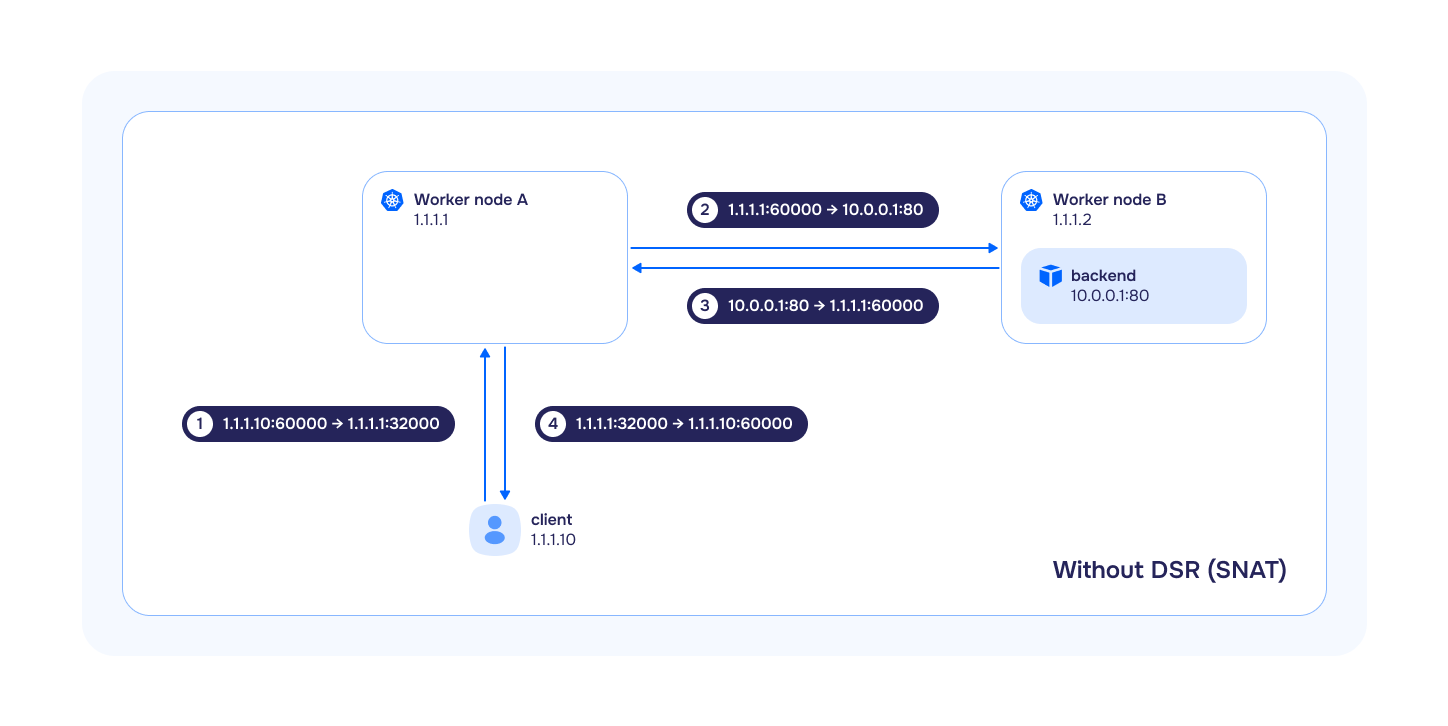
SNAT(Source Network Address Translation) — is a subtype of NAT in which, for each outgoing packet, the source IP address is translated to the IP address of the gateway from the target subnet, and incoming packets passing through the gateway are translated back based on a translation table. In this mode,bpfLBfully replicates the logic ofkube-proxy:- if
externalTrafficPolicy: Localis specified in theService, the traffic will be forwarded and balanced only to those target pods running on the same node where the traffic arrived. If the target pod is not running on this node, the traffic will be dropped. - if
externalTrafficPolicy: Clusteris specified in theService, the traffic will be forwarded and balanced to all target pods in the cluster. At the same time, if the target pods are located on other nodes, SNAT will be performed when transmitting traffic to them (the source IP address will be replaced with the InternalIP of the node).
- if
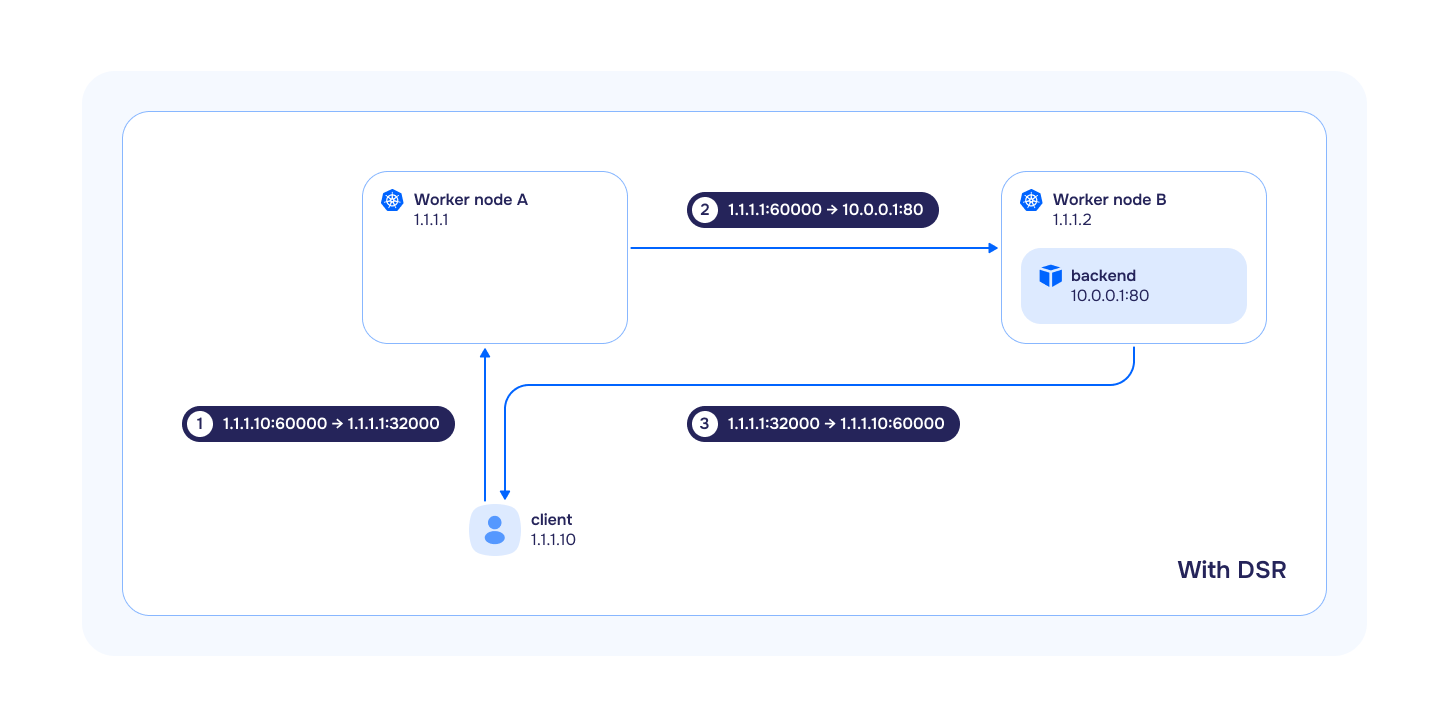
DSR(Direct Server Return) — is a method where all incoming traffic passes through the load balancer, and all outgoing traffic bypasses it. This method is used instead ofSNAT. Often, responses are much larger than requests, andDSRcan significantly increase the overall throughput of the scheme:- if
externalTrafficPolicy: Localis specified in theService, its behavior is completely analogous tokube-proxyandbpfLBinSNATmode. - if
externalTrafficPolicy: Clusteris specified in theService, the traffic will be forwarded and balanced to all target pods in the cluster. It is important to take into account the following features:- if the target pods are on other nodes, then the source IP address will be preserved when incoming traffic is sent to them;
- outgoing traffic will go directly from the node on which the target pod was launched;
- the source IP address will be replaced with the external IP address of the node to which the incoming request originally came.
- if
In case of using DSR and Service mode with externalTrafficPolicy: Cluster additional network environment settings are required. Network equipment must be ready for asymmetric traffic flow: IP address anti-spoofing tools (uRPF, sourceGuard, etc.) must be disabled or configured accordingly.
Hybrid— in this mode, TCP traffic is processed inDSRmode, and UDP inSNATmode.
Operational specifics of CNI Cilium on AWS
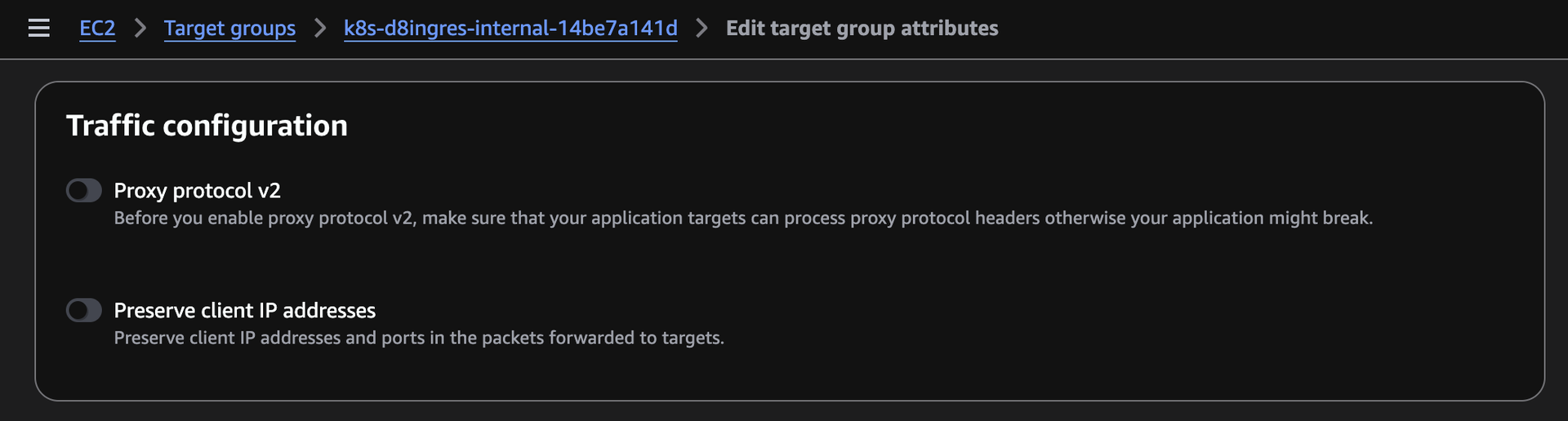
If Cilium runs in VXLAN mode (the only mode available on AWS), then by default connections from inside the cluster (from a node or a pod) to internal resources exposed through an internal load balancer (Load Balancer) do not work. From outside the cluster, the load balancer address answers. The cause is the enabled preserve_client_ip option (“Preserve client IP addresses”) on the target group: the load balancer skips NAT and the return traffic goes straight through the VXLAN tunnel past the load balancer. The traffic becomes asymmetric, and the connection drops. To fix it, disable preserve_client_ip on the target group in one of two ways.
After you disable preserve_client_ip, the load balancer performs SNAT, and the application stops seeing the real client IP address at the network level. For HTTP/HTTPS traffic this is not a problem: the address is still passed in the X-Forwarded-For header.
Using the AWS web console. Open EC2 → Target groups, select the load balancer target group (for example, k8s-d8ingres-internal-...), click Edit target group attributes, and in the Traffic configuration block turn off the Preserve client IP addresses toggle.
Using the AWS CLI. Run the command with your own target group ARN and region (you can get the ARN in the same Target groups section or with aws elbv2 describe-target-groups):
aws elbv2 modify-target-group-attributes \
  --target-group-arn arn:aws:elasticloadbalancing:REGION:ACCOUNT:targetgroup/NAME/ID \
  --attributes Key=preserve_client_ip.enabled,Value=false \
  --region REGION
Using CiliumClusterwideNetworkPolicy
Applying CiliumClusterwideNetworkPolicy without policyAuditMode enabled may break control plane operation or cut SSH access to all cluster nodes.
The safe rollout procedure for CiliumClusterwideNetworkPolicy, including mandatory control plane and host firewall rules, is described in the Network policies section of the documentation. For details on the Cilium policy formats, refer to CiliumNetworkPolicy and CiliumClusterwideNetworkPolicy.
Changing Cilium Operation Mode
When changing Cilium’s operation mode (the tunnelMode parameter) from Disabled to VXLAN or vice versa, it is necessary to reboot all nodes, otherwise, pod availability issues may occur.
Disabling the kube-proxy Module
Cilium fully replaces the functionality of the kube-proxy module, so kube-proxy is automatically disabled when the cni-cilium module is enabled.
Using selective load balancing algorithm for services
In Deckhouse Platform, you can apply the following algorithms to load balance service traffic:
Random: Randomly select a backend for each connection. Easy to implement, but does not always provide even distribution.Maglev: Uses consistent hashing to distribute traffic evenly, suitable for large-scale services.Least Connections: Directs traffic to the backend with the lowest number of active connections, optimizing load for applications with long-lived connections.
By default, the Random balancing algorithm is set for all services. However, Deckhouse allows you to override the algorithm for individual services. To use a selective balancing algorithm for a specific service, follow these steps:
- Edit the
cni-ciliummodule configuration in Deckhouse by enabling theextraLoadBalancerAlgorithmsEnabledparameter. This activates support for service annotations for selective algorithms. - In the service manifest, specify the
service.cilium.io/lb-algorithmannotation with one of the values:random,maglev, orleast-conn.
This mechanism requires Linux kernel version 5.15 or higher to work correctly.
Using Egress Gateway
The feature is available only in the following Deckhouse Platform editions: SE+, EE, Ultimate.
Egress Gateway in Deckhouse Platform can be used in one of two modes: Basic mode and Virtual IP mode. Use Custom Resource EgressGateway (parameter spec.sourceIP.mode) to select the mode.
Basic mode
Pre-configured IP addresses are used on egress nodes.
Virtual IP mode
The ability to dynamically assign additional IP addresses to nodes is implemented.
Exporting data from Hubble
Deckhouse Platform allows to configure data export from Hubble running inside Cilium agents using the cluster-scoped custom resource HubbleMonitoringConfig. To enable export, create a HubbleMonitoringConfig resource.
Creating or modifying the HubbleMonitoringConfig resource will restart all Cilium agents in the cluster.
After the manifest is applied:
- Hubble metrics become available in Prometheus. All exported metrics have the
hubble_*prefix; - Hubble logs are written to the
/var/log/cilium/hubble/flow.logfile on each node.
Third-party components
List of third-party software used in the cni-cilium module:
-
Cilium 1.17.17
License: Apache License 2.0
Cilium is open source software for providing and transparently securing network connectivity and loadbalancing between application workloads such as application containers or processes.
-
CNI plugins 1.9.1
License: Apache License 2.0
Some reference and example networking plugins, maintained by the CNI team.
-
Gops 0.3.27
License: BSD 3-Clause License
A tool to list and diagnose Go processes currently running on your system.