The module lifecycle stage: General Availability
How to secure my application?
To enable Dex authentication for your application, follow these steps:
-
Create a DexAuthenticator custom resource.
When you create a DexAuthenticator in a cluster, an instance of oauth2-proxy is created and connected to Dex. The Deployment, Service, Ingress, and Secret objects will be created in the specified namespace.
Example of the DexAuthenticator custom resource:
apiVersion: deckhouse.io/v1 kind: DexAuthenticator metadata: # Dex authenticator pod name prefix. # For example, if the name prefix is `app-name`, then Dex authenticator pods will look like `app-name-dex-authenticator-7f698684c8-c5cjg`. name: app-name # Namespace to deploy Dex authenticator to. namespace: app-ns spec: # Your application's domain. Requests to it will be redirected for Dex authentication. applicationDomain: "app-name.kube.my-domain.com" # A parameter that determines whether to send the `Authorization: Bearer` header to the application. # This one is useful in combination with auth_request in NGINX. sendAuthorizationHeader: false # The name of the Secret containing the SSL certificate. applicationIngressCertificateSecretName: "ingress-tls" # The name of the Ingress class to use in the Ingress resource created for the Dex authenticator. applicationIngressClassName: "nginx" # The duration of the active user session. keepUsersLoggedInFor: "720h" # The list of groups whose users are allowed to authenticate. allowedGroups: - everyone - admins # The list of addresses and networks for which authentication is allowed. whitelistSourceRanges: - 1.1.1.1/32 - 192.168.0.0/24 -
Connect your application to Dex.
For this, add the following annotations to the application’s Ingress resource:
nginx.ingress.kubernetes.io/auth-signin: https://$host/dex-authenticator/sign_innginx.ingress.kubernetes.io/auth-response-headers: X-Auth-Request-User,X-Auth-Request-Emailnginx.ingress.kubernetes.io/auth-url: https://<SERVICE_NAME>.<NS>.svc.{{ C_DOMAIN }}/dex-authenticator/auth, where:SERVICE_NAME: Name of the authenticator’s Service. Usually, it is<NAME>-dex-authenticator(<NAME>is themetadata.nameof the DexAuthenticator).NS: Value of themetadata.namespaceparameter of the DexAuthenticator.C_DOMAIN: Cluster domain (the clusterDomain parameter of the ClusterConfiguration resource).
Note: If the DexAuthenticator
<NAME>is too long, the Service name may be truncated. To find the correct service name, use the following command (specify the namespace name and DexAuthenticator name):d8 k get service -n <NS> -l "deckhouse.io/dex-authenticator-for=<NAME>" -o jsonpath='{.items[0].metadata.name}'Example of annotations for an application’s Ingress resource for connecting to Dex:
annotations:
  nginx.ingress.kubernetes.io/auth-signin: https://$host/dex-authenticator/sign_in
  nginx.ingress.kubernetes.io/auth-url: https://app-name-dex-authenticator.app-ns.svc.cluster.local/dex-authenticator/auth
  nginx.ingress.kubernetes.io/auth-response-headers: X-Auth-Request-User,X-Auth-Request-Email
The application Ingress must have TLS configured. DexAuthenticator does not support HTTP-only Ingress resources.
Setting up CIDR-based restrictions
DexAuthenticator does not have a built-in system for managing authentication based on user IP address. Instead, you can use Ingress resource annotations:
-
To restrict access by IP and keep Dex authentication, add the annotation with a comma-separated list of allowed CIDRs:
nginx.ingress.kubernetes.io/whitelist-source-range: 192.168.0.0/32,1.1.1.1 -
To allow access without Dex authentication for users from specified networks while requiring authentication for others, add the annotation:
nginx.ingress.kubernetes.io/satisfy: "any"
Authentication flow with DexAuthenticator
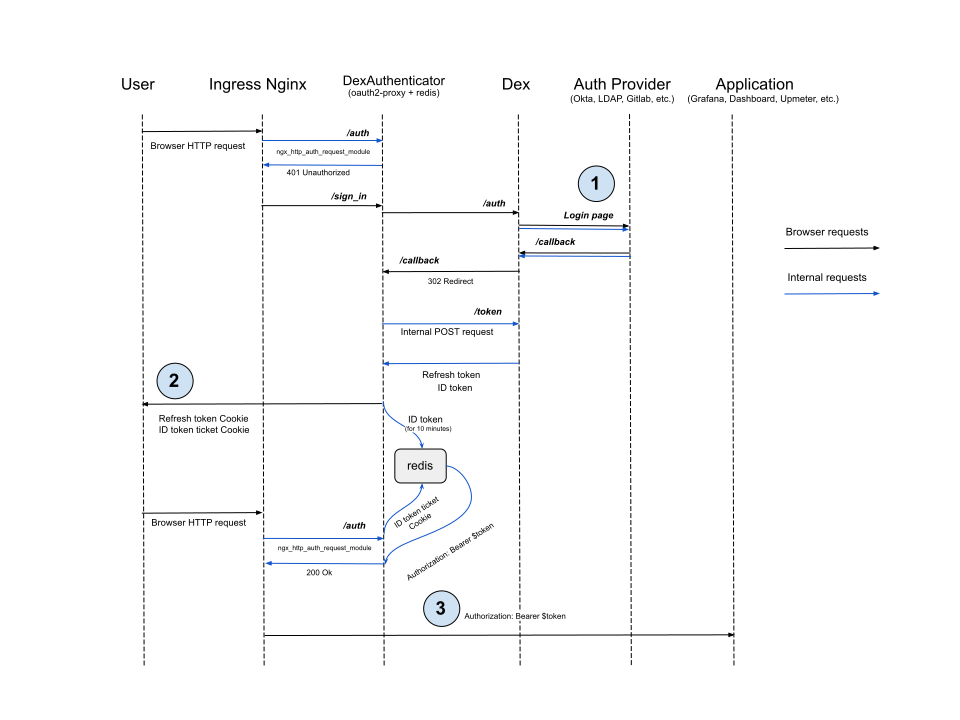
DexAuthenticator only works with HTTPS. It does not support Ingress resources configured for HTTP only.
Authentication cookies are set with the Secure attribute, which means they are only sent over encrypted HTTPS connections.
Make sure your application Ingress has TLS configured before integrating with DexAuthenticator.
-
Dex redirects the user to the provider’s login page in most cases and waits for the user to be redirected back to the
/callbackURL. However, some providers like LDAP or Atlassian Crowd do not support this flow. The user must enter credentials in the Dex login form instead, and Dex will validate them by making a request to the provider’s API. -
DexAuthenticator sets the cookie with the full refresh token (instead of issuing a ticket as for the ID token) because Redis does not persist data. If no ID token is found in Redis by the ticket, the user can request a new ID token by providing the refresh token from the cookie.
-
DexAuthenticator sets the
AuthorizationHTTP header to the ID token value from Redis. This is not required for services likeupmeter, asupmeterpermissions are less granular. For the Kubernetes Dashboard, it is critical: the Dashboard passes the ID token on to access the Kubernetes API.
How to generate a kubeconfig and access Kubernetes API?
kubeconfig for remote access to the cluster via kubectl can be generated in the kubeconfigurator web interface.
Configure the publishAPI parameter:
-
Open the
user-authnmodule settings (create the ModuleConfiguser-authnresource if there is none):d8 k edit mc user-authn -
Add the following section to the
settingsblock and save:publishAPI: enabled: true
The name kubeconfig is reserved for the kubeconfig generation web interface. The URL depends on the publicDomainTemplate parameter (for example, for the template that looks like %s.kube.my, the kubeconfig generation web interface will be available at kubeconfig.kube.my, and for %s-kube.company.my — at kubeconfig-kube.company.my).
Configuring kube-apiserver
Using the control-plane-manager module, DKP automatically configures kube-apiserver with the following flags so that the dashboard and kubeconfig-generator modules can work in the cluster.
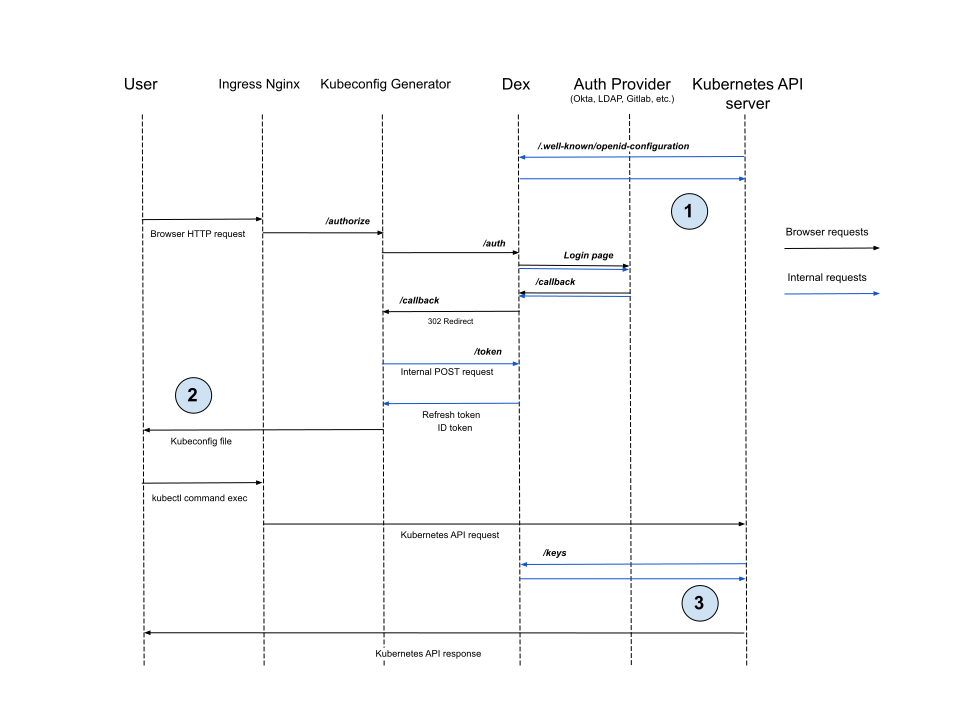
The flow of accessing Kubernetes API with generated kubeconfig
-
Before
kube-apiserverstarts, it must request the OIDC provider’s configuration endpoint (Dex in our case) to get the issuer and JWKS endpoint settings. -
Kubeconfig generator stores the ID token and refresh token in the
kubeconfigfile. -
After receiving a request with an ID token,
kube-apiserververifies that the token is signed by the provider configured in step 1 using keys from the JWKS endpoint. It then compares the token’sissandaudclaim values with the configuration.
How to enable Kerberos (SPNEGO) SSO for LDAP?
If clients run in a corporate SSO environment (browser trusts the Dex host), Dex can accept Kerberos tickets via Authorization: Negotiate and log in without the password form.
Enabling Kerberos (SPNEGO) SSO for LDAP:
- In AD/KDC, create/provision an SPN
HTTP/<dex-fqdn>for a service account and generate akeytab. - In the cluster, create a Secret in the
d8-user-authnnamespace with thekrb5.keytabdata key. - In the LDAP DexProvider resource, enable
spec.ldap.kerberos:enabled: truekeytabSecretName: <secret name>- optional:
expectedRealm,usernameFromPrincipal,fallbackToPassword
Dex will mount the keytab automatically and start accepting SPNEGO. A server‑side krb5.conf is not required — tickets are validated using the keytab.
How to configure Basic Authentication for accessing Kubernetes API via LDAP?
- Enable the
publishAPIparameter in theuser-authnmodule configuration. - Create a DexProvider resource of type
LDAPand setenableBasicAuth: true. - Configure RBAC for groups obtained from LDAP.
- Provide users with a
kubeconfigconfigured for Basic Authentication (LDAP username and password).
Only one authentication provider in the cluster can have enableBasicAuth enabled.
A detailed example is described in the Usage section.
How is Dex protected against credential brute-forcing?
Each user is allowed no more than 20 login attempts. After the limit is exhausted, one additional attempt is added every 6 seconds.