
Available with limitations in: Open/CE, Core, BE, SE, SE+
Available without limitations in: Ultimate/EE
Included in extensions: Advanced Infrastructure Security
The module lifecycle stage: General Availability
The module has 9 alerts.
The module is enabled by default in the following bundles: Default, Managed.
The module is disabled by default in the Minimal bundle.
How to explicitly enable the module...
You may explicitly enable or disable the module in one of the following ways:
-
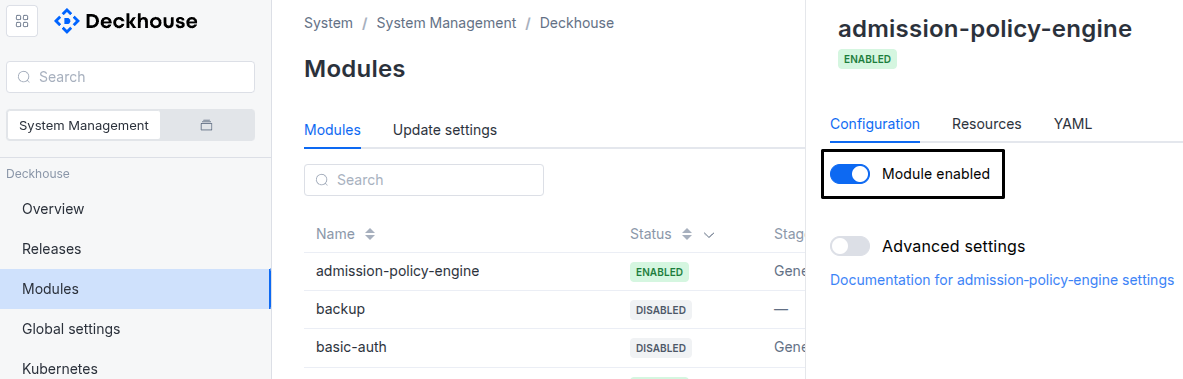
Via Deckhouse web UI. In the “System” → “System Management” → “Deckhouse” → “Modules” section, open the
admission-policy-enginemodule and enable (or disable) the “Module enabled” toggle. Save changes.Example:
-
Via Deckhouse CLI (d8).
Use the d8 system module enable command for enabling, or d8 system module disable command for disabling the module (you need Deckhouse CLI (d8), configured to work with the cluster).
Example of enabling the module:
d8 system module enable admission-policy-engine -
Using ModuleConfig
admission-policy-engine.Set
spec.enabledtotrueorfalsein ModuleConfigadmission-policy-engine(create it if necessary);Example of a manifest to enable module
admission-policy-engine:apiVersion: deckhouse.io/v1alpha1 kind: ModuleConfig metadata: name: admission-policy-engine spec: enabled: true
How to configure the module...
You can configure the module in one of the following ways:
-
Via Deckhouse web UI.
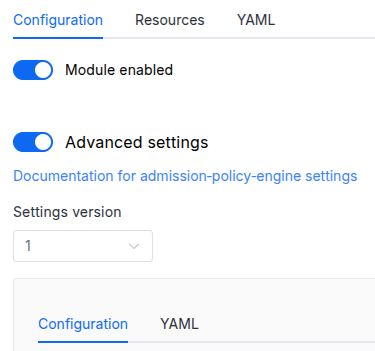
In the “System” → “System Management” → “Deckhouse” → “Modules” section, open the
admission-policy-enginemodule and enable the “Advanced Settings” switch. Fill in the required fields in the “Configuration” tab or specify the module settings in YAML format on the “YAML” tab, excluding the settings section. Save the changes.Example:
You can also edit the ModuleConfig object
admission-policy-engineon the “YAML” tab in the module settings window (“System” → “System Management” → “Deckhouse” → “Modules”, open the moduleadmission-policy-engine) by specifying the schema version in thespec.versionparameter and the necessary module parameters in thespec.settingssection. -
Via Deckhouse CLI (d8) (requires Deckhouse CLI (d8) configured to work with the cluster).
Edit the existing ModuleConfig
admission-policy-engine(for more details on configuring Deckhouse, see the documentation) by executing the following command:d8 k edit mc admission-policy-engineMake the necessary changes in the
spec.settingssection. If necessary, specify the schema version in thespec.versionparameter. Save the changes.You can also create a file with manifest for ModuleConfig
admission-policy-engineusing the example below. Fill in thespec.settingssection with the required module parameters. If necessary, specify the schema version in thespec.versionparameter.Apply the manifest using the following command (indicate the manifest file name):
d8 k apply -f <FILENAME>Example of a manifest for ModuleConfig
admission-policy-engine:apiVersion: deckhouse.io/v1alpha1 kind: ModuleConfig metadata: name: admission-policy-engine spec: version: 1 enabled: true settings: # Module parameters from the "Parameters" section below.
Parameters
Schema version: 1
- objectsettings
- objectsettings.denyVulnerableImages
Available in editions: Ultimate/EE
Trivy provider settings.
The Trivy provider prevents creation of the Pod, Deployment, StatefulSet, and DaemonSet resources with images containing vulnerabilities in namespaces labeled with
security.deckhouse.io/trivy-provider: "".Images of every container are checked, including init containers and ephemeral containers. As a result, attaching an ephemeral container with
kubectl debugis denied if its image contains vulnerabilities of a disallowed severity level.Deprecated. These settings have been moved to the
operator-trivymodule. Migrate your configuration.- array of stringssettings.denyVulnerableImages.allowedSeverityLevels
List of allowed vulnerability severity levels.
Images containing only vulnerabilities of the specified severity levels will not be blocked.
- stringElement of the array
Allowed values:
UNKNOWN,LOW,MEDIUM,HIGH,CRITICAL
- booleansettings.denyVulnerableImages.enabled
Enable the Trivy provider.
Default:
false - array of objectssettings.denyVulnerableImages.registrySecrets
List of additional Secrets for accessing private registries.
By default, the
deckhouse-registrySecret is used to download images for scanning.Default:
[]- stringsettings.denyVulnerableImages.registrySecrets.name
Required value
- stringsettings.denyVulnerableImages.registrySecrets.namespace
Required value
- stringsettings.denyVulnerableImages.storageClass
Name of the StorageClass used by the Trivy provider.
If the value is not specified, the StorageClass set in the global
settings.modules.storageClassparameter is used instead.The global
settings.modules.storageClassparameter is only applied when the module is enabled. Changing the global parameter while the module is enabled will not trigger disk re-provisioning.Warning. If you specify a value different from the current StorageClass used in the existing PersistentVolumeClaim, the disk will be re-provisioned, and all data will be deleted.
If you set it to
false,emptyDirwill be forcibly used instead of a PVC.Examples:
storageClass: ceph-ssdstorageClass: 'false'
- objectsettings.imageSignatureVerification
Available in editions: SE+, Ultimate/EE
Settings of the image signature verification configured by the
verifyImageSignaturespolicy of the SecurityPolicy resource.- integersettings.imageSignatureVerification.registryCredentialsCacheTTLSeconds
Time in seconds for which the credentials of a private registry stay cached after being read from the
dockerCfgfield of a SecurityPolicy.After you change
dockerCfg, the signature verification keeps using the previous credentials until the cache entry expires. A lower value applies the new credentials sooner, at the cost of more frequent reads of the Secret from the Kubernetes API.Default:
300Allowed values:
30 <= X <= 43200Examples:
registryCredentialsCacheTTLSeconds: 300registryCredentialsCacheTTLSeconds: 3600
- objectsettings.podSecurityStandards
Pod Security Standards policy settings (PSS).
- booleansettings.podSecurityStandards.controllerValidation
Applies constraints to pod-creating controllers (Deployment, StatefulSet, DaemonSet, Job, CronJob, ReplicationController) in addition to Pods.
Set to
true(default) to validate both Pods and controllers, or tofalseto validate only Pods and leave controllers unchecked.How a violation in a controller is reported is set by controllerValidationEnforcement.
The parameter is the default for every constraint that reads a pod spec, including the ones generated from OperationPolicy and SecurityPolicy resources. A policy overrides it with its own
spec.controllerValidationsection.Default:
true - stringsettings.podSecurityStandards.controllerValidationEnforcement
Action on a pod-creating controller that violates a policy with
enforcementAction: Deny.Warn— the controller is accepted with a warning, and the Pods it creates are denied. The value is the default for a transition period, while workloads are brought in line with the controller-level checks.Policy— the controller is checked with the action of the policy, so a denying policy denies the controller as well. The value is to become the default after the transition period.
A policy with another action keeps it for controllers:
Warnwarns andDryrunonly records the violation.The parameter applies to the Pod Security Standards and is the default for OperationPolicy and SecurityPolicy resources. A policy overrides it with
spec.controllerValidation.mode. The parameter takes effect when controllerValidation istrue.Default:
WarnAllowed values:
Warn,Policy - array of stringssettings.podSecurityStandards.controllerValidationExcludedPolicies
Pod Security Standards rules that are checked on Pods only.
The rules are named as the SecurityPolicy parameters the standards are published with, in the
d8-pod-security-baselineandd8-pod-security-restrictedobjects. An excluded rule is checked on Pods only in both standards. The parameter takes effect when controllerValidation istrue.Some rules are checked by one constraint and are excluded together: listing any rule of a group checks the whole group on Pods only. The groups are
allowHostPIDwithallowHostIPC, andallowHostNetworkwithallowedHostPorts.Default:
[]Example:
controllerValidationExcludedPolicies: - allowPrivilegeEscalation - requiredDropCapabilities- stringElement of the array
Allowed values:
allowPrivileged,allowPrivilegeEscalation,allowHostPID,allowHostIPC,allowHostNetwork,allowedHostPorts,allowedAppArmor,allowedCapabilities,requiredDropCapabilities,allowedHostPaths,allowedProcMount,seLinux,allowedUnsafeSysctls,seccompProfiles,allowedVolumes,runAsUser
- stringsettings.podSecurityStandards.defaultPolicy
Sets the default Pod Security Standards policy for all non-system namespaces:
Privileged— an unrestricted policy. Privilege escalation is possible with this policy;Baseline— a policy with minimum restrictions that prevents privilege escalation;Restricted— a policy with maximum restrictions that conforms to current best practices for securely running applications in a cluster.
Default:
BaselineAllowed values:
Privileged,Baseline,Restricted - stringsettings.podSecurityStandards.enforcementAction
The enforcement action to control what to do with the result of the constraint.
Deny— Deny action.Dryrun— No action. It is used when debugging. Information about the event can be viewed in the web-interface Deckhouse Platform or withd8 k.Warn— Same asDryrun. In addition to the event information, it provides some info on why that constraint would have been denied if you had setDenyinstead ofWarn.
Applies to application namespaces. Namespaces named
d8-*andkube-*are governed by the module itself: a violation is reported there and, unless the module that owns the namespace has opted it into enforcement, the workload still starts.Default:
DenyAllowed values:
Warn,Deny,Dryrun - objectsettings.podSecurityStandards.policies
Sets additional policy parameters.
- objectsettings.podSecurityStandards.policies.hostPorts
HostPort constraint settings.
- array of objectssettings.podSecurityStandards.policies.hostPorts.knownRanges
Set the range of known ports which will be allowed in a hostPort binding.
- integersettings.podSecurityStandards.policies.hostPorts.knownRanges.max
- integersettings.podSecurityStandards.policies.hostPorts.knownRanges.min