The module lifecycle stage: Experimental
The module has requirements for installation
The module is configured through ModuleConfig. The contract holds one platform-level setting: whether the
module integrates with the ai-models catalog. Everything an order needs — its class, its model and its
runtime — is declared in InferenceServiceClass and InferenceService, not in ModuleConfig.
Minimal configuration
apiVersion: deckhouse.io/v1alpha1
kind: ModuleConfig
metadata:
  name: ai-inference
spec:
  enabled: true
  version: 1
With no settings block the module keeps catalog integration on, which is the default.
Catalog integration
catalog.mode decides whether the module resolves a model through the ai-models catalog.
Keep the default when ai-models is installed: the module looks a model up in the catalog and gains
inter-module access to it, so an order may name a catalog model instead of a direct source.
Turn integration off when ai-models is not installed, or when every order in the cluster names its model
source directly. The module then creates no catalog client and asks for no inter-module permissions; orders
that name a direct model source keep working, and an order that names a catalog model is refused with a reason
in its status.
apiVersion: deckhouse.io/v1alpha1
kind: ModuleConfig
metadata:
  name: ai-inference
spec:
  enabled: true
  version: 1
  settings:
    catalog:
      mode: None
Switching the mode restarts the module controller: the catalog client is created or dropped at startup. Orders already running are not redeployed, and an order that has to be re-resolved reports the new mode in its status conditions.
Where the rest of the configuration lives
- exposure policy, the allow-list of API contracts and the accelerator policy — in
InferenceServiceClass; - the model, the class reference and the runtime parameters of one order — in
InferenceService; - node placement, priority class and resource requests of the module components — inherited from the platform, not exposed as module settings.
See Custom Resources for the fields of both resources.
How to explicitly enable the module…
You may explicitly enable or disable the module in one of the following ways:
-
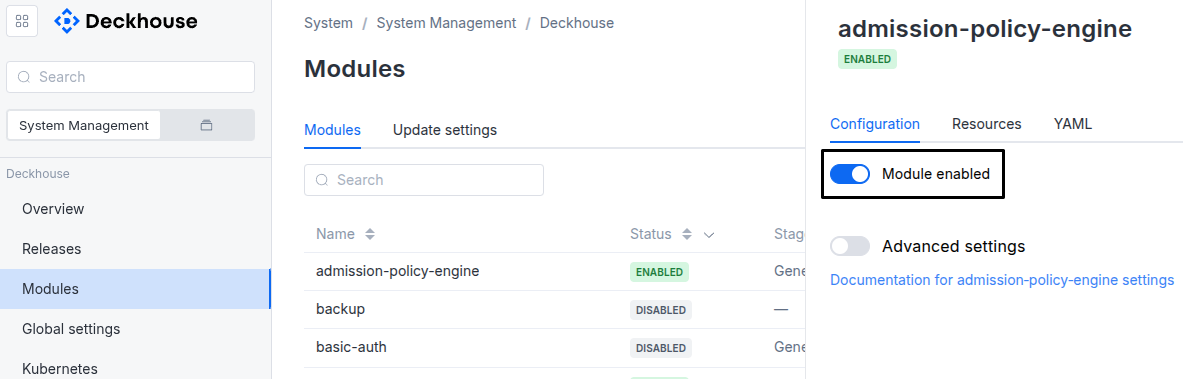
Via Deckhouse web UI. In the “System” → “System Management” → “Deckhouse” → “Modules” section, open the
ai-inferencemodule and enable (or disable) the “Module enabled” toggle. Save changes.Example:
-
Via Deckhouse CLI (d8).
Use the d8 system module enable command for enabling, or d8 system module disable command for disabling the module (you need Deckhouse CLI (d8), configured to work with the cluster).
Example of enabling the module:
d8 system module enable ai-inference -
Using ModuleConfig
ai-inference.Set
spec.enabledtotrueorfalsein ModuleConfigai-inference(create it if necessary);Example of a manifest to enable module
ai-inference:apiVersion: deckhouse.io/v1alpha1 kind: ModuleConfig metadata: name: ai-inference spec: enabled: true
You can configure the module in one of the following ways:
-
Via Deckhouse web UI.
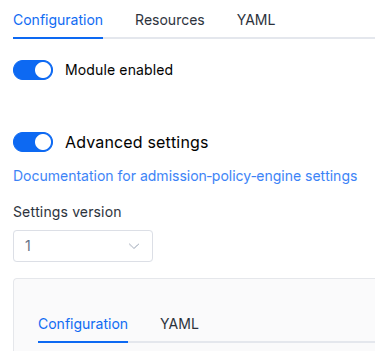
In the “System” → “System Management” → “Deckhouse” → “Modules” section, open the
ai-inferencemodule and enable the “Advanced Settings” switch. Fill in the required fields in the “Configuration” tab or specify the module settings in YAML format on the “YAML” tab, excluding the settings section. Save the changes.Example:
You can also edit the ModuleConfig object
ai-inferenceon the “YAML” tab in the module settings window (“System” → “System Management” → “Deckhouse” → “Modules”, open the moduleai-inference) by specifying the schema version in thespec.versionparameter and the necessary module parameters in thespec.settingssection. -
Via Deckhouse CLI (d8) (requires Deckhouse CLI (d8) configured to work with the cluster).
Edit the existing ModuleConfig
ai-inference(for more details on configuring Deckhouse, see the documentation) by executing the following command:d8 k edit mc ai-inferenceMake the necessary changes in the
spec.settingssection. If necessary, specify the schema version in thespec.versionparameter. Save the changes.You can also create a file with manifest for ModuleConfig
ai-inferenceusing the example below. Fill in thespec.settingssection with the required module parameters. If necessary, specify the schema version in thespec.versionparameter.Apply the manifest using the following command (indicate the manifest file name):
d8 k apply -f <FILENAME>Example of a manifest for ModuleConfig
ai-inference:apiVersion: deckhouse.io/v1alpha1 kind: ModuleConfig metadata: name: ai-inference spec: version: 1 enabled: true settings: # Module parameters from the "Parameters" section below.
Requirements
To the Kubernetes version: 1.34 and above.
To the Deckhouse version: 1.75.0 and above.
Parameters
Schema version: 1
-
-
objectsettings.catalogControls integration with the ai-models catalog module. Disable it when orders use direct model sources and ai-models is not installed.
Default:
{ "mode": "Enabled" }-
stringsettings.catalog.mode
Required value
Catalog integration mode.Enabledkeeps catalog lookup and inter-module access.Nonedisables catalog clients and permissions; direct HuggingFace orders remain available.Default:
EnabledAllowed values:
Enabled,None
-
-