Available in editions: Ultimate/EE
Included in extensions: On-prem IaaS
The module lifecycle stage: General Availability
The module is automatically enabled for all cloud clusters deployed in VMware Cloud Director.
List of required VMware Cloud Director services
The following VMware Cloud Director service must be available for Deckhouse Platform to operate:
| Service | API version |
|---|---|
| VMware Cloud Director API | 37.2 and later |
For VMware Cloud Director API versions earlier than 37.2, compatibility mode for legacy API versions is used.
How to explicitly enable the module...
You may explicitly enable or disable the module in one of the following ways:
-
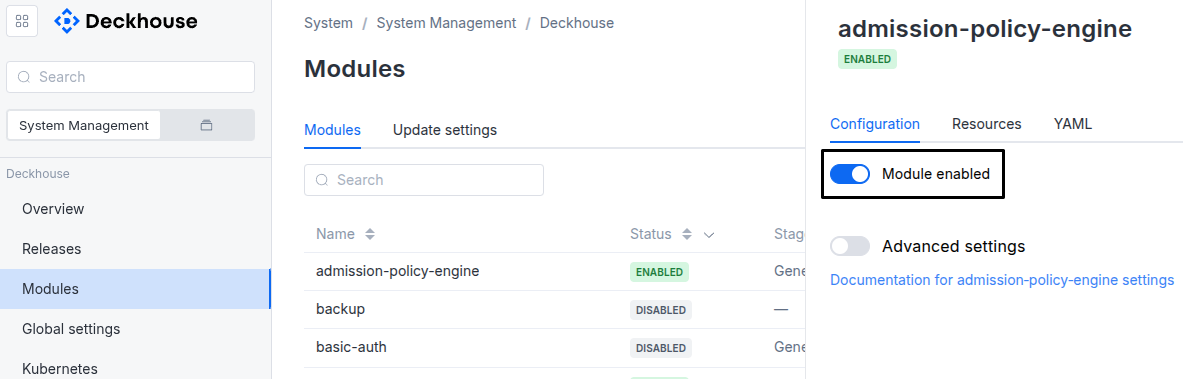
Via Deckhouse web UI. In the “System” → “System Management” → “Deckhouse” → “Modules” section, open the
cloud-provider-vcdmodule and enable (or disable) the “Module enabled” toggle. Save changes.Example:
-
Via Deckhouse CLI (d8).
Use the d8 system module enable command for enabling, or d8 system module disable command for disabling the module (you need Deckhouse CLI (d8), configured to work with the cluster).
Example of enabling the module:
d8 system module enable cloud-provider-vcd -
Using ModuleConfig
cloud-provider-vcd.Set
spec.enabledtotrueorfalsein ModuleConfigcloud-provider-vcd(create it if necessary);Example of a manifest to enable module
cloud-provider-vcd:apiVersion: deckhouse.io/v1alpha1 kind: ModuleConfig metadata: name: cloud-provider-vcd spec: enabled: true
How to configure the module...
You can configure the module in one of the following ways:
-
Via Deckhouse web UI.
In the “System” → “System Management” → “Deckhouse” → “Modules” section, open the
cloud-provider-vcdmodule and enable the “Advanced Settings” switch. Fill in the required fields in the “Configuration” tab or specify the module settings in YAML format on the “YAML” tab, excluding the settings section. Save the changes.Example:
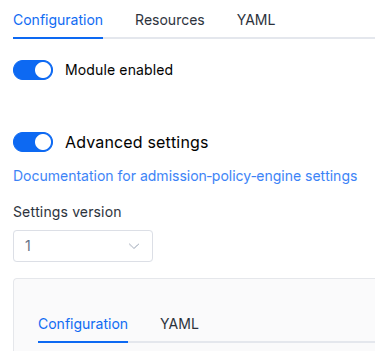
You can also edit the ModuleConfig object
cloud-provider-vcdon the “YAML” tab in the module settings window (“System” → “System Management” → “Deckhouse” → “Modules”, open the modulecloud-provider-vcd) by specifying the schema version in thespec.versionparameter and the necessary module parameters in thespec.settingssection. -
Via Deckhouse CLI (d8) (requires Deckhouse CLI (d8) configured to work with the cluster).
Edit the existing ModuleConfig
cloud-provider-vcd(for more details on configuring Deckhouse, see the documentation) by executing the following command:d8 k edit mc cloud-provider-vcdMake the necessary changes in the
spec.settingssection. If necessary, specify the schema version in thespec.versionparameter. Save the changes.You can also create a file with manifest for ModuleConfig
cloud-provider-vcdusing the example below. Fill in thespec.settingssection with the required module parameters. If necessary, specify the schema version in thespec.versionparameter.Apply the manifest using the following command (indicate the manifest file name):
d8 k apply -f <FILENAME>Example of a manifest for ModuleConfig
cloud-provider-vcd:apiVersion: deckhouse.io/v1alpha1 kind: ModuleConfig metadata: name: cloud-provider-vcd spec: version: 1 enabled: true settings: # Module parameters from the "Parameters" section below.
Parameters
Schema version: 1
- objectsettings
- stringsettings.mainNetwork
Path to the network to which the primary network interfaces of virtual machines will be connected..
Example:
mainNetwork: internal - objectsettings.metadata
Custom metadata entries that will be stored in cluster objects, such as virtual machines, disks, and networks.
Changing metadata will cause CloudEphemeral nodes to be recreated.
- stringsettings.organization
Name of the Organization in VCD.
- objectsettings.provider
Parameters for connecting to the VCD API.
- stringsettings.provider.apiToken
Token for authentication in VCD.
When using the
apiTokenparameter, theusernameandpasswordparameters must be empty. - booleansettings.provider.insecure
Set to
trueif VCD has a self-signed certificate.Default:
false - stringsettings.provider.password
VCD user password.
- stringsettings.provider.server
VCD server host or IP address.
- stringsettings.provider.username
VCD user name with full permissions for the project.
- stringsettings.sshPublicKey
Public SSH key for accessing the nodes.
- objectsettings.storageClass
The module automatically creates StorageClasses that are available in VCD (VMware Cloud Director).
- stringsettings.storageClass.defaultDeprecated
The name of StorageClass that will be used in the cluster by default.
If the parameter is omitted, the default StorageClass is either:
- an arbitrary StorageClass present in the cluster that has the default annotation;
- StorageClass for
default StorageProfile; - the first (in lexicographic order) StorageClass created by the module.
Parameter is deprecated. Instead, use the global parameter global.defaultClusterStorageClass.
Example:
default: ceph-ssd - array of stringssettings.storageClass.exclude
A list of StorageClass names (or regex expressions for names) to exclude from the creation in the cluster.
Example:
exclude:
- ".*-hdd"
- iscsi-fast
- stringsettings.virtualApplicationName
Name of the Virtual Application in VCD that belongs to the specified Virtual Data Center.
Pattern:
^[a-z0-9]([-a-z0-9]*[a-z0-9])?$ - stringsettings.virtualDataCenter
Name of the Virtual Data Center in VCD that belongs to the specified Organization.