
Available in editions: Open/CE, BE, SE, SE+, Ultimate/EE, Core
The module lifecycle stage: General Availability
The module does not have any mandatory parameters.
The module has 9 alerts.
The module is enabled by default in the following bundles: Default, Managed.
The module is disabled by default in the Minimal bundle.
How to explicitly enable the module...
You may explicitly enable or disable the module in one of the following ways:
-
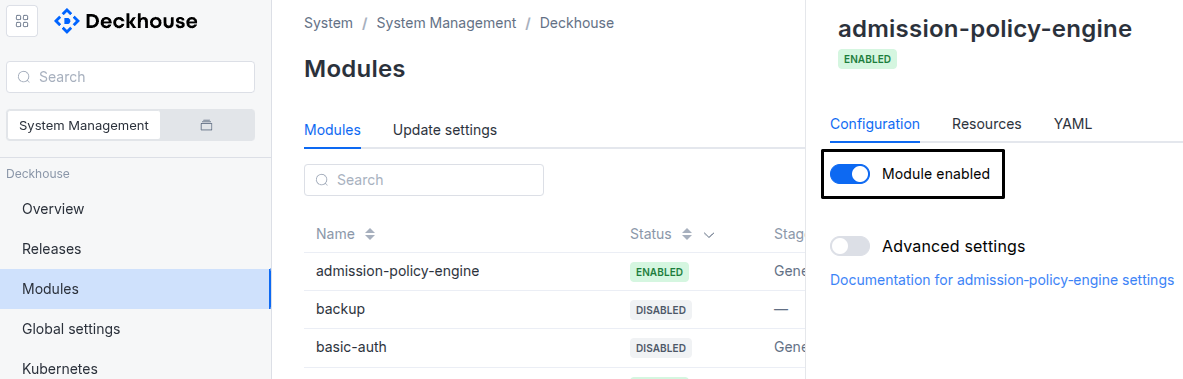
Via Deckhouse web UI. In the “System” → “System Management” → “Deckhouse” → “Modules” section, open the
documentationmodule and enable (or disable) the “Module enabled” toggle. Save changes.Example:
-
Via Deckhouse CLI (d8).
Use the d8 system module enable command for enabling, or d8 system module disable command for disabling the module (you need Deckhouse CLI (d8), configured to work with the cluster).
Example of enabling the module:
d8 system module enable documentation -
Using ModuleConfig
documentation.Set
spec.enabledtotrueorfalsein ModuleConfigdocumentation(create it if necessary);Example of a manifest to enable module
documentation:apiVersion: deckhouse.io/v1alpha1 kind: ModuleConfig metadata: name: documentation spec: enabled: true
How to configure the module...
You can configure the module in one of the following ways:
-
Via Deckhouse web UI.
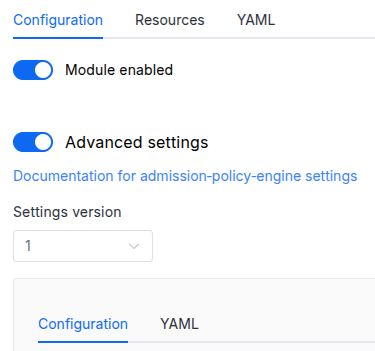
In the “System” → “System Management” → “Deckhouse” → “Modules” section, open the
documentationmodule and enable the “Advanced Settings” switch. Fill in the required fields in the “Configuration” tab or specify the module settings in YAML format on the “YAML” tab, excluding the settings section. Save the changes.Example:
You can also edit the ModuleConfig object
documentationon the “YAML” tab in the module settings window (“System” → “System Management” → “Deckhouse” → “Modules”, open the moduledocumentation) by specifying the schema version in thespec.versionparameter and the necessary module parameters in thespec.settingssection. -
Via Deckhouse CLI (d8) (requires Deckhouse CLI (d8) configured to work with the cluster).
Edit the existing ModuleConfig
documentation(for more details on configuring Deckhouse, see the documentation) by executing the following command:d8 k edit mc documentationMake the necessary changes in the
spec.settingssection. If necessary, specify the schema version in thespec.versionparameter. Save the changes.You can also create a file with manifest for ModuleConfig
documentationusing the example below. Fill in thespec.settingssection with the required module parameters. If necessary, specify the schema version in thespec.versionparameter.Apply the manifest using the following command (indicate the manifest file name):
d8 k apply -f <FILENAME>Example of a manifest for ModuleConfig
documentation:apiVersion: deckhouse.io/v1alpha1 kind: ModuleConfig metadata: name: documentation spec: version: 1 enabled: true settings: # Module parameters from the "Parameters" section below.
Parameters
Schema version: 1
- objectsettings
- objectsettings.auth
Parameters to authenticate and authorize access to the documentation web interface.
- array of stringssettings.auth.allowedUserEmails
Array of emails of users that can access module’s public web interfaces.
This parameter is used if the
user-authnmodule is enabled or theexternalAuthenticationparameter is set. - array of stringssettings.auth.allowedUserGroups
Array of groups whose users can browse the documentation.
This parameter is used if the
user-authnmodule is enabled or theexternalAuthenticationparameter is set.Caution! If the module works together with the
user-authnmodule, add the allowed groups to the DexProvider configuration.Default:
[]Examples:
allowedUserGroups: - admin - usersallowedUserGroups: [] - objectsettings.auth.externalAuthentication
Parameters to enable external authentication based on the Ingress NGINX external-auth mechanism that uses the Nginx auth_request module.
External authentication is enabled automatically if the user-authn module is enabled.
- stringsettings.auth.externalAuthentication.authSignInURL
URL to redirect the user for authentication (if the authentication service returned a non-200 HTTP response).
Default:
Example:
authSignInURL: https://$host/dex-authenticator/sign_in - stringsettings.auth.externalAuthentication.authURL
URL of the authentication service.
If the user is authenticated, the service should return an HTTP 200 response code.
Default:
Example:
authURL: https://documentation-dex-authenticator.d8-system.svc.cluster.local/dex-authenticator/auth
- booleansettings.highAvailability
Manually enable the high availability mode.
By default, Deckhouse Platform automatically decides whether to enable the HA mode. Learn more about the high availability mode for modules.
In the HA mode the documentation runs in two replicas on different nodes; the “High availability mode” section of the usage page of the module tells what it needs and why S3 helps.
Examples:
highAvailability: truehighAvailability: false - objectsettings.https
What certificate type to use.
This parameter completely overrides the
global.modules.httpssettings.Examples:
https: mode: Disabledhttps: mode: OnlyInURIhttps: mode: CustomCertificate customCertificate: secretName: foobarhttps: mode: CertManager certManager: clusterIssuerName: letsencrypt- objectsettings.https.certManager
Parameters for certmanager.
- stringsettings.https.certManager.clusterIssuerName
What ClusterIssuer to use for getting an SSL certificate (currently,
letsencrypt,letsencrypt-staging,selfsignedare available; also, you can define your own).Default:
letsencryptExample:
clusterIssuerName: letsencrypt
- objectsettings.https.customCertificate
Parameters for custom certificate usage.
- stringsettings.https.customCertificate.secretName
Name of the Secret in the
d8-systemnamespace to use with the documentation web UI.This secret must have the kubernetes.io/tls format.
- stringsettings.https.mode
HTTPS usage mode:
CertManager— the web UI is accessed over HTTPS using a certificate obtained from a clusterIssuer specified in thecertManager.clusterIssuerNameparameter.CustomCertificate— the web UI is accessed over HTTPS using a certificate from thed8-systemnamespace.Disabled— in this mode, the documentation web UI can only be accessed over HTTP.OnlyInURI— HTTP access with an external HTTPS balancer. The balancer terminates HTTPS, and all links inuser-authnare generated with the HTTPS scheme. The balancer must provide redirection from HTTP to HTTPS.
Default:
CertManagerAllowed values:
Disabled,CertManager,CustomCertificate,OnlyInURI
- stringsettings.ingressClass
Class of the Ingress controller of the documentation web UI.
An optional parameter; by default, the
modules.ingressClassglobal value is used.Pattern:
^[a-z0-9]([-a-z0-9]*[a-z0-9])?(\.[a-z0-9]([-a-z0-9]*[a-z0-9])?)*$ - objectsettings.moduleStorage
Storage of the documentation of module versions, prepared when a version is opened for the first time.
- objectsettings.moduleStorage.s3
Where the prepared documentation of module versions is kept besides the cache of the documentation pod.
- objectsettings.moduleStorage.s3.external
S3 storage of your own for
type: External. The connection and the keys are taken from a Secret; the keys it holds are listed in the “S3 storage of your own” section of the usage page of the module.- stringsettings.moduleStorage.s3.external.prefix
Part of the bucket the module uses: every object it reads, writes or deletes has a key starting with this prefix. Other objects of the bucket stay untouched, so the bucket may be shared.
Default:
documentation/Pattern:
^([A-Za-z0-9][A-Za-z0-9._-]*/)+$Examples:
prefix: documentation/prefix: clusters/main/documentation/ - objectsettings.moduleStorage.s3.external.secretRef
Required value
Secret with the connection and the keys of the S3 storage, in any namespace.
Deckhouse Platform copies it into the
documentation-s3-connectionSecret ind8-system. The documentation pod uses that Secret. After the Secret is created or changed, the documentation pod restarts within 5 minutes. Until the Secret appears, the versions are kept in the pod only.- stringsettings.moduleStorage.s3.external.secretRef.name
Required value
Name of the Secret.
Pattern:
^[a-z0-9]([-a-z0-9]*[a-z0-9])?(\.[a-z0-9]([-a-z0-9]*[a-z0-9])?)*$Maximum length:
253Example:
name: documentation-s3 - stringsettings.moduleStorage.s3.external.secretRef.namespace
Required value
Namespace of the Secret.
Pattern:
^[a-z0-9]([-a-z0-9]*[a-z0-9])?$Maximum length:
63Examples:
namespace: d8-systemnamespace: documentation-storage
- stringsettings.moduleStorage.s3.external.size
How much of the bucket the module may take under the prefix. Above 80% of it the module deletes stored versions until 60% is left, in this order:
- Copies replaced after an update of the documentation template.
- Versions opened by readers.
- Versions used by the search.
Within each group the versions stored longest ago go first.
Default:
5GiPattern:
^[1-9][0-9]*(Mi|Gi|Ti)$Examples:
size: 5Gisize: 20Gi
- stringsettings.moduleStorage.s3.type
Disabled— only in the pod: after a restart of the pod the versions are prepared again when opened. In the high availability mode each replica prepares and keeps the versions on its own, with twice the CPU and the requests to the registry; turn S3 on for that mode.System— also in the system S3 storage of the system-s3 module: after a restart of the pod the versions open from it in a fraction of a second. The module creates a 5 GiB bucket for it. Requires thesystem-s3module to be enabled: without it the versions are kept in the pod only, and theD8DocumentationSystemS3Disabledalert fires.External— also in an S3 storage of your own, set in theexternalsection.
Default:
DisabledAllowed values:
Disabled,System,External
- objectsettings.nodeSelector
Same as in the pods’
spec.nodeSelectorparameter in Kubernetes.If the parameter is omitted or
false, it will be determined automatically.Example:
nodeSelector: disktype: ssd - array of objectssettings.tolerations
Same as in the pods’
spec.tolerationsparameter in Kubernetes;If the parameter is omitted or
false, it will be determined automatically.Example:
tolerations: - key: key1 operator: Equal value: value1 effect: NoSchedule- stringsettings.tolerations.effect
- stringsettings.tolerations.key
- stringsettings.tolerations.operator
- integersettings.tolerations.tolerationSeconds
- stringsettings.tolerations.value