Available in: Open/CE, Core, BE, SE, SE+, Ultimate/EE
The module lifecycle stage: Generally available version
The module has requirements for installation
How to explicitly enable or disable the module…
You may explicitly enable or disable the module in one of the following ways:
-
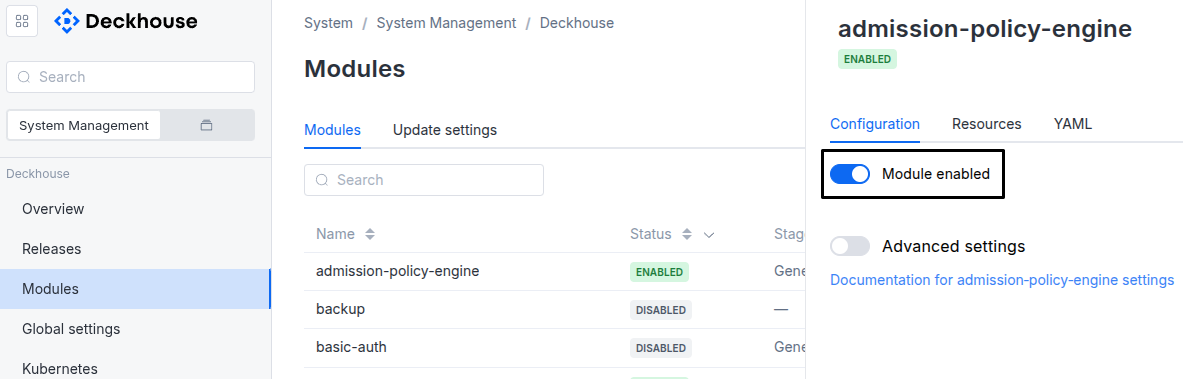
Via Deckhouse web UI. In the “System” → “System Management” → “Deckhouse” → “Modules” section, open the
extended-monitoringmodule and enable (or disable) the “Module enabled” toggle. Save changes.Example:
-
Via Deckhouse CLI (d8).
Use the d8 system module enable command for enabling, or d8 system module disable command for disabling the module (you need Deckhouse CLI (d8), configured to work with the cluster).
Example of enabling the module:
d8 system module enable extended-monitoring -
Using ModuleConfig
extended-monitoring.Set
spec.enabledtotrueorfalsein ModuleConfigextended-monitoring(create it if necessary).Example of a manifest to enable module
extended-monitoring:apiVersion: deckhouse.io/v1alpha1 kind: ModuleConfig metadata: name: extended-monitoring spec: enabled: true
You can configure the module in one of the following ways:
-
Via Deckhouse web UI.
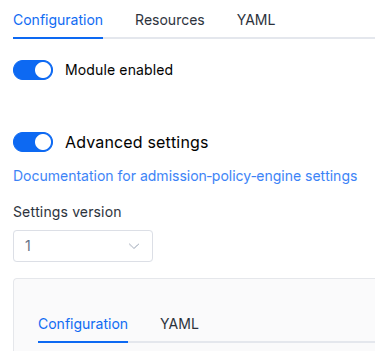
In the “System” → “System Management” → “Deckhouse” → “Modules” section, open the
extended-monitoringmodule and enable the “Advanced Settings” toggle. Fill in the required fields in the “Configuration” tab or specify the module settings in YAML format on the “YAML” tab, without the top-levelsettingskey. Save the changes.Example:
You can also edit the ModuleConfig object
extended-monitoringon the “YAML” tab in the module settings window (“System” → “System Management” → “Deckhouse” → “Modules”, open the moduleextended-monitoring) by specifying the schema version in thespec.versionparameter and the necessary module parameters in thespec.settingssection. -
Via Deckhouse CLI (d8) (requires Deckhouse CLI (d8) configured to work with the cluster).
Edit the existing ModuleConfig
extended-monitoring(for more details on configuring Deckhouse Platform, see the documentation) by executing the following command:d8 k edit mc extended-monitoringMake the necessary changes in the
spec.settingssection. If necessary, specify the schema version in thespec.versionparameter. Save the changes.You can also create a manifest file for ModuleConfig
extended-monitoringusing the example below. Fill in thespec.settingssection with the required module parameters. If necessary, specify the schema version in thespec.versionparameter.Apply the manifest using the following command (indicate the manifest file name):
d8 k apply -f <FILENAME>Example of a manifest for ModuleConfig
extended-monitoring:apiVersion: deckhouse.io/v1alpha1 kind: ModuleConfig metadata: name: extended-monitoring spec: version: 2 enabled: true settings: # Module parameters from the "Parameters" section below.
Requirements
To the Deckhouse Platform version: 1.76 and above.
To the versions of other modules:
-
prometheus: any version.
Conversions
The module is configured using the ModuleConfig resource, the schema of which contains a version number. When you apply an old version of the ModuleConfig schema in a cluster, automatic transformations are performed. To manually update the ModuleConfig schema version, the following steps must be completed sequentially for each version:
-
Updates from version 1 to 2:
If the
.imageAvailability.skipRegistryCertVerificationfield is set totrue, add.imageAvailability.registry.tlsConfig.insecureSkipVerify=true. Then, delete theskipRegistryCertVerificationfield from the object. If the.imageAvailabilityobject becomes empty after this change, delete it.
Parameters
Schema version: 2
-
-
objectsettings.certificatesSettings for monitoring the certificates in the Kubernetes cluster.
Default:
{}-
booleansettings.certificates.exporterEnabledEnables x509-certificate-exporter.
Default:
false
-
-
objectsettings.eventsSettings for monitoring the events in the Kubernetes cluster.
Default:
{}-
booleansettings.events.exporterEnabledEnables eventsExporter.
Default:
false -
stringsettings.events.severityLevelSetting for the logging level.
Default:
OnlyWarningsAllowed values:
All,OnlyWarnings
-
-
objectsettings.imageAvailabilitySettings for monitoring the availability of images in the cluster.
Default:
{}-
stringsettings.imageAvailability.awsRegionAWS region for ECR authentication.
Example:
awsRegion: eu-central-1 -
stringsettings.imageAvailability.defaultRegistryDefault registry to use when an image name is not fully qualified.
Default:
index.docker.io -
booleansettings.imageAvailability.exporterEnabledEnables imageAvailabilityExporter.
Default:
true -
array of stringssettings.imageAvailability.forceCheckDisabledControllers
A list of controller kinds for which image is forcibly checked, even when workloads are disabled or suspended.
Specify
Allto check all controller kinds.Example:
forceCheckDisabledControllers: - Deployment - StatefulSet-
stringsettings.imageAvailability.forceCheckDisabledControllers.Element of the array
Allowed values:
Deployment,StatefulSet,DaemonSet,CronJob,All
-
-
array of stringssettings.imageAvailability.ignoredImagesA list of images to ignore when checking the presence in the registry, e.g.,
alpine:3.12orquay.io/test/test:v1.1.Example:
ignoredImages: - alpine:3.10 - alpine:3.2 -
stringsettings.imageAvailability.imageCheckInterval
Interval for checking container registries for image availability.
Supports Go-style duration format (e.g.
10s,10m,10h).Default:
60s -
array of objectssettings.imageAvailability.mirrorsList of mirrors for container registries.
Example:
mirrors: - mirror: mirror.gcr.io original: docker.io - mirror: mirror.internal-registry.com original: internal-registry.com-
stringsettings.imageAvailability.mirrors.mirrorHostname of the mirror container registry used instead of
original, for examplemirror.gcr.io. -
stringsettings.imageAvailability.mirrors.originalHostname of the source container registry to replace with a mirror, for example
docker.io.
-
-
objectsettings.imageAvailability.registryConnection settings for container registry.
Default:
{}-
stringsettings.imageAvailability.registry.schemeContainer registry access scheme.
Default:
HTTPSAllowed values:
HTTP,HTTPS -
objectsettings.imageAvailability.registry.tlsConfigTLS settings for connecting to the container registry.
Default:
{}-
stringsettings.imageAvailability.registry.tlsConfig.caRoot CA certificate to validate the container registry’s HTTPS certificate (if self-signed certificates are used).
-
booleansettings.imageAvailability.registry.tlsConfig.insecureSkipVerifyWhether to skip the verification of the container registry certificate.
Default:
false
-
-
-
-
objectsettings.nodeSelector
The same as in the pods’
spec.nodeSelectorparameter in Kubernetes.If the parameter is omitted or
false, it will be determined by advanced scheduling. -
array of objectssettings.tolerations
The same as in the pods’
spec.tolerationsparameter in Kubernetes.If the parameter is omitted or
false, it will be determined by advanced scheduling.-
stringsettings.tolerations.effect
Taint effect to match. An empty value matches all effects.
Might be:
NoSchedule: Do not schedule new pods onto the node unless they tolerate the taint.PreferNoSchedule: Prefer not to schedule new pods onto the node, but do not forbid it.NoExecute: Evict pods that do not tolerate the taint; pods that tolerate it may stay.
-
stringsettings.tolerations.key
Taint key that the toleration applies to. An empty value matches all taint keys.
If
keyis empty,operatormust beExists. -
stringsettings.tolerations.operator
How
keyrelates tovalue. Defaults toEqual.Might be:
Equal: Match bothkeyandvalue.Exists: Match bykeyonly;valuemust be empty.
-
integersettings.tolerations.tolerationSeconds
How long (in seconds) the pod can stay on a node after a matching
NoExecutetaint is added.Used only with
effect: NoExecute. If omitted, the taint is tolerated forever. Zero or negative values mean immediate eviction. -
stringsettings.tolerations.value
Taint value to match.
Must be empty when
operatorisExists.
-
-