Available with limitations in: Open/CE, Core, BE, SE, SE+, Certified Core/CSE Lite (1.73)
Available without limitations in: Ultimate/EE
Included with limitations in extensions: Advanced Networking, Advanced Infrastructure Security, Cluster Union, Multitenancy, Network Security
The module lifecycle stage: General Availability
The module has requirements for installation
Web interfaces associated with the module: istio
Compatibility table for supported versions
The table below shows Istio versions and their support status in Deckhouse Platform (DP).
| Istio version | Kubernetes versions supported by Istio | Status in DP |
|---|---|---|
| 1.27 | 1.29, 1.30, 1.31, 1.32, 1.33, 1.34, 1.35, 1.36 | Supported |
| 1.25 | 1.29, 1.30, 1.31, 1.32, 1.33, 1.34, 1.35, 1.36 | Supported |
| 1.21 | 1.26, 1.27, 1.28, 1.29, 1.30, 1.31, 1.32, 1.33, 1.34, 1.35, 1.36 | Deprecated and will be deleted |
Problems Istio helps to solve
Istio is a framework for managing network traffic on a centralized basis that implements the Service Mesh approach.
Istio solves the tasks for applications:
- Using Mutual TLS.
- Access authorization between services.
- Request routing.
- Managing request balancing between service Endpoints.
- Improving Observability.
- Organizing a multi-datacenter cluster by joining clusters into a single Service Mesh (multicluster).
- Grouping isolated clusters into a federation with the ability to provide native (in the Service Mesh sense) access to selected services.
- Joining the mesh without per-pod sidecars using ambient mode.
Mutual TLS
Mutual TLS is the main method of mutual service authentication. It is based on the fact that all outgoing requests are verified using the server certificate, and all incoming requests are verified using the client certificate. After the verification is complete, the sidecar-proxy can identify the remote node and use these data for authorization or auxiliary purposes.
Each service gets its own identifier of the following format: <TrustDomain>/ns/<Namespace>/sa/<ServiceAccount> where TrustDomain is the cluster domain in our case. You can assign your own ServiceAccount to each service or use the regular “default” one. The service ID can be used for authorization and other purposes. This is the identifier used as a name to validate against in TLS certificates.
You can redefine this settings at the Namespace level.
Authorization
The AuthorizationPolicy resource is responsible for managing authorization. Once this resource is created for the service, the following algorithm is used for determining the fate of the request:
- The request is denied if it falls under the DENY policy.
- The request is allowed if there are no ALLOW policies for the service.
- The request is allowed if it falls under the ALLOW policy.
- In all other cases, the request is denied.
In other words, if you explicitly deny something, then only this restrictive rule will work. On the other hand, if you explicitly allow something, only explicitly authorized requests would be allowed (however, restrictions will have precedence).
You can use the following arguments for defining authorization rules:
- Service IDs and wildcard expressions based on them (
mycluster.local/ns/myns/sa/myappormycluster.local/*) - Namespace
- IP ranges
- HTTP headers
- JWT tokens
Request routing
VirtualService is the main resource for routing control; it allows you to override the destination of an HTTP or TCP request. Routing decisions can be based on the following parameters:
- Host or other headers
- URI
- Method (GET, POST, etc.)
- Pod labels or the namespace of the request source
- dst-IP or dst-port for non-HTTP requests
Managing request balancing between service Endpoints
DestinationRule is the main resource for managing request balancing; it allows you to configure the details of requests leaving the Pods:
- Limits/timeouts for TCP
- Balancing algorithms between Endpoints
- Rules for detecting problems on the Endpoint side to take it out of balancing
- Encryption details
All customizable limits apply to each client Pod individually (on a per Pod basis)! Suppose you limited a service to one TCP connection. In this case, if you have three client Pods, the service will get three incoming connections.
Observability
Tracing
Istio makes it possible to collect application traces and inject trace headers if there are none. In doing so, however, you have to keep in mind the following:
- If a request initiates secondary requests for a service, they must inherit the trace headers by means of the application.
- You will need to install Jaeger to collect and display traces.
Grafana
The standard module bundle includes the following additional dashboards:
- Dashboard for evaluating the throughput and success of requests/responses between applications.
- Dashboard for evaluating control plane performance and load.
Kiali
Kiali is a tool for visualizing your application’s service tree. It allows you to quickly assess the situation in the network connectivity by visualizing the requests and their quantitative characteristics directly on the scheme.
Mesh metrics and access logs (Telemetry API)
Metrics for Grafana workloads graphs and quantitative in Kiali on Prometheus scraping metrics istio_* series from istio-proxy. Starting with Istio 1.21+, Istio exposes those using Telemetry API mesh defaults instead of legacy telemetry.v2 filters alone.
DP configures telemetryAPI.enabled: when false you keep the legacy stack; when true you switch to meshConfig.defaultProviders, bundled Telemetry resources, and the dataPlane.accessLog template wired into access logs. Step-by-step examples, readiness checks, optional extra Telemetry policies, and tracing (spec.tracing) are in Telemetry API for mesh metrics, tracing, and access logs.
Architecture of the cluster with Istio enabled
The cluster components are divided into two categories:
- Control plane — managing and maintaining services; “control-plane” usually refers to istiod pods;
- Data plane — mediating and controlling all network communication between microservices, it is composed of a set of sidecar-proxy containers.
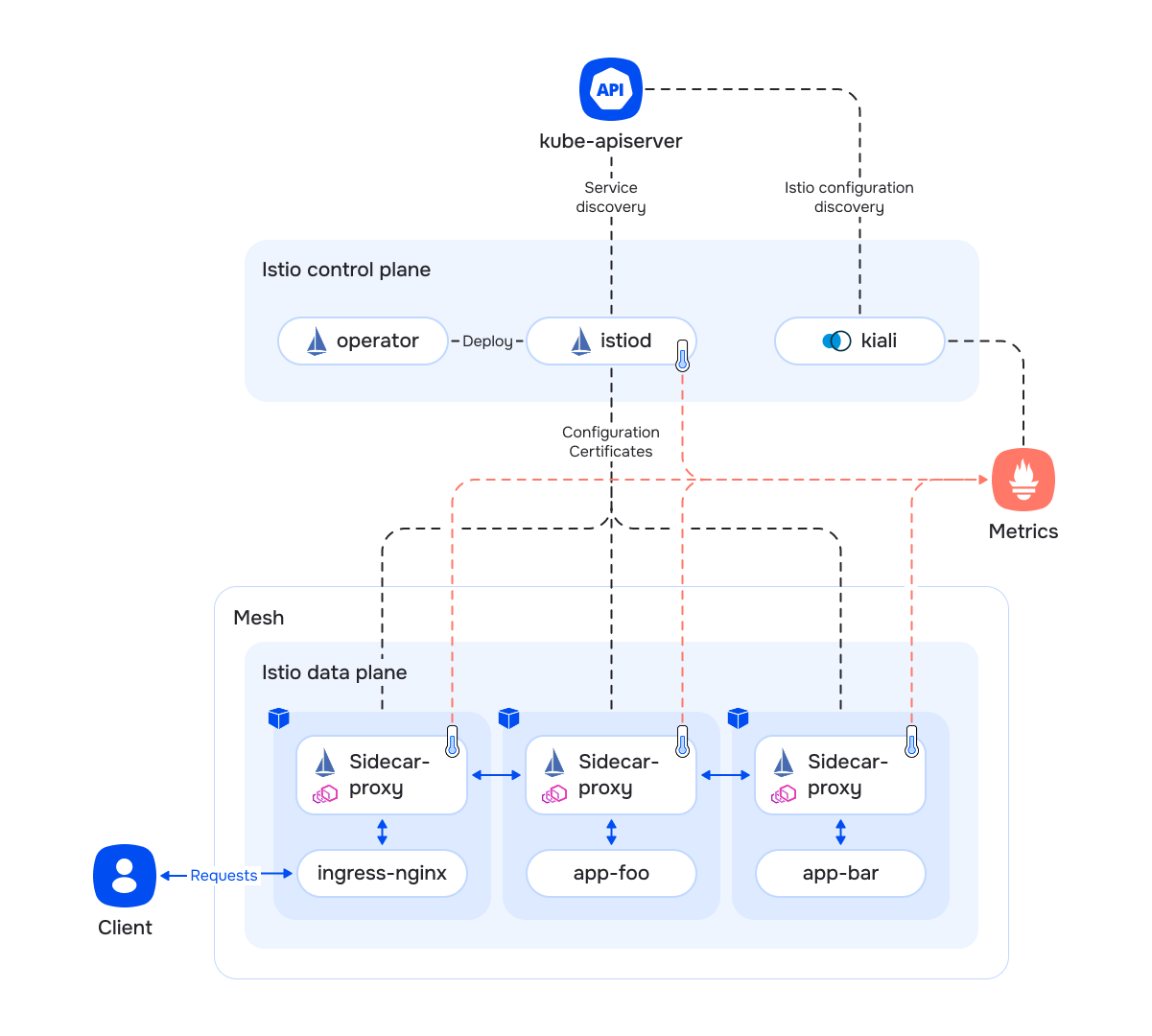
All data plane services are grouped into a mesh with the following features:
- It has a common namespace for generating service ID in the form
<TrustDomain>/ns/<Namespace>/sa/<ServiceAccount>. Each mesh has a TrustDomain ID (in our case, it is the same as the cluster domain), e.g.mycluster.local/ns/myns/sa/myapp. - Services within a single mesh can authenticate each other using trusted root certificates.
Control plane components:
istiod— the main service with the following tasks:- Continuous connection to the Kubernetes API and collecting information about services.
- Processing and validating all Istio-related Custom Resources using the Kubernetes validating-webhook mechanism.
- Configuring each sidecar proxy individually:
- Generating authorization, routing, balancing rules, etc..
- Distributing information about other application services in the cluster.
- Issuing individual client certificates for implementing Mutual TLS. These certificates are unrelated to the certificates that Kubernetes uses for its own service needs.
- Automatic tuning of manifests that describe application pods via the Kubernetes mutating-webhook mechanism:
- Injecting an additional sidecar-proxy service container.
- Injecting an additional init container for configuring the network subsystem (configuring DNAT to intercept application traffic).
- Routing readiness and liveness probes through the sidecar-proxy.
operator— installs all the resources required to operate a specific version of the control plane.kiali— dashboard for monitoring and controlling Istio resources as well as user services managed by Istio that allows you:- Visualize inter-service connections.
- Diagnose problem inter-service connections.
- Diagnose the control plane state.
The Ingress controller must be refined to receive user traffic:
- You need to add sidecar-proxy to the controller pods. It only handles traffic from the controller to the application services (the
enableIstioSidecarparameter of theIngressNginxControllerresource). - Services not managed by Istio continue to function as before, requests to them are not intercepted by the controller sidecar.
- Requests to services running under Istio are intercepted by the sidecar and processed according to Istio rules (read more about activating Istio to work with the application).
The istiod controller and sidecar-proxy containers export their own metrics that the cluster-wide Prometheus collects.
Application service architecture with Istio enabled
Details
- Each service pod gets a sidecar container — sidecar-proxy. From the technical standpoint, this container contains two applications:
- Envoy proxies service traffic. It is responsible for implementing all the Istio functionality, including routing, authentication, authorization, etc.
- pilot-agent is a part of Istio. It keeps the Envoy configurations up to date and has a built-in caching DNS server.
- Each pod has a DNAT configured for incoming and outgoing service requests to the sidecar-proxy. The additional init container is used for that. Thus, the traffic is routed transparently for applications.
- Since incoming service traffic is redirected to the sidecar-proxy, this also applies to the readiness/liveness traffic. The Kubernetes subsystem that does this doesn’t know how to probe containers under Mutual TLS. Thus, all the existing probes are automatically reconfigured to use a dedicated sidecar-proxy port that routes traffic to the application unchanged.
- You have to configure the Ingress controller to receive requests from outside the cluster:
- The controller’s pods have additional sidecar-proxy containers.
- Unlike application Pods, the Ingress controller’s sidecar-proxy intercepts only outgoing traffic from the controller to the services. The incoming traffic from the users is handled directly by the controller itself;
- Ingress resources require refinement in the form of adding annotations:
nginx.ingress.kubernetes.io/service-upstream: "true"— the Ingress controller will use the service’s ClusterIP as upstream instead of the Pod addresses. In this case, traffic balancing between the Pods is handled by the sidecar-proxy. Use this option only if your service has a ClusterIP.nginx.ingress.kubernetes.io/upstream-vhost: "myservice.myns.svc"— the Ingress controller’s sidecar-proxy makes routing decisions based on the Host header. If this annotation is omitted, the controller will leave a header with the site address (e.g.Host: example.com).
- Resources of the Service type do not require any adaptation and continue to function properly. Just like before, applications have access to service addresses like
servicename,servicename.myns.svc, etc; - DNS requests from within the pods are transparently redirected to the sidecar-proxy for processing:
- This way, domain names of the services in the neighboring clusters can be disassociated from their addresses.
User request lifecycle
Application with Istio turned off
Application with Istio turned on
Activating Istio to work with the application
The main purpose of the activation is to add a sidecar container to the application pods so that Istio can manage the traffic.
The sidecar-injector is a recommended way to add sidecars. Istio can inject sidecar containers into user pods using the Admission Webhook mechanism. You can configure it using labels and annotations:
- A label attached to a namespace allows the sidecar-injector to identify a group of pods to inject sidecar containers into:
istio-injection=enabled— use the global version of Istio (spec.settings.globalVersioninModuleConfig);istio.io/rev=v1x21— use the specific Istio version for a given namespace;istio.io/rev=default— use the global version of Istio (spec.settings.globalVersioninModuleConfig).
- The
sidecar.istio.io/inject("true"or"false") pod annotation lets you redefine thesidecarInjectorPolicypolicy locally. These annotations work only in namespaces to which the above labels are attached.
It is also possible to add the sidecar to an individual pod in namespace without the istio-injection=enabled or istio.io/rev=vXxYZ labels by setting the sidecar.istio.io/inject=true Pod label.
Istio-proxy, running as a sidecar container, consumes resources and adds the following overhead:
- Any incoming DNAT request is forcibly intercepted by the Envoy proxy. Envoy analyzes the request and forwards it by establishing a new connection. On the receiver side, the process is identical: traffic first reaches the “receiving” Envoy and only then is passed to the application itself.
- Each Envoy instance stores information about all services in the cluster; therefore, scaling the cluster leads to a linear increase in Envoy’s RAM consumption due to storing the full service map. Using the Sidecar CustomResource, the configuration is filtered, and only the necessary minimum of data is delivered to Envoy.
The EnvoyFilter interface can be controlled by Lua plugins, but it is an internal control mechanism for implementing the Istio functionality. It must not be used in a user configuration, as doing so would compromise the integrity of the system.
It is also important to get the Ingress controller and the application’s Ingress resources ready:
- Enable
enableIstioSidecarof theIngressNginxControllerresource. - Add annotations to the application’s Ingress resources:
nginx.ingress.kubernetes.io/service-upstream: "true"— the Ingress controller will use the service’s ClusterIP as upstream instead of the Pod addresses. In this case, traffic balancing between the Pods is now handled by the sidecar-proxy. Use this option only if your service has a ClusterIP.nginx.ingress.kubernetes.io/upstream-vhost: "myservice.myns.svc"— the Ingress controller’s sidecar-proxy makes routing decisions based on the Host header. If this annotation is omitted, the controller will leave a header with the site address (e.g.Host: example.com).
Federation and multicluster
Available in Enterprise Edition and DP Ultimate only.
DP supports two schemes of inter-cluster interaction:
Below are their fundamental differences:
- The federation aggregates multiple sovereign (independent) clusters:
- Each cluster has its own namespace (for Namespace, Service, etc.);
- Access to individual services between clusters is clearly defined.
- The multicluster aggregates co-dependent clusters:
- Cluster namespaces are shared — each service is available to neighboring clusters as if it were running in a local cluster (unless authorization rules prohibit that).
Federation
Requirements for clusters
- Each cluster must have a unique domain in the
clusterDomainparameter of the ClusterConfiguration resource. None of the clusters should use the defaultcluster.local. - Pod and Service subnets in the
podSubnetCIDRandserviceSubnetCIDRparameters of the ClusterConfiguration resource may overlap.
Istio uses traffic analysis as follows:
- HTTP and HTTPS traffic — identification and routing or blocking decisions are based on headers.
- TCP traffic — decisions are based only on the destination IP address and port number.
cluster.local is an unmodified alias for the local cluster domain. Using cluster.local as a principal in AuthorizationPolicy always refers to the local cluster, even if another cluster in the mesh has clusterDomain explicitly set to cluster.local (Istio trust domain migration best practices).
Istio operates in the multi-network mode: pods from different clusters can only communicate through the Istio ingress gateway. Direct communication between pods of different clusters is not supported.
Only sidecar-mode workloads can take part in a federation. For details, refer to Ambient mesh limitations.
General principles of federation
- Federation requires mutual trust between clusters. Thereby, to use federation, you have to make sure that both clusters (say, A and B) trust each other. This is achieved by a mutual exchange of root certificates.
- You also need to share information about public services to use the federation. You can do that using the
ServiceEntryresource. AServiceEntrydefines the publicingressgatewayaddress of the B cluster so that services of the A cluster can communicate with the bar service in the B cluster.
Enabling the federation
Enabling federation (via the istio.federation.enabled = true module parameter) results in the following activities:
- The
ingressgatewayservice is added to the cluster. Its task is to proxy mTLS traffic coming from outside of the cluster to application services. - A service gets added to the cluster that exports the following cluster metadata to the outside:
- Istio root certificate (accessible without authentication).
- List of public services in the cluster (available only for authenticated requests from neighboring clusters).
- List of public addresses of the
ingressgatewayservice (available only for authenticated requests from neighboring clusters).
Managing the federation
To establish a federation, you must:
- Create a set of
IstioFederationresources in each cluster that describe all the other clusters.- After successful auto-negotiation between clusters, the status of
IstioFederationresource will be filled with neighbour’s public and private metadata (status.metadataCache.publicandstatus.metadataCache.private).
- After successful auto-negotiation between clusters, the status of
- Add the
federation.istio.deckhouse.io/public-service: ""label to each Service that is considered public within the federation.- In the other federation clusters, corresponding
ServiceEntryand DestinationRule resources will be created for each such Service, leading to theingressgatewayof the original cluster. - The label value must be empty. You do not need to label other resources, such as Deployment, Pod, or VirtualService, to publish a service in the federation.
- In the other federation clusters, corresponding
Federation publishing does not support ExternalName services, services without .spec.ports, or services with ports missing the name field.
Each port name must start with a supported Istio prefix: http, http2, https, tcp, tls, grpc, or grpc-web. The module uses the port name to determine the protocol in the generated ServiceEntry. If the prefix is not recognized, the port will be handled as TCP.
Example of a public service:
apiVersion: v1
kind: Service
metadata:
  name: reviews
  namespace: bookinfo
  labels:
    federation.istio.deckhouse.io/public-service: ""
spec:
  selector:
    app: reviews
  ports:
  - name: http
    port: 9080
    targetPort: 9080
To troubleshoot service publishing in the federation, follow these checks:
Check which services are marked as public in the local cluster:
d8 k get svc -A -l federation.istio.deckhouse.io/public-service=
Check metadata exchange status with remote clusters:
d8 k get istiofederation
d8 k get istiofederation <name> -o jsonpath='{.status.conditions}'
Check that the remote cluster provided its public services list:
d8 k get istiofederation <name> -o jsonpath='{.status.metadataCache.private.publicServices}'
Check that local routing resources were created from the received metadata:
d8 k -n d8-istio get serviceentry,destinationrule
In the IstioFederation status.conditions, the PublicMetadataExchangeReady, PrivateMetadataExchangeReady, and DataplaneConnectionReady conditions should become True. If metadata exchange does not work, check the D8IstioFederationMetadataEndpointDoesntWork alert and the availability of the remote cluster spec.metadataEndpoint.
Multicluster
Requirements for clusters
- Cluster domains in the
clusterDomainparameter of the ClusterConfiguration resource must be the same for all multicluster members. The default value iscluster.local. - Pod and Service subnets in the
podSubnetCIDRandserviceSubnetCIDRparameters of the ClusterConfiguration resource must be unique for each multicluster member.
Istio uses traffic analysis as follows:
- HTTP and HTTPS traffic — identification and routing or blocking decisions are based on headers.
- TCP traffic — decisions are based only on the destination IP address and port number.
If service or pod IP addresses overlap between clusters, requests from pods in other clusters may unintentionally match Istio’s routing, allow, or deny rules. Overlapping service and pod subnets is not recommended (Istio network models).
Istio operates in the multi-network mode: pods from different clusters can only communicate through the Istio ingress gateway. Direct communication between pods of different clusters is not supported.
Only sidecar-mode workloads can take part in a multicluster. For details, refer to Ambient mesh limitations.
General principles
- Multicluster requires mutual trust between clusters. Thereby, to use multiclustering, you have to make sure that both clusters (say, A and B) trust each other. From a technical point of view, this is achieved by a mutual exchange of root certificates.
- Istio connects directly to the API server of the neighboring cluster to gather information about its services. This DP module takes care of the corresponding communication channel.
Enabling the multicluster
Enabling the multicluster (via the istio.multicluster.enabled = true module parameter) results in the following activities:
- A proxy is added to the cluster to publish access to the API server via the standard Ingress resource:
- Access through this public address is secured by authorization based on Bearer tokens signed with trusted keys. DP automatically exchanges trusted public keys during the mutual configuration of the multicluster.
- The proxy itself has read-only access to a limited set of resources.
- A service gets added to the cluster that exports the following cluster metadata to the outside:
- Istio root certificate (accessible without authentication).
- The public API server address (available only for authenticated requests from neighboring clusters).
- List of public addresses of the
ingressgatewayservice (available only for authenticated requests from neighboring clusters). - Server public keys to authenticate requests to API server and to private metadata.
Managing the multicluster
To create a multicluster, you need to create a set of IstioMulticluster resources in each cluster that describe all the other clusters.
In case of issues when working with a multi-cluster, it is necessary to check in each cluster:
- The status of the
IstioMultiClusterresources. To do this, run the commandd8 k describe istiomulticluster cluster-name. It is important that the resource status showsRoot CAand that thePublic Last Fetch Timestampfield has a recent timestamp. - The
Ingress Gatewaysfield of theIstioMultiClusterresource should contain the IP address of the second cluster’sIngressGateway. -
Using the
istioctlutility from the DP debug container, ensure that remote clusters have thesyncedstatus and a specifiedistiodinstance (for details, refer to Debugging Istio with istioctl from the debug container):istioctl remote-clusters -i d8-istioExample output:
NAME          SECRET                                     STATUS     ISTIOD
cluster-b     d8-istio/istio-remote-secret-cluster-b     synced     istiod-v1x21-5c57d85b54-k8pl7
Ambient mesh
Available in Enterprise Edition and Certified Security Edition Pro only. Ambient mesh support is experimental and not recommended for production use.
Besides the classic sidecar mode, Istio can run the data plane in ambient mode. In this mode, the mesh functionality is split into two layers, and application pods no longer get a per-pod istio-proxy sidecar container:
- A node-level component (
ztunnel) handles L4 functionality (mutual TLS, identity, basic authorization) for all mesh workloads on the node. - An optional per-namespace component (a waypoint proxy) handles L7 functionality (HTTP routing, L7 authorization, telemetry).
Compared to the sidecar mode, ambient mode reduces per-pod overhead (no sidecar container injected into every pod) and lets you adopt mesh features incrementally — first L4 via ztunnel, then L7 only for the namespaces that need it.
Components
The following components are used in the ambient mode:
ztunnel: A DaemonSet that runs one pod per node and transparently tunnels traffic of the ambient workloads on that node over HTTP-Based Overlay Network Encapsulation (HBONE) with mutual TLS. It provides L4 features without a sidecar.- Waypoint proxy: An optional L7 proxy deployed per namespace (or for a subset of its workloads and services). In DP, it is provisioned through the WaypointInstance custom resource, which is a DP abstraction on top of the native Istio waypoint provisioning. It adds declarative management of replicas (
Static/HPA), resources (Static/VPA), node placement, and disruption budgets (PDB) per waypoint instance.
Prerequisites
To use the ambient mode, make sure to follow these requirements:
- Use Istio 1.25 or newer (ambient mode is available starting with Istio 1.25).
- Set
dataPlane.trafficRedirectionSetupModetoCNIPlugin. Ambient mode requires the CNI plugin to set up traffic redirection. - Enable ambient mode via the
ambient.enabledmodule parameter.
Ambient mesh limitations
Ambient mode is compatible with federation and multicluster at the cluster level: you can enable ambient mode in a cluster that is a federation or multicluster member, and the existing inter-cluster interaction keeps working.
The limitation applies to individual workloads: federation and multicluster cover sidecar-mode workloads only. Cross-cluster traffic to and from a workload enrolled in ambient mode does not work in either direction.
To let a workload take part in a federation or a multicluster, keep it in sidecar mode — do not add the istio.io/dataplane-mode=ambient label to the workload or its namespace.
Both data plane modes can coexist in the same cluster, so you can keep cross-cluster workloads in sidecar mode and enroll the rest of them in ambient mode.
Enrolling workloads
The module installs and runs the ambient infrastructure (ztunnel and the waypoint controller for WaypointInstance resources), but it does not enroll your workloads automatically.
To enroll workloads, use the standard Istio labels:
- Add the
istio.io/dataplane-mode=ambientlabel to a namespace (or pod) to capture its traffic withztunnel(L4). - Create a WaypointInstance resource in the namespace, then point workloads or services at it with the
istio.io/use-waypointlabel to enable L7 features.
See the “Examples” section for step-by-step configuration.
Delete all WaypointInstance resources before disabling ambient mode. With ambient mode disabled, the waypoint controller is not running and cannot reconcile or clean up waypoint resources.
Authentication
By default, the user-authn module provides authentication for Kiali. External authentication can also be configured via externalAuthentication.
If both are disabled, the module uses basic auth with an auto-generated password.
To view the generated password:
d8 k -n d8-system exec svc/deckhouse-leader -c deckhouse -- deckhouse-controller module values istio -o json | jq '.istio.internal.auth.password'
To re-generate the password, delete the Secret:
d8 k -n d8-istio delete secret/kiali-basic-auth
The auth.password parameter is deprecated.
Estimating overhead
Using Istio will incur additional resource costs for both control-plane (istiod controller) and data-plane (istio-sidecars).
control-plane
The istiod controller continuously monitors the cluster configuration, compiles the settings for the istio-sidecars and distributes them over the network. Accordingly, the more applications and their instances, the more services, and the more frequently this configuration changes, the more computational resources are required and the greater the load on the network. Two approaches are supported to reduce the load on controller instances:
- horizontal scaling (module configuration
controlPlane.replicasManagement) — the more controller instances, the fewer instances of istio-sidecars to serve for each controller and the less CPU and network load. - data-plane segmentation using the Sidecar resource (recommended approach) — the smaller the scope of an individual istio-sidecar, the less data in the data-plane needs to be updated and the less CPU and network overhead.
A rough estimate of overhead for a control-plane instance that serves 1000 services and 2000 istio-sidecars is 1 vCPU and 1.5 GB RAM.
data-plane
The consumption of data-plane resources (istio-sidecar) is affected by many factors:
- number of connections,
- the intensity of requests,
- size of requests and responses,
- protocol (HTTP/TCP),
- number of CPU cores,
- complexity of Service Mesh configuration.
A rough estimate of the overhead for an istio-sidecar instance is 0.5 vCPU for 1000 requests/sec and 50 MB RAM. istio-sidecars also increase latency in network requests — about 2.5ms per request.
Third-party components
List of third-party software used in the istio module:
-
Istio 1.21.6
License: Apache License 2.0
An open platform to connect, manage, and secure microservices.
-
Istio 1.25.2
License: Apache License 2.0
An open platform to connect, manage, and secure microservices.
-
Istio 1.27.9
License: Apache License 2.0
An open platform to connect, manage, and secure microservices.
-
Kiali 1.81.0
License: Apache License 2.0
Visualisation tool for the istio service mesh topology, and features like circuit breakers or request rates.
-
Kiali 2.7.1
License: Apache License 2.0
Visualisation tool for the istio service mesh topology, and features like circuit breakers or request rates.
-
Kiali 2.12.0
License: Apache License 2.0
Visualisation tool for the istio service mesh topology, and features like circuit breakers or request rates.