Available with limitations in: Open/CE, Core, BE, SE, SE+, Certified Core/CSE Lite (1.73)
Available without limitations in: Ultimate/EE
Included with limitations in extensions: Advanced Networking, Advanced Infrastructure Security, Cluster Union, Multitenancy, Network Security
The module lifecycle stage: General Availability
The module has requirements for installation
The module has 20 alerts.
The module is not enabled by default in any bundles.
How to explicitly enable the module...
You may explicitly enable or disable the module in one of the following ways:
-
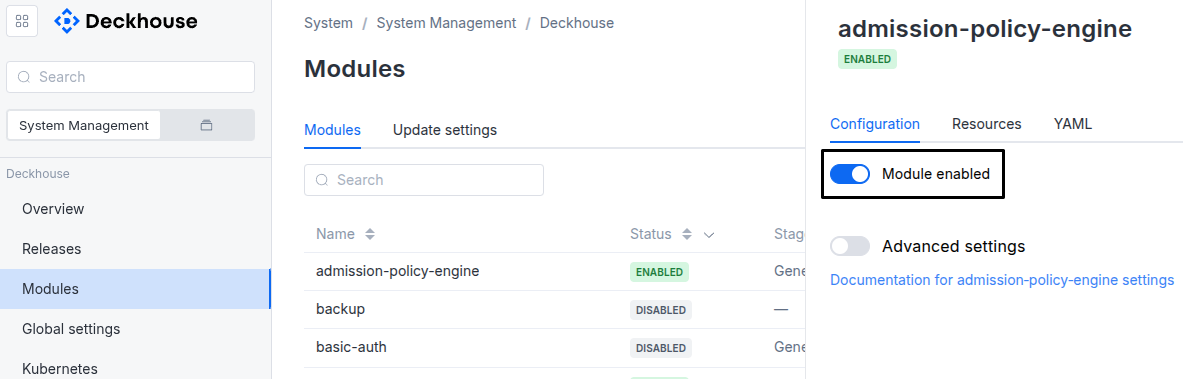
Via Deckhouse web UI. In the “System” → “System Management” → “Deckhouse” → “Modules” section, open the
istiomodule and enable (or disable) the “Module enabled” toggle. Save changes.Example:
-
Via Deckhouse CLI (d8).
Use the d8 system module enable command for enabling, or d8 system module disable command for disabling the module (you need Deckhouse CLI (d8), configured to work with the cluster).
Example of enabling the module:
d8 system module enable istio -
Using ModuleConfig
istio.Set
spec.enabledtotrueorfalsein ModuleConfigistio(create it if necessary);Example of a manifest to enable module
istio:apiVersion: deckhouse.io/v1alpha1 kind: ModuleConfig metadata: name: istio spec: enabled: true
How to configure the module...
You can configure the module in one of the following ways:
-
Via Deckhouse web UI.
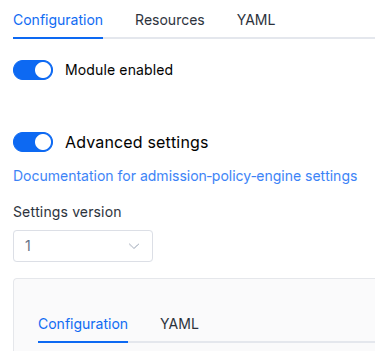
In the “System” → “System Management” → “Deckhouse” → “Modules” section, open the
istiomodule and enable the “Advanced Settings” switch. Fill in the required fields in the “Configuration” tab or specify the module settings in YAML format on the “YAML” tab, excluding the settings section. Save the changes.Example:
You can also edit the ModuleConfig object
istioon the “YAML” tab in the module settings window (“System” → “System Management” → “Deckhouse” → “Modules”, open the moduleistio) by specifying the schema version in thespec.versionparameter and the necessary module parameters in thespec.settingssection. -
Via Deckhouse CLI (d8) (requires Deckhouse CLI (d8) configured to work with the cluster).
Edit the existing ModuleConfig
istio(for more details on configuring Deckhouse, see the documentation) by executing the following command:d8 k edit mc istioMake the necessary changes in the
spec.settingssection. If necessary, specify the schema version in thespec.versionparameter. Save the changes.You can also create a file with manifest for ModuleConfig
istiousing the example below. Fill in thespec.settingssection with the required module parameters. If necessary, specify the schema version in thespec.versionparameter.Apply the manifest using the following command (indicate the manifest file name):
d8 k apply -f <FILENAME>Example of a manifest for ModuleConfig
istio:apiVersion: deckhouse.io/v1alpha1 kind: ModuleConfig metadata: name: istio spec: version: 3 enabled: true settings: # Module parameters from the "Parameters" section below.
Requirements
To the Deckhouse version: 1.68.0 and above.
Conversions
The module is configured using the ModuleConfig resource, the schema of which contains a version number. When you apply an old version of the ModuleConfig schema in a cluster, automatic transformations are performed. To manually update the ModuleConfig schema version, the following steps must be completed sequentially for each version :
- Updates from version 1 to 2:
Delete
.settings.auth.password. - Updates from version 2 to 3:
- Move
.settings.enableHTTP10to.settings.dataPlane.enableHTTP10. - Move
.settings.proxyConfigto.settings.dataPlane.proxyConfig.
- Move
Parameters
Schema version: 3
- objectsettings
- array of stringssettings.additionalVersions
Additional versions of Istio control plane to install. You can use specific namespace labels (
istio.io/rev=) to switch between installed revisions.Default:
[]- stringElement of the array
Pattern:
^[0-9]+\.[0-9]+$
- objectsettings.alliance
Available in editions: Ultimate/EE
Common options both for federation and multicluster.
- objectsettings.alliance.ingressGateway
Available in editions: Ultimate/EE
ingressgateway settings.
- array of objectssettings.alliance.ingressGateway.advertise
Available in editions: Ultimate/EE
The actual addresses that will be announced to remote clusters for organizing intercluster application requests. If not specified, the addresses will be discovered automatically.
Default:
[]Examples:
advertise: - address: 172.16.0.5 port: 15443advertise: - address: somehost.example.com port: 15443- stringsettings.alliance.ingressGateway.advertise.address
Required value
Pattern:
^([a-z0-9]([a-z0-9-]{0,61}[a-z0-9])?\.)+[a-z]{2,}$Pattern:
^[0-9]{1,3}\.[0-9]{1,3}\.[0-9]{1,3}\.[0-9]{1,3}$Examples:
address: somehost.example.comaddress: 172.16.0.5 - integersettings.alliance.ingressGateway.advertise.port
Required value
Allowed values:
1024 <= X <= 65535
- objectsettings.alliance.ingressGateway.gatewayPodAnnotations
Available in editions: Ultimate/EE
Additional annotations for ingressgateway DaemonSet pods.
Example:
gatewayPodAnnotations: checksum/config: xyz-123 - stringsettings.alliance.ingressGateway.inlet
Available in editions: Ultimate/EE
The method for exposing ingressgateway.
LoadBalancer— is a recommended method if you have a cloud-based cluster and it supports Load Balancing.NodePort— for installations that do not have the LB.
Default:
LoadBalancerAllowed values:
LoadBalancer,NodePortExample:
inlet: LoadBalancer - stringsettings.alliance.ingressGateway.loadBalancerClass
Available in editions: Ultimate/EE
Class of the load balancer for incoming network requests (passed to the
spec.loadBalancerClassparameter of the provisioned service with theLoadBalancertype).Applies only when
inletisLoadBalancer. - objectsettings.alliance.ingressGateway.nodePort
Available in editions: Ultimate/EE
Special settings for NodePort inlet.
Examples:
nodePort: {}nodePort: port: 30001- integersettings.alliance.ingressGateway.nodePort.port
Static port number for NodePort-type Service. Must be in range, set by kube-apiserver –service-node-port-range argument (default is 30000-32767).
Allowed values:
1024 <= X <= 65535
- objectsettings.alliance.ingressGateway.nodeSelector
Available in editions: Ultimate/EE
ingressgateway DaemonSet nodeSelector.
The same as the
spec.nodeSelectorpod parameter in Kubernetes.Example:
nodeSelector: type: ingress - objectsettings.alliance.ingressGateway.serviceAnnotations
Available in editions: Ultimate/EE
Additional service annotations. They can be used, e.g., for configuring a local LB in the Yandex Cloud (using the
yandex.cpi.flant.com/listener-subnet-idannotation).Example:
serviceAnnotations: yandex.cpi.flant.com/listener-subnet-id: xyz-123 - array of objectssettings.alliance.ingressGateway.tolerations
Available in editions: Ultimate/EE
ingressgateway DaemonSet tolerations.
The same as
spec.tolerationsfor the Kubernetes pod.Example:
tolerations: - operator: Exists- stringsettings.alliance.ingressGateway.tolerations.effect
- stringsettings.alliance.ingressGateway.tolerations.key
- stringsettings.alliance.ingressGateway.tolerations.operator
- integersettings.alliance.ingressGateway.tolerations.tolerationSeconds
- stringsettings.alliance.ingressGateway.tolerations.value
- objectsettings.ambient
Available in editions: Ultimate/EE
Ambient mesh related settings.
Default:
{"enabled":false}- booleansettings.ambient.enabled
Enable ambient mesh.
Ambient-mode workloads cannot take part in federation or multicluster. Both remain functional for sidecar-mode workloads. See ambient mesh limitations.
Default:
falseExample:
enabled: true - objectsettings.ambient.waypointController
Available in editions: Ultimate/EE
Settings for CPU and memory requests and limits by waypoint-controller pods.
- objectsettings.ambient.waypointController.resourcesManagement
Settings for CPU and memory requests and limits by waypoint-controller pods.
Examples:
resourcesManagement: mode: VPA vpa: mode: InPlaceOrRecreate cpu: min: 25m max: 1 limitRatio: 1.5 memory: min: 64Mi max: 1Gi limitRatio: 1.5resourcesManagement: mode: Static static: requests: cpu: 25m memory: 64Mi limits: cpu: '1' memory: 1Gi- stringsettings.ambient.waypointController.resourcesManagement.mode
Resource management mode for waypoint-controller pods.
Possible values:
Default:
VPAAllowed values:
VPA,Static - objectsettings.ambient.waypointController.resourcesManagement.static
Resource management options for the
Staticmode.- objectsettings.ambient.waypointController.resourcesManagement.static.limits
Configuring CPU and memory limits.
- stringsettings.ambient.waypointController.resourcesManagement.static.limits.cpu
Configuring CPU limits.
Pattern:
^[0-9]+m?$ - string or numbersettings.ambient.waypointController.resourcesManagement.static.limits.memory
Configuring memory limits.
Pattern:
^[0-9]+(\.[0-9]+)?(E|P|T|G|M|k|Ei|Pi|Ti|Gi|Mi|Ki)?$
- objectsettings.ambient.waypointController.resourcesManagement.static.requests
Resource requests settings for pods.
- stringsettings.ambient.waypointController.resourcesManagement.static.requests.cpu
Configuring CPU requests.
Pattern:
^[0-9]+m?$ - string or numbersettings.ambient.waypointController.resourcesManagement.static.requests.memory
Configuring memory requests.
Pattern:
^[0-9]+(\.[0-9]+)?(E|P|T|G|M|k|Ei|Pi|Ti|Gi|Mi|Ki)?$
- objectsettings.ambient.waypointController.resourcesManagement.vpa
Resource management options for the
VPAmode.- objectsettings.ambient.waypointController.resourcesManagement.vpa.cpu
CPU-related VPA settings.
- numbersettings.ambient.waypointController.resourcesManagement.vpa.cpu.limitRatio
The CPU limits/requests ratio.
This ratio is used for calculating the initial CPU limits for a pod.
If this parameter is set, the VPA will recalculate the CPU limits while maintaining the specified limits/requests ratio.
- string or numbersettings.ambient.waypointController.resourcesManagement.vpa.cpu.max
The maximum value that the VPA can set for the CPU requests.
Default:
1Pattern:
^[0-9]+m?$ - string or numbersettings.ambient.waypointController.resourcesManagement.vpa.cpu.min
The minimum value that the VPA can set for the CPU requests.
Default:
25mPattern:
^[0-9]+m?$
- objectsettings.ambient.waypointController.resourcesManagement.vpa.memory
Memory-related VPA settings.
- numbersettings.ambient.waypointController.resourcesManagement.vpa.memory.limitRatio
The memory limits/requests ratio.
This ratio is used for calculating the initial memory limits for a pod.
If this parameter is set, the VPA will recalculate the memory limits while maintaining the specified limits/requests ratio.
- string or numbersettings.ambient.waypointController.resourcesManagement.vpa.memory.max
The maximum memory requests the VPA can set.
Default:
1GiPattern:
^[0-9]+(\.[0-9]+)?(E|P|T|G|M|k|Ei|Pi|Ti|Gi|Mi|Ki)?$ - string or numbersettings.ambient.waypointController.resourcesManagement.vpa.memory.min
The minimum memory requests the VPA can set.
Default:
64MiPattern:
^[0-9]+(\.[0-9]+)?(E|P|T|G|M|k|Ei|Pi|Ti|Gi|Mi|Ki)?$
- stringsettings.ambient.waypointController.resourcesManagement.vpa.mode
VPA operating mode.
Possible values:
-
Initial: VPA sets initial values for pod resource requests and limits at pod creation time. Resource values are not changed automatically afterwards. -
InPlaceOrRecreate: VPA attempts to update pod resources in place when supported by the cluster. If in-place updates are not possible, the pod will be recreated.
Default:
InPlaceOrRecreateAllowed values:
Initial,InPlaceOrRecreate -
- objectsettings.auth
Options related to authentication or authorization in the application.
Example:
auth: externalAuthentication: authURL: https://dex.d8.svc.cluster.local/dex/auth authSignInURL: https://example.com/dex/sign_in allowedUserGroups: - admins- array of stringssettings.auth.allowedUserEmails
An array of emails of users that can access module’s public web interfaces.
This parameter is used if the
user-authnmodule is enabled or theexternalAuthenticationparameter is set. - array of stringssettings.auth.allowedUserGroups
An array of user groups that can access module’s public web interfaces.
This parameter is used if the
user-authnmodule is enabled or theexternalAuthenticationparameter is set.Caution! Note that you must add those groups to the appropriate field in the DexProvider config if this module is used together with the user-authn one.
- objectsettings.auth.externalAuthentication
Parameters to enable external authentication based on the Ingress NGINX external-auth mechanism that uses the Nginx auth_request module.
External authentication is enabled automatically if the user-authn module is enabled.
- stringsettings.auth.externalAuthentication.authSignInURL
The URL to redirect the user for authentication (if the authentication service returned a non-200 HTTP response code).
Example:
authSignInURL: https://example.com/dex/sign_in - stringsettings.auth.externalAuthentication.authURL
The URL of the authentication service.
If the user is authenticated, the service should return an HTTP 200 response code.
Example:
authURL: https://example.com/dex/auth
- booleansettings.auth.satisfyAny
Enables single authentication.
If used together with the whitelistSourceRanges parameter, it authorizes all the users from above networks (no need to enter a username and password).
Default:
falseExample:
satisfyAny: true - array of stringssettings.auth.whitelistSourceRanges
An array if CIDRs that are allowed to authenticate in module’s public web interfaces.
Example:
whitelistSourceRanges:
- 1.1.1.1/32
- objectsettings.ca
Explicitly specified root certificate. It signs individual service certificates to use in mutual TLS connections. To create a certificate, you can use the example, in which
basicConstraints = CA:FALSEneeds to be replaced withbasicConstraints = CA:TRUE.- stringsettings.ca.cert
The root or intermediate certificate in PEM format.
- stringsettings.ca.chain
A certificate chain in PEM format if
certis an intermediate certificate. - stringsettings.ca.key
The key to the root certificate in PEM format.
- stringsettings.ca.root
The root certificate in PEM format if
certis an intermediate certificate.
- objectsettings.controlPlane
istiod specific settings.
- objectsettings.controlPlane.extraEnvs
Additional environment variables for the istiod (pilot) container.
Keys reserved by the module cannot be overridden:
ISTIO_MULTIROOT_MESHENABLE_ENHANCED_RESOURCE_SCOPINGPILOT_HTTP10PILOT_ENABLE_AMBIENT
Example:
extraEnvs: GODEBUG: gctrace=1 - objectsettings.controlPlane.nodeSelector
Optional
nodeSelectorfor istiod. The same as thespec.nodeSelectorpod parameter in Kubernetes.If the parameter is omitted or
false, it will be determined automatically. - objectsettings.controlPlane.replicasManagement
Replication management settings and scaling of istiod.
Examples:
replicasManagement: mode: StandardreplicasManagement: mode: Static static: replicas: 3replicasManagement: mode: HPA hpa: minReplicas: 2 maxReplicas: 5 metrics: - type: CPU targetAverageUtilization: 80- objectsettings.controlPlane.replicasManagement.hpa
Options for replicas management for the
HPAmode.- numbersettings.controlPlane.replicasManagement.hpa.maxReplicas
Required value
The upper limit for the number of replicas to which the HPA can scale up. It cannot be less that
minReplicas.Allowed values:
1 <= X - array of objectssettings.controlPlane.replicasManagement.hpa.metrics
Required value
The HPA will use these metrics to decide whether to increase or decrease the number of replicates.
- numbersettings.controlPlane.replicasManagement.hpa.metrics.targetAverageUtilization
Required value
The target value of the average of the resource metric across all relevant pods, represented as a percentage of the requested value of the resource for the pods.
Allowed values:
1 <= X <= 100 - stringsettings.controlPlane.replicasManagement.hpa.metrics.type
Required value
Metric type.
Allowed values:
CPU
- numbersettings.controlPlane.replicasManagement.hpa.minReplicas
Required value
The lower limit for the number of replicas to which the HPA can scale down.
Allowed values:
1 <= X
- stringsettings.controlPlane.replicasManagement.mode
Replicas management mode:
Standard— replicas management and scaling mode according to the global fault tolerance mode (the highAvailability parameter);Static— the mode, where the number of replicas is specified explicitly (the static.replicas parameter);HPA— the mode, where the number of replicas is calculated automatically using HPA based on CPU usage. You can configure this mode by modifying parameters in the hpa parameter section.
Default:
StandardAllowed values:
Standard,Static,HPA - objectsettings.controlPlane.replicasManagement.static
Options for replicas management for the
Staticmode.- numbersettings.controlPlane.replicasManagement.static.replicas
Required value
Desired number of replicas.
Allowed values:
1 <= X
- objectsettings.controlPlane.resourcesManagement
Settings for CPU and memory requests and limits by istiod pods.
Examples:
resourcesManagement: mode: VPA vpa: mode: InPlaceOrRecreate cpu: min: 50m max: 2 limitRatio: 1.5 memory: min: 256Mi max: 2Gi limitRatio: 1.5resourcesManagement: mode: Static static: requests: cpu: 55m memory: 256Mi limits: cpu: '2' memory: 2GiresourcesManagement: mode: VPA vpa: mode: Auto cpu: min: 50m max: 2 limitRatio: 1.5 memory: min: 256Mi max: 2Gi limitRatio: 1.5- stringsettings.controlPlane.resourcesManagement.mode
Resource management mode:
Default:
VPAAllowed values:
VPA,Static - objectsettings.controlPlane.resourcesManagement.static
Resource management options for the
Staticmode.- objectsettings.controlPlane.resourcesManagement.static.limits
Configuring CPU and memory limits.
- stringsettings.controlPlane.resourcesManagement.static.limits.cpu
Configuring CPU limits.
Pattern:
^[0-9]+m?$ - string or numbersettings.controlPlane.resourcesManagement.static.limits.memory
Configuring memory limits.
Pattern:
^[0-9]+(\.[0-9]+)?(E|P|T|G|M|k|Ei|Pi|Ti|Gi|Mi|Ki)?$
- objectsettings.controlPlane.resourcesManagement.static.requests
Resource requests settings for pods.
- stringsettings.controlPlane.resourcesManagement.static.requests.cpu
Configuring CPU requests.
Pattern:
^[0-9]+m?$ - string or numbersettings.controlPlane.resourcesManagement.static.requests.memory
Configuring memory requests.
Pattern:
^[0-9]+(\.[0-9]+)?(E|P|T|G|M|k|Ei|Pi|Ti|Gi|Mi|Ki)?$
- objectsettings.controlPlane.resourcesManagement.vpa
Resource management options for the
VPAmode.- objectsettings.controlPlane.resourcesManagement.vpa.cpu
CPU-related VPA settings.
- numbersettings.controlPlane.resourcesManagement.vpa.cpu.limitRatio
The CPU limits/requests ratio.
This ratio is used for calculating the initial CPU limits for a pod.
If this parameter is set, the VPA will recalculate the CPU limits while maintaining the specified limits/requests ratio.
- string or numbersettings.controlPlane.resourcesManagement.vpa.cpu.max
The maximum value that the VPA can set for the CPU requests.
Default:
2Pattern:
^[0-9]+m?$ - string or numbersettings.controlPlane.resourcesManagement.vpa.cpu.min
The minimum value that the VPA can set for the CPU requests.
Default:
50mPattern:
^[0-9]+m?$
- objectsettings.controlPlane.resourcesManagement.vpa.memory
Memory-related VPA settings.
- numbersettings.controlPlane.resourcesManagement.vpa.memory.limitRatio
The memory limits/requests ratio.
This ratio is used for calculating the initial memory limits for a pod.
If this parameter is set, the VPA will recalculate the memory limits while maintaining the specified limits/requests ratio.
- string or numbersettings.controlPlane.resourcesManagement.vpa.memory.max
The maximum memory requests the VPA can set.
Default:
2GiPattern:
^[0-9]+(\.[0-9]+)?(E|P|T|G|M|k|Ei|Pi|Ti|Gi|Mi|Ki)?$ - string or numbersettings.controlPlane.resourcesManagement.vpa.memory.min
The minimum memory requests the VPA can set.
Default:
256MiPattern:
^[0-9]+(\.[0-9]+)?(E|P|T|G|M|k|Ei|Pi|Ti|Gi|Mi|Ki)?$
- stringsettings.controlPlane.resourcesManagement.vpa.mode
VPA operating mode.
-
Initial— VPA sets initial values for pod resource requests and limits at pod creation time. Resource values are not changed automatically afterwards. -
InPlaceOrRecreate— VPA attempts to update pod resources in place when supported by the cluster. If in-place updates are not possible, the pod will be recreated. -
Auto— VPA automatically recreates pods to apply updated resource values.Starting from Deckhouse version 1.75, this mode is considered legacy. It is recommended to use
InPlaceOrRecreateinstead.
Default:
InPlaceOrRecreateAllowed values:
Initial,InPlaceOrRecreate,Auto -
- array of objectssettings.controlPlane.tolerations
Optional
tolerationsfor istiod. The same asspec.tolerationsfor the Kubernetes pod.If the parameter is omitted or
false, it will be determined automatically.- stringsettings.controlPlane.tolerations.effect
- stringsettings.controlPlane.tolerations.key
- stringsettings.controlPlane.tolerations.operator
- integersettings.controlPlane.tolerations.tolerationSeconds
- stringsettings.controlPlane.tolerations.value
- objectsettings.dataPlane
- objectsettings.dataPlane.accessLog
- objectsettings.dataPlane.accessLog.jsonLabels
Structured access log format using key-value pairs. Template operators are described in envoy documentation.
Default:
{"start_time":"%START_TIME%","method":"%REQ(:METHOD)%","path":"%REQ(X-ENVOY-ORIGINAL-PATH?:PATH)%","protocol":"%PROTOCOL%","response_code":"%RESPONSE_CODE%","response_flags":"%RESPONSE_FLAGS%","bytes_received":"%BYTES_RECEIVED%","bytes_sent":"%BYTES_SENT%","duration":"%DURATION%","user_agent":"%REQ(USER-AGENT)%","authority":"%REQ(:AUTHORITY)%","upstream_host":"%UPSTREAM_HOST%"} - stringsettings.dataPlane.accessLog.textFormat
Sidecar’s access log format template. Template operators are described in envoy documentation.
Default:
[%START_TIME%] "%REQ(:METHOD)% %REQ(X-ENVOY-ORIGINAL-PATH?:PATH)% %PROTOCOL%" %RESPONSE_CODE% %RESPONSE_FLAGS% %RESPONSE_CODE_DETAILS% %CONNECTION_TERMINATION_DETAILS% "%UPSTREAM_TRANSPORT_FAILURE_REASON%" %BYTES_RECEIVED% %BYTES_SENT% %DURATION% %RESP(X-ENVOY-UPSTREAM-SERVICE-TIME)% "%REQ(X-FORWARDED-FOR)%" "%REQ(USER-AGENT)%" "%REQ(X-REQUEST-ID)%" "%REQ(:AUTHORITY)%" "%UPSTREAM_HOST%" %UPSTREAM_LOCAL_ADDRESS% %DOWNSTREAM_LOCAL_ADDRESS% %DOWNSTREAM_REMOTE_ADDRESS% %REQUESTED_SERVER_NAME% %ROUTE_NAME% - stringsettings.dataPlane.accessLog.type
Default:
TextAllowed values:
Text,JSON
- booleansettings.dataPlane.enableHTTP10
Whether to handle HTTP/1.0 requests in istio-sidecars or deny them with
426 Upgrade Requiredresponse.Default:
falseExample:
enableHTTP10: true - array of objectssettings.dataPlane.extensionProviders
Additional Istio extension providers to register in the mesh configuration.
The provider name
d8-mainis reserved by Deckhouse.Default:
[]Example:
extensionProviders: - name: authservice-grpc envoyExtAuthzGrpc: service: authservice.example.svc.cluster.local port: 10003- objectsettings.dataPlane.extensionProviders.envoyExtAuthzGrpc
Required value
External authorization provider that implements Envoy ext_authz gRPC API.
- booleansettings.dataPlane.extensionProviders.envoyExtAuthzGrpc.clearRouteCache
Clear route cache to let the external authorization service affect routing decisions.
- booleansettings.dataPlane.extensionProviders.envoyExtAuthzGrpc.failOpen
Allow requests when the authorization service is unavailable or returns a 5xx error.
- integersettings.dataPlane.extensionProviders.envoyExtAuthzGrpc.port
Required value
Service port.
Allowed values:
1 <= X <= 65535 - stringsettings.dataPlane.extensionProviders.envoyExtAuthzGrpc.service
Required value
Service that implements Envoy ext_authz gRPC API. The format is
[<namespace>/]<hostname>. - stringsettings.dataPlane.extensionProviders.envoyExtAuthzGrpc.statusOnError
HTTP status returned to the client when communication with the authorization service fails.
- stringsettings.dataPlane.extensionProviders.envoyExtAuthzGrpc.timeout
Maximum duration the proxy waits for the authorization service response.
- stringsettings.dataPlane.extensionProviders.name
Required value
Unique extension provider name.
Pattern:
^[a-z0-9]([-a-z0-9]*[a-z0-9])?$
- booleansettings.dataPlane.proxyConfig.holdApplicationUntilProxyStarts
With this feature, the sidecar-injector injects the sidecar at the first place of Pod’s container list and adds a postStart hook to be sure if the Envoy proxy is initialized before the application. So the Envoy is able to handle requests without application network errors.
This global flag can be overriden per Pod by an annotation —
proxy.istio.io/config: '{ "holdApplicationUntilProxyStarts": true }'.Default:
falseExample:
holdApplicationUntilProxyStarts: true - stringsettings.dataPlane.proxyConfig.idleTimeout
Timeout for connections without application activity established between the client’s istio-sidecar and the service. When the timeout expires, the connection between the sidecar and the service is closed, but the connection between the application and the sidecar is not closed. If set to
0s, the timeout is disabled.This global flag can be overriden per Pod by an annotation:
    proxy.istio.io/config: |-
      proxyMetadata:
        ISTIO_META_IDLE_TIMEOUT: "12h"
Warning! Disabling this timeout (setting the value to
0s) is very likely to result in leaky connections due to TCP FIN packet loss, etc. Warning! After changing this setting, a restart of the client pods is required.Default:
1hPattern:
^[0-9]+(s|m|h)$Example:
idleTimeout: 24h
- stringsettings.dataPlane.trafficRedirectionSetupMode
Managing the redirection mode of application traffic to be forwarded under Istio control in the Pod’s network namespace.
CNIPlugin— in this mode, the configuration is performed by a CNI plugin when creating a Pod on a node. This mode does not require additional permissions for Pods and is recommended. This mode has limitations when using application init-containers that perform network communication with other services.InitContainer— classic mode, each application Pod is automatically injected with a special init-container that configures the network environment of the Pod. In order to perform this configuration, the init-container is given additional permissions, which may not meet the security requirements of individual installations.
Default:
InitContainerAllowed values:
CNIPlugin,InitContainerExamples:
trafficRedirectionSetupMode: CNIPlugintrafficRedirectionSetupMode: InitContainer
- objectsettings.federation
Available in editions: Ultimate/EE
Parameters for federating with other clusters.
- booleansettings.federation.enabled
Designate this cluster as a federation member. See how to enable federation.
Federation covers sidecar-mode workloads only. Ambient-mode workloads cannot take part in it. See ambient mesh limitations.
Default:
falseExample:
enabled: true
- stringsettings.globalVersion
Specific version of Istio control-plane which handles unspecific versions of data plane (namespaces with
istio-injection=enabledlabel, notistio.io/rev=).Default:
1.25Pattern:
^[0-9]+\.[0-9]+$ - booleansettings.highAvailability
Manually enable the high availability mode.
By default, Deckhouse automatically decides whether to enable the HA mode. Click here to learn more about the HA mode for modules.
Example:
highAvailability: true - objectsettings.https
What certificate type to use with module’s public web interfaces.
This parameter completely overrides the
global.modules.httpssettings.Examples:
https: mode: CustomCertificate customCertificate: secretName: foobarhttps: mode: CertManager certManager: clusterIssuerName: letsencrypt- objectsettings.https.certManager
- stringsettings.https.certManager.clusterIssuerName
What ClusterIssuer to use for Kiali/metadata-exporter (including SPIFFE endpoint)/api-proxy.
Currently,
letsencrypt,letsencrypt-staging,selfsignedare available. Also, you can define your own.Default:
letsencrypt
- objectsettings.https.customCertificate
- stringsettings.https.customCertificate.secretName
The name of the secret in the
d8-systemnamespace to use with Kiali/metadata-exporter (including SPIFFE endpoint)/api-proxy.This secret must have the kubernetes.io/tls format.
Default:
false
- stringsettings.https.mode
The HTTPS usage mode:
CertManager— Kiali/metadata-exporter (including SPIFFE endpoint)/api-proxy will use HTTPS and get a certificate from the clusterissuer defined in thecertManager.clusterIssuerNameparameter.CustomCertificate— Kiali/metadata-exporter (including SPIFFE endpoint)/api-proxy will use HTTPS using the certificate from thed8-systemnamespace.OnlyInURI— Kiali/metadata-exporter (including SPIFFE endpoint)/api-proxy will work over HTTP (thinking that there is an external HTTPS load balancer in front that terminates HTTPS traffic). All the links in theuser-authnwill be generated using the HTTPS scheme. Load balancer should provide a redirect from HTTP to HTTPS.
Caution! Unlike other modules, Istio doesn’t support non-secured HTTP (
mode: Disabled).Default:
CertManagerAllowed values:
CertManager,CustomCertificate,OnlyInURI
- stringsettings.ingressClass
The class of the Ingress controller used for Kiali, metadata-exporter and proxy-api.
Optional. By default, the
modules.ingressClassglobal value is used.Pattern:
^[a-z0-9]([-a-z0-9]*[a-z0-9])?(\.[a-z0-9]([-a-z0-9]*[a-z0-9])?)*$ - stringsettings.jwksResolverAdditionalRootCA
An additional root certificate in PEM format. It is used by istiod when resolving JWKS URIs over HTTPS.
Example: —–BEGIN CERTIFICATE—– MIIDXTCCAkWgAwIBAgIJAN… —–END CERTIFICATE—–
- objectsettings.multicluster
Available in editions: Ultimate/EE
Multicluster parameters.
- booleansettings.multicluster.enabled
Designate this cluster as a multicluster member. See how to enable multicluster.
Multicluster covers sidecar-mode workloads only. Ambient-mode workloads cannot take part in it. See ambient mesh limitations.
Default:
falseExample:
enabled: true
- objectsettings.nodeSelector
Optional
nodeSelectorfor istio-operator, metadata-exporter and Kiali. The same as thespec.nodeSelectorpod parameter in Kubernetes.If the parameter is omitted or
false, it will be determined automatically. - stringsettings.outboundTrafficPolicyMode
Policy for requests directed to external services that aren’t registered in the service mesh.
With
RegistryOnly, external services must be registered via aServiceEntrycustom resource or routed through anegressgateway.Default:
AllowAnyAllowed values:
AllowAny,RegistryOnlyExample:
outboundTrafficPolicyMode: AllowAny - objectsettings.sidecar
Network settings for traffic capture by istio sidecar.
- array of stringssettings.sidecar.excludeInboundPorts
The range of inbound ports whose traffic is guaranteed not to flow through Istio.
You can redefine this parameter for single Pod using the
traffic.sidecar.istio.io/excludeInboundPortsannotation.Default:
[]Example:
excludeInboundPorts: - '8080' - '8443'- stringElement of the array
Pattern:
^[0-9]{1,5}$
- array of stringssettings.sidecar.excludeOutboundIPRanges
Traffic to these IP ranges is guaranteed not to flow through Istio.
You can redefine this parameter for single Pod using the
traffic.sidecar.istio.io/excludeOutboundIPRangesannotation.Default:
[]Example:
excludeOutboundIPRanges: - 10.1.1.0/24- stringElement of the array
Pattern:
^[0-9]{1,3}\.[0-9]{1,3}\.[0-9]{1,3}\.[0-9]{1,3}/[0-9]{1,2}$
- array of stringssettings.sidecar.excludeOutboundPorts
The range of outbound ports whose traffic is guaranteed not to flow through Istio.
You can redefine this parameter for single Pod using the
traffic.sidecar.istio.io/excludeOutboundPortsannotation.Default:
[]Example:
excludeOutboundPorts: - '8080' - '8443'- stringElement of the array
Pattern:
^[0-9]{1,5}$
- array of stringssettings.sidecar.includeOutboundIPRanges
Traffic to these IP ranges is forcibly routed through Istio.
You can redefine this parameter for single Pod using the
traffic.sidecar.istio.io/includeOutboundIPRangesannotation.Default:
["0.0.0.0/0"]Example:
includeOutboundIPRanges: - 10.1.1.0/24- stringElement of the array
Pattern:
^[0-9]{1,3}\.[0-9]{1,3}\.[0-9]{1,3}\.[0-9]{1,3}/[0-9]{1,2}$
- objectsettings.sidecar.resourcesManagement
Manages Istio sidecar container resources.
Caution! The setting only applies to new Pods with
istio-proxy.Example:
resourcesManagement: static: requests: cpu: 100m memory: 128Mi limits: cpu: 2000m memory: 1Gi- stringsettings.sidecar.resourcesManagement.mode
Resource management mode:
Static— allows you to specify requests/limits. The parameters of this mode are defined in the static parameter section;
Default:
StaticAllowed values:
Static - objectsettings.sidecar.resourcesManagement.static
Resource management options for the
Staticmode.- objectsettings.sidecar.resourcesManagement.static.limits
Configuring CPU and memory limits.
- stringsettings.sidecar.resourcesManagement.static.limits.cpu
Configuring CPU limits.
Default:
2000mPattern:
^[0-9]+m?$ - string or numbersettings.sidecar.resourcesManagement.static.limits.memory
Configuring memory limits.
Default:
1GiPattern:
^[0-9]+(\.[0-9]+)?(E|P|T|G|M|k|Ei|Pi|Ti|Gi|Mi|Ki)?$
- objectsettings.sidecar.resourcesManagement.static.requests
Resource requests settings for pods.
- stringsettings.sidecar.resourcesManagement.static.requests.cpu
Configuring CPU requests.
Default:
100mPattern:
^[0-9]+m?$ - string or numbersettings.sidecar.resourcesManagement.static.requests.memory
Configuring memory requests.
Default:
128MiPattern:
^[0-9]+(\.[0-9]+)?(E|P|T|G|M|k|Ei|Pi|Ti|Gi|Mi|Ki)?$
- objectsettings.telemetryAPI
Telemetry API (
telemetry.istio.io) integration.When
enabledistrue, the module drives mesh metrics via the Telemetry API andmeshConfig.defaultProviders.metrics: [prometheus], keepsvalues.telemetry.enabledbut disables the previoustelemetry.v2filters, and extends the always-presentTelemetryd8-mainind8-istiowithspec.metrics. Whentracing.enabledistruewith a configuredtracing.collector,spec.tracingis added viadeckhouse-tracingso Grafana and Kiali keep seeingistio_*series from sidecars.When
false(default), the previoustelemetry.v2stack stays on (including Sail’stelemetry.v2.prometheus), withoutdefaultProviders.metrics, whileTelemetryd8-mainstill enables access logs (backwards compatible with releases since the access-logTelemetrywas introduced).dataPlane.accessLogdefines the Envoy log template inmeshConfig.extensionProviders; theTelemetryd8-mainobject selects that provider for access logging.- booleansettings.telemetryAPI.enabled
Telemetry API path: wires
defaultProviders.metrics, turns offtelemetry.v2, addsspec.metrics(and tracing when configured) toTelemetryd8-main.Default:
falseExample:
enabled: true
- array of objectssettings.tolerations
Optional
tolerationsfor istio-operator, metadata-exporter and Kiali. The same asspec.tolerationsfor the Kubernetes pod.If the parameter is omitted or
false, it will be determined automatically.- stringsettings.tolerations.effect
- stringsettings.tolerations.key
- stringsettings.tolerations.operator
- integersettings.tolerations.tolerationSeconds
- stringsettings.tolerations.value
- objectsettings.tracing
Tracing parameters.
If the
ingress-nginxmodule is enabled (global.enabledModulescontainsingress-nginx), the module creates IstioTelemetryresourceingress-nginx-disable-span-reportingin namespaced8-ingress-nginx. Built-in Ingress controller pods with an Istio sidecar stop exporting spans to the tracing backend (reduces noise while keeping meshes functional).- objectsettings.tracing.collector
Tracing collection settings. Single source for both legacy control-plane tracing and the Telemetry API path.
- If
telemetryAPI.enabledisfalseandtracing.enabledistrue, the module fillsmeshConfig.defaultConfig.tracing.zipkinfromcollector.zipkin.address(withtracing.sampling). OpenTelemetry export requires the Telemetry API path. - If
telemetryAPI.enabledistrueand tracing is enabled, configure eithercollector.opentelemetryorcollector.zipkin. When both are set, OpenTelemetry wins. In either case the extension provider is nameddeckhouse-tracingwithspec.tracingonTelemetryd8-main.
- objectsettings.tracing.collector.opentelemetry
OpenTelemetry extension provider for the Telemetry API path (
meshConfig.extensionProviders+ mesh-widespec.tracing).Requires
serviceandport(gRPC OTLP by default; sethttp.pathfor HTTP export). Not used whentelemetryAPI.enabledisfalse.- objectsettings.tracing.collector.opentelemetry.http
Optional HTTP OTLP exporter settings (omit to use gRPC).
- stringsettings.tracing.collector.opentelemetry.http.path
OTLP traces HTTP path (defaults to
/v1/tracesin the chart whenhttpis set butpathis empty).Example:
path: "/v1/traces" - stringsettings.tracing.collector.opentelemetry.http.timeout
HTTP export timeout (Istio duration string).
Example:
timeout: 10s
- integersettings.tracing.collector.opentelemetry.port
Collector port (for example
4317for gRPC OTLP).Allowed values:
1 <= X <= 65535Example:
port: 4317 - stringsettings.tracing.collector.opentelemetry.service
Collector hostname reachable from the mesh (for example a Kubernetes Service DNS name).
Example:
service: opentelemetry-collector.observability.svc.cluster.local
- objectsettings.tracing.collector.zipkin
Zipkin protocol parameters used by Istio for sending traces. Jaeger accepts Zipkin ingestion on the standard port (
9411).With tracing enabled, set
addresshere for legacy mode or for Telemetry API when OpenTelemetry is not configured undercollector.opentelemetry.- stringsettings.tracing.collector.zipkin.address
Network address of zipkin collector in
<host>:<port>format (FQDN/IP and port allowed by the regex).Pattern:
[0-9a-zA-Z\.-]+Example:
address: zipkin.myjaeger.svc:9411
- If
- booleansettings.tracing.enabled
Turn on or off tracing collection and displaying in Kiali.
Default:
falseExample:
enabled: true - objectsettings.tracing.kiali
Span displaying settings for Kiali.
When not configured, Kiali won’t show any tracing dashboards.
Examples:
kiali: {}kiali: jaegerURLForUsers: https://tracing-service:4443/jaeger jaegerGRPCEndpoint: http://tracing.myjaeger.svc:16685/- stringsettings.tracing.kiali.jaegerGRPCEndpoint
Accessible from cluster address of jaeger GRPC interface for system queries by Kiali.
When not configured, Kiali will only show external links using the
jaegerURLForUsersconfig without interpretationing.Example:
jaegerGRPCEndpoint: http://tracing.myjaeger.svc:16685/ - stringsettings.tracing.kiali.jaegerURLForUsers
Jaeger UI address for users. Mandatory parameter if Kiali is enabled.
Example:
jaegerURLForUsers: https://tracing-service:4443/jaeger
- numbersettings.tracing.sampling
The sampling rate option can be used to control what percentage of requests get reported to your tracing system.
This should be configured depending upon your traffic in the mesh and the amount of tracing data you want to collect.
It is possible to override this option with the following Pod annotation:
proxy.istio.io/config: |
  tracing:
    sampling: 100.0
Default:
1.0Allowed values:
0.01 <= X <= 100.0Example:
sampling: 50.05