
Available in editions: Open/CE, BE, SE, SE+, Ultimate/EE, Core
Included in extensions: Multitenancy
The module lifecycle stage: Preview
The module has 22 alerts.
The module does not have any mandatory parameters.
The module has 22 alerts.
The module is enabled by default in the following bundles: Default, Managed.
The module is disabled by default in the Minimal bundle.
How to explicitly enable the module...
You may explicitly enable or disable the module in one of the following ways:
-
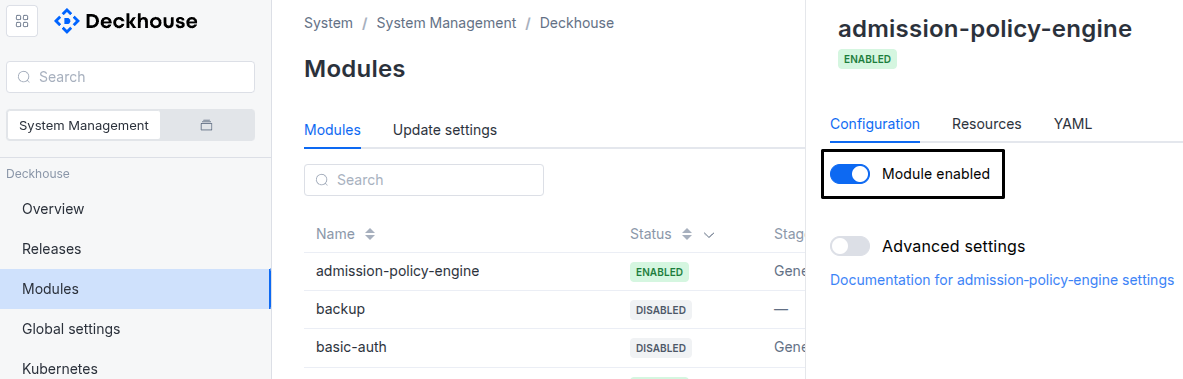
Via Deckhouse web UI. In the “System” → “System Management” → “Deckhouse” → “Modules” section, open the
multitenancy-managermodule and enable (or disable) the “Module enabled” toggle. Save changes.Example:
-
Via Deckhouse CLI (d8).
Use the d8 system module enable command for enabling, or d8 system module disable command for disabling the module (you need Deckhouse CLI (d8), configured to work with the cluster).
Example of enabling the module:
d8 system module enable multitenancy-manager -
Using ModuleConfig
multitenancy-manager.Set
spec.enabledtotrueorfalsein ModuleConfigmultitenancy-manager(create it if necessary);Example of a manifest to enable module
multitenancy-manager:apiVersion: deckhouse.io/v1alpha1 kind: ModuleConfig metadata: name: multitenancy-manager spec: enabled: true
How to configure the module...
You can configure the module in one of the following ways:
-
Via Deckhouse web UI.
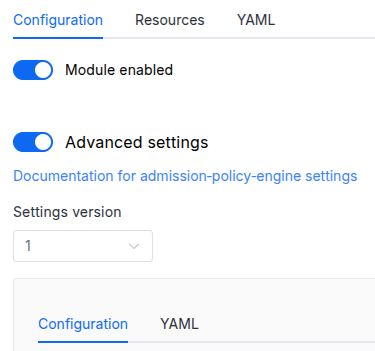
In the “System” → “System Management” → “Deckhouse” → “Modules” section, open the
multitenancy-managermodule and enable the “Advanced Settings” switch. Fill in the required fields in the “Configuration” tab or specify the module settings in YAML format on the “YAML” tab, excluding the settings section. Save the changes.Example:
You can also edit the ModuleConfig object
multitenancy-manageron the “YAML” tab in the module settings window (“System” → “System Management” → “Deckhouse” → “Modules”, open the modulemultitenancy-manager) by specifying the schema version in thespec.versionparameter and the necessary module parameters in thespec.settingssection. -
Via Deckhouse CLI (d8) (requires Deckhouse CLI (d8) configured to work with the cluster).
Edit the existing ModuleConfig
multitenancy-manager(for more details on configuring Deckhouse, see the documentation) by executing the following command:d8 k edit mc multitenancy-managerMake the necessary changes in the
spec.settingssection. If necessary, specify the schema version in thespec.versionparameter. Save the changes.You can also create a file with manifest for ModuleConfig
multitenancy-managerusing the example below. Fill in thespec.settingssection with the required module parameters. If necessary, specify the schema version in thespec.versionparameter.Apply the manifest using the following command (indicate the manifest file name):
d8 k apply -f <FILENAME>Example of a manifest for ModuleConfig
multitenancy-manager:apiVersion: deckhouse.io/v1alpha1 kind: ModuleConfig metadata: name: multitenancy-manager spec: version: 1 enabled: true settings: # Module parameters from the "Parameters" section below.
Parameters
Schema version: 1
- objectsettings
- booleansettings.allowNamespacesWithoutProjects
Whether namespaces can be created directly, outside a Project.
The parameter decides only who creates namespaces directly. Whatever its value, the controller turns every namespace that is not a system one into a project of its own.
If
true, anyone allowed to create namespaces can create one directly (d8 k create namespace), and the controller turns such a namespace into a project of its own (see Automatic project creation for namespaces).If
false, users create environments as Project objects, and additional namespaces of a project as ProjectNamespace objects. Only cluster administrators (thesystem:mastersgroup andsystem:sudouser), Deckhouse, the module controller and system components create namespaces directly; the full list is in Who bypasses admission. Anyone can create thedefaultnamespace. The check is a ValidatingAdmissionPolicy that the API server evaluates itself, so it does not depend on the module controller being available.Default:
true - booleansettings.highAvailability
Whether the module runs in the high availability mode.
If not set, the mode is chosen automatically, as described for the global
highAvailabilityparameter.Examples:
highAvailability: truehighAvailability: false