Available in editions: Open/CE, BE, SE, SE+, Ultimate/EE, Core
Included in extensions: Advanced Infrastructure Security, Billing
The module lifecycle stage: Preview
To configure connection parameters to the container registry and manage the container registry operating mode, use the registry section of the deckhouse module configuration.
The parameters of the registry module itself are specified in ModuleConfig registry.
The module is enabled by default in the Default bundle.
The module is disabled by default in the following bundles: Managed, Minimal.
How to explicitly enable the module...
You may explicitly enable or disable the module in one of the following ways:
-
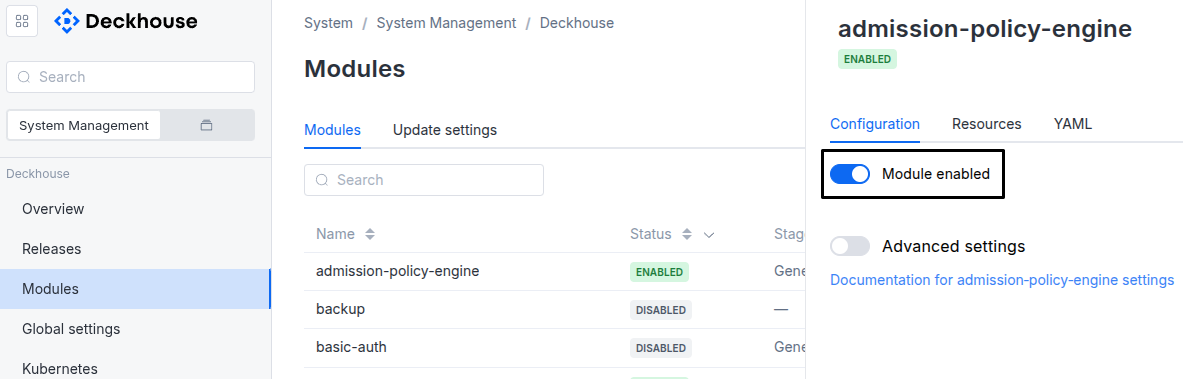
Via Deckhouse web UI. In the “System” → “System Management” → “Deckhouse” → “Modules” section, open the
registrymodule and enable (or disable) the “Module enabled” toggle. Save changes.Example:
-
Via Deckhouse CLI (d8).
Use the d8 system module enable command for enabling, or d8 system module disable command for disabling the module (you need Deckhouse CLI (d8), configured to work with the cluster).
Example of enabling the module:
d8 system module enable registry -
Using ModuleConfig
registry.Set
spec.enabledtotrueorfalsein ModuleConfigregistry(create it if necessary);Example of a manifest to enable module
registry:apiVersion: deckhouse.io/v1alpha1 kind: ModuleConfig metadata: name: registry spec: enabled: true
How to configure the module...
You can configure the module in one of the following ways:
-
Via Deckhouse web UI.
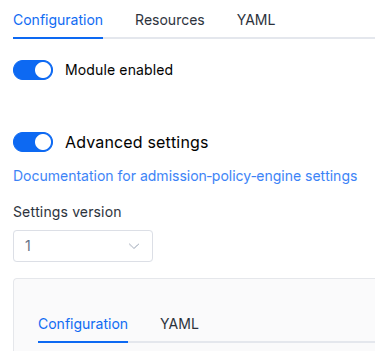
In the “System” → “System Management” → “Deckhouse” → “Modules” section, open the
registrymodule and enable the “Advanced Settings” switch. Fill in the required fields in the “Configuration” tab or specify the module settings in YAML format on the “YAML” tab, excluding the settings section. Save the changes.Example:
You can also edit the ModuleConfig object
registryon the “YAML” tab in the module settings window (“System” → “System Management” → “Deckhouse” → “Modules”, open the moduleregistry) by specifying the schema version in thespec.versionparameter and the necessary module parameters in thespec.settingssection. -
Via Deckhouse CLI (d8) (requires Deckhouse CLI (d8) configured to work with the cluster).
Edit the existing ModuleConfig
registry(for more details on configuring Deckhouse, see the documentation) by executing the following command:d8 k edit mc registryMake the necessary changes in the
spec.settingssection. If necessary, specify the schema version in thespec.versionparameter. Save the changes.You can also create a file with manifest for ModuleConfig
registryusing the example below. Fill in thespec.settingssection with the required module parameters. If necessary, specify the schema version in thespec.versionparameter.Apply the manifest using the following command (indicate the manifest file name):
d8 k apply -f <FILENAME>Example of a manifest for ModuleConfig
registry:apiVersion: deckhouse.io/v1alpha1 kind: ModuleConfig metadata: name: registry spec: version: 1 enabled: true settings: # Module parameters from the "Parameters" section below.
Parameters
Schema version: 1
- objectsettings
- objectsettings.https
What certificate type to use.
This parameter completely overrides the
global.modules.httpssettings.Examples:
https: mode: Disabledhttps: mode: OnlyInURIhttps: mode: CustomCertificate customCertificate: secretName: foobarhttps: mode: CertManager certManager: clusterIssuerName: letsencrypt- objectsettings.https.certManager
Parameters for certmanager.
- stringsettings.https.certManager.clusterIssuerName
What ClusterIssuer to use for getting an SSL certificate (currently,
letsencrypt,letsencrypt-staging,selfsignedare available; also, you can define your own).Default:
letsencryptExample:
clusterIssuerName: letsencrypt
- objectsettings.https.customCertificate
Parameters for custom certificate usage.
- stringsettings.https.customCertificate.secretName
The name of the secret in the
d8-systemnamespace to use with the registry ingress.This secret must have the kubernetes.io/tls format.
- stringsettings.https.mode
The HTTPS usage mode:
CertManager: The registry ingress is accessed over HTTPS using a certificate obtained from a clusterIssuer specified in thecertManager.clusterIssuerNameparameter.CustomCertificate: The registry ingress is accessed over HTTPS using a certificate from thed8-systemnamespace.Disabled: In this mode, the registry ingress can only be accessed over HTTP.OnlyInURI: The registry ingress will work over HTTP (thinking that there is an external HTTPS load balancer in front of it that terminates HTTPS traffic). Load balancer should provide a redirect from HTTP to HTTPS.
Default:
CertManagerAllowed values:
Disabled,CertManager,CustomCertificate,OnlyInURI
- stringsettings.ingressClass
The class of the Ingress controller used for the registry.
Optional. By default, the
modules.ingressClassglobal value is used.Pattern:
^[a-z0-9]([-a-z0-9]*[a-z0-9])?(\.[a-z0-9]([-a-z0-9]*[a-z0-9])?)*$ - stringsettings.mode
Whether the module manages how the cluster pulls images.
-
Unmanaged— the module manages nothing. No components are created and no node configuration is written; the cluster keeps pulling from the registry it was installed with. This is the default, so enabling the module changes nothing on its own.Asking for
Unmanagedon a cluster the module was managing does not take effect instantly: image references all over the cluster name the in-cluster registry, and they move to the upstream one only as each module’s release is rendered again. So the module stops advertising its address at once and keeps serving it until nothing names it any more, which normally takes a few minutes. On a cluster that was installed with the module already managing, it also writes the registry it was fetching from back into the cluster’s registry credentials — otherwise nothing would remember where images come from, since the installer had put the in-cluster registry there. Until then its components are still running, andD8RegistryDrainStuckreports a withdrawal that cannot finish. -
Managed— the module owns the pull path: it configures the container runtime on every node through its node agent, and optionally runs an in-cluster cache.
There is no choice of implementation. A cluster that has never run the previous implementation of this module always uses the current one; a cluster that has runs the previous one until it is brought to its
Unmanagedstate, after which the migration completes on its own.Default:
UnmanagedAllowed values:
Managed,Unmanaged -
- objectsettings.primary
The single authoritative source of Deckhouse component images. Applies only when
modeisManaged.Additional registries are declared as separate RegistryUpstream resources rather than here: a module or a user bringing their own registry must not have to edit a ModuleConfig owned by someone else.
- objectsettings.primary.upstream
The registry to pull Deckhouse component images from.
If omitted, the cluster is air-gapped: the in-cluster cache becomes authoritative and is populated with
d8 mirror push. Omitting it requiresstorage.cache: trueandstorage.source.Example:
upstream: host: registry.deckhouse.io path: "/deckhouse/ee" scheme: HTTPS auth: license: DECKHOUSE_LICENSE_KEY- objectsettings.primary.upstream.auth
Credentials for the registry.
- stringsettings.primary.upstream.auth.license
The Deckhouse license key.
A shorthand for the
username/passwordpair used withregistry.deckhouse.io. Mutually exclusive with them.Changing the license changes the registry credentials, so it goes through the same preflight probe as an address change: the new credentials are verified before the cluster is switched over, and the last known good ones are kept if the probe fails.
- stringsettings.primary.upstream.auth.password
The password for basic authentication.
- stringsettings.primary.upstream.auth.username
The username for basic authentication.
- stringsettings.primary.upstream.ca
A PEM-encoded certificate authority bundle used to verify the registry when
schemeisHTTPS.If not specified, the system trust store is used.
- stringsettings.primary.upstream.host
Required value
The registry host, optionally with a port.
Examples:
host: registry.deckhouse.iohost: my-private-registry.com:5000 - array of objectssettings.primary.upstream.mirrors
Additional addresses serving the same content as the primary registry, used for failover and load balancing.
Mirrors are not separate sources: the cache holds one de-duplicated set regardless of which mirror the images came from. A registry with different content is an additional upstream and belongs in a RegistryUpstream resource.
- objectsettings.primary.upstream.mirrors.auth
Credentials for the registry.
- stringsettings.primary.upstream.mirrors.auth.license
The Deckhouse license key.
A shorthand for the
username/passwordpair used withregistry.deckhouse.io. Mutually exclusive with them.Changing the license changes the registry credentials, so it goes through the same preflight probe as an address change: the new credentials are verified before the cluster is switched over, and the last known good ones are kept if the probe fails.
- stringsettings.primary.upstream.mirrors.auth.password
The password for basic authentication.
- stringsettings.primary.upstream.mirrors.auth.username
The username for basic authentication.
- stringsettings.primary.upstream.mirrors.ca
A PEM-encoded certificate authority bundle used to verify the mirror.
- stringsettings.primary.upstream.mirrors.host
Required value
The mirror host, optionally with a port.
- stringsettings.primary.upstream.mirrors.path
The repository prefix inside the mirror.
- stringsettings.primary.upstream.mirrors.scheme
The protocol used to reach the mirror.
Default:
HTTPSAllowed values:
HTTP,HTTPS
- stringsettings.primary.upstream.path
The repository prefix inside the registry.
Example:
path: "/deckhouse/ee" - stringsettings.primary.upstream.scheme
The protocol used to reach the registry.
Use
HTTPonly for insecure, trusted registries.Default:
HTTPSAllowed values:
HTTP,HTTPS
- objectsettings.storage
The in-cluster registry cache. Applies only when
modeisManaged.- booleansettings.storage.cache
Whether pulls go through the in-cluster cache on the master nodes.
This is one of the two configuration axes; the other is whether
primary.upstreamis set. Together they cover every supported layout:cache: falsewith an upstream — nodes pull straight from the upstream, no cache is deployed.cache: truewith an upstream — a pass-through cache, filled from the upstream.cache: truewithout an upstream — air-gap: the cache is the only source of images and is filled withd8 mirror push.
Turning the cache on or off is a safe, idempotent reconfiguration. Removing the upstream while the cache is on is the one transition with a condition: it takes effect only once the cache leader holds the whole expected image set, so nodes are never cut off.
Default:
false - objectsettings.storage.garbageCollection
When the cache reclaims the disk taken by releases the cluster has moved past.
Needed because nothing else ever removes anything: every release adds a slice of the repository, so a cluster that lives for years fills its store and then stops being able to pull.
A collection puts one replica read-only for as long as it takes. That replica keeps serving every image it holds; what it cannot do is store the result of a cache miss, or accept a
d8 mirror push. Only one replica collects at a time, so the others are unaffected.- booleansettings.storage.garbageCollection.enabled
Whether the cache reclaims its disk at all.
Turning this off leaves the store to grow without bound, which only makes sense with a disk large enough that it never matters.
Default:
true - stringsettings.storage.garbageCollection.schedule
A five-field cron expression, in the replicas’ own time zone.
Defaults to a night hour. If the
masternode group has a maintenance window, the start of that window is used instead — that being a time the operator has already declared safe for disruption.Pattern:
^\s*\S+\s+\S+\s+\S+\s+\S+\s+\S+\s*$Examples:
schedule: 17 3 * * *schedule: 0 2 * * Sun
- stringsettings.storage.size
The size of the persistent volume backing the cache.
Pattern:
^[0-9]+(\.[0-9]+)?(E|P|T|G|M|k|Ei|Pi|Ti|Gi|Mi|Ki)?$Example:
size: 50Gi - objectsettings.storage.source
The image set the cache is expected to hold.
Required in an air-gapped cluster: with no upstream to fall back on, completeness must be decidable before the cache can be trusted as the only source.
- stringsettings.storage.source.bundleRef
The name of the image set, for example the bundle pushed with
d8 mirror push.Example:
bundleRef: d8-mirror-bundle - integersettings.storage.source.expectedDigests
The number of distinct digests the set contains.
Allowed values:
0 <= XExample:
expectedDigests: 459
- array of stringssettings.whitelistSourceRanges
A list of CIDR-formatted addresses allowed to connect to the registry. If not specified, connections from any address are allowed.
Example:
whitelistSourceRanges: - 10.0.0.0/10 - 192.168.0.0/16- stringElement of the array
Pattern:
^(([0-9]|[1-9][0-9]|1[0-9]{2}|2[0-4][0-9]|25[0-5])\.){3}([0-9]|[1-9][0-9]|1[0-9]{2}|2[0-4][0-9]|25[0-5])(\/(3[0-2]|[1-2][0-9]|[0-9]))?$