Available in: Ultimate/EE
Included in extensions: Advanced Storage
The module lifecycle stage: Experimental
The module has requirements for installation
Before enabling the module, you need to allow the use of experimental modules in the deckhouse ModuleConfig. To do this, set the allowExperimentalModules parameter to true.
How to explicitly enable or disable the module…
You may explicitly enable or disable the module in one of the following ways:
-
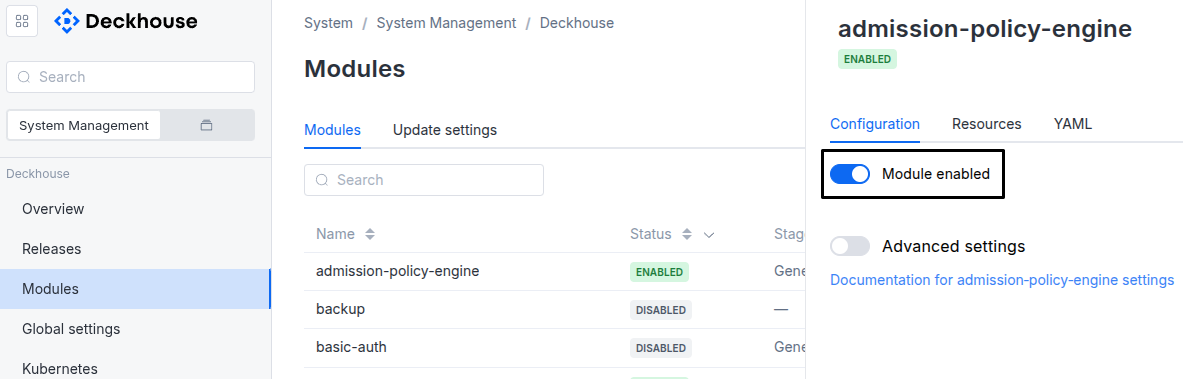
Via Deckhouse web UI. In the “System” → “System Management” → “Deckhouse” → “Modules” section, open the
sds-objectmodule and enable (or disable) the “Module enabled” toggle. Save changes.Example:
-
Via Deckhouse CLI (d8).
Use the d8 system module enable command for enabling, or d8 system module disable command for disabling the module (you need Deckhouse CLI (d8), configured to work with the cluster).
Example of enabling the module:
d8 system module enable sds-object -
Using ModuleConfig
sds-object.Set
spec.enabledtotrueorfalsein ModuleConfigsds-object(create it if necessary).Example of a manifest to enable module
sds-object:apiVersion: deckhouse.io/v1alpha1 kind: ModuleConfig metadata: name: sds-object spec: enabled: true
You can configure the module in one of the following ways:
-
Via Deckhouse web UI.
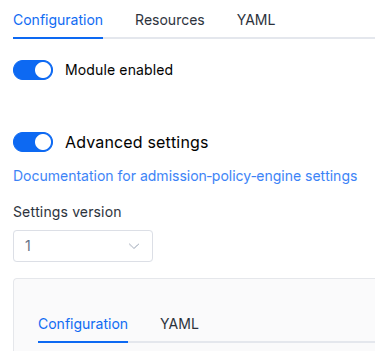
In the “System” → “System Management” → “Deckhouse” → “Modules” section, open the
sds-objectmodule and enable the “Advanced Settings” toggle. Fill in the required fields in the “Configuration” tab or specify the module settings in YAML format on the “YAML” tab, without the top-levelsettingskey. Save the changes.Example:
You can also edit the ModuleConfig object
sds-objecton the “YAML” tab in the module settings window (“System” → “System Management” → “Deckhouse” → “Modules”, open the modulesds-object) by specifying the schema version in thespec.versionparameter and the necessary module parameters in thespec.settingssection. -
Via Deckhouse CLI (d8) (requires Deckhouse CLI (d8) configured to work with the cluster).
Edit the existing ModuleConfig
sds-object(for more details on configuring Deckhouse Platform, see the documentation) by executing the following command:d8 k edit mc sds-objectMake the necessary changes in the
spec.settingssection. If necessary, specify the schema version in thespec.versionparameter. Save the changes.You can also create a manifest file for ModuleConfig
sds-objectusing the example below. Fill in thespec.settingssection with the required module parameters. If necessary, specify the schema version in thespec.versionparameter.Apply the manifest using the following command (indicate the manifest file name):
d8 k apply -f <FILENAME>Example of a manifest for ModuleConfig
sds-object:apiVersion: deckhouse.io/v1alpha1 kind: ModuleConfig metadata: name: sds-object spec: version: 1 enabled: true settings: # Module parameters from the "Parameters" section below.
Requirements
To the Deckhouse Platform version: 1.72 and above.
Parameters
Schema version: 1
-
-
objectsettings.controllerSettings of the sds-object-controller (reconciler for the store CRs — SeaweedFSStore, SDSElasticStore — and for ObjectStore, Bucket, BucketContents and BucketAccess).
Default:
{}-
objectsettings.controller.resourcesManagementsds-object-controller resources management options.
Default:
{}Example:
mode: VPA vpa: cpu: limitRatio: 1.5 max: 200m min: 50m memory: limitRatio: 1.5 max: 256Mi min: 64Mi mode: Auto-
stringsettings.controller.resourcesManagement.modeThe mode for managing resource requests. Classical
Staticrequests/limits orVPA.Default:
VPAAllowed values:
VPA,Static -
objectsettings.controller.resourcesManagement.staticStatic resource management settings.
-
objectsettings.controller.resourcesManagement.static.limitsResource limits for the controller pod.
-
settings.controller.resourcesManagement.static.limits.cpuCPU limit.
-
settings.controller.resourcesManagement.static.limits.memoryMemory limit.
-
-
objectsettings.controller.resourcesManagement.static.requestsResource requests for the controller pod.
-
settings.controller.resourcesManagement.static.requests.cpuCPU request.
-
settings.controller.resourcesManagement.static.requests.memoryMemory request.
-
-
-
objectsettings.controller.resourcesManagement.vpaParameters of the VPA mode.
Default:
{}-
objectsettings.controller.resourcesManagement.vpa.cpuCPU-related parameters.
Default:
{}-
numbersettings.controller.resourcesManagement.vpa.cpu.limitRatio
Coefficient used to calculate the initial CPU limit from the request.
VPA preserves the resulting limits/requests ratio during further resource tuning.
-
settings.controller.resourcesManagement.vpa.cpu.maxMaximum allowed CPU requests.
Default:
200m -
settings.controller.resourcesManagement.vpa.cpu.minMinimum allowed CPU requests.
Default:
50m
-
-
objectsettings.controller.resourcesManagement.vpa.memoryMemory-related parameters.
Default:
{}-
numbersettings.controller.resourcesManagement.vpa.memory.limitRatio
Coefficient used to calculate the initial memory limit from the request.
VPA preserves the resulting limits/requests ratio during further resource tuning.
-
settings.controller.resourcesManagement.vpa.memory.maxMaximum allowed memory requests.
Default:
256Mi -
settings.controller.resourcesManagement.vpa.memory.minMinimum allowed memory requests.
Default:
64Mi
-
-
stringsettings.controller.resourcesManagement.vpa.modeThe VPA usage mode.
Default:
AutoAllowed values:
Initial,Auto
-
-
-
-
stringsettings.logLevelModule log verbosity level.
Default:
INFOAllowed values:
ERROR,WARN,INFO,DEBUG,TRACE -
objectsettings.nodeSelector
The same as in the Pods’
spec.nodeSelectorparameter in Kubernetes. Applies to the module service Pods (controller, webhooks).If the parameter is omitted,
nodeSelectorwill be determined automatically.Note: this does not control placement of object storage data planes — that is configured per store via
SeaweedFSStore.spec.placement. -
array of objectssettings.tolerations
The same as in the Pods’
spec.tolerationsparameter in Kubernetes. Applies to the module service Pods (controller, webhooks).If the parameter is omitted,
tolerationswill be determined automatically.-
stringsettings.tolerations.effectTaint effect the toleration matches. An empty value matches any effect.
Allowed values:
‘’,NoSchedule,PreferNoSchedule,NoExecute -
stringsettings.tolerations.keyTaint key the toleration applies to. An empty key with
operator: Existsmatches any taint. -
stringsettings.tolerations.operatorOperator that defines how
keyandvalueare matched.Allowed values:
Exists,Equal -
integersettings.tolerations.tolerationSeconds
Duration in seconds the toleration tolerates the taint after it is added.
Applies only when
effectisNoExecute. Unset means tolerate forever. -
stringsettings.tolerations.valueTaint value the toleration matches. Required when
operatorisEqual.
-
-