Available in: Ultimate/EE
The module lifecycle stage: Experimental
The module has requirements for installation
Before enabling the module, you need to allow the use of experimental modules in the deckhouse ModuleConfig. To do this, set the allowExperimentalModules parameter to true.
How to explicitly enable or disable the module…
You may explicitly enable or disable the module in one of the following ways:
-
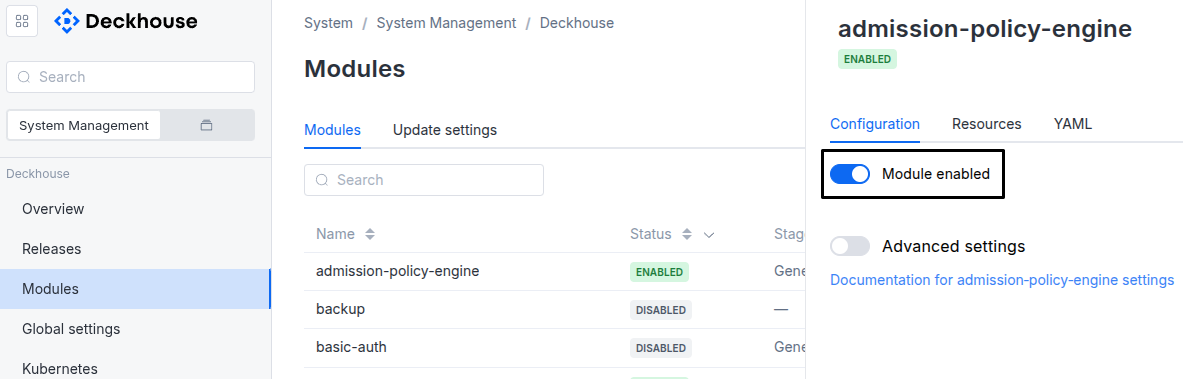
Via Deckhouse web UI. In the “System” → “System Management” → “Deckhouse” → “Modules” section, open the
security-events-managermodule and enable (or disable) the “Module enabled” toggle. Save changes.Example:
-
Via Deckhouse CLI (d8).
Use the d8 system module enable command for enabling, or d8 system module disable command for disabling the module (you need Deckhouse CLI (d8), configured to work with the cluster).
Example of enabling the module:
d8 system module enable security-events-manager -
Using ModuleConfig
security-events-manager.Set
spec.enabledtotrueorfalsein ModuleConfigsecurity-events-manager(create it if necessary).Example of a manifest to enable module
security-events-manager:apiVersion: deckhouse.io/v1alpha1 kind: ModuleConfig metadata: name: security-events-manager spec: enabled: true
You can configure the module in one of the following ways:
-
Via Deckhouse web UI.
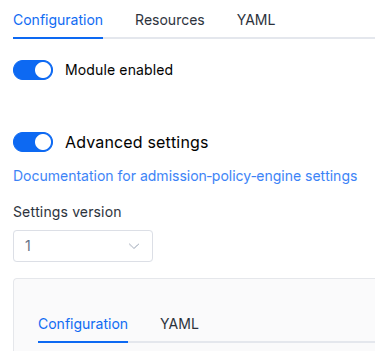
In the “System” → “System Management” → “Deckhouse” → “Modules” section, open the
security-events-managermodule and enable the “Advanced Settings” toggle. Fill in the required fields in the “Configuration” tab or specify the module settings in YAML format on the “YAML” tab, without the top-levelsettingskey. Save the changes.Example:
You can also edit the ModuleConfig object
security-events-manageron the “YAML” tab in the module settings window (“System” → “System Management” → “Deckhouse” → “Modules”, open the modulesecurity-events-manager) by specifying the schema version in thespec.versionparameter and the necessary module parameters in thespec.settingssection. -
Via Deckhouse CLI (d8) (requires Deckhouse CLI (d8) configured to work with the cluster).
Edit the existing ModuleConfig
security-events-manager(for more details on configuring Deckhouse Platform, see the documentation) by executing the following command:d8 k edit mc security-events-managerMake the necessary changes in the
spec.settingssection. If necessary, specify the schema version in thespec.versionparameter. Save the changes.You can also create a manifest file for ModuleConfig
security-events-managerusing the example below. Fill in thespec.settingssection with the required module parameters. If necessary, specify the schema version in thespec.versionparameter.Apply the manifest using the following command (indicate the manifest file name):
d8 k apply -f <FILENAME>Example of a manifest for ModuleConfig
security-events-manager:apiVersion: deckhouse.io/v1alpha1 kind: ModuleConfig metadata: name: security-events-manager spec: version: 1 enabled: true settings: # Module parameters from the "Parameters" section below.
Requirements
To the Deckhouse Platform version: 1.76 and above.
To the versions of other modules:
-
log-shipper: 1.0.6 and above. -
loki: any version.
Parameters
Schema version: 1
-
-
objectsettings.clusterSecurityEventDestinationConfigs for ClusterSecurityEventDestination objects
-
booleansettings.clusterSecurityEventDestination.clusterLokiWhether to generate ClusterSecurityEventDestination for cluster Loki.
Default:
true
-
-
objectsettings.controllerSecurity events controller settings.
-
integersettings.controller.replicasNumber of controller replicas.
Default:
1Allowed values:
1 <= X <= 10 -
objectsettings.controller.resourcesRequestsResource request management for controller. When vertical-pod-autoscaler is disabled, static or VPA min values are used as requests.
-
stringsettings.controller.resourcesRequests.mode
Default:
VPAAllowed values:
VPA,Static -
objectsettings.controller.resourcesRequests.static
Default:
{}-
settings.controller.resourcesRequests.static.cpu
Default:
10m -
settings.controller.resourcesRequests.static.memory
Default:
64Mi
-
-
objectsettings.controller.resourcesRequests.vpa
Default:
{}-
objectsettings.controller.resourcesRequests.vpa.cpu
Default:
{}-
settings.controller.resourcesRequests.vpa.cpu.max
Default:
100m -
settings.controller.resourcesRequests.vpa.cpu.min
Default:
10m
-
-
objectsettings.controller.resourcesRequests.vpa.memory
Default:
{}-
settings.controller.resourcesRequests.vpa.memory.max
Default:
256Mi -
settings.controller.resourcesRequests.vpa.memory.min
Default:
64Mi
-
-
stringsettings.controller.resourcesRequests.vpa.mode
Default:
InitialAllowed values:
Initial,Auto
-
-
-
stringsettings.controller.vectorValidateTimeoutTimeout for the
vector validaterun the controller performs before publishing a new gateway Vector config (Go duration string, for example “30s”, “2m”). The controller validates with--no-environment, which takes about 2 seconds for a 256 KB config, so the default leaves a wide margin. If the check cannot be completed within the timeout, the config is published anyway and the gateway reloader validates it instead.Default:
60sPattern:
^([0-9]+(\.[0-9]+)?(ns|us|ms|s|m|h))+$
-
-
objectsettings.gatewaySecurity events gateway settings.
-
objectsettings.gateway.bufferDefault buffer settings for all gateway Vector sinks. Can be overridden per-destination in ClusterSecurityEventDestination.spec.buffer. Defaults to Disk + Block for zero data loss of security events.
-
integersettings.gateway.buffer.maxEventsMaximum number of events in the buffer. Used as a secondary limit for Memory type. Ignored when type is Disk (disk buffer uses maxSize only).
Default:
500Allowed values:
100 <= X <= 10000000 -
stringsettings.gateway.buffer.maxSizeMaximum size of the buffer as a Kubernetes quantity string with a mandatory unit suffix (e.g. “512Mi”, “1Gi”, “256Mi”). Plain numbers without a unit suffix are NOT accepted. For Disk type: maximum disk space used on the volume. For Memory type: approximate memory limit for the in-memory ring buffer.
Default:
512MiPattern:
^[0-9]+(\.[0-9]+)?(Ki|Mi|Gi|Ti|Pi|Ei|k|M|G|T|P|E)$ -
stringsettings.gateway.buffer.type
Buffer type.
- Disk: disk-based buffer using LevelDB. Survives Vector process restarts within the pod. DEFAULT — ensures no security events are lost during temporary destination outages.
- Memory: in-memory ring buffer. Faster, but all events are lost on Vector process restart. Use only for test/dev environments.
Default:
DiskAllowed values:
Memory,Disk -
stringsettings.gateway.buffer.whenFull
Behavior when the buffer is full.
- Block: apply backpressure to upstream. Pipeline slows down but NO events are lost. DEFAULT — the correct choice for security events.
- DropNewest: discard incoming events. Data loss occurs but no backpressure. Use only when data loss is acceptable (test environments).
Default:
BlockAllowed values:
Block,DropNewest
-
-
objectsettings.gateway.logShipperBufferBuffer settings for the log-shipper ClusterLogDestination that ships events from agents to the gateway. Defaults to Disk + Block for zero data loss on the agent side.
-
integersettings.gateway.logShipperBuffer.maxEventsMaximum number of events in the agent buffer. Used as a secondary limit for Memory type.
Default:
500Allowed values:
100 <= X <= 10000000 -
stringsettings.gateway.logShipperBuffer.maxSizeMaximum size of the agent buffer as a Kubernetes quantity string with a mandatory unit suffix (e.g. “257Mi”, “512Mi”, “1Gi”). Plain numbers without a unit suffix are NOT accepted. Per node agent. Must be at least 268435488 bytes (~256MB) — log-shipper’s disk buffer minimum. A value of exactly “256Mi” (268435456 bytes) is rejected by the agent.
Default:
257MiPattern:
^[0-9]+(\.[0-9]+)?(Ki|Mi|Gi|Ti|Pi|Ei|k|M|G|T|P|E)$ -
stringsettings.gateway.logShipperBuffer.type
Buffer type for the log-shipper agent buffer.
- Disk: disk-based buffer. Survives Vector process restarts on the agent node. DEFAULT.
- Memory: in-memory ring buffer. Events are lost on agent restart.
Default:
DiskAllowed values:
Memory,Disk -
stringsettings.gateway.logShipperBuffer.whenFull
Behavior when the agent buffer is full.
- Block: apply backpressure. NO events are lost. DEFAULT.
- DropNewest: discard incoming events. Data loss occurs.
Default:
BlockAllowed values:
Block,DropNewest
-
-
objectsettings.gateway.nodeSelectorNode selector for gateway Deployment.
-
stringsettings.gateway.reloaderValidateTimeoutTimeout for
vector validateexecuted by the gateway reloader sidecar (Go duration string, e.g. “45s”, “2m”). Increase this if the gateway vector config is large (many SecurityEventDefinitions × transforms) andvector validateis being killed by the reloader before completing. Range: 5s–5m; invalid values fall back to 120s.Default:
120sPattern:
^([0-9]+(\.[0-9]+)?(ns|us|ms|s|m|h))+$ -
integersettings.gateway.replicasNumber of gateway replicas.
Default:
2Allowed values:
1 <= X <= 100 -
objectsettings.gateway.resourcesResource requests/limits for gateway pods.
-
objectsettings.gateway.resources.limits
-
stringsettings.gateway.resources.limits.cpu
Pattern:
^([0-9]+(\.[0-9]+)?|[0-9]+m)$ -
stringsettings.gateway.resources.limits.memory
Pattern:
^[0-9]+(\.[0-9]+)?(E|P|T|G|M|k|Ei|Pi|Ti|Gi|Mi|Ki)?$
-
-
objectsettings.gateway.resources.requests
-
stringsettings.gateway.resources.requests.cpu
Default:
100mPattern:
^([0-9]+(\.[0-9]+)?|[0-9]+m)$ -
stringsettings.gateway.resources.requests.memory
Default:
128MiPattern:
^[0-9]+(\.[0-9]+)?(E|P|T|G|M|k|Ei|Pi|Ti|Gi|Mi|Ki)?$
-
-
-
objectsettings.gateway.resourcesRequestsResource request management for gateway (vector container). When vertical-pod-autoscaler is disabled, static or VPA min values are used as requests.
-
stringsettings.gateway.resourcesRequests.mode
Default:
VPAAllowed values:
VPA,Static -
objectsettings.gateway.resourcesRequests.static
Default:
{}-
settings.gateway.resourcesRequests.static.cpu
Default:
100m -
settings.gateway.resourcesRequests.static.memory
Default:
128Mi
-
-
objectsettings.gateway.resourcesRequests.vpa
Default:
{}-
objectsettings.gateway.resourcesRequests.vpa.cpu
Default:
{}-
settings.gateway.resourcesRequests.vpa.cpu.max
Default:
3000m -
settings.gateway.resourcesRequests.vpa.cpu.min
Default:
100m
-
-
objectsettings.gateway.resourcesRequests.vpa.memory
Default:
{}-
settings.gateway.resourcesRequests.vpa.memory.max
Default:
4096Mi -
settings.gateway.resourcesRequests.vpa.memory.min
Default:
128Mi
-
-
stringsettings.gateway.resourcesRequests.vpa.mode
Default:
InitialAllowed values:
Initial,Auto
-
-
-
array of objectssettings.gateway.tolerationsTolerations for gateway pods.
-
-
objectsettings.securityEventConfigDefault configuration of security alert sources and destination (default resource ClusterSecurityEventConfig). Can be overridden per CR ClusterSecurityEventShipper.
Default:
{ "destinations": [ "cluster-loki" ], "enabled": true, "sourcesMasks": [ "podSecurityEventShipper/*", "clusterSecurityEventShipper/*" ] }-
objectsettings.securityEventConfig.cefDefault CEF (Common Event Format) metadata for the generated ClusterSecurityEventConfig. These values populate spec.cef in the default CSEC and are used as fallbacks when a ClusterSecurityEventDestination with encoding.codec=CEF does not specify its own device vendor/product/version and CEF format version.
-
stringsettings.securityEventConfig.cef.deviceProduct
Default device product for CEF header.
Applies to a destination that does not set
encoding.cef.deviceProductof its own. When the parameter is omitted,security-events-manageris used.Maximum length:
63 -
stringsettings.securityEventConfig.cef.deviceVendor
Default device vendor for CEF header.
Applies to a destination that does not set
encoding.cef.deviceVendorof its own. When the parameter is omitted,Deckhouseis used.Maximum length:
63 -
stringsettings.securityEventConfig.cef.deviceVersion
Default device version for CEF header. This is the fourth field of the CEF header and is unrelated to
version, which selects the format of theCEF:prefix.Applies to a destination that does not set
encoding.cef.deviceVersionof its own. When the parameter is omitted,1is used.Maximum length:
63 -
stringsettings.securityEventConfig.cef.version
Default CEF format version written in the
CEF:prefix of the header.Applies to a destination that does not set
encoding.cef.versionof its own. When the parameter is omitted,V0is used.Possible values:
V0— emit theCEF:0prefix, used by default and expected by most SIEM systems;V1— emit theCEF:1prefix.
Allowed values:
V0,V1
-
-
array of stringssettings.securityEventConfig.destinationsList of ClusterSecurityEventDestination names.
Default:
[ "cluster-loki" ]-
stringsettings.securityEventConfig.destinations.Element of the array
Maximum length:
253
-
-
booleansettings.securityEventConfig.enabledGenerate default ClusterSecurityEventConfig.
Default:
true -
stringsettings.securityEventConfig.minimumSeverityThresholdMinimal severity to ship (inclusive).
Default:
LowAllowed values:
Low,Medium,High,Critical -
array of stringssettings.securityEventConfig.sourcesList of enabled source identifiers (used when sourcesMasks is not set).
-
stringsettings.securityEventConfig.sources.Element of the array
Maximum length:
253
-
-
array of stringssettings.securityEventConfig.sourcesMasksList of glob-style masks for enabled sources (e.g. “*” for all). Mutually exclusive with sources. When set, ClusterSecurityEventConfig uses enabledSourcesMasks.
-
stringsettings.securityEventConfig.sourcesMasks.Element of the array
Maximum length:
253
-
-
-