Available in editions: Ultimate/EE
Included in extensions: Advanced Networking
The module lifecycle stage: General Availability
For the ServiceWithHealthchecks load balancers you create to work, the following conditions must be met:
-
The network policy of the custom project in which the ServiceWithHealthchecks will be created must include a rule allowing incoming traffic from all pods in the
d8-service-with-healthchecksnamespace:ingress: - from: - namespaceSelector: matchLabels: kubernetes.io/metadata.name: d8-service-with-healthchecksFor more information on network policies, see the Configuring Network Policies section.
-
The cluster role used in ClusterRoleBinding and RoleBinding when assigning permissions to users and service accounts for the ServiceWithHealthchecks resource must be extended with the following rules:
getlistwatchcreateupdatepatchdelete.
For more details, see the section Granting permissions to users and service accounts.
Enabling the module does not automatically replace existing Service resources with ServiceWithHealthcheck resources. To replace existing services with ServiceWithHealthcheck, follow these steps:
- Create ServiceWithHealthcheck resources with the same names and parameters as the existing Service resources you want to replace. When creating a ServiceWithHealthcheck, specify the required
healthchecksparameters. - Delete the Service resources that you want to replace with ServiceWithHealthcheck.
The module is not enabled by default in any bundles.
How to explicitly enable the module...
You may explicitly enable or disable the module in one of the following ways:
-
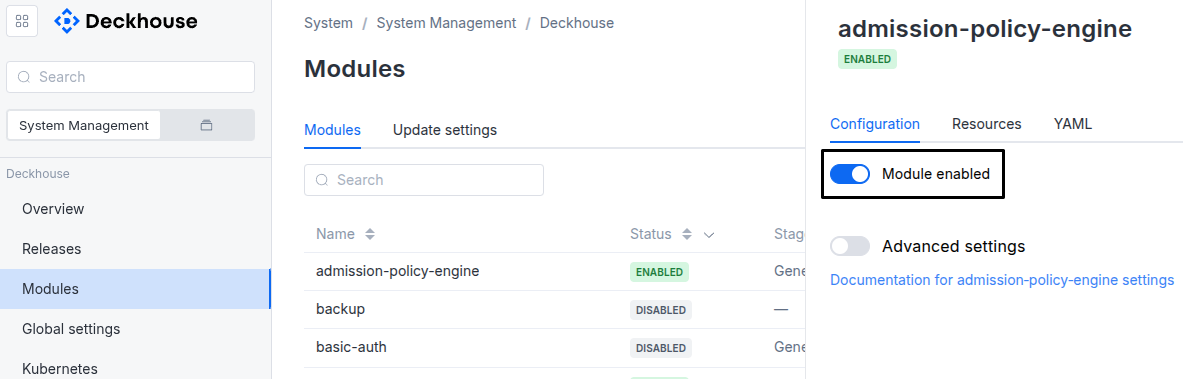
Via Deckhouse web UI. In the “System” → “System Management” → “Deckhouse” → “Modules” section, open the
service-with-healthchecksmodule and enable (or disable) the “Module enabled” toggle. Save changes.Example:
-
Via Deckhouse CLI (d8).
Use the d8 system module enable command for enabling, or d8 system module disable command for disabling the module (you need Deckhouse CLI (d8), configured to work with the cluster).
Example of enabling the module:
d8 system module enable service-with-healthchecks -
Using ModuleConfig
service-with-healthchecks.Set
spec.enabledtotrueorfalsein ModuleConfigservice-with-healthchecks(create it if necessary);Example of a manifest to enable module
service-with-healthchecks:apiVersion: deckhouse.io/v1alpha1 kind: ModuleConfig metadata: name: service-with-healthchecks spec: enabled: true
How to configure the module...
You can configure the module in one of the following ways:
-
Via Deckhouse web UI.
In the “System” → “System Management” → “Deckhouse” → “Modules” section, open the
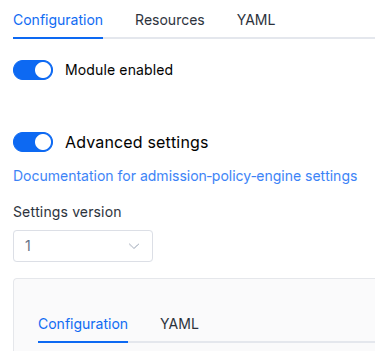
service-with-healthchecksmodule and enable the “Advanced Settings” switch. Fill in the required fields in the “Configuration” tab or specify the module settings in YAML format on the “YAML” tab, excluding the settings section. Save the changes.Example:
You can also edit the ModuleConfig object
service-with-healthcheckson the “YAML” tab in the module settings window (“System” → “System Management” → “Deckhouse” → “Modules”, open the moduleservice-with-healthchecks) by specifying the schema version in thespec.versionparameter and the necessary module parameters in thespec.settingssection. -
Via Deckhouse CLI (d8) (requires Deckhouse CLI (d8) configured to work with the cluster).
Edit the existing ModuleConfig
service-with-healthchecks(for more details on configuring Deckhouse, see the documentation) by executing the following command:d8 k edit mc service-with-healthchecksMake the necessary changes in the
spec.settingssection. If necessary, specify the schema version in thespec.versionparameter. Save the changes.You can also create a file with manifest for ModuleConfig
service-with-healthchecksusing the example below. Fill in thespec.settingssection with the required module parameters. If necessary, specify the schema version in thespec.versionparameter.Apply the manifest using the following command (indicate the manifest file name):
d8 k apply -f <FILENAME>Example of a manifest for ModuleConfig
service-with-healthchecks:apiVersion: deckhouse.io/v1alpha1 kind: ModuleConfig metadata: name: service-with-healthchecks spec: version: 1 enabled: true settings: # Module parameters from the "Parameters" section below.
Parameters
Schema version: 1
- objectsettings
- booleansettings.debug
If set, enables debug logging level for the controller and agent, providing more verbose log output including caller information.
Default:
false - booleansettings.verboseStatus
If true, the agent will update the lastProbeTime field in the ServiceWithHealthchecks status on every health check (every periodSeconds). This can be useful for debugging but causes high API server load. If false, only state transitions are recorded.
Default:
false