The module lifecycle stage: Experimental
The module has requirements for installation
Before enabling the module, you need to allow the use of experimental modules in the deckhouse ModuleConfig. To do this, set the allowExperimentalModules parameter to true.
How to explicitly enable or disable the module…
You may explicitly enable or disable the module in one of the following ways:
-
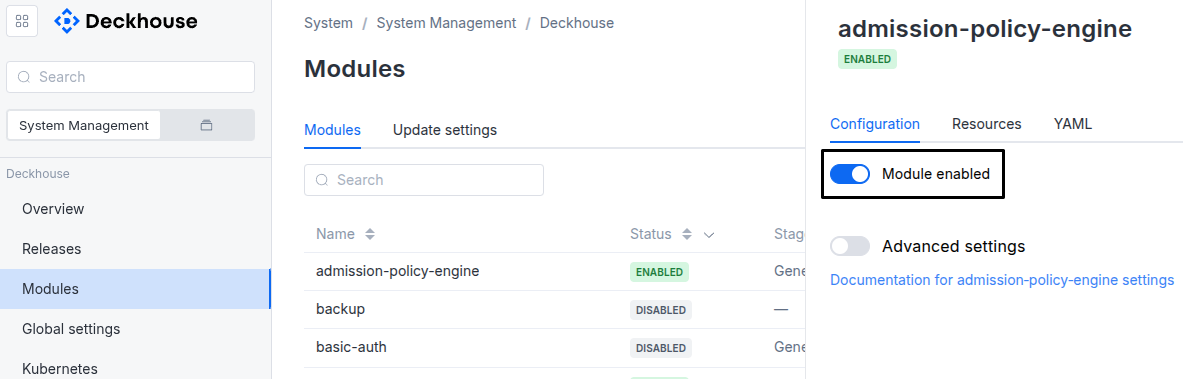
Via Deckhouse web UI. In the “System” → “System Management” → “Deckhouse” → “Modules” section, open the
system-s3module and enable (or disable) the “Module enabled” toggle. Save changes.Example:
-
Via Deckhouse CLI (d8).
Use the d8 system module enable command for enabling, or d8 system module disable command for disabling the module (you need Deckhouse CLI (d8), configured to work with the cluster).
Example of enabling the module:
d8 system module enable system-s3 -
Using ModuleConfig
system-s3.Set
spec.enabledtotrueorfalsein ModuleConfigsystem-s3(create it if necessary).Example of a manifest to enable module
system-s3:apiVersion: deckhouse.io/v1alpha1 kind: ModuleConfig metadata: name: system-s3 spec: enabled: true
You can configure the module in one of the following ways:
-
Via Deckhouse web UI.
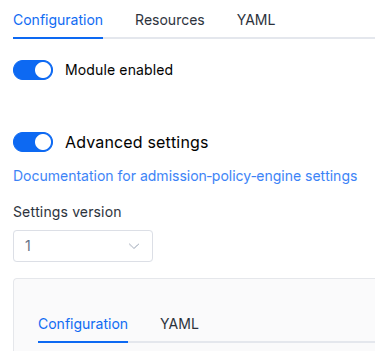
In the “System” → “System Management” → “Deckhouse” → “Modules” section, open the
system-s3module and enable the “Advanced Settings” toggle. Fill in the required fields in the “Configuration” tab or specify the module settings in YAML format on the “YAML” tab, without the top-levelsettingskey. Save the changes.Example:
You can also edit the ModuleConfig object
system-s3on the “YAML” tab in the module settings window (“System” → “System Management” → “Deckhouse” → “Modules”, open the modulesystem-s3) by specifying the schema version in thespec.versionparameter and the necessary module parameters in thespec.settingssection. -
Via Deckhouse CLI (d8) (requires Deckhouse CLI (d8) configured to work with the cluster).
Edit the existing ModuleConfig
system-s3(for more details on configuring Deckhouse Platform, see the documentation) by executing the following command:d8 k edit mc system-s3Make the necessary changes in the
spec.settingssection. If necessary, specify the schema version in thespec.versionparameter. Save the changes.You can also create a manifest file for ModuleConfig
system-s3using the example below. Fill in thespec.settingssection with the required module parameters. If necessary, specify the schema version in thespec.versionparameter.Apply the manifest using the following command (indicate the manifest file name):
d8 k apply -f <FILENAME>Example of a manifest for ModuleConfig
system-s3:apiVersion: deckhouse.io/v1alpha1 kind: ModuleConfig metadata: name: system-s3 spec: version: 3 enabled: true settings: # Module parameters from the "Parameters" section below.
Requirements
To the Deckhouse Platform version: 1.72 and above.
Conversions
The module is configured using the ModuleConfig resource, the schema of which contains a version number. When you apply an old version of the ModuleConfig schema in a cluster, automatic transformations are performed. To manually update the ModuleConfig schema version, the following steps must be completed sequentially for each version:
-
Updates from version 1 to 2:
Replace
storage.singleReplica: truewithhighAvailability: falseand deletestorage.singleReplicaandstorage.recreateConfirmation. The replica count now follows the platform’s high-availability mode, and the recreate acknowledgement is gone: switching the mode is a migration between two Garage clusters and loses no data.
-
Updates from version 2 to 3:
Delete the
storagesection: the size of the system storage volumes is no longer a setting — it is the sum of the SystemBuckets’spec.sizeand grows with it.
Parameters
Schema version: 3
-
-
objectsettings.controllerSettings of the system-s3-controller (the reconciler for SystemBucket resources and for the storage data plane).
Default:
{}-
settings.controller.resourcesManagementsystem-s3-controller resources management options.
Default:
{}Example:
mode: VPA vpa: cpu: limitRatio: 1.5 max: 200m min: 50m memory: limitRatio: 1.5 max: 256Mi min: 64Mi mode: Auto-
stringsettings.controller.resourcesManagement.modeThe mode for managing resource requests. Classical
Staticrequests/limits orVPA.Default:
VPAAllowed values:
VPA,Static -
objectsettings.controller.resourcesManagement.staticStatic resource management settings.
-
objectsettings.controller.resourcesManagement.static.limitsResource limits for the controller pod.
-
settings.controller.resourcesManagement.static.limits.cpuCPU limit.
-
settings.controller.resourcesManagement.static.limits.memoryMemory limit.
-
-
objectsettings.controller.resourcesManagement.static.requestsResource requests for the controller pod.
-
settings.controller.resourcesManagement.static.requests.cpuCPU request.
-
settings.controller.resourcesManagement.static.requests.memoryMemory request.
-
-
-
objectsettings.controller.resourcesManagement.vpaParameters of the VPA mode.
Default:
{}-
objectsettings.controller.resourcesManagement.vpa.cpuCPU-related parameters.
Default:
{}-
numbersettings.controller.resourcesManagement.vpa.cpu.limitRatio
Coefficient used to calculate the initial CPU limit from the request.
VPA preserves the resulting limits/requests ratio during further resource tuning.
-
settings.controller.resourcesManagement.vpa.cpu.maxMaximum allowed CPU requests.
Default:
200m -
settings.controller.resourcesManagement.vpa.cpu.minMinimum allowed CPU requests.
Default:
50m
-
-
objectsettings.controller.resourcesManagement.vpa.memoryMemory-related parameters.
Default:
{}-
numbersettings.controller.resourcesManagement.vpa.memory.limitRatio
Coefficient used to calculate the initial memory limit from the request.
VPA preserves the resulting limits/requests ratio during further resource tuning.
-
settings.controller.resourcesManagement.vpa.memory.maxMaximum allowed memory requests.
Default:
256Mi -
settings.controller.resourcesManagement.vpa.memory.minMinimum allowed memory requests.
Default:
64Mi
-
-
stringsettings.controller.resourcesManagement.vpa.modeThe VPA usage mode.
Default:
AutoAllowed values:
Initial,Auto
-
-
-
-
booleansettings.highAvailability
Overrides the platform’s high-availability mode for the system object storage.
Left unset it follows
global.highAvailability, and with that unset too, whether the control plane itself is highly available (more than one master).The mode decides the shape of the data plane: highly available means three Garage replicas with a replication factor of 3, and not highly available means a single replica with a replication factor of 1 — a third of the footprint, no redundancy, and the store is unavailable while its pod is down.
Left unset, the mode is DERIVED from the cluster, and one direction of that is not acted on: a control plane that loses masters starts reading as not highly available, and the store keeps its three replicas anyway. Dropping to one is a loss of redundancy, and losing masters is not a request for it — it happens when the cluster can least afford it. The store moves to a single replica only when this setting says so out loud. The other direction needs no asking: masters coming back grows the store on its own.
Changing the mode on an installation that already holds data is done on the same Garage cluster, on the same volumes. Garage cannot change its replication factor while it runs, so the module stops the data plane, removes the saved cluster layout and starts it again with the other replica count; no objects are copied and no second cluster is built.
Going from one replica to three, the store is unavailable from the stop until the three replicas are up — usually under a minute, longer if the new volumes are slow to be provisioned. The new replicas are filled in the background while the store serves. Going from three to one, writes are refused first, until every replica holds everything (reads keep working); if that does not happen within 10 minutes, writes are given back and the change is tried again later. Then the store is unavailable for about a minute while it restarts on one replica, and the volumes of the two replicas that are gone are released.
The endpoint keeps its address and every key keeps working, so no credentials
Secrethas to be re-read. Progress is reported in theReplicationReadycondition ofModule/system-s3.Examples:
highAvailability: truehighAvailability: false -
stringsettings.logLevelModule log verbosity level.
Default:
INFOAllowed values:
ERROR,WARN,INFO,DEBUG,TRACE -
stringsettings.storageClass
StorageClass the system object storage orders its volumes from — one PersistentVolumeClaim per Garage replica.
Left unset it follows
global.modules.storageClass, and with that unset too, the cluster’s default StorageClass.A StorageClass is required: the module has no storage of its own to fall back to, so an installation where none of the three resolves brings up no data plane at all and says so in the
StorageReadycondition ofModule/system-s3.Which class to choose is a durability decision. A class whose volumes are pinned to a node (a local class) ties each replica’s data to the node it first landed on: the replica’s copy is lost with that node and is rebuilt from the others, which the highly available mode survives and the single replica does not. A class whose volumes follow the pod (a network class) keeps the data across a node’s replacement.
On a local class, where the replicas run decides where their data lives. They run on nodes with the
node-role.deckhouse.io/system-s3role if the cluster has any, on system nodes otherwise, and on the masters when it has neither. Giving the role to a NodeGroup made for the store, with disks sized for it, keeps the data off nodes that a NodeGroup grows, shrinks and replaces for other workloads — each such replacement costs a replica its copy on a local class.Changing it on an installation that already holds data is performed as a migration, because the volumes of a running store cannot be re-ordered from another class in place: the module builds a second Garage cluster on the new class, copies the objects into it and moves the endpoint onto it. Both clusters exist at once for the length of it, so the storage it needs is up to twice the usual. What consumers see is a few minutes, during the switch itself, in which writes are refused. In the highly available mode the store keeps serving reads, though a read can stall for up to about a minute while a source replica restarts; a single-replica store is restarted once during the switch, and reads are unavailable for that minute or two. The cluster migrated away from is kept read-only only until every replica of the new one holds every block, and is then removed. Putting the setting back before the switch happens calls the migration off and removes the half-built cluster. A change of
highAvailabilitymade together with it is carried out by the same migration.Examples:
storageClass: ceph-csi-rbdstorageClass: localpath-system
-