Available with limitations in: Open/CE
Available without limitations in: Core, BE, SE, SE+, Ultimate/EE
The module lifecycle stage: General Availability
Do not create Pods and ReplicaSets directly: these objects are secondary and should be created by controllers (Deployment, StatefulSet, Job, and others). The User, PrivilegedUser, Editor, and ClusterEditor access levels cannot create or modify Pods, and no access level below SuperAdmin can create or modify ReplicaSets.
In multi-tenancy mode, the allowAccessToSystemNamespaces, namespaceSelector, and limitNamespaces fields of ClusterAuthorizationRule are enforced by the authorization webhook. If the webhook is unavailable, the requests it has to answer are denied. The webhook does not check control plane components, kubelets, and the ServiceAccounts of kube-system and of the namespaces whose names start with d8-. For details, see Basic role-based model.
Access rights are configured with the roles of the granular model in RoleBinding and ClusterRoleBinding objects, or with the custom resources of the basic model.
The module has 24 alerts.
The module is enabled by default in the following bundles: Default, Managed.
The module is disabled by default in the Minimal bundle.
How to explicitly enable the module...
You may explicitly enable or disable the module in one of the following ways:
-
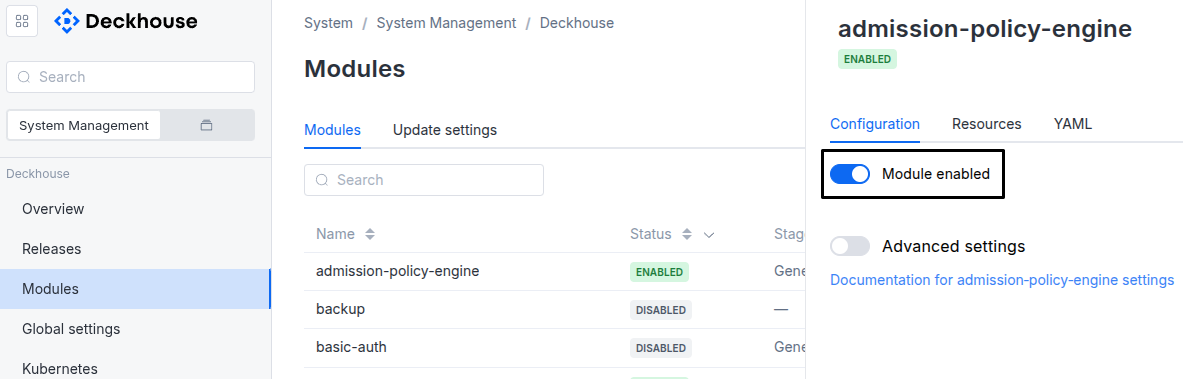
Via Deckhouse web UI. In the “System” → “System Management” → “Deckhouse” → “Modules” section, open the
user-authzmodule and enable (or disable) the “Module enabled” toggle. Save changes.Example:
-
Via Deckhouse CLI (d8).
Use the d8 system module enable command for enabling, or d8 system module disable command for disabling the module (you need Deckhouse CLI (d8), configured to work with the cluster).
Example of enabling the module:
d8 system module enable user-authz -
Using ModuleConfig
user-authz.Set
spec.enabledtotrueorfalsein ModuleConfiguser-authz(create it if necessary);Example of a manifest to enable module
user-authz:apiVersion: deckhouse.io/v1alpha1 kind: ModuleConfig metadata: name: user-authz spec: enabled: true
How to configure the module...
You can configure the module in one of the following ways:
-
Via Deckhouse web UI.
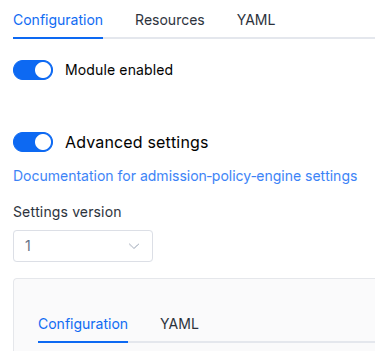
In the “System” → “System Management” → “Deckhouse” → “Modules” section, open the
user-authzmodule and enable the “Advanced Settings” switch. Fill in the required fields in the “Configuration” tab or specify the module settings in YAML format on the “YAML” tab, excluding the settings section. Save the changes.Example:
You can also edit the ModuleConfig object
user-authzon the “YAML” tab in the module settings window (“System” → “System Management” → “Deckhouse” → “Modules”, open the moduleuser-authz) by specifying the schema version in thespec.versionparameter and the necessary module parameters in thespec.settingssection. -
Via Deckhouse CLI (d8) (requires Deckhouse CLI (d8) configured to work with the cluster).
Edit the existing ModuleConfig
user-authz(for more details on configuring Deckhouse, see the documentation) by executing the following command:d8 k edit mc user-authzMake the necessary changes in the
spec.settingssection. If necessary, specify the schema version in thespec.versionparameter. Save the changes.You can also create a file with manifest for ModuleConfig
user-authzusing the example below. Fill in thespec.settingssection with the required module parameters. If necessary, specify the schema version in thespec.versionparameter.Apply the manifest using the following command (indicate the manifest file name):
d8 k apply -f <FILENAME>Example of a manifest for ModuleConfig
user-authz:apiVersion: deckhouse.io/v1alpha1 kind: ModuleConfig metadata: name: user-authz spec: version: 1 enabled: true settings: # Module parameters from the "Parameters" section below.
Parameters
Schema version: 1
- objectsettings
- booleansettings.controlPlaneConfigurator.enabled
Passes parameters for configuring
authz-webhookto thecontrol-plane-managermodule (see the parameters of the control-plane-manager module).If this parameter is disabled, the
control-plane-managermodule assumes that Webhook-based authorization is disabled by default. In this case (if no additional settings are provided), thecontrol-plane-managermodule will try to delete all references to the Webhook plugin from the manifest (even if you configure the manifest manually).Default:
trueExamples:
enabled: trueenabled: false
- booleansettings.enableMultiTenancy
Available in editions: BE, SE, SE+, Ultimate/EE
Enable namespace-based authorization (multi-tenancy mode).
When enabled, the module deploys the authorization webhook on the master nodes and Permission Browser. They enforce the
namespaceSelector,limitNamespaces, andallowAccessToSystemNamespacesfields of ClusterAuthorizationRule and serve WhoCan, SubjectAccessReport, and the filtered list of namespaces. Thekube-apiserversettings are applied automatically by the control-plane-manager module, see Configuring kube-apiserver for multi-tenancy mode.Default:
falseExamples:
enableMultiTenancy: trueenableMultiTenancy: false