
Available in editions: Open/CE, BE, SE, SE+, Ultimate/EE, Core
The module lifecycle stage: General Availability
The module has requirements for installation
VPA works directly with the Pod (instead of the Pod controller) by measuring and changing its containers’ parameters. Configuring is performed using the VerticalPodAutoscaler Custom Resource.
The module generally requires no configuration and only has the nodeSelector/tolerations and logLevel settings.
The module has 1 alert.
The module is enabled by default in the following bundles: Default, Managed.
The module is disabled by default in the Minimal bundle.
How to explicitly enable the module...
You may explicitly enable or disable the module in one of the following ways:
-
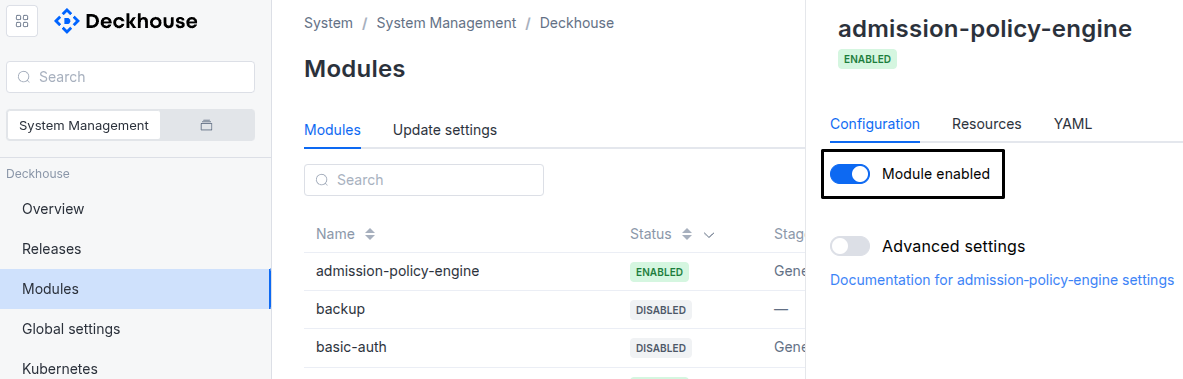
Via Deckhouse web UI. In the “System” → “System Management” → “Deckhouse” → “Modules” section, open the
vertical-pod-autoscalermodule and enable (or disable) the “Module enabled” toggle. Save changes.Example:
-
Via Deckhouse CLI (d8).
Use the d8 system module enable command for enabling, or d8 system module disable command for disabling the module (you need Deckhouse CLI (d8), configured to work with the cluster).
Example of enabling the module:
d8 system module enable vertical-pod-autoscaler -
Using ModuleConfig
vertical-pod-autoscaler.Set
spec.enabledtotrueorfalsein ModuleConfigvertical-pod-autoscaler(create it if necessary);Example of a manifest to enable module
vertical-pod-autoscaler:apiVersion: deckhouse.io/v1alpha1 kind: ModuleConfig metadata: name: vertical-pod-autoscaler spec: enabled: true
How to configure the module...
You can configure the module in one of the following ways:
-
Via Deckhouse web UI.
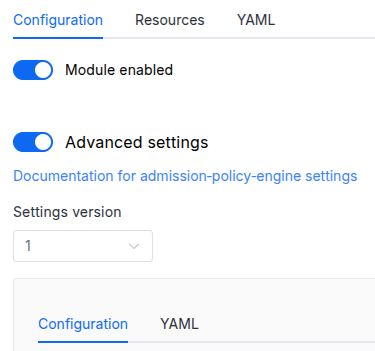
In the “System” → “System Management” → “Deckhouse” → “Modules” section, open the
vertical-pod-autoscalermodule and enable the “Advanced Settings” switch. Fill in the required fields in the “Configuration” tab or specify the module settings in YAML format on the “YAML” tab, excluding the settings section. Save the changes.Example:
You can also edit the ModuleConfig object
vertical-pod-autoscaleron the “YAML” tab in the module settings window (“System” → “System Management” → “Deckhouse” → “Modules”, open the modulevertical-pod-autoscaler) by specifying the schema version in thespec.versionparameter and the necessary module parameters in thespec.settingssection. -
Via Deckhouse CLI (d8) (requires Deckhouse CLI (d8) configured to work with the cluster).
Edit the existing ModuleConfig
vertical-pod-autoscaler(for more details on configuring Deckhouse, see the documentation) by executing the following command:d8 k edit mc vertical-pod-autoscalerMake the necessary changes in the
spec.settingssection. If necessary, specify the schema version in thespec.versionparameter. Save the changes.You can also create a file with manifest for ModuleConfig
vertical-pod-autoscalerusing the example below. Fill in thespec.settingssection with the required module parameters. If necessary, specify the schema version in thespec.versionparameter.Apply the manifest using the following command (indicate the manifest file name):
d8 k apply -f <FILENAME>Example of a manifest for ModuleConfig
vertical-pod-autoscaler:apiVersion: deckhouse.io/v1alpha1 kind: ModuleConfig metadata: name: vertical-pod-autoscaler spec: version: 1 enabled: true settings: # Module parameters from the "Parameters" section below.
Requirements
To the versions of other modules:
-
prometheus: any version. -
prometheus-metrics-adapter: any version.
Parameters
Schema version: 1
- objectsettings
- stringsettings.logLevel
Logging level of the VPA components: recommender, updater, and admission-controller.
Each level includes the messages of the less detailed levels. Some informational messages and warnings, such as startup messages, are logged at any level.
Supported values:
Error: Errors and important messages that VPA logs at the info level, such as failed evictions and failed in-place updates.Warning: Warnings, the component version at startup, and the pod evictions caused by node resource pressure that the recommender processes (default).Info: Actions on pods, such as evictions, in-place resource updates, and setting the resources of pods being created.Debug: The progress of each recommender cycle and detailed information on decisions for each pod and container, such as why a pod was not updated. Produces a very large volume of logs, so use it for troubleshooting only.Trace: Every request to the Kubernetes API. Use it only whenDebugis not enough to find the problem.
Default:
WarningAllowed values:
Trace,Debug,Info,Warning,Error - objectsettings.nodeSelector
The same as in the pods’
spec.nodeSelectorparameter in Kubernetes.If the parameter is omitted or
false, it will be determined automatically. - array of objectssettings.tolerations
The same as in the pods’
spec.tolerationsparameter in Kubernetes;If the parameter is omitted or
false, it will be determined automatically.- stringsettings.tolerations.effect
- stringsettings.tolerations.key
- stringsettings.tolerations.operator
- integersettings.tolerations.tolerationSeconds
- stringsettings.tolerations.value