Available with limitations in: Open/CE, Core, BE, SE
Available without limitations in: SE+, Ultimate/EE
Included with limitations in extensions: Advanced Networking
Included without limitations in extensions: Cluster Union
The module lifecycle stage: General Availability
The module has 16 alerts.
The module is not enabled by default in any bundles.
How to explicitly enable the module...
You may explicitly enable or disable the module in one of the following ways:
-
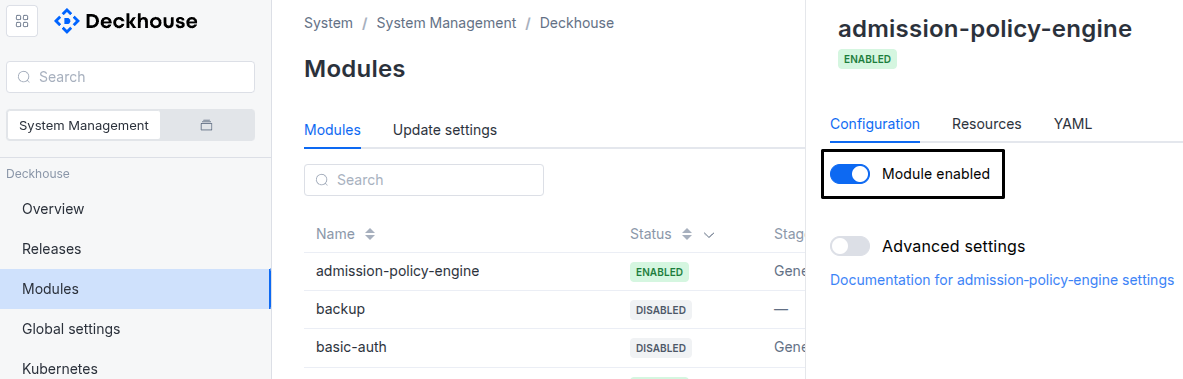
Via Deckhouse web UI. In the “System” → “System Management” → “Deckhouse” → “Modules” section, open the
cni-ciliummodule and enable (or disable) the “Module enabled” toggle. Save changes.Example:
-
Via Deckhouse CLI (d8).
Use the d8 system module enable command for enabling, or d8 system module disable command for disabling the module (you need Deckhouse CLI (d8), configured to work with the cluster).
Example of enabling the module:
d8 system module enable cni-cilium -
Using ModuleConfig
cni-cilium.Set
spec.enabledtotrueorfalsein ModuleConfigcni-cilium(create it if necessary);Example of a manifest to enable module
cni-cilium:apiVersion: deckhouse.io/v1alpha1 kind: ModuleConfig metadata: name: cni-cilium spec: enabled: true
How to configure the module...
You can configure the module in one of the following ways:
-
Via Deckhouse web UI.
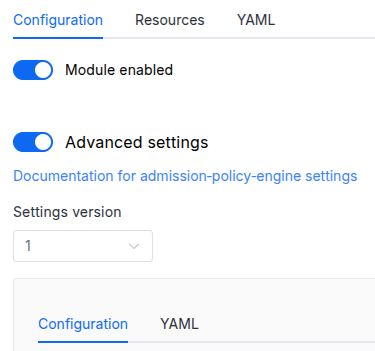
In the “System” → “System Management” → “Deckhouse” → “Modules” section, open the
cni-ciliummodule and enable the “Advanced Settings” switch. Fill in the required fields in the “Configuration” tab or specify the module settings in YAML format on the “YAML” tab, excluding the settings section. Save the changes.Example:
You can also edit the ModuleConfig object
cni-ciliumon the “YAML” tab in the module settings window (“System” → “System Management” → “Deckhouse” → “Modules”, open the modulecni-cilium) by specifying the schema version in thespec.versionparameter and the necessary module parameters in thespec.settingssection. -
Via Deckhouse CLI (d8) (requires Deckhouse CLI (d8) configured to work with the cluster).
Edit the existing ModuleConfig
cni-cilium(for more details on configuring Deckhouse, see the documentation) by executing the following command:d8 k edit mc cni-ciliumMake the necessary changes in the
spec.settingssection. If necessary, specify the schema version in thespec.versionparameter. Save the changes.You can also create a file with manifest for ModuleConfig
cni-ciliumusing the example below. Fill in thespec.settingssection with the required module parameters. If necessary, specify the schema version in thespec.versionparameter.Apply the manifest using the following command (indicate the manifest file name):
d8 k apply -f <FILENAME>Example of a manifest for ModuleConfig
cni-cilium:apiVersion: deckhouse.io/v1alpha1 kind: ModuleConfig metadata: name: cni-cilium spec: version: 1 enabled: true settings: # Module parameters from the "Parameters" section below.
Parameters
Schema version: 1
- objectsettings
- booleansettings.activeL2NeighborDiscoveryEnabled
Enables the Cilium
L2 neighbor discoverymechanism, which helps ensure that ARP table entries are kept up-to-date on all cluster nodes.Default:
true - stringsettings.bpfLBMode
eBPF LoadBalancer mode:
SNAT— traffic from the client to the pod (and back) passes through NAT, and accordingly the sender’s address is lost.DSR— traffic from the client to the pod passes with the sender’s address preserved, and back - according to the routing rules (bypassing the balancer). This mode saves network traffic and reduces delays, but only works for TCP traffic.Hybrid— TCP traffic is processed in DSR mode, and UDP traffic is processed in SNAT mode.
Default:
HybridAllowed values:
SNAT,Hybrid,DSR - booleansettings.createNodeRoutes
Create routes to Pods on other Nodes.
All Nodes must be located in the same L2 domain.
- booleansettings.debugLogging
Enables debug logging for Cilium components.
Default:
false - objectsettings.encryption
CNI Cilium encryption settings.
- stringsettings.encryption.mode
Encryption mode:
Disabled— encryption is disabled.-
WireGuard— enables traffic encryption between pods using WireGuard.Note! Before using WireGuard encryption, please ensure that the Linux kernel running on the cluster nodes has support WireGuard (either via the CONFIG_WIREGUARD=m kernel config option on Linux 5.6 and newer, or using an external WireGuard module for older kernels).
Note! Using WireGuard may cause significant CPU consumption by Cilium agent pods.
Default:
DisabledAllowed values:
Disabled,WireGuard - booleansettings.encryption.nodeToNodeModeEnabled
Enabling traffic encryption between nodes and pods in HostNetwork.
Note! The node-to-node traffic from and to the control-plane nodes is left unencrypted to prevent possible communication issues when renewing WireGuard public keys. At the same time, the traffic between control-plane components is still encrypted at the application layer.
Note! When this mode is active,
NodePortandHostPortare not available from thePodNetwork.Default:
false
- booleansettings.exclusiveCNIPlugin
Prevents additional CNI plugins from being enabled on cluster nodes. If the Istio module’s
dataPlane.trafficRedirectionSetupModesetting is set toCNIPlugin, the option will be automatically set tofalse.Explicitly disabling this option is recommended only when using an additional CNI or a specific CNI plugin in the cluster. An example of such a use case could be the Linkerd CNI plugin.
Default:
true - booleansettings.extraLoadBalancerAlgorithmsEnabled
Allows selectively overriding the load balancing algorithm using eBPF between backends for individual services. The annotation
service.cilium.io/lb-algorithmis used for overriding with one of the following values:random,maglev, orleast-conn.Note! This option requires the Linux kernel version on the nodes to be at least 5.15.
Default:
false - objectsettings.ipv4OptionsGuard
Mitigation of CVE-2026-98432 (use-after-free in the Linux IPv4 TCP handshake triggered by a TCP SYN with IP options).
A sidecar of the CNI agent installs a filter into the host network namespace and into every pod network namespace on the node, including pods started later. The filter matches IPv4 TCP SYN packets and IPv4 fragments carrying IP options.
The filter follows the iptables mode (nft or legacy) that iptables-wrapper selects on the node, the same as the other Deckhouse components. In the nft mode, the filter uses native nftables expressions. In the legacy mode, it uses iptables with the
u32match. No kernel modules are loaded unlessallowKernelModuleLoadis set. If the kernel modules of the selected mode are not loaded but those of the other mode are, the filter uses the other mode, and the node is reported by theD8IPv4OptionsGuardBackendMismatchalert. A node that cannot be protected is reported by theD8IPv4OptionsGuardNodeUnprotectedalert.To exclude a node (for example, a node with CIPSO labeled networking), set the
ipv4-options-guard.deckhouse.io/disabled: "true"label on it: the changes are reverted on that node.The mitigation does not fix the vulnerability: update the node kernel as soon as a fixed version is available.
- booleansettings.ipv4OptionsGuard.allowKernelModuleLoad
The filter needs the
nf_tableskernel module in the nft mode and theip_tables,iptable_raw,xt_tcpudpandxt_u32kernel modules in the legacy mode.By default, kernel modules are not loaded: if a module of the mode selected by iptables-wrapper is not loaded, the filter uses the other mode when its modules are loaded, and the node is reported as unprotected otherwise. Set to
trueto load the modules of the selected mode.Default:
false - booleansettings.ipv4OptionsGuard.disableMPTCP
In the
Enforcemode, setnet.mptcp.enabled=0in the host and in every pod network namespace. This removes the precondition of the published exploit.Listeners opened before the change stay MPTCP until the process is restarted. After a node reboot, MPTCP on the host is disabled again once the CNI agent starts.
Default:
true - stringsettings.ipv4OptionsGuard.mode
Operating mode.
If the mode is not set, it is
Enforcein clusters installed with the mitigation andAuditin clusters that existed before it.Audit— matching packets are only counted (thed8_ipv4_options_guard_matched_packets_totalmetric and theD8IPv4OptionsGuardMatchedTrafficalert). Use it to check that no workload relies on IP options. While any node is in this mode, theD8IPv4OptionsGuardAuditModealert reminds that the cluster is not protected yet.Enforce— matching packets are dropped, and MPTCP is disabled ifdisableMPTCPis set.Disabled— the filter is removed from all network namespaces, including running pods, andnet.mptcp.enabledis restored to the value it had before.
The mode is applied without restarting the CNI agent pods.
In the
AuditandEnforcemodes withbpfLBModeset toDSRorHybrid, the backend node also removes the DSR IPv4 option from service packets before they reach the pod. Switching to or fromDisabledturns this on or off and restarts the Cilium agents.Allowed values:
Audit,Enforce,Disabled
- array of stringssettings.labelsRegex
Cilium creates security identifiers based on the k8s entity labels. The more labels are involved in this process, the higher the access granularity that can be achieved. However, in large clusters, excessive granularity can create a heavy load. You can use the
labelsRegexoption to explicitly specify which labels are to be used for security policies, and which labels are to be neglected. Refer to the documentation to learn more about reducing the identity cardinalityEach label must be specified by a RegExp expression in YAML quoted string format. Note that special characters must be escaped.
Example:
labelsRegex: - k8s:!app\.kubernetes\.io - k8s:io\.cilium\.k8s\.policy - booleansettings.loadBalancerICMPReplyEnabled
Enable ICMP Echo Reply generation for LoadBalancer service IPs.
When enabled, nodes respond to ICMP Echo Requests (ping) addressed to LoadBalancer external IPs.
Default:
false - booleansettings.loadBalancerSourceRangeAllTypes
Enable loadBalancerSourceRanges CIDR filtering for all service types, not just LoadBalancer services. The corresponding NodePort and ClusterIP will also apply the CIDR filter. For more detailed information, please visit the link.
Default:
true - stringsettings.masqueradeMode
Cilium masquerade work mode for pods traffic leaving the cluster.
-
BPF- use cilium BPF. Basic operation mode.In this mode, masquerade will not be used if the destination IP address is within the
podSubnetCIDRorInternalIP/ExternalIPof any of the cluster nodes. -
Netfilter- use kernel Netfilter(iptables/nf_tables).In this mode, masquerade will not be used if the destination IP address is within the
podSubnetCIDRorInternalIP/ExternalIPof any of the cluster nodes.
In
BPFmode, ifExternalIPother thanInternalIPis specified for a cluster node, and that IP address is not currently assigned to any interface on the node, it will not be reachable from neighboring nodes from pods network. TheNetfiltermode allows you to bypass this limitation, but some other features stop working, such asEgressGateway.Default:
BPFAllowed values:
Netfilter,BPF -
- array of stringssettings.nodePortAddresses
List of CIDRs that restrict which node IP addresses are used for Cilium BPF NodePort listeners.
Only addresses assigned to selected network devices and matching one of the configured CIDRs will be exposed as NodePort frontends.
Example:
nodePortAddresses: - 192.168.1.100/32 - 10.0.0.0/8 - 192.168.1.0/24 - booleansettings.policyAuditMode
Do not enforce any Network Policy. Just log allowed/disallowed connections.
Default:
false - settings.resourcesManagement
Settings for CPU and memory requests and limits by cilium agent pods.
Examples:
resourcesManagement: mode: VPA vpa: mode: InPlaceOrRecreate cpu: min: 50m max: 2 limitRatio: 1.5 memory: min: 256Mi max: 2Gi limitRatio: 1.5resourcesManagement: mode: Static static: requests: cpu: 55m memory: 256Mi limits: cpu: 2 memory: 2GiresourcesManagement: mode: VPA vpa: mode: Auto cpu: min: 50m max: 2 limitRatio: 1.5 memory: min: 256Mi max: 2Gi limitRatio: 1.5- stringsettings.resourcesManagement.mode
Resource management mode:
Default:
VPAAllowed values:
VPA,Static - objectsettings.resourcesManagement.static
Resource management options for the
Staticmode.- objectsettings.resourcesManagement.static.limits
Configuring CPU and memory limits.
- string or numbersettings.resourcesManagement.static.limits.cpu
Configuring CPU limits.
Pattern:
^[0-9]+m?$ - string or numbersettings.resourcesManagement.static.limits.memory
Configuring memory limits.
Pattern:
^[0-9]+(\.[0-9]+)?(E|P|T|G|M|k|Ei|Pi|Ti|Gi|Mi|Ki)?$
- objectsettings.resourcesManagement.static.requests
Resource requests settings for pods.
- string or numbersettings.resourcesManagement.static.requests.cpu
Configuring CPU requests.
Pattern:
^[0-9]+m?$ - string or numbersettings.resourcesManagement.static.requests.memory
Configuring memory requests.
Pattern:
^[0-9]+(\.[0-9]+)?(E|P|T|G|M|k|Ei|Pi|Ti|Gi|Mi|Ki)?$
- objectsettings.resourcesManagement.vpa
Resource management options for the
VPAmode.- objectsettings.resourcesManagement.vpa.cpu
CPU-related VPA settings.
- numbersettings.resourcesManagement.vpa.cpu.limitRatio
The CPU limits/requests ratio.
This ratio is used for calculating the initial CPU limits for a pod.
If this parameter is set, the VPA will recalculate the CPU limits while maintaining the specified limits/requests ratio.
- string or numbersettings.resourcesManagement.vpa.cpu.max
The maximum value that the VPA can set for the CPU requests.
Default:
4Pattern:
^[0-9]+m?$ - string or numbersettings.resourcesManagement.vpa.cpu.min
The minimum value that the VPA can set for the CPU requests.
Default:
100mPattern:
^[0-9]+m?$
- objectsettings.resourcesManagement.vpa.memory
Memory-related VPA settings.
- numbersettings.resourcesManagement.vpa.memory.limitRatio
The memory limits/requests ratio.
This ratio is used for calculating the initial memory limits for a pod.
If this parameter is set, the VPA will recalculate the memory limits while maintaining the specified limits/requests ratio.
- string or numbersettings.resourcesManagement.vpa.memory.max
The maximum memory requests the VPA can set.
Default:
4GiPattern:
^[0-9]+(\.[0-9]+)?(E|P|T|G|M|k|Ei|Pi|Ti|Gi|Mi|Ki)?$ - string or numbersettings.resourcesManagement.vpa.memory.min
The minimum memory requests the VPA can set.
Default:
128MiPattern:
^[0-9]+(\.[0-9]+)?(E|P|T|G|M|k|Ei|Pi|Ti|Gi|Mi|Ki)?$
- stringsettings.resourcesManagement.vpa.mode
VPA operating mode.
-
Initial— VPA sets initial values for pod resource requests and limits at pod creation time. Resource values are not changed automatically afterwards. -
InPlaceOrRecreate— VPA attempts to update pod resources in place when supported by the cluster. If in-place updates are not possible, the pod will be recreated. -
Auto— VPA automatically recreates pods to apply updated resource values.Starting from Deckhouse version 1.75, this mode is considered legacy. It is recommended to use
InPlaceOrRecreateinstead.
Default:
InitialAllowed values:
Initial,InPlaceOrRecreate,Auto -
- booleansettings.sctpEnabled
Enable SCTP support for Cilium (for both incoming and outgoing traffic).
Note. Cilium implements only basic SCTP support. Therefore, when using SCTP with Cilium, please be aware of the following limitations:
- The following features are not currently supported:
SCTP multi-homing,NetworkPolicies for pod-to-VIP. - For incoming SCTP packets port overwriting is not supported.
This means that applications must be published through either HostPort or Service, where the
targetPortMUST match theportspecified. Otherwise, the packet will be dropped. - For outgoing SCTP packets, only 1:1 SNAT is supported by default.
In this mode, only the src_ip is replaced, while the src_port remains unchanged. If the src_port is already in use on the node, the packet will be rejected.
To enable src_port substitution, you must switch the
masqueradeModeparameter toNetfiltermode.
Default:
false - The following features are not currently supported:
- booleansettings.svcSourceRangeCheck
For services of the
loadBalancertype, enables checking the source IP for compliance with loadBalancer.sourceRanges. The check is not performed if access is made from within the cluster or thesourceRangesparameter is empty/not specified. Some cloud providers support filtering of incoming traffic based on thesourceRangesparameter in their loadBalancer implementations. In such cases, the cilium documentation recommends disabling thesvcSourceRangeCheckoption.Do not enable if another balancer or any type of SNAT is running in front of the services.
Default:
false - stringsettings.tunnelMode
Tunnel mode.
Note! After changing the parameter, it is necessary to restart all nodes, otherwise, there may be problems with the availability of Pods!
Note! VXLAN mode is not compatible with following bpfLBMode modes: Hybrid, DSR. bpfLBMode will be overriden to SNAT if the tunnelMode is VXLAN.
Default:
DisabledAllowed values:
Disabled,VXLAN