
Available in editions: Ultimate/EE, SE+
Included in extensions: On-prem IaaS
The module lifecycle stage: General Availability
The module has 1 alert.
The module is not enabled by default in any bundles.
How to explicitly enable the module...
You may explicitly enable or disable the module in one of the following ways:
-
Via Deckhouse web UI. In the “System” → “System Management” → “Deckhouse” → “Modules” section, open the
cloud-provider-zvirtmodule and enable (or disable) the “Module enabled” toggle. Save changes.Example:
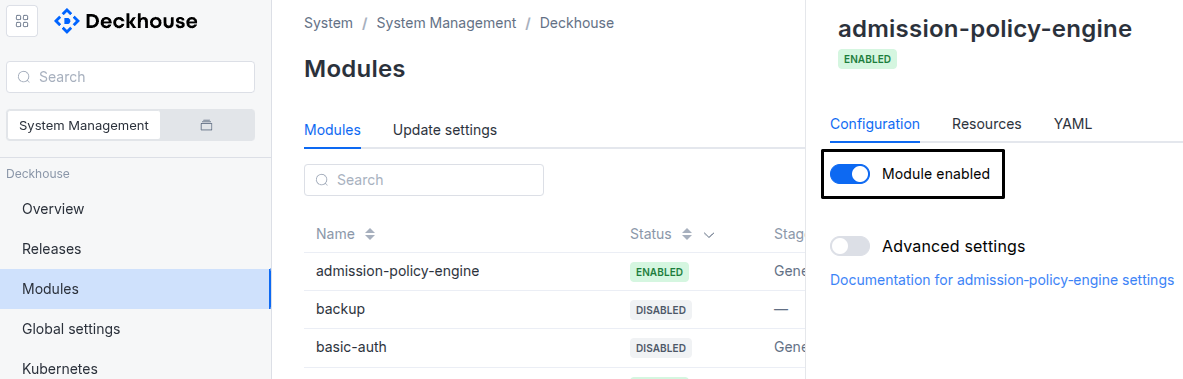
-
Via Deckhouse CLI (d8).
Use the d8 system module enable command for enabling, or d8 system module disable command for disabling the module (you need Deckhouse CLI (d8), configured to work with the cluster).
Example of enabling the module:
d8 system module enable cloud-provider-zvirt -
Using ModuleConfig
cloud-provider-zvirt.Set
spec.enabledtotrueorfalsein ModuleConfigcloud-provider-zvirt(create it if necessary);Example of a manifest to enable module
cloud-provider-zvirt:apiVersion: deckhouse.io/v1alpha1 kind: ModuleConfig metadata: name: cloud-provider-zvirt spec: enabled: true
How to configure the module...
You can configure the module in one of the following ways:
-
Via Deckhouse web UI.
In the “System” → “System Management” → “Deckhouse” → “Modules” section, open the
cloud-provider-zvirtmodule and enable the “Advanced Settings” switch. Fill in the required fields in the “Configuration” tab or specify the module settings in YAML format on the “YAML” tab, excluding the settings section. Save the changes.Example:
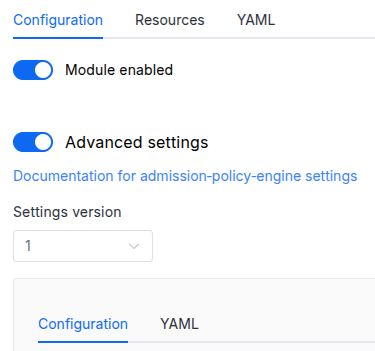
You can also edit the ModuleConfig object
cloud-provider-zvirton the “YAML” tab in the module settings window (“System” → “System Management” → “Deckhouse” → “Modules”, open the modulecloud-provider-zvirt) by specifying the schema version in thespec.versionparameter and the necessary module parameters in thespec.settingssection. -
Via Deckhouse CLI (d8) (requires Deckhouse CLI (d8) configured to work with the cluster).
Edit the existing ModuleConfig
cloud-provider-zvirt(for more details on configuring Deckhouse, see the documentation) by executing the following command:d8 k edit mc cloud-provider-zvirtMake the necessary changes in the
spec.settingssection. If necessary, specify the schema version in thespec.versionparameter. Save the changes.You can also create a file with manifest for ModuleConfig
cloud-provider-zvirtusing the example below. Fill in thespec.settingssection with the required module parameters. If necessary, specify the schema version in thespec.versionparameter.Apply the manifest using the following command (indicate the manifest file name):
d8 k apply -f <FILENAME>Example of a manifest for ModuleConfig
cloud-provider-zvirt:apiVersion: deckhouse.io/v1alpha1 kind: ModuleConfig metadata: name: cloud-provider-zvirt spec: version: 2 enabled: true settings: # Module parameters from the "Parameters" section below.
Conversions
The module is configured using the ModuleConfig resource, the schema of which contains a version number. When you apply an old version of the ModuleConfig schema in a cluster, automatic transformations are performed. To manually update the ModuleConfig schema version, the following steps must be completed sequentially for each version :
- Updates from version 1 to 2:
The settings are grouped under the
provider,nodes,storage, andccmparameters.The conversion sets temporary values for the
server,clusterID, andsshPublicKeyparameters. Replace them with the actual values.The zVirt login and password are not stored in the module settings. The module reads them from the
d8-credentialsSecret of thecloud-provider.deckhouse.io/credentialstype.
Parameters
Schema version: 2
- objectsettings
- objectsettings.ccm
Cloud Controller Manager (CCM) subsystem settings.
CCM keeps the cluster node metadata up to date and removes from the cluster the nodes whose virtual machines no longer exist in zVirt.
- booleansettings.ccm.disabled
Disables the Cloud Controller Manager.
When set to
true, the module does not deploy CCM.Default:
false - objectsettings.ccm.parameters
Required value
Parameters of the CCM subsystem.
- objectsettings.nodes
Required value
Nodes subsystem settings.
The subsystem describes how the cluster nodes are created in zVirt, including the layout, the SSH key, and the static network configuration.
- booleansettings.nodes.disabled
Disables the nodes subsystem.
When set to
true, the cluster does not create CloudEphemeral nodes in zVirt.Default:
false - objectsettings.nodes.parameters
Required value
Parameters of the nodes subsystem.
- objectsettings.nodes.parameters.customNetworkConfigs
Static network configuration of the nodes of CloudPermanent NodeGroups.
The key is the name of a CloudPermanent NodeGroup, for example
master. Nodes of a NodeGroup that is not listed get their network settings over DHCP.Addresses from the
networkInterfaceAddresseslist are assigned by node index. The first address goes to the node with index 0, the second address goes to the node with index 1, and so on. If the list holds fewer addresses than the NodeGroup has replicas, the remaining nodes get their addresses over DHCP.- objectsettings.nodes.parameters.customNetworkConfigs.<KEY_NAME>
<KEY_NAME>— item (key) name.Static network configuration of a node network interface.
- array of stringssettings.nodes.parameters.customNetworkConfigs.<KEY_NAME>.dnsServers
List of DNS servers.
Example:
dnsServers: - 8.8.8.8 - 8.8.4.4 - array of stringssettings.nodes.parameters.customNetworkConfigs.<KEY_NAME>.networkInterfaceAddresses
Required value
List of IP addresses to assign to the interface, one address per node.
Example:
networkInterfaceAddresses: - 192.168.1.10 - 192.168.1.11 - stringsettings.nodes.parameters.customNetworkConfigs.<KEY_NAME>.networkInterfaceGateway
Required value
Default network gateway.
Example:
networkInterfaceGateway: 192.168.1.1 - stringsettings.nodes.parameters.customNetworkConfigs.<KEY_NAME>.networkInterfaceName
Required value
Name of the network interface to apply the static configuration to.
Example:
networkInterfaceName: enp1s0 - stringsettings.nodes.parameters.customNetworkConfigs.<KEY_NAME>.networkInterfaceNetmask
Required value
Subnet mask for the interface.
Example:
networkInterfaceNetmask: 255.255.255.0
- stringsettings.nodes.parameters.layout
Required value
Layout name.
The available layouts are described in “Layouts”.
Allowed values:
Standard - stringsettings.nodes.parameters.sshPublicKey
Required value
Public SSH key for accessing the nodes.
- objectsettings.provider
Required value
zVirt connection settings.
- objectsettings.provider.parameters
Required value
Parameters for connecting to the zVirt API.
The login and the password are not set in the module settings. The module reads them from the
d8-credentialsSecret of thecloud-provider.deckhouse.io/credentialstype in thed8-cloud-provider-zvirtnamespace.- stringsettings.provider.parameters.caBundle
Base64-encoded bundle of CA certificates in PEM format to verify the zVirt API certificate.
When the
insecureparameter is set totrue, the bundle is ignored. - stringsettings.provider.parameters.clusterID
Required value
ID of the zVirt cluster to create virtual machines in.
The cluster must have shared storage domains and CPUs of the same type.
Pattern:
^[\da-fA-F]{8}\-[\da-fA-F]{4}\-[\da-fA-F]{4}\-[\da-fA-F]{4}\-[\da-fA-F]{12}$Example:
clusterID: 49bb4594-0cd4-4eb7-8288-8594eafd5a86 - booleansettings.provider.parameters.insecure
Disables verification of the zVirt API certificate.
Set to
trueif zVirt uses a self-signed certificate.Default:
false - stringsettings.provider.parameters.server
Required value
URL of the zVirt API endpoint.
Specify a URL with the
httporhttpsscheme.
- objectsettings.storage
Storage subsystem settings.
The subsystem provides the CSI driver and the StorageClasses for zVirt storage domains.
- booleansettings.storage.disabled
Disables the storage subsystem.
When set to
true, disk provisioning in the cluster is unavailable.Default:
false - objectsettings.storage.parameters
Required value
Parameters of the storage subsystem.
- array of stringssettings.storage.parameters.excludedStorageClasses
List of StorageClasses to exclude from creation in the cluster.
The module creates a StorageClass for each active zVirt storage domain. Each item of the list is a regular expression matched against the whole StorageClass name. For example,
dataexcludes only thedataStorageClass, anddata.*excludes every StorageClass whose name starts withdata.