The module lifecycle stage: Generally available version
The module has requirements for installation
Warning! When changing module network settings, make sure cert-manager issuer and Code module use the same Ingress class.
- Check
spec.network.ingressClassinCodeInstance.- Check Ingress class in cert-manager
Issuer/ClusterIssuersolver configuration.- After switching Ingress class, re-issue certificates if needed.
Git SSH Operation on Port 22
By default, the Deckhouse cluster uses the built-in Ingress controller — ingress-nginx. This controller provides access to the web interface (UI) via standard HTTP (port 80) and HTTPS (port 443) ports. However, ingress-nginx does not support TCP port proxying.
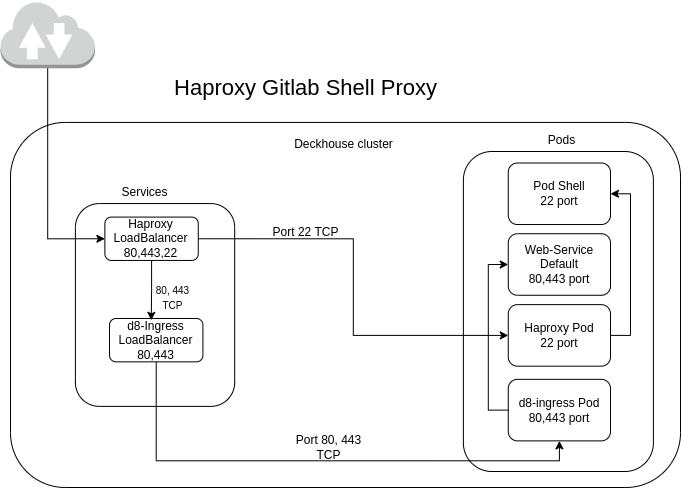
To proxy external TCP traffic through port 22 (Git SSH), a special option is provided in the module configuration. When this option is enabled, Haproxy is deployed with a service of type LoadBalancer. Haproxy forwards traffic from port 22 to the corresponding Git SSH Pod. Ports 80 and 443 continue to be handled by ingress-nginx, where TLS traffic termination occurs.
Self-signed certificates (certificates issued with internal Certificate Authority)
To use self-signed certificates in different connections (HTTPS, rediss, SMTPS etc…), create secret or configmap in d8-code namespace with certificates and declare it in CR:
...
spec:
  network:
    certificates:
      customCAs:
       - secret: custom-tls-ca
         keys:
           - ca.crt
           - tls.crt
       - secret: more-custom-CAs
         keys:
           - custom-ca-1.crt
       - configMap: custom-CA-cm
       - configMap: more-custom-CAs-cm
         keys:
           - custom-ca-2.crt
           - custom-ca-3.crt
...
Configure custom certificate for web UI
To use your own TLS certificate for the web endpoint, create a TLS Secret in d8-code and reference it in spec.network.web.https.
-
Create TLS Secret in
d8-code:kubectl -n d8-code create secret generic code-web-tls \ --from-file=tls.crt=tls.crt \ --from-file=tls.key=tls.key \ --from-file=ca.crt=ca.crt -
Configure
CodeInstanceto use this Secret for web UI and include the certificate innetwork.certificates.customCAsto distribute trust to all containers:
apiVersion: deckhouse.io/v1
kind: CodeInstance
metadata:
  name: code
spec:
  network:
    certificates:
      customCAs:
        - secret: code-web-tls
          keys:
            - tls.crt
    web:
      hostname: code.example.com
      https:
        mode: CustomCertificate
        customCertificate:
          secretName: code-web-tls
The certificate must be valid for the configured hostname.
If your certificate is signed by a private CA, prefer providing the CA certificate/chain in customCAs.
Gzip compression setup
Settings are inherit from resource IngressNginxController by default, with following default values applied:
gzip_comp_level 1gzip_types application/atom+xml application/javascript application/x-javascript application/json application/rss+xml application/vnd.ms-fontobject application/x-font-ttf application/x-web-app-manifest+json application/xhtml+xml application/xml font/opentype image/svg+xml image/x-icon text/css text/javascript text/plain text/x-component
You can configure compression using resource IngressNginxController,
by setting options in spec.config. Example:
...
spec:
  config:
     gzip-level: "5"
     gzip-types: "font/opentype image/svg+xml image/x-icon text/css text/plain text/x-component"
...
ownLoadBalancer setting
Features of the ownLoadBalancer option
Warning! ownLoadBalancer DOES NOT support the following modes:
HostPort,HostPortWithSSLPassthrough,HostPortWithProxyProtocol, andHostWithFailover. Ingress-nginx controller modes.
These modes are service exposure modes configured in d8-ingress-nginx IngressNginxController. If your cluster uses one of them, do not enable ownLoadBalancer.
-
Separate IP Address: When the
ownLoadBalancer.enabledoption is enabled for the Code module, a separate IP address is allocated, distinct from the main Deckhouse IP address. A separate DNS record must be created for this address. The following services will be accessible via this DNS record:- Web interface (UI) on ports 80 and 443.
- Git SSH on port 22.
-
Ignored Parameters: When the
ownLoadBalancer.enabledoption is enabled, the following parameters are ignored:spec.network.gitSsh.hostnamespec.network.gitSsh.service.typespec.network.gitSsh.service.nodePort
Instead, the
shellservice is assigned theLoadBalancertype, and Git SSH becomes accessible via the same domain as the web service. -
Default value:
ownLoadBalancer.enabledistrueby default.
Configure ownLoadBalancer.httpBackends
Use spec.network.ownLoadBalancer.httpBackends to explicitly define which IngressNginxController instances receive HTTP(S) traffic from the Code HAProxy LoadBalancer.
- If this list is empty, backend service names are derived automatically from the selected Ingress class.
- Use this option when you run several ingress controllers and want to bind Code traffic to specific controllers.
Example:
apiVersion: deckhouse.io/v1
kind: CodeInstance
metadata:
  name: code
spec:
  network:
    ownLoadBalancer:
      enabled: true
      httpBackends:
        - system-controller
Configuration Example
Below is an example of enabling Haproxy for Git SSH proxying in CodeInstance:
apiVersion: deckhouse.io/v1
kind: CodeInstance
metadata:
  name: code
spec:
...
  network:
    ownLoadBalancer:
      enabled: true
...
Verification checklist
After applying changes, verify:
kubectl -n d8-code get svc shell webservice-default- A
LoadBalancerexternal IP is assigned to the expected service(s). - DNS A record points to that external IP.
- Git SSH access works:
ssh -T git@<host> -p 22Haproxy Workflow Diagram
Haproxy inside the Deckhouse cluster operates according to the following diagram:
Istio service mesh
Code module supports Istio service mesh. When enabled, the operator switches all internal communication between Code components from application-level TLS to Istio mTLS (handled by Envoy sidecars). The operator also creates a PeerAuthentication resource to enforce mTLS.
Enable Istio
Set spec.network.istio.enabled to true in the CodeInstance:
apiVersion: deckhouse.io/v1
kind: CodeInstance
metadata:
  name: code
spec:
  network:
    istio:
      enabled: true
      strict: true
Prerequisites: the Deckhouse Istio module must be installed. The operator handles sidecar injection per-pod via the
sidecar.istio.io/inject: "true"label — thed8-codenamespace does not need to be labeled for namespace-wide injection.
Strict mode
When strict: true, the operator:
- Creates a
PeerAuthenticationwith STRICT mTLS mode — plain text is rejected on all ports except metrics (9090, 9254) and shell SSH (22, only whenownLoadBalancer.enabled=false). - Configures Ingress annotations for Istio sidecar routing (
service-upstream,upstream-vhost,backend-protocol: http) on all Ingress resources (webservice, pages, registry).
Critical requirement: the ingress controller must be in the Istio mesh — set
IngressNginxController.spec.enableIstioSidecar=true. See Deckhouse documentation: Enabling Istio for applications. Without this, the web UI, Pages, and Registry will be inaccessible because the ingress controller cannot reach the backend services over plain HTTP on port 8181 (STRICT).
When strict: false (default), the operator:
- Creates a
PeerAuthenticationwith PERMISSIVE mTLS mode — both mTLS and plain text are accepted on all ports. - Configures Ingress annotations with
service-upstreamandbackend-protocol: http(withoutupstream-vhost), which works without the ingress controller being in the mesh.
What the operator does
When Istio is enabled, the operator:
- Injects sidecars into all Code pods by adding the
sidecar.istio.io/inject: "true"label and theproxy.istio.io/config: {"holdApplicationUntilProxyStarts":true}annotation. - Switches internal URLs to HTTP — components communicate over plain HTTP; mTLS is handled by sidecars.
- Removes application-level TLS — no internal TLS certificates are created for webservice, Gitaly, or Praefect.
- Creates a
PeerAuthenticationresource namedd8-code-istio-mtlsin thed8-codenamespace with:- STRICT mTLS mode for all Code workloads (selected by label
app.kubernetes.io/managed-by=code-operator) — only whenspec.network.istio.strict: true. Whenstrict: false(default), the mode is PERMISSIVE. - PERMISSIVE exceptions on specific ports that receive non-mesh traffic — see below (these exceptions apply only in STRICT mode).
- STRICT mTLS mode for all Code workloads (selected by label
When Istio is disabled, the operator removes the PeerAuthentication resource and restores application-level TLS.
PERMISSIVE ports
The following ports are set to PERMISSIVE because they receive traffic from sources outside the Istio mesh, or from Pod DNS addresses where auto-mTLS does not apply:
| Port | Component | Reason |
|---|---|---|
| 9090 | Gitaly metrics | Prometheus scraping (kube-rbac-proxy), typically not in mesh |
| 9254 | webservice metrics | Prometheus scraping (kube-rbac-proxy), typically not in mesh |
| 22 | shell SSH | Only whenownLoadBalancer.enabled=false: shell Service is LoadBalancer, external SSH traffic arrives directly. When ownLoadBalancer.enabled=true (default): HAProxy is in the mesh, traffic goes HAProxy → shell via mTLS, port is STRICT |
Important! Port 8181 (webservice workhorse) is STRICT — but only when
spec.network.istio.strict: true. This means the ingress controller (nginx) must be in the Istio mesh, or use an Istio Ingress Gateway, to reach the web UI. See Deckhouse documentation: Enabling Istio for applications for instructions on enabling sidecar injection for the ingress-nginx controller.
Gitaly headless Service
The Gitaly Service is always created as headless (clusterIP: None). This is required because Praefect connects to individual Gitaly nodes via Pod DNS (gitaly-<name>-<n>.gitaly-<name>.d8-code.svc). With a headless Service, Istio creates per-Pod outbound clusters with mTLS metadata, enabling auto-mTLS between Praefect and Gitaly under STRICT mode.
Recommended: move ingress controller into the mesh
Port 8181 (webservice workhorse) is STRICT when spec.network.istio.strict: true — the ingress controller (nginx) must be in the Istio mesh to reach the web UI. See Deckhouse documentation: Enabling Istio for applications for instructions on enabling sidecar injection for the ingress-nginx controller.
Verify
# Check that PeerAuthentication was created
kubectl -n d8-code get peerauthentication d8-code-istio-mtls -o yaml

# Check that sidecars are injected
kubectl -n d8-code get pods -o jsonpath='{.items[0].spec.containers[*].name}'
# Should list "istio-proxy" alongside app containers