Available with limitations in: Core
Available without limitations in: Open/CE, BE, SE, SE+, Ultimate/EE
The module lifecycle stage: Generally available version
The module has requirements for installation
How to explicitly enable or disable the module…
You may explicitly enable or disable the module in one of the following ways:
-
Via Deckhouse web UI. In the “System” → “System Management” → “Deckhouse” → “Modules” section, open the
consolemodule and enable (or disable) the “Module enabled” toggle. Save changes.Example:
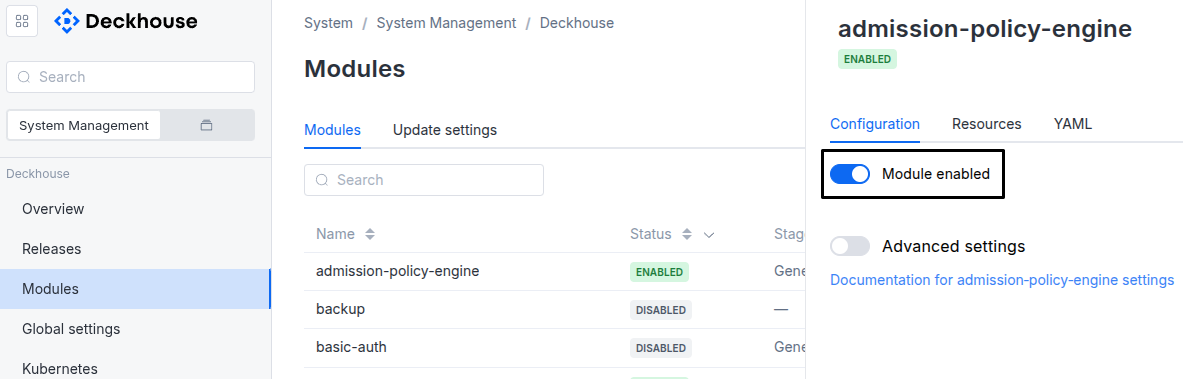
-
Via Deckhouse CLI (d8).
Use the d8 system module enable command for enabling, or d8 system module disable command for disabling the module (you need Deckhouse CLI (d8), configured to work with the cluster).
Example of enabling the module:
d8 system module enable console -
Using ModuleConfig
console.Set
spec.enabledtotrueorfalsein ModuleConfigconsole(create it if necessary).Example of a manifest to enable module
console:apiVersion: deckhouse.io/v1alpha1 kind: ModuleConfig metadata: name: console spec: enabled: true
You can configure the module in one of the following ways:
-
Via Deckhouse web UI.
In the “System” → “System Management” → “Deckhouse” → “Modules” section, open the
consolemodule and enable the “Advanced Settings” toggle. Fill in the required fields in the “Configuration” tab or specify the module settings in YAML format on the “YAML” tab, without the top-levelsettingskey. Save the changes.Example:
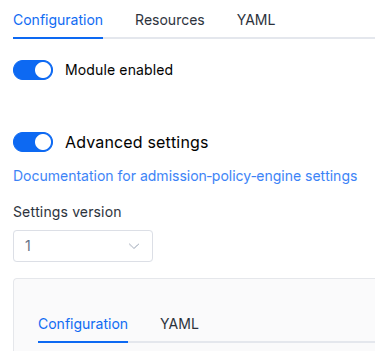
You can also edit the ModuleConfig object
consoleon the “YAML” tab in the module settings window (“System” → “System Management” → “Deckhouse” → “Modules”, open the moduleconsole) by specifying the schema version in thespec.versionparameter and the necessary module parameters in thespec.settingssection. -
Via Deckhouse CLI (d8) (requires Deckhouse CLI (d8) configured to work with the cluster).
Edit the existing ModuleConfig
console(for more details on configuring Deckhouse Platform, see the documentation) by executing the following command:d8 k edit mc consoleMake the necessary changes in the
spec.settingssection. If necessary, specify the schema version in thespec.versionparameter. Save the changes.You can also create a manifest file for ModuleConfig
consoleusing the example below. Fill in thespec.settingssection with the required module parameters. If necessary, specify the schema version in thespec.versionparameter.Apply the manifest using the following command (indicate the manifest file name):
d8 k apply -f <FILENAME>Example of a manifest for ModuleConfig
console:apiVersion: deckhouse.io/v1alpha1 kind: ModuleConfig metadata: name: console spec: version: 2 enabled: true settings: # Module parameters from the "Parameters" section below.
Requirements
To the Deckhouse Platform version: 1.71 and above.
Conversions
The module is configured using the ModuleConfig resource, the schema of which contains a version number. When you apply an old version of the ModuleConfig schema in a cluster, automatic transformations are performed. To manually update the ModuleConfig schema version, the following steps must be completed sequentially for each version:
-
Updates from version 1 to 2:
The
allowAnyoneToRuleTheClusterfield is removed. Theauth.passwordfield is removed; if theauthobject becomes empty, it is removed as well.
Parameters
Schema version: 2
-
-
objectsettings.authAuthentication configuration.
Default:
{}-
array of stringssettings.auth.allowedUserGroups
An array of user groups that can access the web UI.
This parameter is used if the user-authn module is enabled or the
externalAuthenticationparameter is set.Caution! Note that you must add those groups to the appropriate field in the DexProvider config if this module is used together with the user-authn one.
-
stringsettings.auth.allowedUserGroups.Element of the array
Maximum length:
253
-
-
objectsettings.auth.externalAuthenticationParameters to enable external authentication. Uses Nginx Ingress external-auth mechanism which is based on the the Nginx auth_request module.
-
stringsettings.auth.externalAuthentication.authSignInURL
URL to redirect the user for authentication (if the authentication service returned a non-200 HTTP response code).
Must start with
http://orhttps://and be set together withauthURL.Maximum length:
2048Pattern:
^https?:// -
stringsettings.auth.externalAuthentication.authURL
URL of the authentication service. If the user is authenticated, the service should return an HTTP 200 response code.
Must start with
http://orhttps://and be set together withauthSignInURL.Maximum length:
2048Pattern:
^https?:// -
booleansettings.auth.externalAuthentication.useBearerTokens
The console must use the user ID to work with the Kubernetes API (the authentication service must return the Authorization HTTP header that contains the bearer-token – the console will use this token to make requests to the Kubernetes API server).
Default value is
true.Caution! For security reasons, this mode only works if
https.mode(global or for a module) is not set toDisabled.
-
-
stringsettings.auth.sessionTTL
User session will be kept for specified amount of time even if user will not log in.
Specified as a single number with
s,morhsuffix, for example30m. Compound values like1h30mare not supported.Default:
24hPattern:
^[0-9]+[smh]$ -
array of stringssettings.auth.whitelistSourceRangesAn array of IPv4 CIDRs that are allowed to authenticate. The mask is required, for example
1.1.1.1/32.Example:
whitelistSourceRanges: - 1.1.1.1/32-
stringsettings.auth.whitelistSourceRanges.Element of the array
Pattern:
^((25[0-5]|2[0-4][0-9]|1[0-9]{2}|[1-9]?[0-9])\.){3}(25[0-5]|2[0-4][0-9]|1[0-9]{2}|[1-9]?[0-9])/([0-9]|[12][0-9]|3[0-2])$
-
-
-
integersettings.externalWebsocketPortExternal port for WebSocket protocol requests. If WebSocket traffic goes through a proxy server before reaching the backend, the frontend application will use this to connect to the proxy server.
Allowed values:
1 <= X <= 65535 -
booleansettings.highAvailability
Manually enable the high availability mode.
By default, Deckhouse automatically decides whether to enable the HA mode. Click here to learn more about the HA mode for modules.
Examples:
highAvailability: truehighAvailability: false -
objectsettings.https
What certificate type to use with frontend and status apps.
This parameter completely overrides the
global.modules.httpssettings.Examples:
customCertificate: secretName: foobar mode: CustomCertificatecertManager: clusterIssuerName: letsencrypt mode: CertManager-
objectsettings.https.certManager
-
stringsettings.https.certManager.clusterIssuerName
What ClusterIssuer to use for frontend.
Currently,
letsencrypt,letsencrypt-staging,selfsignedare available. Also, you can define your own.Default:
letsencryptMaximum length:
253Pattern:
^[a-z0-9]([-a-z0-9]*[a-z0-9])?(\.[a-z0-9]([-a-z0-9]*[a-z0-9])?)*$
-
-
objectsettings.https.customCertificate
Default:
{}-
stringsettings.https.customCertificate.secretName
The name of the secret in the
d8-systemnamespace to use with frontend.This secret must have the kubernetes.io/tls format.
Default:
falseMaximum length:
253Pattern:
^[a-z0-9]([-a-z0-9]*[a-z0-9])?(\.[a-z0-9]([-a-z0-9]*[a-z0-9])?)*$
-
-
stringsettings.https.mode
The HTTPS usage mode:
Disabled— in this mode, the web UI can only be accessed over HTTP. Caution! This mode is not supported. HTTPS is required for the module to function properly. If HTTPS is disabled, the web UI will be unavailable.CertManager— frontend will use HTTPS and get a certificate from the clusterissuer defined in thecertManager.clusterIssuerNameparameter.CustomCertificate— frontend will use HTTPS using the certificate from thed8-systemnamespace.OnlyInURI— frontend will work over HTTP (thinking that there is an external HTTPS load balancer in front that terminates HTTPS traffic). All the links in theuser-authnwill be generated using the HTTPS scheme.
Allowed values:
Disabled,CertManager,CustomCertificate,OnlyInURI
-
-
stringsettings.ingressClass
The class of the Ingress controller used for the web UI.
An optional parameter. By default, the
modules.ingressClassglobal value is used.Pattern:
^[a-z0-9]([-a-z0-9]*[a-z0-9])?(\.[a-z0-9]([-a-z0-9]*[a-z0-9])?)*$Example:
ingressClass: nginx -
objectsettings.nodeSelector
Node selector for frontend and backend pods. The same as in the Pods’
spec.nodeSelectorparameter in Kubernetes.If the parameter is omitted or
false, it will be determined automatically according to the general node placement logic: module components are placed on control plane nodes, or, if none are available for such placement, on nodes with thenode-role.deckhouse.io/systemlabel.Example:
disktype: ssd -
array of objectssettings.tolerations
Node tolerations for frontend and backend pods. The same as in the Pods’
spec.tolerationsparameter in Kubernetes;If the parameter is omitted or
false, it will be determined automatically.Example:
tolerations: - effect: NoSchedule key: key1 operator: Equal value: value1-
stringsettings.tolerations.effect
Allowed values:
NoSchedule,PreferNoSchedule,NoExecute -
stringsettings.tolerations.key
Maximum length:
316 -
stringsettings.tolerations.operator
Allowed values:
Exists,Equal -
integersettings.tolerations.tolerationSeconds
-
stringsettings.tolerations.value
Maximum length:
63
-
-