The module lifecycle stage: Generally available version
The module has requirements for installation
Module functionality is guaranteed only when using stock kernels provided with supported distributions.
Module functionality when using other kernels or distributions is possible but not guaranteed.
If you create virtual machines by cloning, change the UUID of Volume Groups on VMs created this way. Cloned Volume Groups have identical UUIDs, which can lead to conflicts. For detailed instructions, see the section “How do I change the UUID of Volume Groups when cloning virtual machines?”.
Methods and scenarios for configuring node disk subsystem
There are two methods for configuring the disk subsystem on Kubernetes cluster nodes depending on storage organization conditions:
For each disk subsystem configuration method on nodes, there are two configuration scenarios:
- “Full mirror”: Recommended to use as it is reliable and simple to configure.
- “Partial mirror”.
Features, pros and cons of scenarios are shown in the table:
| Configuration scenario | Implementation features | Pros | Cons |
|---|---|---|---|
| “Full mirror” |
|
|
|
| “Partial mirror” |
|
|
|
Differences in disk subsystem configuration depending on the selected scenario are shown in the diagram:
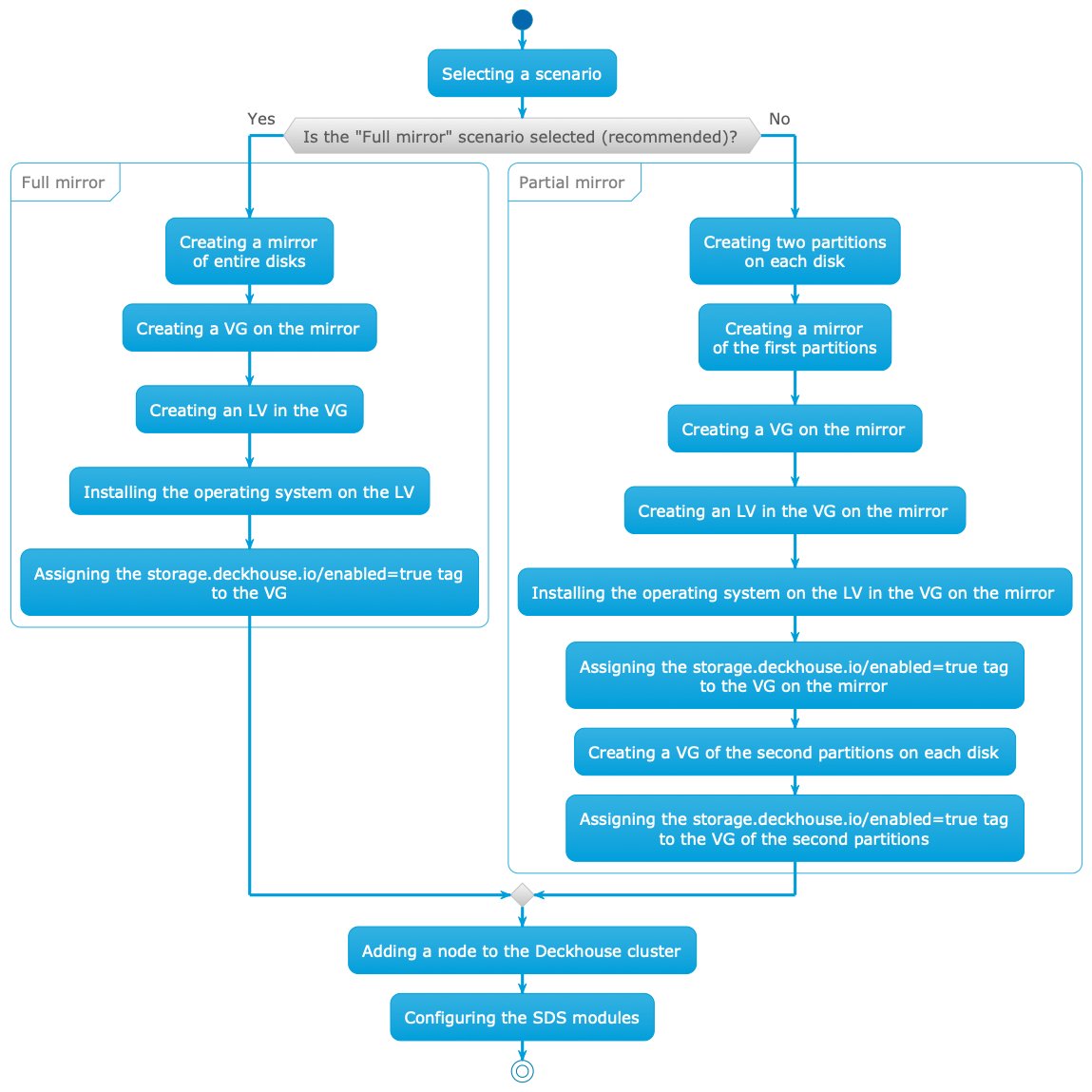
Storage with identical disks
Use this method when the node has disks of the same type.
Full mirror
This scenario is recommended to use as it is reliable and simple to configure.
Configure the node according to this scenario:
-
Assemble a mirror from entire disks (hardware or software). This mirror will be used simultaneously for the root system and for data.
-
When installing the operating system:
- Create a Volume Group named
mainon the mirror. - Create a Logical Volume named
rootin themainVolume Group. - Install the operating system on the
rootLogical Volume.
- Create a Volume Group named
-
Set the
storage.deckhouse.io/enabled=truetag for themainVolume Group by running the command:vgchange main --addtag storage.deckhouse.io/enabled=true -
Add the prepared node to the cluster.
If the node matches the
nodeSelectorspecified inspec.nodeSelectorofsds-replicated-volumeorsds-local-volumemodules, thesds-node-configuratormodule agent will start on the node. The agent will discover themainVolume Group and create the corresponding LVMVolumeGroup resource in the cluster. The resource can be used to create volumes insds-replicated-volumeorsds-local-volumemodules.
SDS modules configuration example (identical disks, “Full mirror”)
Configure three nodes according to the “Full mirror” scenario. After configuration, three LVMVolumeGroup resources with randomly generated names will be created in the cluster.
In the future, it will be possible to specify names for LVMVolumeGroup resources created during automatic Volume Group discovery by adding an LVM tag with the desired resource name.
List LVMVolumeGroup resources by running the command:
d8 k get lvmvolumegroups.storage.deckhouse.ioExample output:
NAME                                      THINPOOLS   CONFIGURATION APPLIED   PHASE   NODE       SIZE      ALLOCATED SIZE   VG     AGE
vg-014df517-39d1-4453-b7b3-9930c563627c   0/0         True                    Ready   worker-2   25596Mi   0                main   61s
vg-014df517-39d1-4453-b7b3-9930c563627c   0/0         True                    Ready   worker-0   25596Mi   0                main   4m17s
vg-014df517-39d1-4453-b7b3-9930c563627c   0/0         True                    Ready   worker-1   25596Mi   0                main   108s
sds-local-volume module configuration (identical disks, “Full mirror”)
Configure the sds-local-volume module according to the “Full mirror” scenario: create a LocalStorageClass resource and add all LVMVolumeGroup resources to it, so that the main Volume Group is used on all nodes in the sds-local-volume module. Run the command:
d8 k apply -f -<<EOF
apiVersion: storage.deckhouse.io/v1alpha1
kind: LocalStorageClass
metadata:
  name: local-sc
spec:
  lvm:
    lvmVolumeGroups:
      - name: vg-014df517-39d1-4453-b7b3-9930c563627c
      - name: vg-014df517-39d1-4453-b7b3-9930c563627c
      - name: vg-014df517-39d1-4453-b7b3-9930c563627c
    type: Thick
  reclaimPolicy: Delete
  volumeBindingMode: WaitForFirstConsumer
EOF
sds-replicated-volume module configuration (identical disks, “Full mirror”)
Configure the sds-replicated-volume module according to the “Full mirror” scenario:
-
Create a ReplicatedStoragePool resource and add all LVMVolumeGroup resources to it, so that the
mainVolume Group is used on all nodes in thesds-replicated-volumemodule. Run the command:d8 k apply -f -<<EOF apiVersion: storage.deckhouse.io/v1alpha1 kind: ReplicatedStoragePool metadata: name: data spec: type: LVM lvmVolumeGroups: - name: vg-014df517-39d1-4453-b7b3-9930c563627c - name: vg-014df517-39d1-4453-b7b3-9930c563627c - name: vg-014df517-39d1-4453-b7b3-9930c563627c EOF -
Create a ReplicatedStorageClass resource and specify the name of the previously created ReplicatedStoragePool resource in the
storagePoolfield. Run the command:d8 k apply -f -<<EOF --- apiVersion: storage.deckhouse.io/v1alpha1 kind: ReplicatedStorageClass metadata: name: replicated-sc-r1 spec: storagePool: data replication: None reclaimPolicy: Delete topology: Ignored # When specifying this topology, there should be no zones in the cluster (nodes with topology.kubernetes.io/zone labels) --- apiVersion: storage.deckhouse.io/v1alpha1 kind: ReplicatedStorageClass metadata: name: replicated-sc-r2 spec: storagePool: data replication: Availability reclaimPolicy: Delete topology: Ignored # When specifying this topology, there should be no zones --- apiVersion: storage.deckhouse.io/v1alpha1 kind: ReplicatedStorageClass metadata: name: replicated-sc-r3 spec: storagePool: data replication: ConsistencyAndAvailability reclaimPolicy: Delete topology: Ignored # When specifying this topology, there should be no zones EOF
Partial mirror
Using partitions with identical PARTUUID is not supported, as well as changing PARTUUID of a partition that is used to create a Volume Group.
When creating a partition table, it is recommended to choose the GPT format, as PARTUUID in MBR is pseudo-random and contains the partition number.
In addition, the PARTLABEL attribute cannot be set in MBR, which may be useful for subsequent partition identification.
In this scenario, two partitions are created on each disk:
- The first partition is used to create a mirror where the root system and SDS data that are not replicated are placed.
- The second partition is used to create a separate Volume Group without mirroring for SDS data that are replicated.
This allows for maximum efficient use of disk space.
Configure the node according to the “Partial mirror” scenario:
-
When installing the operating system:
- Create two partitions on each disk.
- Assemble a mirror from the first partitions on each disk.
- Create a Volume Group named
main-safeon the mirror. - Create a Logical Volume named
rootin themain-safeVolume Group. - Install the operating system on the
rootLogical Volume.
-
Set the
storage.deckhouse.io/enabled=truetag for themain-safeVolume Group by running the command:vgchange main-safe --addtag storage.deckhouse.io/enabled=true -
Create a Volume Group named
main-unsafefrom the second partitions of each disk. -
Set the
storage.deckhouse.io/enabled=truetag for themain-unsafeVolume Group by running the command:vgchange main-unsafe --addtag storage.deckhouse.io/enabled=true -
Add the prepared node to the cluster.
If the node matches the
nodeSelectorspecified inspec.nodeSelectorofsds-replicated-volumeorsds-local-volumemodules, thesds-node-configuratormodule agent will start on the node. The agent will discover themain-safeandmain-unsafeVolume Groups and create the corresponding LVMVolumeGroup resources in the cluster. The resources can be used to create volumes insds-replicated-volumeorsds-local-volumemodules.
SDS modules configuration example (identical disks, “Partial mirror”)
This example describes configuring three nodes according to the “Partial mirror” scenario. After configuration, six LVMVolumeGroup resources with randomly generated names will be created in the cluster.
In the future, it will be possible to specify names for LVMVolumeGroup resources created during automatic Volume Group discovery by adding an LVM tag with the desired resource name.
List LVMVolumeGroup resources by running the command:
d8 k get lvmvolumegroups.storage.deckhouse.ioExample output:
NAME                                      THINPOOLS   CONFIGURATION APPLIED   PHASE   NODE       SIZE      ALLOCATED SIZE   VG            AGE
vg-014df517-39d1-4453-b7b3-9930c563627c   0/0         True                    Ready   worker-2   25596Mi   0                main-safe     61s
vg-014df517-39d1-4453-b7b3-9930c563627c   0/0         True                    Ready   worker-0   25596Mi   0                main-safe     4m17s
vg-014df517-39d1-4453-b7b3-9930c563627c   0/0         True                    Ready   worker-1   25596Mi   0                main-safe     108s
vg-deccf08a-44d4-45f2-aea9-6232c0eeef91   0/0         True                    Ready   worker-2   25596Mi   0                main-unsafe   61s
vg-e0f00cab-03b3-49cf-a2f6-595628a2593c   0/0         True                    Ready   worker-0   25596Mi   0                main-unsafe   4m17s
vg-fe679d22-2bc7-409c-85a9-9f0ee29a6ca2   0/0         True                    Ready   worker-1   25596Mi   0                main-unsafe   108s
sds-local-volume module configuration (identical disks, “Partial mirror”)
Configure the sds-local-volume module according to the “Partial mirror” scenario: create a LocalStorageClass resource and add LVMVolumeGroup resources to it, so that only the main-safe Volume Group is used on all nodes in the sds-local-volume module. Run the command:
d8 k apply -f -<<EOF
apiVersion: storage.deckhouse.io/v1alpha1
kind: LocalStorageClass
metadata:
  name: local-sc
spec:
  lvm:
    lvmVolumeGroups:
      - name: vg-014df517-39d1-4453-b7b3-9930c563627c
      - name: vg-014df517-39d1-4453-b7b3-9930c563627c
      - name: vg-014df517-39d1-4453-b7b3-9930c563627c
    type: Thick
  reclaimPolicy: Delete
  volumeBindingMode: WaitForFirstConsumer
EOF
sds-replicated-volume module configuration (identical disks, “Partial mirror”)
Configure the sds-replicated-volume module according to the “Partial mirror” scenario:
-
Create a ReplicatedStoragePool resource named
data-safeand add LVMVolumeGroup resources to it, so that only themain-safeVolume Group is used on all nodes in thesds-replicated-volumemodule in ReplicatedStorageClass withreplication: Noneparameter. Run the command:d8 k apply -f -<<EOF apiVersion: storage.deckhouse.io/v1alpha1 kind: ReplicatedStoragePool metadata: name: data-safe spec: type: LVM lvmVolumeGroups: - name: vg-014df517-39d1-4453-b7b3-9930c563627c - name: vg-014df517-39d1-4453-b7b3-9930c563627c - name: vg-014df517-39d1-4453-b7b3-9930c563627c EOF -
Create a ReplicatedStoragePool resource named
data-unsafeand add LVMVolumeGroup resources to it, so that only themain-unsafeVolume Group is used on all nodes in thesds-replicated-volumemodule in ReplicatedStorageClass withreplication: Availabilityorreplication: ConsistencyAndAvailabilityparameter. Run the command:d8 k apply -f -<<EOF apiVersion: storage.deckhouse.io/v1alpha1 kind: ReplicatedStoragePool metadata: name: data-unsafe spec: type: LVM lvmVolumeGroups: - name: vg-deccf08a-44d4-45f2-aea9-6232c0eeef91 - name: vg-e0f00cab-03b3-49cf-a2f6-595628a2593c - name: vg-fe679d22-2bc7-409c-85a9-9f0ee29a6ca2 EOF -
Create a ReplicatedStorageClass resource and specify the names of previously created ReplicatedStoragePool resources in the
storagePoolfield, so that bothmain-safeandmain-unsafeVolume Groups are used on all nodes. Run the command:d8 k apply -f -<<EOF --- apiVersion: storage.deckhouse.io/v1alpha1 kind: ReplicatedStorageClass metadata: name: replicated-sc-r1 spec: storagePool: data-safe # Note that `data-safe` should be used for this resource, since it has `replication: None` specified, which means that data replication for persistent volumes (PV) created with this StorageClass will not be performed replication: None reclaimPolicy: Delete topology: Ignored # When specifying this topology, there should be no zones in the cluster (nodes with topology.kubernetes.io/zone labels) --- apiVersion: storage.deckhouse.io/v1alpha1 kind: ReplicatedStorageClass metadata: name: replicated-sc-r2 spec: storagePool: data-unsafe # Note that `data-unsafe` should be used for this resource, since it has `replication: Availability` specified, which means that data replication for persistent volumes (PV) created with this StorageClass will be performed replication: Availability reclaimPolicy: Delete topology: Ignored # When specifying this topology, there should be no zones --- apiVersion: storage.deckhouse.io/v1alpha1 kind: ReplicatedStorageClass metadata: name: replicated-sc-r3 spec: storagePool: data-unsafe # Note that `data-unsafe` should be used for this resource, since it has `replication: ConsistencyAndAvailability` specified, which means that data replication for persistent volumes (PV) created with this StorageClass will be performed replication: ConsistencyAndAvailability reclaimPolicy: Delete topology: Ignored # When specifying this topology, there should be no zones EOF
Combined storage
Use combined storage when using disks of different types simultaneously on the node.
When combining disks of different types to create storage, it is recommended to make a mirror from disks of one type and install the operating system on it according to the “Full mirror” scenario, but not use it for SDS.
For SDS, use disks of other types (hereinafter — additional disks) that differ from those used for the mirror under the operating system.
Recommendations for using additional disks depending on their type:
| Disk type | Recommended usage purposes |
|---|---|
| NVMe SSD | Creating volumes requiring high performance |
| SATA SSD | Creating volumes not requiring high performance |
| HDD | Creating volumes not requiring high performance |
Additional disks can be configured according to any of the “Full mirror” or “Partial mirror” scenarios.
Below is the process of configuring additional disks using the following types as an example:
- NVMe SSD.
- SATA SSD.
- HDD.
Additional disks configuration (Full mirror)
Below is the order of actions for configuring additional disks for the case of primary cluster deployment and configuration when connecting to nodes via SSH. If you already have a working cluster and you are adding additional disks to its nodes, it is recommended to create and configure Volume Groups using the LVMVolumeGroup resource, instead of executing the commands below on the node.
Configure additional disks on the node according to the “Full mirror” scenario:
-
Assemble a mirror from all additional disks of a certain type entirely (hardware or software).
-
Create a Volume Group named
<vg-name>on the mirror. -
Set the
storage.deckhouse.io/enabled=truetag for the<vg-name>Volume Group by running the command:vgchange <vg-name> --addtag storage.deckhouse.io/enabled=true
Replace <vg-name> with an informative name depending on the type of additional disks.
Examples of Volume Group names for additional disks of different types:
ssd-nvme: For NVMe SSD disks.ssd-sata: For SATA SSD disks.hdd: For HDD disks.
SDS modules configuration example (combined storage, “Full mirror”)
This example describes configuring three nodes according to the “Full mirror” scenario. After configuration, three LVMVolumeGroup resources with randomly generated names will be created in the cluster.
In the future, it will be possible to specify names for LVMVolumeGroup resources created during automatic Volume Group discovery by adding an LVM tag with the desired resource name.
List LVMVolumeGroup resources by running the command:
d8 k get lvmvolumegroups.storage.deckhouse.ioExample output:
NAME                                      THINPOOLS   CONFIGURATION APPLIED   PHASE   NODE       SIZE      ALLOCATED SIZE   VG          AGE
vg-014df517-39d1-4453-b7b3-9930c563627c   0/0         True                    Ready   worker-2   25596Mi   0                <vg-name>   61s
vg-014df517-39d1-4453-b7b3-9930c563627c   0/0         True                    Ready   worker-0   25596Mi   0                <vg-name>   4m17s
vg-014df517-39d1-4453-b7b3-9930c563627c   0/0         True                    Ready   worker-1   25596Mi   0                <vg-name>   108s
<vg-name>: The name assigned to the Volume Group on the mirror in the previous step.
sds-local-volume module configuration (combined storage, “Full mirror”)
Configure the sds-local-volume module according to the “Full mirror” scenario: create a LocalStorageClass resource and add all LVMVolumeGroup resources to it, so that the <vg-name> Volume Group is used on all nodes in the sds-local-volume module. Run the command:
d8 k apply -f -<<EOF
apiVersion: storage.deckhouse.io/v1alpha1
kind: LocalStorageClass
metadata:
  name: <local-storage-class-name>
spec:
  lvm:
    lvmVolumeGroups:
      - name: vg-014df517-39d1-4453-b7b3-9930c563627c
      - name: vg-014df517-39d1-4453-b7b3-9930c563627c
      - name: vg-014df517-39d1-4453-b7b3-9930c563627c
    type: Thick
  reclaimPolicy: Delete
  volumeBindingMode: WaitForFirstConsumer
EOF
In the example above, replace <local-storage-class-name> with an informative name, depending on the type of additional disks.
Examples of informative names for LocalStorageClass resource for additional disks of different types:
local-sc-ssd-nvme: For NVMe SSD disks.local-sc-ssd-sata: For SATA SSD disks.local-sc-ssd-hdd: For HDD disks.
sds-replicated-volume module configuration (combined storage, “Full mirror”)
Configure the sds-replicated-volume module according to the “Full mirror” scenario:
-
Create a ReplicatedStoragePool resource and add all LVMVolumeGroup resources to it, so that the
<vg-name>Volume Group is used on all nodes in thesds-replicated-volumemodule. Run the command:d8 k apply -f -<<EOF apiVersion: storage.deckhouse.io/v1alpha1 kind: ReplicatedStoragePool metadata: name: <replicated-storage-pool-name> spec: type: LVM lvmVolumeGroups: - name: vg-014df517-39d1-4453-b7b3-9930c563627c - name: vg-014df517-39d1-4453-b7b3-9930c563627c - name: vg-014df517-39d1-4453-b7b3-9930c563627c EOFReplace
<replicated-storage-pool-name>with an informative name depending on the type of additional disks.Examples of informative names for ReplicatedStoragePool resource for additional disks of different types:
data-ssd-nvme: For NVMe SSD disks.data-ssd-sata: For SATA SSD disks.data-hdd: For HDD disks.
-
Create a ReplicatedStorageClass resource and specify the name of the previously created ReplicatedStoragePool resource in the
storagePoolfield. Run the command:d8 k apply -f -<<EOF --- apiVersion: storage.deckhouse.io/v1alpha1 kind: ReplicatedStorageClass metadata: name: replicated-sc-ssd-nvme-r1 spec: storagePool: <replicated-storage-pool-name> replication: None reclaimPolicy: Delete topology: Ignored # When specifying this topology, there should be no zones in the cluster (nodes with topology.kubernetes.io/zone labels) --- apiVersion: storage.deckhouse.io/v1alpha1 kind: ReplicatedStorageClass metadata: name: replicated-sc-ssd-nvme-r2 spec: storagePool: <replicated-storage-pool-name> replication: Availability reclaimPolicy: Delete topology: Ignored # When specifying this topology, there should be no zones --- apiVersion: storage.deckhouse.io/v1alpha1 kind: ReplicatedStorageClass metadata: name: replicated-sc-ssd-nvme-r3 spec: storagePool: <replicated-storage-pool-name> replication: ConsistencyAndAvailability reclaimPolicy: Delete topology: Ignored # When specifying this topology, there should be no zones EOF
Additional disks configuration (Partial mirror)
Using partitions with identical PARTUUID is not supported, as well as changing PARTUUID of a partition that is used to create a Volume Group.
When creating a partition table, it is recommended to choose the GPT format, as PARTUUID in MBR is pseudo-random and contains the partition number.
In addition, the PARTLABEL attribute cannot be set in MBR, which may be useful for subsequent partition identification.
Below is the order of actions for configuring additional disks for the case of primary cluster deployment and configuration when connecting to nodes via SSH. If you already have a working cluster and you are adding additional disks to its nodes, it is recommended to create and configure Volume Groups using the LVMVolumeGroup resource, instead of executing the commands below on the node.
In this scenario, two partitions are created on each disk:
- The first partition is used to create a mirror for SDS data that are not replicated.
- The second partition is used to create a separate Volume Group without mirroring for SDS data that are replicated.
This allows for maximum efficient use of disk space.
Configure the node with additional disks according to the “Partial mirror” scenario:
-
Create two partitions on each additional disk.
-
Assemble a mirror from the first partitions on each disk.
-
Create a Volume Group named
<vg-name>-safeon the mirror. -
Create a Volume Group named
<vg-name>-unsafefrom the second partitions of each disk. -
Set the
storage.deckhouse.io/enabled=truetag for the<vg-name>-safeand<vg-name>-unsafeVolume Groups by running the commands:vgchange <vg-name>-safe --addtag storage.deckhouse.io/enabled=true vgchange <vg-name>-unsafe --addtag storage.deckhouse.io/enabled=trueReplace
<vg-name>with an informative prefix depending on the type of additional disks.Examples of informative prefix
<vg-name>for additional disks of different types:ssd-nvme: For NVMe SSD disks.ssd-sata: For SATA SSD disks.hdd: For HDD disks.
SDS modules configuration example (combined storage, “Partial mirror”)
This example describes configuring three nodes according to the “Partial mirror” scenario. After configuration, six LVMVolumeGroup resources with randomly generated names will be created in the cluster.
In the future, it will be possible to specify names for LVMVolumeGroup resources created during automatic Volume Group discovery by adding an LVM tag with the desired resource name.
List LVMVolumeGroup resources by running the command:
d8 k get lvmvolumegroups.storage.deckhouse.ioExample output:
NAME                                      THINPOOLS   CONFIGURATION APPLIED   PHASE   NODE       SIZE      ALLOCATED SIZE   VG                AGE
vg-014df517-39d1-4453-b7b3-9930c563627c   0/0         True                    Ready   worker-2   25596Mi   0                <vg-name>-safe     61s
vg-014df517-39d1-4453-b7b3-9930c563627c   0/0         True                    Ready   worker-0   25596Mi   0                <vg-name>-safe     4m17s
vg-014df517-39d1-4453-b7b3-9930c563627c   0/0         True                    Ready   worker-1   25596Mi   0                <vg-name>-safe     108s
vg-deccf08a-44d4-45f2-aea9-6232c0eeef91   0/0         True                    Ready   worker-2   25596Mi   0                <vg-name>-unsafe   61s
vg-e0f00cab-03b3-49cf-a2f6-595628a2593c   0/0         True                    Ready   worker-0   25596Mi   0                <vg-name>-unsafe   4m17s
vg-fe679d22-2bc7-409c-85a9-9f0ee29a6ca2   0/0         True                    Ready   worker-1   25596Mi   0                <vg-name>-unsafe   108s
<vg-name>: The prefix of the name assigned to the Volume Group created in the previous step.
sds-local-volume module configuration (combined storage, “Partial mirror”)
Configure the sds-local-volume module according to the “Partial mirror” scenario: create a LocalStorageClass resource and add LVMVolumeGroup resources to it, so that only the <vg-name>-safe Volume Group is used on all nodes in the sds-local-volume module. Run the command:
d8 k apply -f -<<EOF
apiVersion: storage.deckhouse.io/v1alpha1
kind: LocalStorageClass
metadata:
  name: <local-storage-class-name>
spec:
  lvm:
    lvmVolumeGroups:
      - name: vg-014df517-39d1-4453-b7b3-9930c563627c
      - name: vg-014df517-39d1-4453-b7b3-9930c563627c
      - name: vg-014df517-39d1-4453-b7b3-9930c563627c
    type: Thick
  reclaimPolicy: Delete
  volumeBindingMode: WaitForFirstConsumer
EOF
In the example above, replace <local-storage-class-name> with an informative name, depending on the type of additional disks.
Examples of informative names for LocalStorageClass resource for additional disks of different types:
local-sc-ssd-nvme: For NVMe SSD disks.local-sc-ssd-sata: For SATA SSD disks.local-sc-hdd: For HDD disks.
sds-replicated-volume module configuration (combined storage, “Partial mirror”)
Configure the sds-replicated-volume module according to the “Partial mirror” scenario:
-
Create a ReplicatedStoragePool resource named
data-<vg-name>-safeand add LVMVolumeGroup resources to it, so that only the<vg-name>-safeVolume Group is used on all nodes in thesds-replicated-volumemodule in ReplicatedStorageClass withreplication: Noneparameter. Run the command:d8 k apply -f -<<EOF apiVersion: storage.deckhouse.io/v1alpha1 kind: ReplicatedStoragePool metadata: name: data-<vg-name>-safe spec: type: LVM lvmVolumeGroups: - name: vg-014df517-39d1-4453-b7b3-9930c563627c - name: vg-014df517-39d1-4453-b7b3-9930c563627c - name: vg-014df517-39d1-4453-b7b3-9930c563627c EOFReplace
data-<vg-name>-safewith an informative name depending on the type of additional disks.Examples of informative names for ReplicatedStoragePool resource for additional disks of different types:
data-ssd-nvme-safe: For NVMe SSD disks.data-ssd-sata-safe: For SATA SSD disks.data-hdd-safe: For HDD disks.
-
Create a ReplicatedStoragePool resource named
data-<vg-name>-unsafeand add LVMVolumeGroup resources to it, so that only the<vg-name>-unsafeVolume Group is used on all nodes in thesds-replicated-volumemodule in ReplicatedStorageClass withreplication: Availabilityorreplication: ConsistencyAndAvailabilityparameter. Run the command:d8 k apply -f -<<EOF apiVersion: storage.deckhouse.io/v1alpha1 kind: ReplicatedStoragePool metadata: name: data-<vg-name>-unsafe spec: type: LVM lvmVolumeGroups: - name: vg-deccf08a-44d4-45f2-aea9-6232c0eeef91 - name: vg-e0f00cab-03b3-49cf-a2f6-595628a2593c - name: vg-fe679d22-2bc7-409c-85a9-9f0ee29a6ca2 EOFIn the example above, replace
data-<vg-name>-unsafewith an informative name, depending on the type of additional disks.Examples of informative names for ReplicatedStoragePool resource for additional disks of different types:
data-ssd-nvme-unsafe: For NVMe SSD disks.data-ssd-sata-unsafe: For SATA SSD disks.data-hdd-unsafe: For HDD disks.
-
Create a ReplicatedStorageClass resource and specify the names of previously created ReplicatedStoragePool resources in the
storagePoolfield, so that both<vg-name>-safeand<vg-name>-unsafeVolume Groups are used on all nodes. Run the command:d8 k apply -f -<<EOF --- apiVersion: storage.deckhouse.io/v1alpha1 kind: ReplicatedStorageClass metadata: name: replicated-sc-ssd-nvme-r1 spec: storagePool: data-<vg-name>-safe # Note that `data-<vg-name>-safe` should be used for this resource, since it has `replication: None` specified, which means that data replication for persistent volumes (PV) created with this StorageClass will not be performed replication: None reclaimPolicy: Delete topology: Ignored # When specifying this topology, there should be no zones in the cluster (nodes with topology.kubernetes.io/zone labels) --- apiVersion: storage.deckhouse.io/v1alpha1 kind: ReplicatedStorageClass metadata: name: replicated-sc-ssd-nvme-r2 spec: storagePool: data-<vg-name>-unsafe # Note that `data-<vg-name>-unsafe` should be used for this resource, since it has `replication: Availability` specified, which means that data replication for persistent volumes (PV) created with this StorageClass will be performed replication: Availability reclaimPolicy: Delete topology: Ignored # When specifying this topology, there should be no zones --- apiVersion: storage.deckhouse.io/v1alpha1 kind: ReplicatedStorageClass metadata: name: replicated-sc-ssd-nvme-r3 spec: storagePool: data-<vg-name>-unsafe # Note that `data-<vg-name>-unsafe` should be used for this resource, since it has `replication: ConsistencyAndAvailability` specified, which means that data replication for persistent volumes (PV) created with this StorageClass will be performed replication: ConsistencyAndAvailability reclaimPolicy: Delete topology: Ignored # When specifying this topology, there should be no zones EOFReplace
data-<vg-name>-unsafewith an informative name depending on the type of additional disks.Examples of informative names for ReplicatedStoragePool resource for additional disks of different types:
data-ssd-nvme-unsafe: For NVMe SSD disks.data-ssd-sata-unsafe: For SATA SSD disks.data-hdd-unsafe: For HDD disks.
Replace
data-<vg-name>-safewith an informative name depending on the type of additional disks.Examples of informative names for ReplicatedStoragePool resource for additional disks of different types:
data-ssd-nvme-safe: For NVMe SSD disks.data-ssd-sata-safe: For SATA SSD disks.data-hdd-safe: For HDD disks.