Available in: Open/CE, Core, BE, SE, SE+, Ultimate/EE
Included in extensions: Advanced Storage, Core Storage, Storage Integration
The module lifecycle stage: Generally available version
The module has requirements for installation
How to explicitly enable or disable the module…
You may explicitly enable or disable the module in one of the following ways:
-
Via Deckhouse web UI. In the “System” → “System Management” → “Deckhouse” → “Modules” section, open the
state-snapshottermodule and enable (or disable) the “Module enabled” toggle. Save changes.Example:
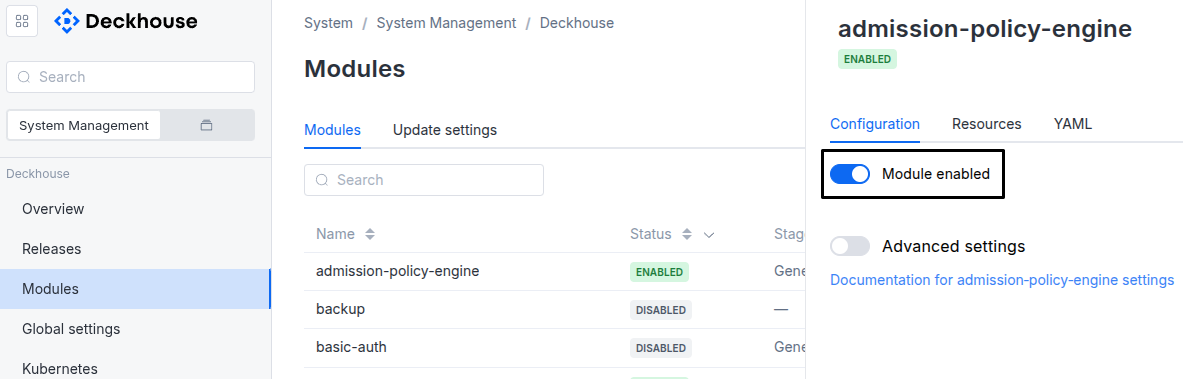
-
Via Deckhouse CLI (d8).
Use the d8 system module enable command for enabling, or d8 system module disable command for disabling the module (you need Deckhouse CLI (d8), configured to work with the cluster).
Example of enabling the module:
d8 system module enable state-snapshotter -
Using ModuleConfig
state-snapshotter.Set
spec.enabledtotrueorfalsein ModuleConfigstate-snapshotter(create it if necessary).Example of a manifest to enable module
state-snapshotter:apiVersion: deckhouse.io/v1alpha1 kind: ModuleConfig metadata: name: state-snapshotter spec: enabled: true
You can configure the module in one of the following ways:
-
Via Deckhouse web UI.
In the “System” → “System Management” → “Deckhouse” → “Modules” section, open the
state-snapshottermodule and enable the “Advanced Settings” toggle. Fill in the required fields in the “Configuration” tab or specify the module settings in YAML format on the “YAML” tab, without the top-levelsettingskey. Save the changes.Example:
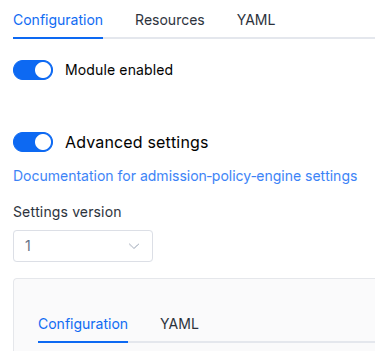
You can also edit the ModuleConfig object
state-snapshotteron the “YAML” tab in the module settings window (“System” → “System Management” → “Deckhouse” → “Modules”, open the modulestate-snapshotter) by specifying the schema version in thespec.versionparameter and the necessary module parameters in thespec.settingssection. -
Via Deckhouse CLI (d8) (requires Deckhouse CLI (d8) configured to work with the cluster).
Edit the existing ModuleConfig
state-snapshotter(for more details on configuring Deckhouse Platform, see the documentation) by executing the following command:d8 k edit mc state-snapshotterMake the necessary changes in the
spec.settingssection. If necessary, specify the schema version in thespec.versionparameter. Save the changes.You can also create a manifest file for ModuleConfig
state-snapshotterusing the example below. Fill in thespec.settingssection with the required module parameters. If necessary, specify the schema version in thespec.versionparameter.Apply the manifest using the following command (indicate the manifest file name):
d8 k apply -f <FILENAME>Example of a manifest for ModuleConfig
state-snapshotter:apiVersion: deckhouse.io/v1alpha1 kind: ModuleConfig metadata: name: state-snapshotter spec: version: 1 enabled: true settings: # Module parameters from the "Parameters" section below.
Requirements
To the Deckhouse Platform version: 1.76.9 and above.
Parameters
Schema version: 1
-
-
stringsettings.logLevelModule log level.
Default:
DEBUGAllowed values:
ERROR,WARN,INFO,DEBUG,TRACE -
stringsettings.snapshotTtlAfterDeleteRecycle-bin retention window: how long a snapshot’s durable data is kept after the Snapshot is deleted, during which it remains recoverable. Go duration, e.g. “24h”, “168h”. Empty = omit env; controller uses the built-in default of 30 days (720h).
Default:
‘’
-