Available in editions: Open/CE, BE, SE, SE+, Ultimate/EE, Core
Included in extensions: Billing
The module lifecycle stage: General Availability
The module has 8 alerts.
The module is enabled by default in the Default bundle.
The module is disabled by default in the following bundles: Managed, Minimal.
How to explicitly enable the module...
You may explicitly enable or disable the module in one of the following ways:
-
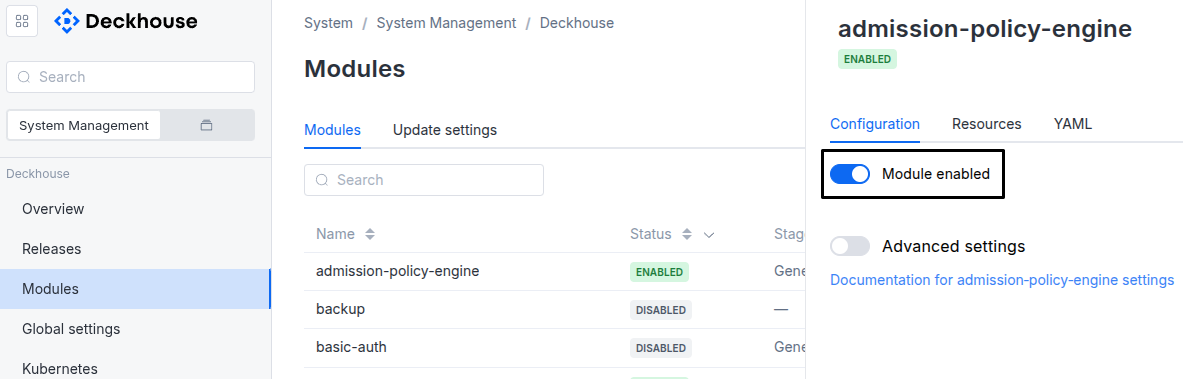
Via Deckhouse web UI. In the “System” → “System Management” → “Deckhouse” → “Modules” section, open the
user-authnmodule and enable (or disable) the “Module enabled” toggle. Save changes.Example:
-
Via Deckhouse CLI (d8).
Use the d8 system module enable command for enabling, or d8 system module disable command for disabling the module (you need Deckhouse CLI (d8), configured to work with the cluster).
Example of enabling the module:
d8 system module enable user-authn -
Using ModuleConfig
user-authn.Set
spec.enabledtotrueorfalsein ModuleConfiguser-authn(create it if necessary);Example of a manifest to enable module
user-authn:apiVersion: deckhouse.io/v1alpha1 kind: ModuleConfig metadata: name: user-authn spec: enabled: true
How to configure the module...
You can configure the module in one of the following ways:
-
Via Deckhouse web UI.
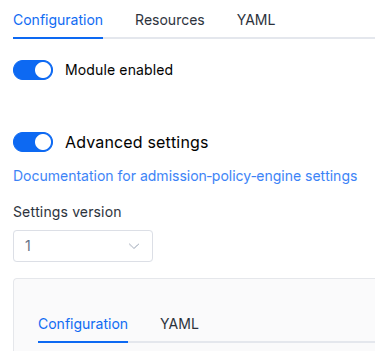
In the “System” → “System Management” → “Deckhouse” → “Modules” section, open the
user-authnmodule and enable the “Advanced Settings” switch. Fill in the required fields in the “Configuration” tab or specify the module settings in YAML format on the “YAML” tab, excluding the settings section. Save the changes.Example:
You can also edit the ModuleConfig object
user-authnon the “YAML” tab in the module settings window (“System” → “System Management” → “Deckhouse” → “Modules”, open the moduleuser-authn) by specifying the schema version in thespec.versionparameter and the necessary module parameters in thespec.settingssection. -
Via Deckhouse CLI (d8) (requires Deckhouse CLI (d8) configured to work with the cluster).
Edit the existing ModuleConfig
user-authn(for more details on configuring Deckhouse, see the documentation) by executing the following command:d8 k edit mc user-authnMake the necessary changes in the
spec.settingssection. If necessary, specify the schema version in thespec.versionparameter. Save the changes.You can also create a file with manifest for ModuleConfig
user-authnusing the example below. Fill in thespec.settingssection with the required module parameters. If necessary, specify the schema version in thespec.versionparameter.Apply the manifest using the following command (indicate the manifest file name):
d8 k apply -f <FILENAME>Example of a manifest for ModuleConfig
user-authn:apiVersion: deckhouse.io/v1alpha1 kind: ModuleConfig metadata: name: user-authn spec: version: 2 enabled: true settings: # Module parameters from the "Parameters" section below.
Conversions
The module is configured using the ModuleConfig resource, the schema of which contains a version number. When you apply an old version of the ModuleConfig schema in a cluster, automatic transformations are performed. To manually update the ModuleConfig schema version, the following steps must be completed sequentially for each version :
- Updates from version 1 to 2:
Replace
publishAPI.enablewithpublishAPI.enabled.
Parameters
Schema version: 2
- objectsettings
- objectsettings.controlPlaneConfigurator
Parameters of the
control-plane-managermodule for automatic configuration ofkube-apiserver.- stringsettings.controlPlaneConfigurator.dexCAMode
How to determine the CA that will be used when configuring
kube-apiserver.Custom— use the CA explicitly set via thedexCustomCAparameter (see below). This option comes in handy if you use an external HTTPS load balancer in front of Ingresses, and this load balancer relies on a self-signed certificate.DoNotNeed— a CA is not required (e.g., when using a public LE or other TLS providers).FromIngressSecret— extract the CA of certificate from the Secret that is used in the Ingress. This option comes in handy if you use self-signed certificates with Ingresses.
Default:
DoNotNeedAllowed values:
Custom,DoNotNeed,FromIngressSecret - stringsettings.controlPlaneConfigurator.dexCustomCA
The CA to use if
dexCAModeisCustom. Plain text (no base64). - booleansettings.controlPlaneConfigurator.enabled
Defines if the
control-plane-managermodule should be used to configure OIDC for thekube-apiserver.Default:
true
- booleansettings.highAvailability
Manually enable the high availability mode.
By default, Deckhouse automatically decides whether to enable the HA mode. Click here to learn more about the HA mode for modules.
Examples:
highAvailability: truehighAvailability: false - objectsettings.https
What certificate type to use with Dex/kubeconfig-generator.
This parameter completely overrides the
global.modules.httpssettings.Examples:
https: mode: CustomCertificate customCertificate: secretName: foobarhttps: mode: CertManager certManager: clusterIssuerName: letsencrypt- objectsettings.https.certManager
- stringsettings.https.certManager.clusterIssuerName
What ClusterIssuer to use for Dex/kubeconfig-generator.
Currently,
letsencrypt,letsencrypt-staging,selfsignedare available. Also, you can define your own.Default:
letsencrypt
- objectsettings.https.customCertificate
- stringsettings.https.customCertificate.secretName
The name of the Secret in the
d8-systemnamespace to use with Dex/kubeconfig-generator.This Secret must have the kubernetes.io/tls format.
Default:
false
- stringsettings.https.mode
The HTTPS usage mode:
CertManager— Dex/kubeconfig-generator will use HTTPS and get a certificate from the ClusterIssuer defined in thecertManager.clusterIssuerNameparameter.CustomCertificate— Dex/kubeconfig-generator will use HTTPS using the certificate from thed8-systemnamespace.Disabled— Dex/kubeconfig-generator will work over HTTP only;OnlyInURI— Dex/kubeconfig-generator will work over HTTP (thinking that there is an external HTTPS load balancer in front that terminates HTTPS traffic). All the links in theuser-authnwill be generated using the HTTPS scheme. Load balancer should provide a redirect from HTTP to HTTPS.
Default:
DisabledAllowed values:
Disabled,CertManager,CustomCertificate,OnlyInURI
- stringsettings.idTokenTTL
TTL of the ID token.
Set as a string specifying hours, minutes, or seconds:
30m,20s,2h30m10s,5h.Should be less than 6 hours (Dex signing keys rotate every 6 hours). A value of 6 hours or more raises the
D8UserAuthnIDTokenTTLTooLongalert.Defines the minimum possible user session lifetime (via
keepUsersLoggedInForin the DexAuthenticator resource and parameters likeauth.sessionTTL, for example, in theconsolemodule).If the session TTL is less than or equal to
idTokenTTL, the effective logout time isidTokenTTL + 1s.To force logout sooner than the default
idTokenTTL, decrease this parameter value as well.The next version of the module settings (
spec.versionof the ModuleConfig) accepts only values less than 6 hours. When a ModuleConfig of an earlier settings version is converted to it, a value of 6 hours or more is replaced with5h59m, which Dex and DexAuthenticator then use. LoweringidTokenTTLfrom 6 hours or more, in the ModuleConfig or by this conversion, has the following effects:- DexAuthenticator sessions whose
keepUsersLoggedInForis less than the previousidTokenTTLbecome shorter. A session lastskeepUsersLoggedInFororidTokenTTL + 1s, whichever is longer. For example, whenidTokenTTLgoes from24hto5h59m, a session withkeepUsersLoggedInFor: 12hlasts 12 hours instead of 24 hours and 1 second. - ID tokens that Dex signed before the change with the signing key current at that moment can be rejected about 6 to 12 hours after the change, before they expire, because Dex then keeps a replaced signing key only for as long as the new
idTokenTTLrequires. A client that refreshes an ID token only when it expires, such as kubectl withauth-provider: oidcin the kubeconfig, keeps sending the rejected token until the token expires. To make such a client request a new token, removeid-tokenfrom its kubeconfig.
To choose when this happens, lower
idTokenTTLin the ModuleConfig in advance.Default:
10mPattern:
^([0-9]+h)?([0-9]+m)?([0-9]+s)?$ - DexAuthenticator sessions whose
- stringsettings.ingressClass
The class of the Ingress controller that will be used for Dex/kubeconfig-generator.
An optional parameter; by default, the
modules.ingressClassglobal value is used.Pattern:
^[a-z0-9]([-a-z0-9]*[a-z0-9])?(\.[a-z0-9]([-a-z0-9]*[a-z0-9])?)*$ - array of objectssettings.kubeconfigGenerator
An array in which additional possible methods for accessing the API server are specified.
This option comes in handy if you prefer not to grant access to the cluster’s API via Ingress but rather do it by other means (e.g., using a bastion host or over OpenVPN).
- stringsettings.kubeconfigGenerator.description
A couple of words how this authentication method differs from others.
- stringsettings.kubeconfigGenerator.id
Required value
The name of the method for accessing the API server (no spaces, lowercase letters).
Pattern:
^[\@\.\:0-9a-z._-]+$ - stringsettings.kubeconfigGenerator.masterCA
A CA for accessing the API:
- If the parameter is not set, Kubernetes CA is used.
- We recommend using a self-signed certificate (and specify it as masterCA) if an HTTP proxy (that terminates HTTPS traffic) is used for exposing.
- stringsettings.kubeconfigGenerator.masterURI
Required value
If you plan to use a TCP proxy, then you must configure a certificate on the API server’s side for the TCP proxy address. Suppose your API servers use three different addresses (
192.168.0.10,192.168.0.11, and192.168.0.12) while the client uses a TCP load balancer (say,192.168.0.15). In this case, you have to re-generate the API server certificates:- edit
kubeadm-config:d8 k -n kube-system edit configmap kubeadm-configand add192.168.0.15to.apiServer.certSANs; - save the resulting config:
kubeadm config view > kubeadmconf.yaml; - delete old API server certificates:
mv /etc/kubernetes/pki/apiserver.* /tmp/; - reissue new certificates:
kubeadm init phase certs apiserver --config=kubeadmconf.yaml; - restart the API server’s container:
docker ps -a | grep 'kube-apiserver' | grep -v pause| awk '{print $1}' | xargs docker restart; - repeat this step for all master nodes.
- edit
- objectsettings.nodeSelector
The same as in the Pods’
spec.nodeSelectorparameter in Kubernetes.If the parameter is omitted or
false, it will be determined automatically. - objectsettings.passwordPolicy
Default:
- stringsettings.passwordPolicy.complexityLevel
Password complexity level.
Depending on the complexity level, a password must meet the following minimum requirements:
None: 1 character.Low: 8 characters.Fair: 8 characters, 1 uppercase letter (A–Z), 1 lowercase letter (a–z), 1 digit.Good: 8 characters, 1 uppercase letter (A–Z), 1 lowercase letter (a–z), 1 digit, 1 special character (!@#$%^&*).Excellent: 8 characters, 1 uppercase letter (A–Z), 1 lowercase letter (a–z), 1 digit, 1 special character (!@#$%^&*), no more than 2 identical characters in a row.Custom: requirements are defined by thecustomfield.
Default:
FairAllowed values:
None,Low,Fair,Good,Excellent,Custom - objectsettings.passwordPolicy.custom
Custom password complexity rules.
Applied only when
complexityLevelis set toCustom. Any combination of the rules below can be enabled independently.- booleansettings.passwordPolicy.custom.capitalized
If
true, a password must contain at least one uppercase letter (A–Z).Default:
false - integersettings.passwordPolicy.custom.minLength
Minimum number of characters in a password.
Default:
8Allowed values:
1 <= X - booleansettings.passwordPolicy.custom.numbers
If
true, a password must contain at least one digit.Default:
false - booleansettings.passwordPolicy.custom.repeatedChars
If
true, a password must not contain more than 2 identical characters in a row (the same rule theExcellentlevel applies).Default:
false - booleansettings.passwordPolicy.custom.specialCharacters
If
true, a password must contain at least one special character (anything that is neither a letter nor a digit).Default:
false
- objectsettings.passwordPolicy.lockout
Automatic temporary lockout after consecutive failed login attempts.
This section only controls lockout after a failed password. An administrator lock via UserOperation (
d8 iam user lock) works independently and does not requirepasswordPolicyor thislockoutblock.- array of stringssettings.passwordPolicy.lockout.applyToConnectors
External (non-local) connector types the lockout additionally applies to.
The built-in
Localconnector is always covered by the lockout policy when this section is configured. Its state is stored in the Password resource and does not need to be opted in here.For the listed external connectors, the failed-attempt counter and the lock state are tracked in the OfflineSessions resource of the corresponding user (one object per
(user, connector)pair).Manually unlocking a user is supported for every type via the UserOperation resource.
- stringElement of the array
Allowed values:
LDAP,Crowd
- stringsettings.passwordPolicy.lockout.lockDuration
Required value
Temporary lockout duration. Can be set in seconds, minutes, hours, or days:
10s,5m,1h,3d.Pattern:
^(?:(?:[1-9]|[1-9][0-9]+)d)?(?:(?:[1-9]|[1-9][0-9]+)h)?(?:(?:[1-9]|[1-9][0-9]+)m)?(?:(?:[1-9]|[1-9][0-9]+)s)?$ - integersettings.passwordPolicy.lockout.maxAttempts
Required value
Number of consecutive failed login attempts after which the user will be temporarily locked out.
- integersettings.passwordPolicy.passwordHistoryLimit
Number of the user’s previous passwords stored in history to prevent their reuse.
Default:
5Allowed values:
0 <= X - objectsettings.passwordPolicy.rotation
Password rotation settings.
- stringsettings.passwordPolicy.rotation.interval
Required value
Time interval after which the password must be changed. Can be set in seconds, minutes, hours or days:
10s,5m,1h,3d.Pattern:
^(?:(?:[1-9]|[1-9][0-9]+)d)?(?:(?:[1-9]|[1-9][0-9]+)h)?(?:(?:[1-9]|[1-9][0-9]+)m)?(?:(?:[1-9]|[1-9][0-9]+)s)?$
- objectsettings.publishAPIDeprecated
Settings for exposing the Kubernetes API server using Ingress or Gateway API.
Important. Starting with version DP 1.77, use the
apiserver.publishAPIparameter of thecontrol-plane-managermodule to publish the Kubernetes API server.For more information on how to expose the Kubernetes API, see the
control-plane-managermodule documentation.- booleansettings.publishAPI.addKubeconfigGeneratorEntry
Setting it to
falsewill remove an entry in kubeconfig-generator.Default:
true - booleansettings.publishAPI.enabled
Setting it to
truewill create an Ingress resource in thed8-user-authnnamespace in the cluster (it exposes the Kubernetes API).Default:
false - objectsettings.publishAPI.https
The HTTPS mode for the API server Ingress.
Examples:
https: mode: SelfSignedhttps: mode: Global global: kubeconfigGeneratorMasterCA: plainstring- objectsettings.publishAPI.https.global
An additional parameter for the
Globalmode.- stringsettings.publishAPI.https.global.kubeconfigGeneratorMasterCA
If there is an external load balancer in front of the Ingress that terminates HTTPS traffic using non-public CA, then you need to specify the CA so it will be included in kubectl-config.
If you are using certificates issued by the
cert-managermodule and Let’s Encrypt in your cluster, you should set an empty string""as the value.Also, you can set the external LB’s certificate itself as a CA if you can’t get the CA that signed it for some reason. Note that after the certificate is updated on the LB, all the previously generated kubeconfigs will stop working.
- stringsettings.publishAPI.https.mode
The mode of issuing certificates for the Ingress resource.
In the
SelfSignedmode, a CA-signed certificate will be issued for the Ingress resource.Use the following command to get the certificate:
d8 k -n d8-user-authn get secrets kubernetes-api-ca-key-pair -oyaml.In the
Globalmode, the policies specified in theglobal.modules.https.modeglobal parameter will be applied. Thus, if the global parameter has theCertManagermode set (withletsencryptas the ClusterIssuer), then the Let’s Encrypt certificate will be issued for the Ingress resource.Default:
SelfSignedAllowed values:
SelfSigned,Global
- stringsettings.publishAPI.ingressClass
The Ingress class that will be used to expose the Kubernetes API via Ingress.
Pattern:
^[a-z0-9]([-a-z0-9]*[a-z0-9])?(\.[a-z0-9]([-a-z0-9]*[a-z0-9])?)*$ - array of stringssettings.publishAPI.whitelistSourceRanges
An array of CIDRs that are allowed to connect to the API server.
- stringElement of the array
Pattern:
^(([0-9]|[1-9][0-9]|1[0-9]{2}|2[0-4][0-9]|25[0-5])\.){3}([0-9]|[1-9][0-9]|1[0-9]{2}|2[0-4][0-9]|25[0-5])(\/(3[0-2]|[1-2][0-9]|[0-9]))?$
- objectsettings.rateLimit
Brute-force protection for the password endpoints of Dex.
When enabled, a per-IP token-bucket rate limiter is installed in front of the
POST /tokenandPOST /auth/{connector}/loginendpoints. The client IP address is taken from theX-Real-IPheader set by the platform Ingress controller.The limit applies to failed authentication attempts only: tokens reserved before the request reaches the Dex handler are returned to the bucket on a successful response (HTTP
2xx/3xx). Therefore, successful logins and refresh-token exchanges do not consume the per-IP budget.Limits are tracked in memory in each Dex replica. In HA setups, the effective per-IP rate is multiplied by the number of replicas, which is fine as a brute-force backstop and is complemented by the account-level lockout.
- booleansettings.rateLimit.enabled
Enable per-IP rate limiting on Dex password endpoints.
Default:
false - objectsettings.rateLimit.perIP
Per-source-IP token-bucket configuration.
Both
requestsPerMinuteandburstparameters count failed authentication attempts only.- integersettings.rateLimit.perIP.burst
Maximum bucket size defining the allowed number of failed authentication attempts from a single IP address before the throttling activates.
Default:
10Allowed values:
1 <= X - integersettings.rateLimit.perIP.requestsPerMinute
Maximum rate of failed authentication attempts tolerated per IP address (in attempts per minute).
Successful logins and refresh-token exchanges do not consume the budget.
Default:
10Allowed values:
1 <= X
- stringsettings.refreshTokenAbsoluteLifetime
Maximum lifetime of refresh tokens (maps to Dex
expiry.refreshTokens.absoluteLifetime).This setting controls how long user sessions can persist. After this period expires, users will need to re-authenticate, even if they have active refresh tokens.
It is specified as a string containing the time unit in hours, minutes and seconds: 30m, 20s, 2h30m10s, 24h.
Default:
4380hPattern:
^([0-9]+h)?([0-9]+m)?([0-9]+s)?$ - objectsettings.staticUsers2FA
- booleansettings.staticUsers2FA.enabled
Required value
If set to
true, the static users will be required to use two-factor authentication (2FA) when logging in. This option is useful for enhancing security by requiring an additional verification step during the login process.Default:
false - stringsettings.staticUsers2FA.issuerName
The issuer name for the two-factor authentication (2FA) tokens. This name is visible to users in the 2FA application (e.g., Google Authenticator).
Default:
Deckhouse
- array of objectssettings.tolerations
The same as in the Pods’
spec.tolerationsparameter in Kubernetes;If the parameter is omitted or
false, it will be determined automatically.Example:
tolerations: - key: key1 operator: Equal value: value1 effect: NoSchedule- stringsettings.tolerations.effect
- stringsettings.tolerations.key
- stringsettings.tolerations.operator
- integersettings.tolerations.tolerationSeconds
- stringsettings.tolerations.value
The creation of the DexAuthenticator Custom Resource leads to the automatic deployment of oauth2-proxy to your application’s namespace and connecting it to Dex.
Caution! Since using OpenID Connect over HTTP poses a significant threat to security (the fact that Kubernetes API server doesn’t support OICD over HTTP confirms that), this module can only be installed if HTTPS is enabled (to do this, set the https.mode parameter to the value other than Disabled either at the cluster level or in the module).
Caution! When this module is enabled, authentication in all web interfaces will be switched from HTTP Basic Auth to Dex (the latter, in turn, will use the external providers that you have defined). To configure kubectl, go to https://kubeconfig.<modules.publicDomainTemplate>/, log in to your external provider’s account and copy the shell commands to your console.
Caution! The API server requires additional configuration to use authentication for dashboard and kubectl. The control-plane-manager module (enabled by default) automates this process.
To set custom labels and annotations for dex-authenticator pods, use spec.podMetadata.
Example (disable Istio sidecar injection):
apiVersion: deckhouse.io/v1
kind: DexAuthenticator
metadata:
  name: app-name
  namespace: app-namespace
spec:
  applicationDomain: app-name.kube.my-domain.com
  applicationIngressClassName: nginx
  podMetadata:
    annotations:
      sidecar.istio.io/inject: "false"