
Available in editions: Open/CE, BE, SE, SE+, Ultimate/EE, Core
Included in extensions: Billing
The module lifecycle stage: General Availability
The module has 15 alerts.
The module is enabled by default in the Default bundle.
The module is disabled by default in the following bundles: Managed, Minimal.
How to explicitly enable the module...
You may explicitly enable or disable the module in one of the following ways:
-
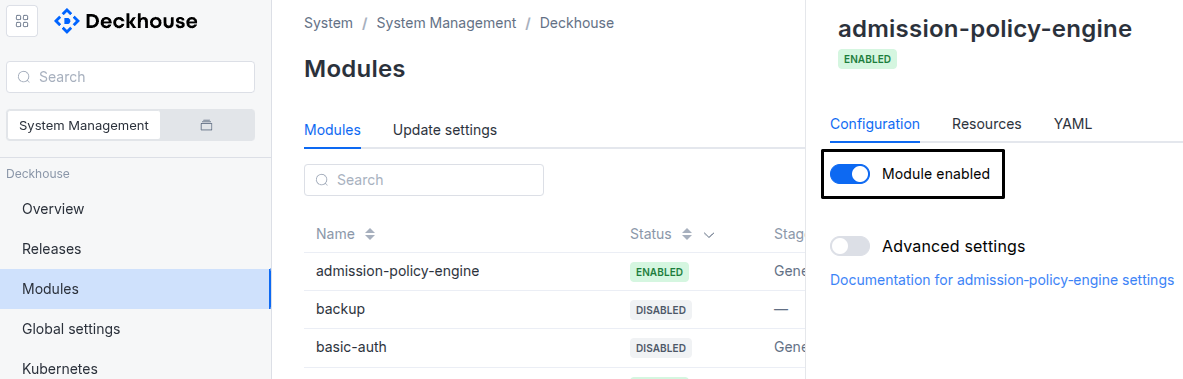
Via Deckhouse web UI. In the “System” → “System Management” → “Deckhouse” → “Modules” section, open the
user-authnmodule and enable (or disable) the “Module enabled” toggle. Save changes.Example:
-
Via Deckhouse CLI (d8).
Use the d8 system module enable command for enabling, or d8 system module disable command for disabling the module (you need Deckhouse CLI (d8), configured to work with the cluster).
Example of enabling the module:
d8 system module enable user-authn -
Using ModuleConfig
user-authn.Set
spec.enabledtotrueorfalsein ModuleConfiguser-authn(create it if necessary);Example of a manifest to enable module
user-authn:apiVersion: deckhouse.io/v1alpha1 kind: ModuleConfig metadata: name: user-authn spec: enabled: true
How to configure the module...
You can configure the module in one of the following ways:
-
Via Deckhouse web UI.
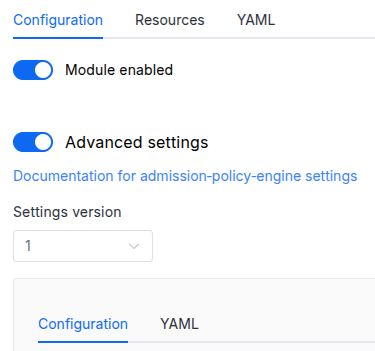
In the “System” → “System Management” → “Deckhouse” → “Modules” section, open the
user-authnmodule and enable the “Advanced Settings” switch. Fill in the required fields in the “Configuration” tab or specify the module settings in YAML format on the “YAML” tab, excluding the settings section. Save the changes.Example:
You can also edit the ModuleConfig object
user-authnon the “YAML” tab in the module settings window (“System” → “System Management” → “Deckhouse” → “Modules”, open the moduleuser-authn) by specifying the schema version in thespec.versionparameter and the necessary module parameters in thespec.settingssection. -
Via Deckhouse CLI (d8) (requires Deckhouse CLI (d8) configured to work with the cluster).
Edit the existing ModuleConfig
user-authn(for more details on configuring Deckhouse, see the documentation) by executing the following command:d8 k edit mc user-authnMake the necessary changes in the
spec.settingssection. If necessary, specify the schema version in thespec.versionparameter. Save the changes.You can also create a file with manifest for ModuleConfig
user-authnusing the example below. Fill in thespec.settingssection with the required module parameters. If necessary, specify the schema version in thespec.versionparameter.Apply the manifest using the following command (indicate the manifest file name):
d8 k apply -f <FILENAME>Example of a manifest for ModuleConfig
user-authn:apiVersion: deckhouse.io/v1alpha1 kind: ModuleConfig metadata: name: user-authn spec: version: 4 enabled: true settings: # Module parameters from the "Parameters" section below.
Conversions
The module is configured using the ModuleConfig resource, the schema of which contains a version number. When you apply an old version of the ModuleConfig schema in a cluster, automatic transformations are performed. To manually update the ModuleConfig schema version, the following steps must be completed sequentially for each version :
- Updates from version 1 to 2:
Replace
publishAPI.enablewithpublishAPI.enabled. - Updates from version 2 to 3:
An
idTokenTTLof 6 hours or more is replaced with5h59m: Dex rotates its signing keys every 6 hours. - Updates from version 3 to 4:
The
staticUsers2FAparameter is renamedtwoFactor. The second factor can now be turned on for more than the local users.
Parameters
Schema version: 4
- objectsettings
- objectsettings.controlPlaneConfigurator
Parameters of the
control-plane-managermodule for automatic configuration ofkube-apiserver.- stringsettings.controlPlaneConfigurator.dexCAMode
How to determine the CA that will be used when configuring
kube-apiserver.Custom— use the CA explicitly set via thedexCustomCAparameter (see below). This option comes in handy if you use an external HTTPS load balancer in front of Ingresses, and this load balancer relies on a self-signed certificate.DoNotNeed— a CA is not required (e.g., when using a public LE or other TLS providers).FromIngressSecret— extract the CA of certificate from the Secret that is used in the Ingress. This option comes in handy if you use self-signed certificates with Ingresses.
Default:
DoNotNeedAllowed values:
Custom,DoNotNeed,FromIngressSecret - stringsettings.controlPlaneConfigurator.dexCustomCA
The CA to use if
dexCAModeisCustom. Plain text (no base64). - booleansettings.controlPlaneConfigurator.enabled
Defines if the
control-plane-managermodule should be used to configure OIDC for thekube-apiserver.Default:
true
- objectsettings.devices
Devices of a user: the browsers and the other clients (kubeconfig,
d8 login) the user signed in from.- integersettings.devices.maxPerApplication
The maximum number of devices on which a user can be simultaneously logged in to a single application (DexAuthenticator, DexClient, kubeconfig).
A device is a browser with a Dex session together with all application domains it has logged in to, or a refresh token without a browser session, e.g. a kubeconfig file.
If a user logs in from a new device and the limit specified in the parameter has been reached, the device that has been unused the longest is logged out of the application. Non-trusted devices are logged out first (for details, see the description of the
trustedAfterparameter).Default:
10Allowed values:
1 <= X <= 1000Examples:
maxPerApplication: 10maxPerApplication: 3 - integersettings.devices.rememberedBrowsers
How many browsers of a user Dex remembers with their first sign-in.
A remembered browser that signs in again keeps its age: the time until it is trusted (
trustedAfter) counts from its first sign-in. Past the limit, the browser seen longest ago is forgotten and counts as new at its next sign-in.0remembers no browser: every sign-in is a new device.Default:
20Allowed values:
0 <= X <= 1000Examples:
rememberedBrowsers: 20rememberedBrowsers: 0 - stringsettings.devices.trustedAfter
Time after which a device of the user is trusted, counted from the first sign-in from its browser (from the sign-in for a device without a browser).
Only a trusted device lets the user sign out of all devices, of the other devices or of another device, and request a password change on their own. A device signed in more recently can sign the user out only of itself. Someone who has just signed in with a stolen password therefore can neither sign the owner out nor change the password, while the owner sees the new device on a trusted one and signs it out. A stolen session is not covered: a copied cookie of Dex or of the web interface has the age of the owner’s device. The operations of an administrator are not limited.
When an application reaches the limit of devices of a user, the devices that are not trusted yet are signed out of it first.
0strusts every device at once: any device can sign out the others and request a password change.Set as a string of whole hours, minutes, and seconds, in this order:
30m,2h30m,24h.Default:
24hPattern:
^([0-9]+h)?([0-9]+m)?([0-9]+s)?$Examples:
trustedAfter: 24htrustedAfter: 1htrustedAfter: 0s
- booleansettings.highAvailability
Manually enable the high availability mode.
By default, Deckhouse automatically decides whether to enable the HA mode. Learn more about the high availability mode for modules.
Examples:
highAvailability: truehighAvailability: false - objectsettings.https
What certificate type to use with Dex.
This parameter completely overrides the
global.modules.httpssettings.Examples:
https: mode: CustomCertificate customCertificate: secretName: foobarhttps: mode: CertManager certManager: clusterIssuerName: letsencrypt- objectsettings.https.certManager
Settings of the
CertManagermode.- stringsettings.https.certManager.clusterIssuerName
What ClusterIssuer to use for Dex.
Currently,
letsencrypt,letsencrypt-staging,selfsignedare available. Also, you can define your own.Default:
letsencrypt
- objectsettings.https.customCertificate
Settings of the
CustomCertificatemode.- stringsettings.https.customCertificate.secretName
The name of the Secret in the
d8-systemnamespace to use with Dex.This Secret must have the kubernetes.io/tls format.
Default:
false
- stringsettings.https.mode
The HTTPS usage mode:
CertManager: Dex uses HTTPS and gets a certificate from the ClusterIssuer set in thecertManager.clusterIssuerNameparameter.CustomCertificate: Dex uses HTTPS with the certificate from thed8-systemnamespace.Disabled: The module is turned off, because it works only with HTTPS.OnlyInURI: Dex works over HTTP behind an external load balancer that terminates HTTPS. Alluser-authnlinks use the HTTPS scheme. The load balancer must redirect HTTP to HTTPS.
If you set the
httpssection withoutmode,Disabledapplies and the module is turned off.Default:
DisabledAllowed values:
Disabled,CertManager,CustomCertificate,OnlyInURI
- stringsettings.idTokenTTL
TTL of the ID token.
Set as a string specifying hours, minutes, or seconds:
30m,20s,2h30m10s,5h.Must be greater than zero and strictly less than 6 hours (Dex signing keys rotate every 6 hours). A ModuleConfig of an earlier settings version (
spec.version1 or 2) with a value of 6 hours or more is still accepted: its value is converted to5h59m.Defines the minimum possible user session lifetime (via
keepUsersLoggedInForin the DexAuthenticator resource and parameters likeauth.sessionTTL, for example, in theconsolemodule).If the session TTL is less than or equal to
idTokenTTL, the effective logout time isidTokenTTL + 1s.To force logout sooner than the default
idTokenTTL, decrease this parameter value as well.Default:
10mPattern:
^([0-9]+h)?([0-9]+m)?([0-9]+s)?$ - stringsettings.ingressClass
The class of the Ingress controller that will be used for Dex.
An optional parameter; by default, the
modules.ingressClassglobal value is used.Pattern:
^[a-z0-9]([-a-z0-9]*[a-z0-9])?(\.[a-z0-9]([-a-z0-9]*[a-z0-9])?)*$ - array of objectssettings.kubeconfigGenerator
An array in which additional possible methods for accessing the API server are specified.
This option comes in handy if you prefer not to grant access to the cluster’s API via Ingress but rather do it by other means (e.g., using a bastion host or over OpenVPN).
- stringsettings.kubeconfigGenerator.description
A couple of words how this authentication method differs from others.
- stringsettings.kubeconfigGenerator.id
Required value
The name of the method for accessing the API server (no spaces, lowercase letters).
Pattern:
^[\@\.\:0-9a-z._-]+$ - stringsettings.kubeconfigGenerator.masterCA
A CA for accessing the API:
- If the parameter is not set, Kubernetes CA is used.
- We recommend using a self-signed certificate (and specify it as masterCA) if an HTTP proxy (that terminates HTTPS traffic) is used for exposing.
- stringsettings.kubeconfigGenerator.masterURI
Required value
API server address that kubeconfig files generated for this access method point to, for example
https://192.168.0.15:6443.If clients reach the API server through a TCP proxy or a load balancer, add its address to the
apiserver.certSANsparameter of thecontrol-plane-managermodule.
- objectsettings.nodeSelector
The same as in the Pods’
spec.nodeSelectorparameter in Kubernetes.If the parameter is omitted, it is determined automatically.
- objectsettings.passwordPolicy
Password policy for local users.
Default:
- stringsettings.passwordPolicy.complexityLevel
Password complexity level.
Depending on the complexity level, a password must meet the following minimum requirements:
None: 1 character.Low: 8 characters.Fair: 8 characters, 1 uppercase letter (A–Z), 1 lowercase letter (a–z), 1 digit.Good: 8 characters, 1 uppercase letter (A–Z), 1 lowercase letter (a–z), 1 digit, 1 special character (!@#$%^&*).Excellent: 8 characters, 1 uppercase letter (A–Z), 1 lowercase letter (a–z), 1 digit, 1 special character (!@#$%^&*), no more than 2 identical characters in a row.Custom: requirements are defined by thecustomfield.
Default:
FairAllowed values:
None,Low,Fair,Good,Excellent,Custom - objectsettings.passwordPolicy.custom
Custom password complexity rules.
Applied only when
complexityLevelis set toCustom. Any combination of the rules below can be enabled independently.- booleansettings.passwordPolicy.custom.capitalized
If
true, a password must contain at least one uppercase letter (A–Z).Default:
false - integersettings.passwordPolicy.custom.minLength
Minimum number of characters in a password.
Default:
8Allowed values:
1 <= X - booleansettings.passwordPolicy.custom.numbers
If
true, a password must contain at least one digit.Default:
false - booleansettings.passwordPolicy.custom.repeatedChars
If
true, a password must not contain more than 2 identical characters in a row (the same rule theExcellentlevel applies).Default:
false - booleansettings.passwordPolicy.custom.specialCharacters
If
true, a password must contain at least one special character (anything that is neither a letter nor a digit).Default:
false
- objectsettings.passwordPolicy.lockout
Automatic temporary lockout after consecutive failed login attempts.
This section only controls lockout after a failed password. An administrator lock via UserOperation (
d8 iam user lock) works independently and does not requirepasswordPolicyor thislockoutblock.- array of stringssettings.passwordPolicy.lockout.applyToConnectors
External (non-local) connector types the lockout additionally applies to.
The built-in
Localconnector is always covered by the lockout policy when this section is configured and does not need to be listed here.For the listed connector types, Dex counts failed attempts and locks each pair of a provider and a user separately. The UserAccount object of the user shows the counter and the lock.
Manually unlocking a user is supported for every provider type via a UserOperation.
- stringElement of the array
Allowed values:
LDAP,Crowd
- stringsettings.passwordPolicy.lockout.lockDuration
Required value
Temporary lockout duration. Can be set in seconds, minutes, hours, or days:
10s,5m,1h,3d.Pattern:
^(?:(?:[1-9]|[1-9][0-9]+)d)?(?:(?:[1-9]|[1-9][0-9]+)h)?(?:(?:[1-9]|[1-9][0-9]+)m)?(?:(?:[1-9]|[1-9][0-9]+)s)?$ - integersettings.passwordPolicy.lockout.maxAttempts
Required value
Number of consecutive failed login attempts after which the user will be temporarily locked out.
- integersettings.passwordPolicy.passwordHistoryLimit
Number of the user’s previous passwords stored in history to prevent their reuse.
Default:
5Allowed values:
0 <= X - objectsettings.passwordPolicy.rotation
Password rotation settings.
- stringsettings.passwordPolicy.rotation.interval
Required value
Time interval after which the password must be changed. Can be set in seconds, minutes, hours or days:
10s,5m,1h,3d.Pattern:
^(?:(?:[1-9]|[1-9][0-9]+)d)?(?:(?:[1-9]|[1-9][0-9]+)h)?(?:(?:[1-9]|[1-9][0-9]+)m)?(?:(?:[1-9]|[1-9][0-9]+)s)?$
- objectsettings.publishAPIDeprecated
Obsolete. The module does not publish the Kubernetes API. The API is published with the
apiserver.publishAPIparameter of thecontrol-plane-managermodule. Move existing settings there.For more information on how to expose the Kubernetes API, see the
control-plane-managermodule documentation.- booleansettings.publishAPI.addKubeconfigGeneratorEntry
Obsolete. Use the
apiserver.publishAPI.ingress.addKubeconfigGeneratorEntryparameter of thecontrol-plane-managermodule.Default:
true - booleansettings.publishAPI.enabled
Obsolete. Does not create an Ingress.
Default:
false - objectsettings.publishAPI.https
The HTTPS mode for the API server Ingress.
Examples:
https: mode: SelfSignedhttps: mode: Global global: kubeconfigGeneratorMasterCA: plainstring- objectsettings.publishAPI.https.global
An additional parameter for the
Globalmode.- stringsettings.publishAPI.https.global.kubeconfigGeneratorMasterCA
If there is an external load balancer in front of the Ingress that terminates HTTPS traffic using non-public CA, then you need to specify the CA so it will be included in kubectl-config.
If you are using certificates issued by the
cert-managermodule and Let’s Encrypt in your cluster, you should set an empty string""as the value.Also, you can set the external LB’s certificate itself as a CA if you can’t get the CA that signed it for some reason. Note that after the certificate is updated on the LB, all the previously generated kubeconfigs will stop working.
- stringsettings.publishAPI.https.mode
The mode of issuing certificates for the Ingress resource.
In the
SelfSignedmode, a CA-signed certificate will be issued for the Ingress resource.In the
Globalmode, the policies specified in theglobal.modules.https.modeglobal parameter will be applied. Thus, if the global parameter has theCertManagermode set (withletsencryptas the ClusterIssuer), then the Let’s Encrypt certificate will be issued for the Ingress resource.Default:
SelfSignedAllowed values:
SelfSigned,Global
- stringsettings.publishAPI.ingressClass
The Ingress class that will be used to expose the Kubernetes API via Ingress.
Pattern:
^[a-z0-9]([-a-z0-9]*[a-z0-9])?(\.[a-z0-9]([-a-z0-9]*[a-z0-9])?)*$ - array of stringssettings.publishAPI.whitelistSourceRanges
An array of CIDRs that are allowed to connect to the API server.
- stringElement of the array
Pattern:
^(([0-9]|[1-9][0-9]|1[0-9]{2}|2[0-4][0-9]|25[0-5])\.){3}([0-9]|[1-9][0-9]|1[0-9]{2}|2[0-4][0-9]|25[0-5])(\/(3[0-2]|[1-2][0-9]|[0-9]))?$
- objectsettings.rateLimit
Brute-force protection for the password endpoints of Dex.
When enabled, Dex limits the failed requests from each client IP address to the following endpoints:
/token: Token endpoint: client authentication and the password grant. Other requests of an authenticated client, such as refresh-token requests, do not count./auth/{connector}/login: Sign-in form of the local, LDAP and Crowd providers./password/change: Password change page./mfaand the paths under it: Steps of two-factor authentication (2FA).
The client IP address is taken from the
X-Real-IPheader that the platform Ingress controller sets. Dex trusts the header only from the proxies of the platform. The Ingress controller proves itself with its client certificate, which the platform CA issued for theingress-nginx:authorganization. The controller presents it to any backend an Ingress asks it to, so whoever can create an Ingress with configuration snippets on that controller can set the address too. The Gateway sends a secret stored in the HTTPRoute object of the module ind8-user-authn: whoever can read it can set the address too. For any other request, for example from a pod that calls the Dex Service directly, Dex counts the address of the connection. Through the Gateway API (thealbmodule) Dex counts the last address ofX-Forwarded-For: the address the ALB saw, or the one a balancer passed when the ALB instance trusts it inoriginalIPDetection.setRealIPFrom. Behind a balancer the ALB instance does not trust, every client is counted by the address of the balancer. Basic Authentication to the Kubernetes API through an LDAP provider is counted per address of the client that the platform Ingress controller or Gateway saw: basic-auth-proxy passes on the last hop ofX-Forwarded-For. The Ingress controller has to see the address of the client itself: behind a balancer that replaces it, all users are counted together (see Which client address does Dex see?).The limit applies to failed authentication attempts only. Each request takes a token from the bucket of its IP address, and a successful response (HTTP
2xxor3xx) returns the token. Successful logins and refresh-token exchanges do not consume the per-IP budget. When the bucket is empty, Dex answers with the429status code and theRetry-Afterheader.Limits are tracked in memory in each Dex replica. In HA setups, the effective per-IP rate is multiplied by the number of replicas. Account lockout complements this limit.
- booleansettings.rateLimit.enabled
Enable per-IP rate limiting on Dex password endpoints.
Default:
false - objectsettings.rateLimit.perIP
Per-source-IP token-bucket configuration.
Both
requestsPerMinuteandburstparameters count failed authentication attempts only.- integersettings.rateLimit.perIP.burst
Maximum bucket size defining the allowed number of failed authentication attempts from a single IP address before the throttling activates.
Default:
10Allowed values:
1 <= X - integersettings.rateLimit.perIP.requestsPerMinute
Maximum rate of failed authentication attempts tolerated per IP address (in attempts per minute).
Successful logins and refresh-token exchanges do not consume the budget.
Default:
10Allowed values:
1 <= X
- stringsettings.refreshTokenAbsoluteLifetime
Maximum lifetime of refresh tokens (maps to Dex
expiry.refreshTokens.absoluteLifetime).This setting controls how long user sessions can persist. After this period expires, users will need to re-authenticate, even if they have active refresh tokens.
A refresh token that is not used for
refreshTokenValidIfNotUsedForexpires earlier.The value must not be shorter than
idTokenTTL.It is specified as a string containing the time unit in hours, minutes and seconds: 30m, 20s, 2h30m10s, 24h.
Default:
4380hPattern:
^([0-9]+h)?([0-9]+m)?([0-9]+s)?$ - stringsettings.refreshTokenValidIfNotUsedFor
Time after which a refresh token that is not used expires (maps to Dex
expiry.refreshTokens.validIfNotUsedFor).A kubeconfig file or an application that has not refreshed its tokens for this time signs in again. By default, about 3 months.
The value must be greater than zero and not longer than
refreshTokenAbsoluteLifetime.It is specified as a string containing the time unit in hours, minutes and seconds: 30m, 20s, 2h30m10s, 24h.
Default:
2190hPattern:
^([0-9]+h)?([0-9]+m)?([0-9]+s)?$Examples:
refreshTokenValidIfNotUsedFor: 2190hrefreshTokenValidIfNotUsedFor: 720h - objectsettings.retention
How long the records of the module are kept.
- stringsettings.retention.revocations
How long a record of a revocation (the end of the sessions and tokens of a user by an operation or a sign-out) is kept for the components that end the sessions of the user from it: DexAuthenticator objects, Basic Authentication to the Kubernetes API, the authorization webhook.
By default, and at least,
idTokenTTLand an hour, but not less than 70 minutes: until every token issued before the revocation expired. A shorter value is raised to this minimum.Set as a string of whole hours, minutes, and seconds, in this order:
30m,2h30m,24h.Pattern:
^([0-9]+h)?([0-9]+m)?([0-9]+s)?$Example:
revocations: 24h - stringsettings.retention.userOperations
How long a UserOperation object is kept after its creation. Then it is deleted, and the history of operations of the web interface no longer shows it.
Set as a string of whole hours, minutes, and seconds, in this order:
30m,2h30m,24h.Default:
24hPattern:
^([0-9]+h)?([0-9]+m)?([0-9]+s)?$Examples:
userOperations: 24huserOperations: 720h
- objectsettings.sessions
Browser sessions of Dex.
With sessions on, Dex remembers the user signed in to a browser:
- The web interfaces of Deckhouse (the DexAuthenticator objects of the platform modules, such as the console or Grafana)
share the sign-in: the user enters the password and the second factor once and opens the others without them (see
sso). For a user of an external provider, this lasts while the stored user data is fresh (seeidentityRefresh). - The sign-in form shows the “Remember me” checkbox. With it, the session survives closing the browser.
- Signing out of an application of a DexAuthenticator object ends the session: the browser is signed out of all the applications of DexAuthenticator objects it signed in to through this session within seconds.
What does not change:
- Access tokens for
kubectl(kubeconfig,d8 login) and applications of the DexClient objects that request offline access are issued only after an interactive sign-in, never from a session of the browser. A DexClient withrefreshTokenLifetime: Sessionis the exception. - An application signed in through a DexAuthenticator stays signed in for
keepUsersLoggedInFor, even after the session of Dex expires. The session limits only signing in without a password. - Signing out of Dex does not sign the user out of an external OIDC provider unless the provider has
upstreamLogoutenabled.
- stringsettings.sessions.absoluteLifetime
Maximum lifetime of a session, counted from the sign-in.
However much the browser is used, the session ends after this time, and the next application asks for the password and the second factor again. By default, a user who works every day enters them once a week.
Set as a string of whole hours, minutes, and seconds, in this order:
30m,2h30m,24h.Default:
168hPattern:
^([0-9]+h)?([0-9]+m)?([0-9]+s)?$ - booleansettings.sessions.enabled
Turns the browser sessions of Dex on.
Default:
false - objectsettings.sessions.identityRefresh
Freshness of the user data that Dex stores at the sign-in, such as the groups of the user.
Dex serves the stored data until it is older than
maxAge, and then reads it from the provider again. This holds with sessions on or off: a refresh of the tokens of an application reaches the provider only when the stored data is older thanmaxAge. A user disabled at the provider therefore keeps refreshing the tokens until then. If the provider answers that the user no longer exists or is no longer allowed in, Dex ends all the sessions and tokens of the user of this provider. The data of local users is read again every time.A provider that answers with a server error (HTTP 5xx) looks to Dex like a provider that is down. Once the stored data is older than
maxAge, Dex answers the refresh of the tokens with 503 and keeps the tokens, and DexAuthenticator sends the user to the sign-inidTokenTTLafter the first such error. Dex of the upstream project (dexidp/dex) and Deckhouse Dex before version 1.78 may answer the refresh of a deleted local or LDAP user this way. Behind such a provider, a deleted user sees an error page for aboutidTokenTTLand then the sign-in page.A sign-in from a session needs fresh data too. Dex keeps no credentials of a user of an external provider to read the data in the background, so once the data is older than
maxAge, such a user signs in to the next application with the password again. Every sign-in and every refresh of the tokens of an application that reads the provider renews the data: a user who keeps working in an application of a DexAuthenticator keeps the single sign-on. To keep it through longer breaks, raisemaxAge.- stringsettings.sessions.identityRefresh.gracePeriod
How much longer than
maxAgeDex serves the stored data when the provider does not answer.After this period, Dex refuses to refresh the tokens of the user until the provider answers.
Set as a string of whole hours, minutes, and seconds, in this order:
30s,5m,1h.Default:
0sPattern:
^([0-9]+h)?([0-9]+m)?([0-9]+s)?$ - stringsettings.sessions.identityRefresh.maxAge
Age of the stored data after which Dex reads it from the provider again.
Defaults to
idTokenTTL.Set as a string of whole hours, minutes, and seconds, in this order:
30m,2h30m,24h.Pattern:
^([0-9]+h)?([0-9]+m)?([0-9]+s)?$
- booleansettings.sessions.rememberMeCheckedByDefault
Whether the “Remember me” checkbox of the sign-in form is selected by default.
Without “Remember me”, the session ends when the browser is closed.
Default:
false - stringsettings.sessions.sso
Sharing of the sign-in between applications.
Platform: The web interfaces of Deckhouse share the sign-in. These are the applications of the DexAuthenticator objects in thed8-*namespaces. User DexAuthenticator and DexClient objects do not share it.None: Every application asks for the sign-in. A session only spares the password when the user signs in to the same application again.
Default:
PlatformAllowed values:
Platform,None - stringsettings.sessions.validIfNotUsedFor
Time after which an unused session ends.
A session is used when the browser signs in to an application through it, and when an application signed in through it refreshes its tokens: an application of a DexAuthenticator object or of a DexClient with
refreshTokenLifetime: Session. Such an application refreshes its tokens while it is open and sends requests; an application closed, or open in a browser of a sleeping computer, does not use the session. While the browser uses the session, it lasts up toabsoluteLifetime.With the default of a day, a session survives a night but not a weekend. For stricter requirements, set a shorter time, for example
1h: the user then enters the password again after each break of an hour.Must not be longer than
absoluteLifetime. When onlyabsoluteLifetimeis set and is shorter than a day, an unused session ends afterabsoluteLifetime.Set as a string of whole hours, minutes, and seconds, in this order:
30m,2h30m,24h.Default:
24hPattern:
^([0-9]+h)?([0-9]+m)?([0-9]+s)?$
- The web interfaces of Deckhouse (the DexAuthenticator objects of the platform modules, such as the console or Grafana)
share the sign-in: the user enters the password and the second factor once and opens the others without them (see
- array of objectssettings.tolerations
The same as in the Pods’
spec.tolerationsparameter in Kubernetes.If the parameter is omitted, it is determined automatically.
Example:
tolerations: - key: key1 operator: Equal value: value1 effect: NoSchedule- stringsettings.tolerations.effect
- stringsettings.tolerations.key
- stringsettings.tolerations.operator
- integersettings.tolerations.tolerationSeconds
- stringsettings.tolerations.value
- objectsettings.twoFactor
Two-factor authentication (2FA) with a one-time code (TOTP) from an authenticator application, with a security key (WebAuthn), or with both, as
methodsandrequireset.The parameter replaces
staticUsers2FAof the earlier versions of the settings, which covered local users only. The module convertsstaticUsers2FAto this parameter.- booleansettings.twoFactor.enabled
Required value
If set to
true, the users of the providers listed inproviderTypeswill be required to use two-factor authentication (2FA) when logging in.Default:
false - stringsettings.twoFactor.issuerName
The issuer name for the two-factor authentication (2FA) tokens. This name is visible to users in the 2FA application (e.g., Google Authenticator) and in the dialog of the browser that registers a security key.
Default:
Deckhouse - array of stringssettings.twoFactor.methods
Second factors of the users of the types in
providerTypes, unlessproviderTypeOverridessets others for a type:TOTP: A one-time code from an authenticator application (for example, Google Authenticator).WebAuthn: A security key (for example, YubiKey), or the Touch ID or Windows Hello of the device. The key confirms a sign-in only for the domain it is bound to, so a fake sign-in page on another domain gets no response it can reuse.
With two methods,
requiresets how they combine.A user registers a method at the first sign-in that asks for it (and until then anyone who knows the password can register their own device). The secret or the keys the user had for a method that is no longer asked for stay until a
Reset2FAoperation, so asking for the method again brings them back.Default:
["TOTP"]- stringElement of the array
Allowed values:
TOTP,WebAuthn
- array of objectssettings.twoFactor.providerTypeOverrides
Second factors of the users of one type of provider, instead of
methodsandrequire. The type must be listed inproviderTypes, and each type appears once.- array of stringssettings.twoFactor.providerTypeOverrides.methods
Required value
Second factors of the users of this type, as
methods.- stringElement of the array
Allowed values:
TOTP,WebAuthn
- stringsettings.twoFactor.providerTypeOverrides.providerType
Required value
Type of provider, one of
providerTypes.Allowed values:
Local,LDAP,Crowd - stringsettings.twoFactor.providerTypeOverrides.require
How the two methods combine, as
require. Required with two methods, and not allowed with one.Allowed values:
Any,All
- array of stringssettings.twoFactor.providerTypes
Types of the providers whose users have to pass the second factor:
Local: The local users (User).LDAP: The users of every DexProvider of theLDAPtype.Crowd: The users of every DexProvider of theCrowdtype.
A user enrolls the authenticator at the first sign-in after the second factor is turned on. Until then, anyone who knows the password can enroll their own device, so ask the users to sign in right after the switch.
Adding a type does not end the refresh tokens or the Dex browser sessions issued before it. A refresh token keeps issuing tokens without the code until it expires, and a browser session created earlier passes without the code. After enabling 2FA, run a UserOperation of type
Logoutfor the users of the providers of the listed types.The second factor is not possible together with Basic Authentication to the Kubernetes API, which has no page for a code. A provider of a listed type cannot have
enableBasicAuth: true. The module refuses a DexProvider that would have both, and refuses this setting while such a DexProvider exists.The OIDC, SAML, GitHub, GitLab and Bitbucket Cloud providers are not on the list. The identity provider handles the second factor for them.
Default:
["Local"]- stringElement of the array
Allowed values:
Local,LDAP,Crowd
- stringsettings.twoFactor.require
How the two methods of
methodscombine.With
Any, the user passes one of them. At the first sign-in the user chooses the method and registers it; later Dex asks for a registered method, the one used last first, and a user who has registered both can sign in another way. A user who has registered one method cannot register the other at a sign-in. To change the method, run aReset2FAoperation for the registered method or setAll. WithAll, the user passes both, the code first and then the key. A user who has only one of them confirms the sign-in with it first and only then registers the other.Allowed values:
Any,All - objectsettings.twoFactor.webAuthn
Parameters of the
WebAuthnmethod.- integersettings.twoFactor.webAuthn.maxCredentials
How many keys a user may register.
The first key is registered at the first sign-in that asks for one. A user adds a further key on the page that confirms a sign-in with a key, after a registered key has confirmed it. A password alone never adds a key.
Lowering the limit keeps the keys users have; a user with as many keys as the limit, or more, adds none.
Default:
3Allowed values:
1 <= X <= 10 - stringsettings.twoFactor.webAuthn.rpID
Domain a registered key is bound to (the relying party ID). A key works only for this domain and its subdomains.
The browser takes a domain that is the domain of the Dex address (
dex.<PUBLIC_DOMAIN>) or its parent, down to a registrable domain (example.com), and refuses any other. By default, it is the domain of the Dex address, so a change ofpublicDomainTemplatemakes every registered key useless, and every user has to register again. Set it to the stable parent domain to keep the keys through such a change.Setting or changing the parameter makes the keys registered before it useless as well.
A user whose key has become useless can neither sign in nor register a new key, because Dex offers the registration only to an account that has no keys, and the old key cannot be used. Reset the second factor of such a user with a UserOperation of type
Reset2FA; the user registers a key again at the next sign-in.Dex accepts
localhostand a lowercase domain of two or more labels, such asexample.comordex.example.com. It refuses any other single label, a final label that is a number (corp.123, and a hexadecimal, binary or octal form such as0x1), and an IP address.Pattern:
^(localhost|[a-z0-9]([a-z0-9-]{0,61}[a-z0-9])?(\.[a-z0-9]([a-z0-9-]{0,61}[a-z0-9])?)+)$Maximum length:
253Example:
rpID: example.com
The module works only with HTTPS, because OpenID Connect over HTTP is a serious security threat and the Kubernetes API server does not support OIDC over HTTP. With https.mode set to Disabled, the module is turned off.
Set https.mode to a value other than Disabled at the cluster level (modules.https.mode) or in the module. If you set the https section of the module, set mode in it too. Without mode, Disabled applies.