
Layouts
This section describes the possible node placement layouts in Yandex Cloud infrastructure and the related configuration options. The layout is specified by the layout parameter in the ModuleConfig resource of the cloud-provider-yandex module.
The selected layout affects networking behavior, availability of public IP addresses, outgoing traffic routing,
and how nodes are accessed.
Standard
In this layout, nodes will not have public IP addresses and will access the internet via a Yandex Cloud NAT Gateway. The NAT Gateway uses random public IP addresses from dedicated address ranges. Because of this, you cannot whitelist the IP addresses of cloud resources behind a specific NAT Gateway in third-party services.
Because nodes are created without public IP addresses in this layout, the master node must be accessible over SSH from the machine where dhctl is running: either directly over a private network or through a bastion host. If the master node is not directly accessible, run the installation with the --ssh-bastion-host, --ssh-bastion-user, and, if needed, --ssh-bastion-port parameters.

Example layout configuration:
apiVersion: deckhouse.io/v1alpha1
kind: ModuleConfig
metadata:
  name: cloud-provider-yandex
spec:
  version: 2
  enabled: true
  settings:
    provider:
      parameters:
        cloudID: <CLOUD_ID>
        folderID: <FOLDER_ID>
    nodes:
      parameters:
        layout: Standard
        sshPublicKey: <SSH_PUBLIC_KEY>
        nodeNetworkCIDR: 192.168.12.0/24
        existingNetworkID: <EXISTING_NETWORK_ID>
        zones:
          - ru-central1-a
          - ru-central1-b
          - ru-central1-d
        labels:
          billing: prod
        dhcpOptions:
          domainName: test.local
          domainNameServers:
            - <DNS_SERVER_1>
            - <DNS_SERVER_2>
WithoutNAT
In this layout, no form of NAT is used, and each node is assigned a public IP address.
DP does not assign security groups to the nodes, so in this layout the nodes are accessible from the outside without restrictions. To restrict the traffic, use the rules of the default group as described in “Configuring security groups in Yandex Cloud”.

Example layout configuration:
apiVersion: deckhouse.io/v1alpha1
kind: ModuleConfig
metadata:
  name: cloud-provider-yandex
spec:
  version: 2
  enabled: true
  settings:
    provider:
      parameters:
        cloudID: <CLOUD_ID>
        folderID: <FOLDER_ID>
    nodes:
      parameters:
        layout: WithoutNAT
        sshPublicKey: <SSH_PUBLIC_KEY>
        nodeNetworkCIDR: 192.168.12.0/24
        existingNetworkID: <EXISTING_NETWORK_ID>
        zones:
          - ru-central1-a
          - ru-central1-b
          - ru-central1-d
        externalIPAddresses:
          master:
            - Auto
            - Auto
            - Auto
          worker:
            - <ZONE_A_EXTERNAL_IP_WORKER_1>
            - Auto
        externalSubnetIDs:
          master:
            - <ZONE_A_SUBNET_ID>
            - <ZONE_B_SUBNET_ID>
            - <ZONE_D_SUBNET_ID>
          worker:
            - <ZONE_A_SUBNET_ID>
            - <ZONE_B_SUBNET_ID>
        dhcpOptions:
          domainName: test.local
          domainNameServers:
            - <DNS_SERVER_1>
            - <DNS_SERVER_2>
WithNATInstance
In this layout, a NAT instance is created in a separate subnet,
and the route tables of the zone subnets are updated with a 0.0.0.0/0 route using the NAT instance as the next hop.
The subnet is isolated to prevent routing loops and must not overlap with any other networks used in the cluster.
To place the NAT instance in an existing subnet, use the withNATInstance.internalSubnetID parameter.
The instance will be created in the zone corresponding to this subnet.
If you need to create a new subnet, specify the withNATInstance.internalSubnetCIDR parameter.
The NAT instance will be placed in this subnet.
Set one of the two parameters, withNATInstance.internalSubnetID or withNATInstance.internalSubnetCIDR.
If withNATInstance.externalSubnetID is also specified,
the NAT instance will be connected to that subnet via a secondary network interface.

Example layout configuration:
apiVersion: deckhouse.io/v1alpha1
kind: ModuleConfig
metadata:
  name: cloud-provider-yandex
spec:
  version: 2
  enabled: true
  settings:
    provider:
      parameters:
        cloudID: <CLOUD_ID>
        folderID: <FOLDER_ID>
    nodes:
      parameters:
        layout: WithNATInstance
        sshPublicKey: <SSH_PUBLIC_KEY>
        nodeNetworkCIDR: 192.168.12.0/24
        existingNetworkID: <EXISTING_NETWORK_ID>
        zones:
          - ru-central1-a
        withNATInstance:
          natInstanceExternalAddress: <NAT_INSTANCE_EXTERNAL_ADDRESS>
          internalSubnetID: <INTERNAL_SUBNET_ID>
          externalSubnetID: <EXTERNAL_SUBNET_ID>
        dhcpOptions:
          domainName: test.local
          domainNameServers:
            - <DNS_SERVER_1>
            - <DNS_SERVER_2>
In this example, master and worker nodes are created without public IP addresses and without additional external network interfaces. Outbound traffic from the cluster subnets goes through the NAT instance.
The NAT instance is not automatically used by the dhctl installer as a bastion host or jump host. To install the cluster, the master node must be accessible over SSH from the machine where dhctl is running: either directly or through a bastion host.
If the master node does not have a public IP address or is not directly accessible, run the installation with the --ssh-bastion-host and --ssh-bastion-user parameters.
If you need to connect directly to a master node using a public IP address, specify the externalIPAddresses and externalSubnetIDs parameters in the nodes.parameters section of the ModuleConfig resource of the cloud-provider-yandex module. Note that the interface connected to the network specified in externalSubnetIDs will be used as the node’s default gateway.
Configuration
The Yandex Cloud provider parameters are defined in four resources:
- The ModuleConfig of the
cloud-provider-yandexmodule defines the layout, the network parameters, and the cloud and folder IDs. - The
d8-credentialsSecret in thed8-cloud-provider-yandexnamespace stores the service account key. Its format is described in “Credentials Secret”. - YandexInstanceClass describes the virtual machine parameters.
- NodeGroup describes the node groups and refers to an instance class. The master node group is described by the same resource with the
CloudPermanenttype.
To change the provider settings in a running cluster, edit the ModuleConfig:
d8 k edit mc cloud-provider-yandex
After changing the node parameters, run the following command:
dhctl converge
If the cluster was installed with the YandexClusterConfiguration schema, it must be migrated to the ModuleConfig-based configuration. Until the migration is complete, the D8CloudProviderYandexCloudMigrationPending alert fires and a Deckhouse Platform update can be blocked.
For instructions, see “How to migrate a cloud provider to ModuleConfig-based configuration?”.
If the module settings had the storageClass.default parameter, set the default StorageClass with the global defaultClusterStorageClass parameter after the migration. The conversion does not carry this value over.
Configuration example
Below is a minimal configuration of a cluster with the Standard layout, one master node, and one group of worker nodes:
apiVersion: deckhouse.io/v1alpha1
kind: ModuleConfig
metadata:
  name: cloud-provider-yandex
spec:
  version: 2
  enabled: true
  settings:
    provider:
      parameters:
        cloudID: <CLOUD_ID>
        folderID: <FOLDER_ID>
    nodes:
      parameters:
        layout: Standard
        nodeNetworkCIDR: 10.241.32.0/20
        sshPublicKey: <SSH_PUBLIC_KEY>
        labels:
          billing: prod
---
apiVersion: deckhouse.io/v1
kind: YandexInstanceClass
metadata:
  name: master
spec:
  cores: 4
  memory: 8192
  imageID: <IMAGE_ID>
  etcdDiskSizeGB: 10
---
apiVersion: deckhouse.io/v1
kind: NodeGroup
metadata:
  name: master
spec:
  nodeType: CloudPermanent
  cloudInstances:
    classReference:
      kind: YandexInstanceClass
      name: master
    minPerZone: 1
    maxPerZone: 1
---
apiVersion: deckhouse.io/v1
kind: YandexInstanceClass
metadata:
  name: worker
spec:
  cores: 4
  memory: 8192
  coreFraction: 50
  imageID: <IMAGE_ID>
---
apiVersion: deckhouse.io/v1
kind: NodeGroup
metadata:
  name: worker
spec:
  nodeType: CloudEphemeral
  cloudInstances:
    classReference:
      kind: YandexInstanceClass
      name: worker
    minPerZone: 1
    maxPerZone: 3
    zones:
      - ru-central1-a
Where:
CLOUD_IDandFOLDER_IDare the Yandex Cloud cloud and folder identifiers, specified by thecloudIDandfolderIDparameters in theprovider.parameterssection of the ModuleConfig resource of thecloud-provider-yandexmodule. For instructions on obtaining these identifiers, see “Connecting and authorizing in Yandex Cloud”.SSH_PUBLIC_KEYis the public SSH key used to access nodes, specified by thesshPublicKeyparameter in thenodes.parameterssection of the ModuleConfig resource of thecloud-provider-yandexmodule.IMAGE_IDis the operating system image ID used to create virtual machines, specified by theimageIDparameter of the YandexInstanceClass resource. If the parameter is not set, the image of themasternode group instance class is used.
The YandexInstanceClass resource for the master node group must specify the etcdDiskSizeGB parameter, which defines the size of a separate disk for etcd. This parameter must not be specified for other node groups.
The rest of the parameters are described in the module settings and in the YandexInstanceClass resource description.
The service account key is not stored in ModuleConfig. It is defined in a separate Secret.
Network parameters and security
This section describes the settings related to addressing, routing, external traffic, and network security in a DP cluster deployed in Yandex Cloud.
Internal node addressing
The nodeNetworkCIDR parameter defines the IP address range that is split between availability zones
and applied to the internal node interfaces. The parameter belongs to the nodes.parameters section of the ModuleConfig resource of the cloud-provider-yandex module:
apiVersion: deckhouse.io/v1alpha1
kind: ModuleConfig
metadata:
  name: cloud-provider-yandex
spec:
  version: 2
  settings:
    nodes:
      parameters:
        nodeNetworkCIDR: 192.168.12.0/24
Deckhouse Platform divides nodeNetworkCIDR into four equal parts and creates internal subnets for nodes in the corresponding availability zones. Each default zone has a fixed part of the range:
| Zone | Part of the range |
|---|---|
ru-central1-a |
First |
ru-central1-b |
Second |
ru-central1-e |
Third |
ru-central1-d |
Fourth |
You can list up to four zones in zones. If the parameter is not set, Deckhouse Platform uses all four zones in the table.
Instructions for using the ru-central1-f zone are provided in “Using the ru-central1-f zone”.
Nodes connect to the subnet in their zone. The range is divided this way in every layout. If existingZoneToSubnetIDMap is set, Deckhouse Platform uses the mapped subnets without creating new ones.
A subnet accepts only one route table, so two clusters with the cni-simple-bridge module cannot use the same subnets. To deploy such clusters in shared subnets, use the cni-cilium module.
Assigning external IP addresses and outgoing traffic
The externalSubnetIDs parameter belongs to the nodes.parameters section of the ModuleConfig resource of the cloud-provider-yandex module and is set per node group:
- the key is the node group name;
- the value is the list of Yandex Cloud subnet IDs that the external network interfaces of that group’s nodes are attached to, in the order of the zones.
The parameter is required when you need to:
- assign a public IP address;
- define a default route for outgoing traffic from nodes;
- use the
Autovalue in theexternalIPAddressesparameter.
Example:
apiVersion: deckhouse.io/v1alpha1
kind: ModuleConfig
metadata:
  name: cloud-provider-yandex
spec:
  version: 2
  settings:
    nodes:
      parameters:
        externalSubnetIDs:
          worker:
            - <RU_CENTRAL1_A_SUBNET_ID>
            - <RU_CENTRAL1_B_SUBNET_ID>
            - <RU_CENTRAL1_D_SUBNET_ID>
The externalIPAddresses parameter in the nodes.parameters section of the ModuleConfig resource of the cloud-provider-yandex module specifies a list of external IP addresses for each node group in the order of their availability zones.
DNS and DHCP settings for internal networks
The dhcpOptions parameter sets the DHCP server configuration
applied to all subnets created within the DP cluster in Yandex Cloud. The parameter belongs to the nodes.parameters section of the ModuleConfig resource of the cloud-provider-yandex module.
Available fields:
domainName: The search domain set in the network configuration.domainNameServers: An array of IP addresses of DNS servers used as recursive resolvers.
Example:
apiVersion: deckhouse.io/v1alpha1
kind: ModuleConfig
metadata:
  name: cloud-provider-yandex
spec:
  version: 2
  settings:
    nodes:
      parameters:
        dhcpOptions:
          domainName: test.local
          domainNameServers:
            - 192.168.0.2
            - 192.168.0.3
The DNS servers listed in domainNameServers must resolve both external and internal domain zones used by the cluster. Otherwise, service disruptions may occur.
After updating dhcpOptions:
- force renew the DHCP lease on all VMs;
- restart the components running in the node network (
hostNetwork: true), includingkube-dns, to refresh theresolv.confcontents.
You can apply changes using the following command:
netplan apply
or another method used in your system, for example systemd-networkd or dhclient.
Using pre-existing subnets
The existingZoneToSubnetIDMap parameter maps
availability zones to pre-created subnets in Yandex Cloud.
Set it when DP has to use existing subnets instead of creating new ones. The parameter belongs to the nodes.parameters section of the ModuleConfig resource of the cloud-provider-yandex module.
Example:
apiVersion: deckhouse.io/v1alpha1
kind: ModuleConfig
metadata:
  name: cloud-provider-yandex
spec:
  version: 2
  settings:
    nodes:
      parameters:
        existingZoneToSubnetIDMap:
          ru-central1-a: e2lu8r1tbbtryhdpa9ro
          ru-central1-b: e2lu8r1tbbtryhdpa9ro
          ru-central1-d: e2lu8r1tbbtryhdpa9ro
DP creates a route table but does not associate it with the subnets. Associate the table manually in the Yandex Cloud interface.
Additional external networks
The additionalExternalNetworkIDs parameter defines a list of additional external networks whose addresses DP treats as public. The parameter belongs to the ccm.parameters section of the ModuleConfig resource of the cloud-provider-yandex module.
This is useful when:
- There are external subnets not listed in
externalSubnetIDsbut that should be treated as external. - You need precise control over how IP addresses are interpreted for load balancing, routing, and status export.
- You use custom network configurations (for example, external NAT gateways or manually reserved IPs).
Example:
apiVersion: deckhouse.io/v1alpha1
kind: ModuleConfig
metadata:
  name: cloud-provider-yandex
spec:
  version: 2
  enabled: true
  settings:
    ccm:
      parameters:
        additionalExternalNetworkIDs:
          - enp6t4sno
If this parameter is not set, DP will only use the subnets explicitly specified in the module settings
(for example, via externalSubnetIDs) to determine whether an IP is public.
Configuring security groups in Yandex Cloud
For every cloud network, Yandex Cloud creates a default security group, including for the cluster network. That group allows any inbound and outbound traffic and applies to the virtual machine network interfaces that are not assigned another group.
You can restrict the cluster traffic with the rules of that group. Assigning another security group to the nodes is not possible, as neither the module settings nor the YandexInstanceClass resource have parameters for that.
Do not assign security groups to the nodes manually in the Yandex Cloud console. The dhctl converge command brings the virtual machines to the state described in the cluster configuration and may remove such an assignment.
Do not delete the rules that allow any traffic until you have configured the other rules of the group. Otherwise, the group blocks the traffic between the nodes and the cluster components lose connection to each other.
Errors in the rules disrupt the cluster. Before configuring the rules in a production cluster, consult the security group usage details in Yandex Cloud.
If the cluster uses Cilium with pod traffic tunneling over VXLAN, allow UDP traffic between nodes on the ports listed in “Network interaction of the platform components”.
To configure the rules of the security group:
-
Identify the cloud network used by the DP cluster.
The network name matches the
prefixparameter of the ModuleConfigglobal. You can retrieve it using the following command:d8 k get mc global -o jsonpath='{.spec.settings.prefix}{"\n"}'If the value is empty, get it from the deprecated
cloud.prefixparameter of ClusterConfiguration (the prefix has moved to the ModuleConfigglobal):d8 k get secrets -n kube-system d8-cluster-configuration -ojson | \ jq -r '.data."cluster-configuration.yaml"' | base64 -d | grep prefix | cut -d: -f2 -
In the Yandex Cloud Console, go to the Virtual Private Cloud service and open the “Security Groups” section. You should see a security group marked
Default.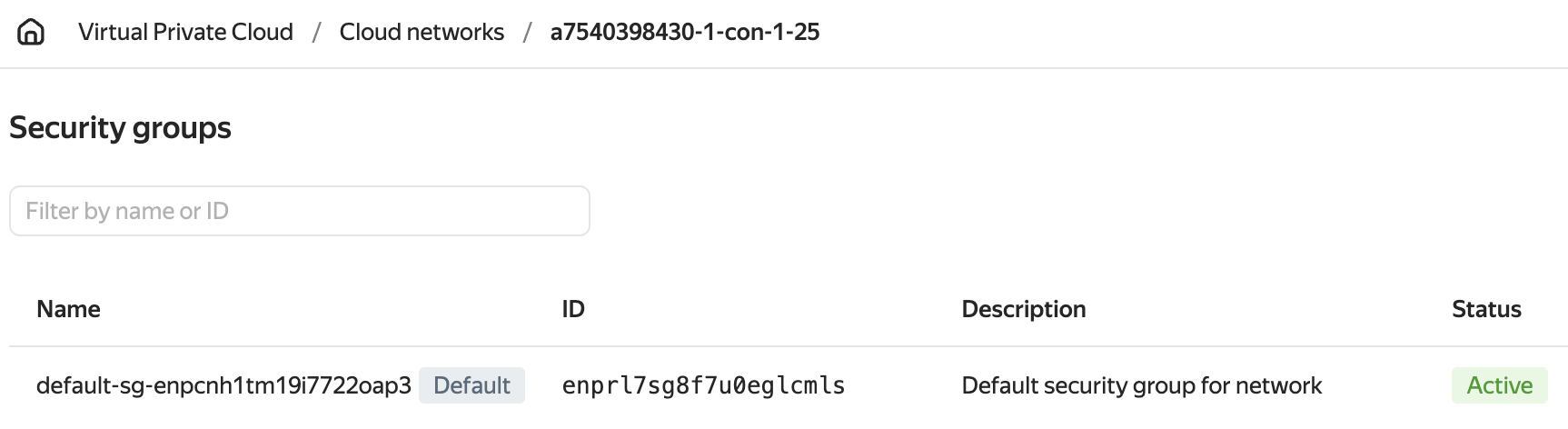
-
Create rules according to the Yandex Cloud instructions.
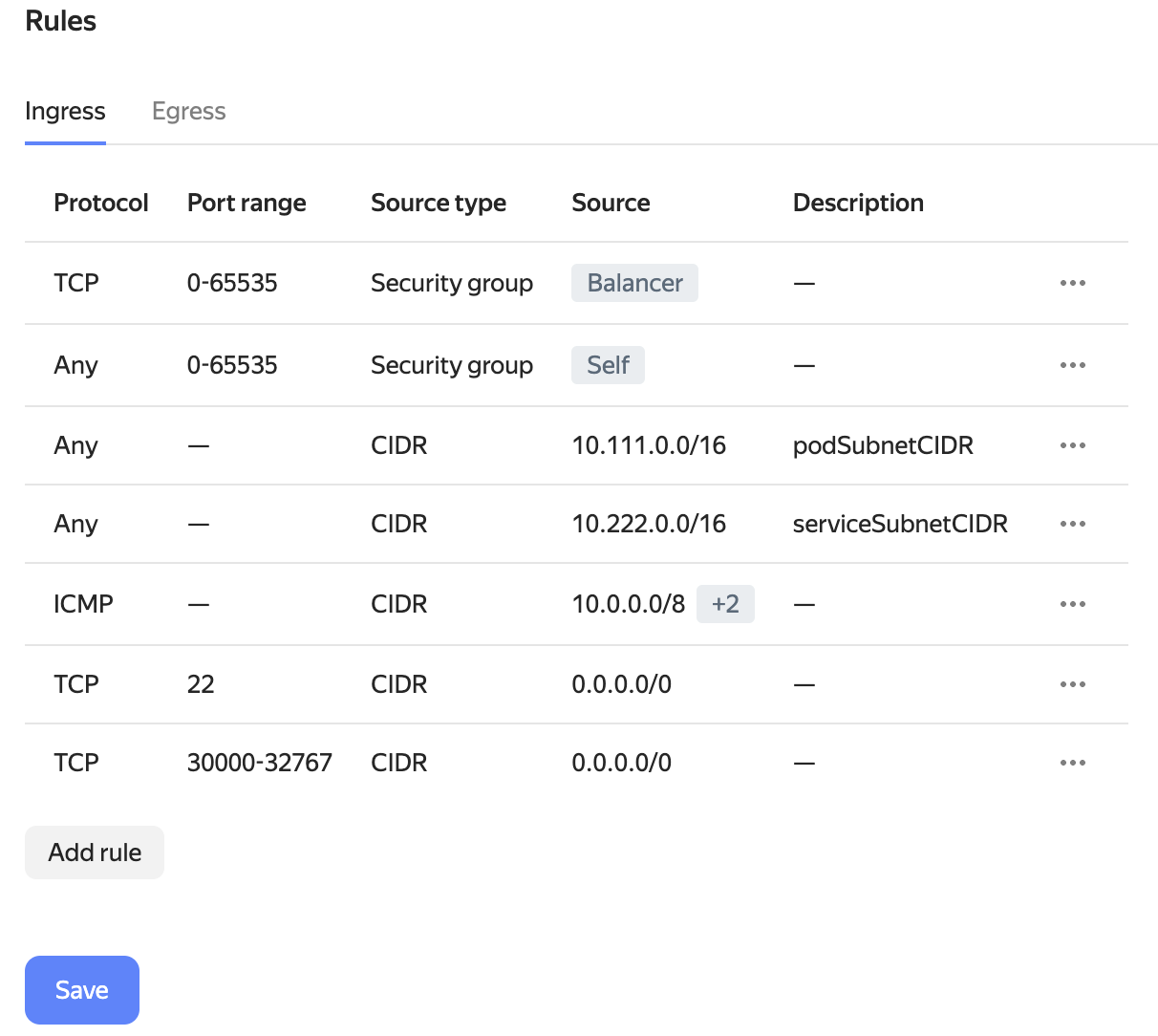
-
Delete the rule that allows all inbound traffic (it is already deleted in the screenshot above) and save your changes.
Configuring access via bastion host
To connect to nodes located in private subnets (for example, when using the Standard or WithNATInstance layout), you can use a bastion host, an intermediary VM with a public IP address that provides SSH access to the nodes.
To configure access, follow these steps:
-
Bootstrap the base infrastructure. Before creating a bastion host, perform the initial installation phase of DP, which sets up the network infrastructure:
dhctl bootstrap-phase base-infra --config config.yml -
Create a bastion host in Yandex Cloud:
yc compute instance create \
  --name bastion \
  --hostname bastion \
  --create-boot-disk image-family=ubuntu-2204-lts,image-folder-id=standard-images,size=20,type=network-hdd \
  --memory 2 \
  --cores 2 \
  --core-fraction 100 \
  --ssh-key ~/.ssh/<SSH_PUBLIC_KEY_FILE> \
  --zone ru-central1-a \
  --public-address 178.154.226.159
Replace
<SSH_PUBLIC_KEY_FILE>with the name of the public key, for exampleid_rsa.pubfor an RSA key orid_ed25519.pubfor an ED25519 key.Ensure the IP address specified in
--public-addressis accessible from your network and is correct. -
Start the main DP bootstrap through the bastion host:
dhctl bootstrap --ssh-bastion-host=178.154.226.159 --ssh-bastion-user=yc-user \
  --ssh-user=ubuntu --ssh-agent-private-keys=/tmp/.ssh/<SSH_PRIVATE_KEY_FILE> --config=/config.yml
Replace
<SSH_PRIVATE_KEY_FILE>with the name of the private key, for exampleid_rsafor an RSA key orid_ed25519for an ED25519 key.Where:
--ssh-bastion-user: User for connecting to the bastion host.--ssh-user: User on the target cluster nodes.--ssh-agent-private-keys: Path to the private SSH key.--config: Path to the DP configuration file.
Replacing the OS image
The imageID parameter of YandexInstanceClass defines the image for CloudEphemeral nodes. With a ModuleConfig-based provider configuration, this parameter also defines the image for CloudPermanent nodes and master nodes.
With a YandexClusterConfiguration-based configuration, the image for CloudPermanent nodes and master nodes is set by imageID in nodeGroups[].instanceClass and masterNodeGroup.instanceClass, respectively.
The replacement procedure is described in “How do I replace the OS image in a cloud cluster?”.