
Deckhouse Platform supports two layouts in the Basis Dynamix cloud:
- Standard: A layout that uses only an external network
- StandardWithInternalNetwork: A layout with an internal (private) network and DNS servers
Both layouts let you manage cluster node placement, network settings, the OS image, and data storage.
Standard
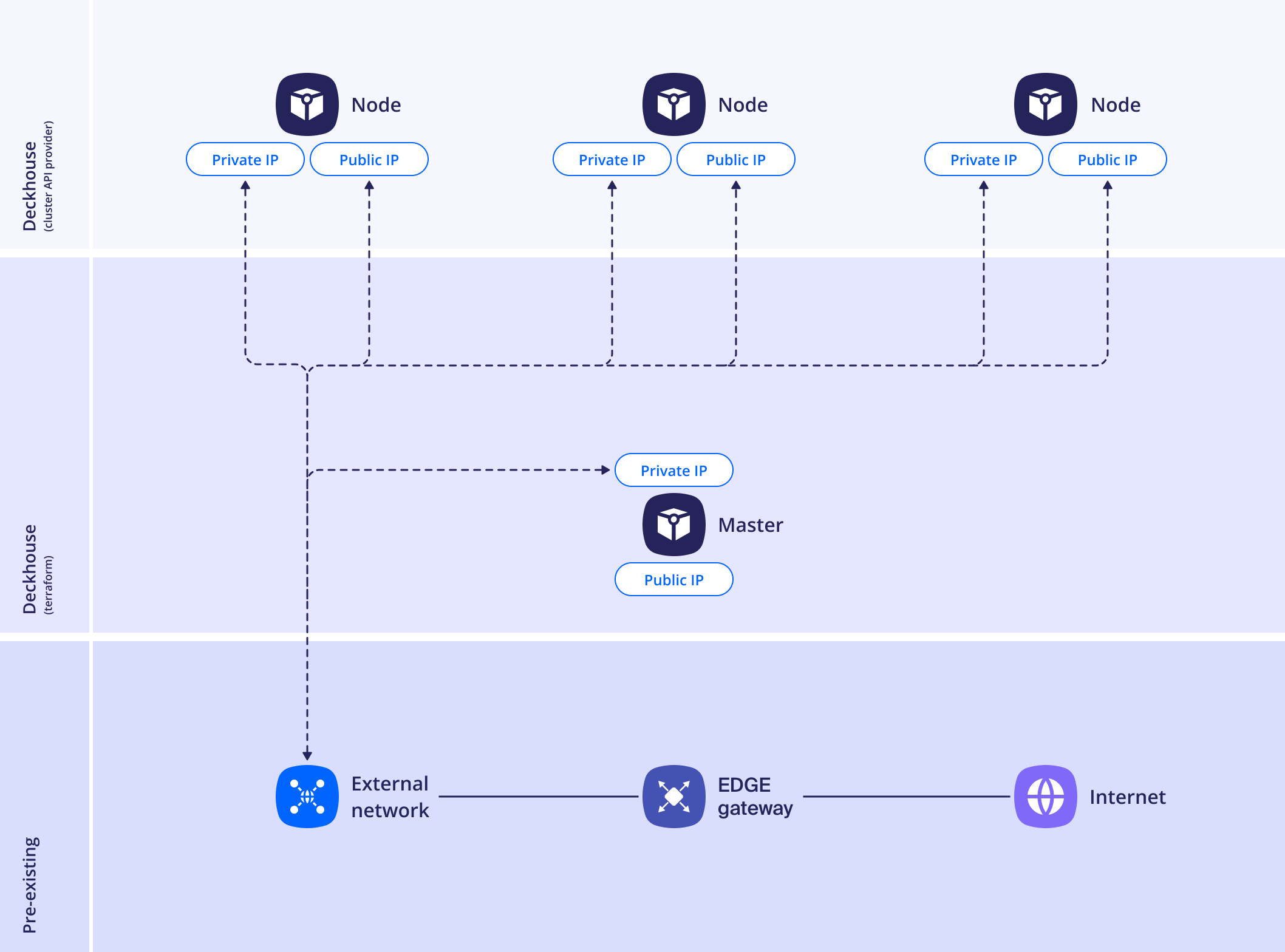
If the external network doesn’t provide DNS server addresses to the nodes, set them in the nameservers parameter.
Example layout configuration:
apiVersion: deckhouse.io/v1
kind: DynamixClusterConfiguration
layout: Standard
sshPublicKey: "<SSH_PUBLIC_KEY>"
location: dynamix
account: acc_user
storagePolicy: storage_policy01
provider:
  controllerUrl: "<controller url>"
  oAuth2Url: "<oAuth2 url>"
  appId: "<app id>"
  appSecret: "<app secret>"
  insecure: true
masterNodeGroup:
  replicas: 1
  instanceClass:
    numCPUs: 6
    memory: 16384
    rootDiskSizeGb: 50
    imageName: "<image name>"
    externalNetwork: "<external network>"
StandardWithInternalNetwork
Example layout configuration:
apiVersion: deckhouse.io/v1
kind: DynamixClusterConfiguration
layout: StandardWithInternalNetwork
sshPublicKey: "<SSH_PUBLIC_KEY>"
location: dynamix
account: acc_user
storagePolicy: storage_policy01
nodeNetworkCIDR: "10.241.32.0/24"
nameservers:
  - "10.0.0.10"
provider:
  controllerUrl: "<controller url>"
  oAuth2Url: "<oAuth2 url>"
  appId: "<app id>"
  appSecret: "<app secret>"
  insecure: true
masterNodeGroup:
  replicas: 1
  instanceClass:
    numCPUs: 6
    memory: 16384
    rootDiskSizeGb: 50
    imageName: "<image name>"
    externalNetwork: "<external network>"
Required parameters
layout: LayoutsshPublicKey: Public key for accessing the nodeslocation: Name of the Basis Dynamix location where the cluster resource group is createdaccount: Account name in the cloudstoragePolicy: Name of the storage policy used by default for virtual machine disksprovider.controllerUrl,oAuth2Url,appId,appSecret: API access parametersimageName: OS image nameexternalNetwork: External network namenodeNetworkCIDR: Address space of the internal network (only for theStandardWithInternalNetworklayout)
Changing storagePolicy recreates nodes of the CloudEphemeral type. The nodes that are recreated are listed in the Changing the storage policy section.
To apply the parameter changes, run dhctl converge.