
Connecting to Kubernetes API using a generated kubeconfig
-
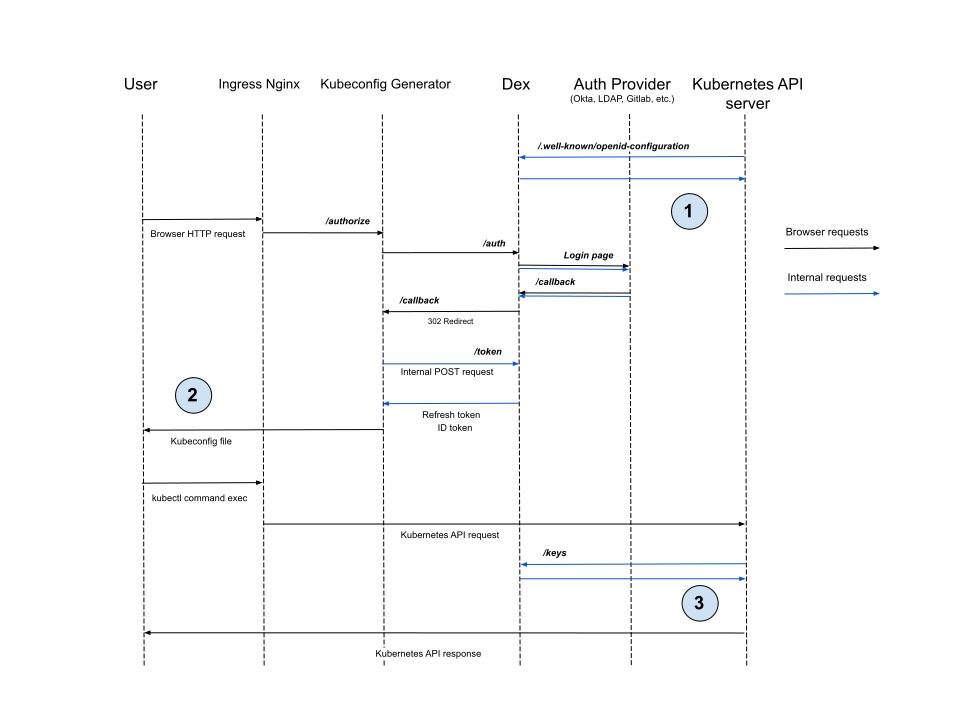
Initialization. kube-apiserver reads the configuration of the OIDC provider (in this case — Dex): the
issuerand the JWKS endpoint for token validation. In Kubernetes 1.30 and later, it reads it through the Dex Service inside the cluster. -
Kubeconfig generation. The Deckhouse Platform (DP) web UI generates a kubeconfig file that includes an
ID tokenand arefresh token. This file is used bykubectlor other Kubernetes clients. -
Authentication when accessing the API. Upon receiving a request with an
ID token, thekube-apiserververifies the token’s signature using keys from the JWKS endpoint. It then compares theiss(issuer) andaud(audience) claims in the token against the server configuration.
Protection against credential brute-forcing in Dex
Dex limits failed sign-in attempts per client IP address on the password endpoints. Configure the limit with the rateLimit parameter. It is turned off by default.
Dex also locks an account after failed sign-in attempts. Configure the lockout with the passwordPolicy.lockout parameter. It applies to local users, and to LDAP and Crowd users if their types are listed in applyToConnectors.
Authentication via DexAuthenticator
-
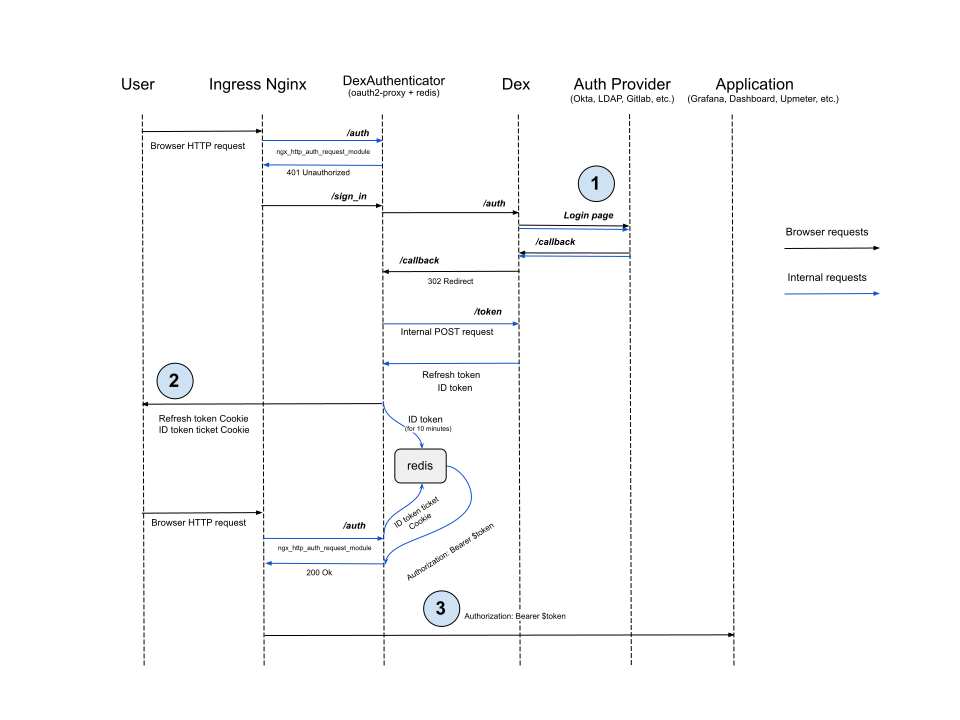
Login process via Dex. In most cases, Dex redirects the user to the login page of an external identity provider (e.g., GitHub, Okta, Keycloak), then expects the user to return to the
/callbackURL after successful authentication.
However, for providers like LDAP or Atlassian Crowd, this flow is not supported. Instead, the user enters their login and password in the Dex login form, and Dex performs authentication by calling the provider’s API directly. -
Token and session storage. DexAuthenticator sets a cookie containing the full
refresh token, rather than issuing a short-lived ticket as with theID token.
This is because Redis, used by DexAuthenticator, does not persist data to disk.
If theID tokenis missing from Redis, the user can obtain a new one using therefresh tokenstored in the cookie. -
Passing the token to the application. DexAuthenticator sets the
AuthorizationHTTP header with theID tokenfrom Redis.
This may be optional for some applications, such as Upmeter, where other authorization mechanisms are used.
However, for applications like the Kubernetes Dashboard, this behavior is critical, as the Dashboard forwards theID tokento access the Kubernetes API on behalf of the user.
DP-specific Dex extensions
DP ships Dex with additional capabilities:
- Groups for static users (the Group object).
- Two-factor authentication (2FA) for local users and for the users of LDAP and Atlassian Crowd providers (the
twoFactorparameter). - A password policy for static users: complexity, password history, rotation and lockout after failed sign-in attempts (the
passwordPolicyparameter). - A forced password change at the next sign-in after an administrator resets the password.
- Lockout after failed sign-in attempts for LDAP and Atlassian Crowd users (the
passwordPolicy.lockout.applyToConnectorsparameter). - Per-IP rate limiting of failed sign-in attempts (the
rateLimitparameter). - Locking and unlocking users with the UserOperation object, also without a password policy.
- Lists of allowed users and groups in DexClient and DexAuthenticator that Dex checks at sign-in and at every refresh-token request.
- Limits on the identities a provider may assert (the
spec.allowedIdentitiesparameter of DexProvider). - Kerberos (SPNEGO) sign-in through the LDAP provider without the password form, with tickets from the
Authorization: Negotiateheader validated by the service keytab. - Refresh tokens for the SAML provider.
- A custom CA certificate for the GitLab provider (the
gitlab.rootCADataparameter).
High availability mode
In high availability mode (highAvailability), Dex and the other user-authn components run in several replicas, so sign-in keeps working if one pod fails. DexAuthenticator follows the same setting unless its own spec.highAvailability is set.