Available in: Open/CE, Core, BE, SE, SE+, Ultimate/EE
The module lifecycle stage: Preview
The module has requirements for installation
An example of the configuration
apiVersion: deckhouse.io/v1alpha1
kind: ModuleConfig
metadata:
  name: loki
spec:
  settings:
    storageClass: ceph-csi-rbd
    diskSizeGigabytes: 10
    retentionPeriodHours: 48
  enabled: true
  version: 1
How to explicitly enable or disable the module…
You may explicitly enable or disable the module in one of the following ways:
-
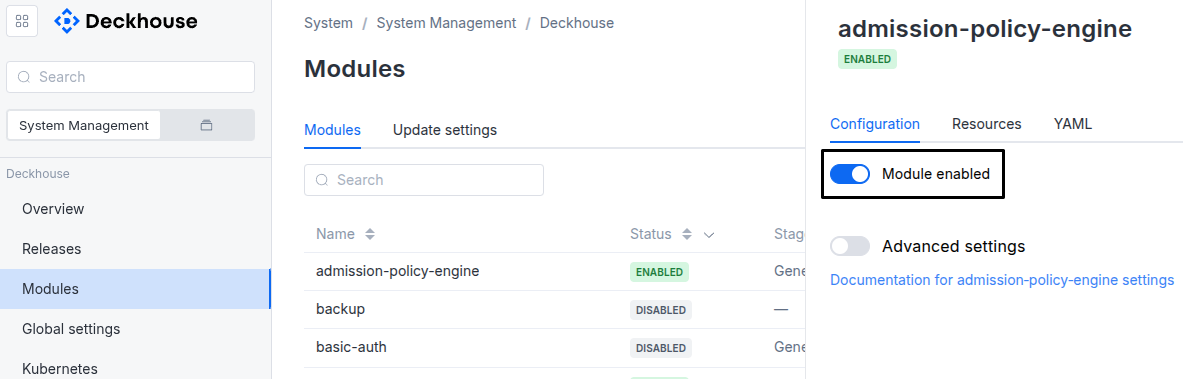
Via Deckhouse web UI. In the “System” → “System Management” → “Deckhouse” → “Modules” section, open the
lokimodule and enable (or disable) the “Module enabled” toggle. Save changes.Example:
-
Via Deckhouse CLI (d8).
Use the d8 system module enable command for enabling, or d8 system module disable command for disabling the module (you need Deckhouse CLI (d8), configured to work with the cluster).
Example of enabling the module:
d8 system module enable loki -
Using ModuleConfig
loki.Set
spec.enabledtotrueorfalsein ModuleConfigloki(create it if necessary).Example of a manifest to enable module
loki:apiVersion: deckhouse.io/v1alpha1 kind: ModuleConfig metadata: name: loki spec: enabled: true
You can configure the module in one of the following ways:
-
Via Deckhouse web UI.
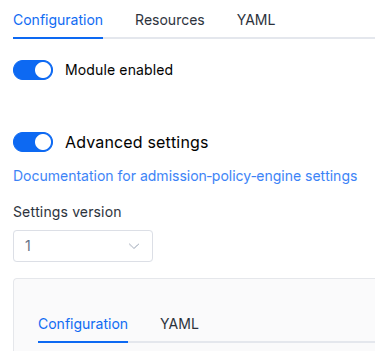
In the “System” → “System Management” → “Deckhouse” → “Modules” section, open the
lokimodule and enable the “Advanced Settings” toggle. Fill in the required fields in the “Configuration” tab or specify the module settings in YAML format on the “YAML” tab, without the top-levelsettingskey. Save the changes.Example:
You can also edit the ModuleConfig object
lokion the “YAML” tab in the module settings window (“System” → “System Management” → “Deckhouse” → “Modules”, open the moduleloki) by specifying the schema version in thespec.versionparameter and the necessary module parameters in thespec.settingssection. -
Via Deckhouse CLI (d8) (requires Deckhouse CLI (d8) configured to work with the cluster).
Edit the existing ModuleConfig
loki(for more details on configuring Deckhouse Platform, see the documentation) by executing the following command:d8 k edit mc lokiMake the necessary changes in the
spec.settingssection. If necessary, specify the schema version in thespec.versionparameter. Save the changes.You can also create a manifest file for ModuleConfig
lokiusing the example below. Fill in thespec.settingssection with the required module parameters. If necessary, specify the schema version in thespec.versionparameter.Apply the manifest using the following command (indicate the manifest file name):
d8 k apply -f <FILENAME>Example of a manifest for ModuleConfig
loki:apiVersion: deckhouse.io/v1alpha1 kind: ModuleConfig metadata: name: loki spec: version: 1 enabled: true settings: # Module parameters from the "Parameters" section below.
Requirements
To the Deckhouse Platform version: 1.73.0 and above.
Parameters
Schema version: 1
-
-
booleansettings.allowDeleteLogsAllow logs deletion using /loki/api/v1/delete endpoints.
Default:
false -
integersettings.diskSizeGigabytesInitial disk size for log storage or PVC size when specifying the storageClass parameters. You should manually specify the required disk size for storing logs for the period defined by the
retentionPeriodHoursparameter. The extended-monitoring module automatically monitors the percentage of used disk space.Default:
2 -
objectsettings.lokiConfig
Loki configuration options available for tuning.
See Loki documentation for more information.
Caution! Incorrect settings may lead to the malfunction of Loki.
Default:
{}-
integersettings.lokiConfig.grpcServerMaxConcurrentStreamsLimit on the number of concurrent streams for gRPC calls.
Default:
100 -
integersettings.lokiConfig.grpcServerMaxRecvMsgSizeLimit on the size of a gRPC message this server can receive in bytes.
Default:
104857600 -
integersettings.lokiConfig.grpcServerMaxSendMsgSizeLimit on the size of a gRPC message this server can send in bytes.
Default:
4194304 -
numbersettings.lokiConfig.ingestionBurstSizeMBOverall ingestion burst size in megabytes. E.g., maximum push request size.
Default:
6 -
numbersettings.lokiConfig.ingestionRateMBOverall ingestion rate limit in megabytes per second.
Default:
4 -
integersettings.lokiConfig.maxChunksPerQueryThe maximum number of chunks that can be fetched per query.
Default:
2000000 -
integersettings.lokiConfig.maxEntriesLimitPerQueryThe maximum number of entries returned for the query.
Default:
5000 -
integersettings.lokiConfig.maxLabelNamesPerSeriesThe maximum number of unique label names per series (log stream).
Default:
32 -
integersettings.lokiConfig.maxStreamsPerUser
The maximum total number of streams for the Loki instance.
Each stream has unique labels. The number of streams is the number of unique label sets. E. g.
{job="my-app", instance="kube-node-1", namespace="production", pod_name="backend-79dbf6fcb7-v5gs7", app="backend"}.0 means unlimited.
Default:
0 -
settings.lokiConfig.perStreamRateLimitMaximum byte rate per second per stream. Can be either a number or a string with a unit (KB, MB, GB).
Default:
3MB -
settings.lokiConfig.perStreamRateLimitBurstMaximum burst size per stream. Can be either a number or a string with a unit (KB, MB, GB).
Default:
15MB
-
-
objectsettings.nodeSelectorThe same as the Pods’
spec.nodeSelectorparameter in Kubernetes. If the parameter is omitted orfalse,nodeSelectorwill be determined automatically. -
settings.resourcesManagementSettings for CPU and memory requests and limits by Loki pods.
Default:
{}Examples:
mode: VPA vpa: cpu: limitRatio: 1.5 max: 2 min: 50m memory: limitRatio: 1.5 max: 2Gi min: 256Mi mode: InPlaceOrRecreatemode: Static static: limits: cpu: 2 memory: 2Gi requests: cpu: 55m memory: 256Mimode: VPA vpa: cpu: limitRatio: 1.5 max: 2 min: 50m memory: limitRatio: 1.5 max: 2Gi min: 256Mi mode: Auto-
stringsettings.resourcesManagement.mode
Resource management mode:
Default:
VPAAllowed values:
VPA,Static -
objectsettings.resourcesManagement.staticResource management options for the
Staticmode.-
objectsettings.resourcesManagement.static.limitsConfiguring CPU and memory limits.
-
settings.resourcesManagement.static.limits.cpuConfiguring CPU limits.
-
settings.resourcesManagement.static.limits.memoryConfiguring memory limits.
-
-
objectsettings.resourcesManagement.static.requestsResource requests settings for pods.
-
settings.resourcesManagement.static.requests.cpuConfiguring CPU requests.
-
settings.resourcesManagement.static.requests.memoryConfiguring memory requests.
-
-
-
objectsettings.resourcesManagement.vpaResource management options for the
VPAmode.Default:
{}-
objectsettings.resourcesManagement.vpa.cpuCPU-related VPA settings.
Default:
{}-
numbersettings.resourcesManagement.vpa.cpu.limitRatio
The CPU limits/requests ratio.
This ratio is used for calculating the initial CPU limits for a pod.
If this parameter is set, the VPA will recalculate the CPU limits while maintaining the specified limits/requests ratio.
-
settings.resourcesManagement.vpa.cpu.maxThe maximum value that the VPA can set for the CPU requests.
Default:
2 -
settings.resourcesManagement.vpa.cpu.minThe minimum value that the VPA can set for the CPU requests.
Default:
50m
-
-
objectsettings.resourcesManagement.vpa.memoryMemory-related VPA settings.
Default:
{}-
numbersettings.resourcesManagement.vpa.memory.limitRatio
The memory limits/requests ratio.
This ratio is used for calculating the initial memory limits for a pod.
If this parameter is set, the VPA will recalculate the memory limits while maintaining the specified limits/requests ratio.
-
settings.resourcesManagement.vpa.memory.maxThe maximum memory requests the VPA can set.
Default:
2Gi -
settings.resourcesManagement.vpa.memory.minThe minimum memory requests the VPA can set.
Default:
256Mi
-
-
stringsettings.resourcesManagement.vpa.mode
VPA operating mode.
-
Initial— VPA sets initial values for pod resource requests and limits at pod creation time. Resource values are not changed automatically afterwards. -
InPlaceOrRecreate— VPA attempts to update pod resources in place when supported by the cluster. If in-place updates are not possible, the pod will be recreated. -
Auto— VPA automatically recreates pods to apply updated resource values.Starting from Deckhouse version 1.75, this mode is considered legacy. It is recommended to use
InPlaceOrRecreateinstead.
Default:
InPlaceOrRecreateAllowed values:
Initial,InPlaceOrRecreate,Auto -
-
-
-
integersettings.retentionPeriodHours
The desired minimum log retention period in hours.
This parameter does not affect the log retention depth, since Loki only deletes old data when the disk is full.
If Loki deletes data that has not yet reached the specified retention period, you will receive a
LokiInsufficientDiskForRetentionalert. In this case, you should either increase the disk size or decrease the value of this parameter.Default:
168 -
settings.storageClass
The name of the StorageClass for storing Loki logs (PVC).
If omitted, the StorageClass of the existing Loki PVC is used. If there is no PVC yet, the StorageClass will be used according to the global storageClass parameter setting.
The global
storageClassparameter is only considered when the module is enabled. Changing the globalstorageClassparameter while the module is enabled will not trigger disk re-provisioning.Warning. Specifying a value different from the one currently used (in the existing PVC) will result in disk re-provisioning and all data will be deleted.
Examples:
storageClass: falsestorageClass: default -
booleansettings.storeSystemLogs
Save logs from the
d8-*namespaces to loki.The log-shipper module must be enabled.
Default:
true -
array of objectssettings.tolerationsThe same as the Pods’
spec.tolerationsparameter in Kubernetes. If the parameter is omitted orfalse,tolerationswill be determined automatically.-
stringsettings.tolerations.effect
-
stringsettings.tolerations.key
-
stringsettings.tolerations.operator
-
integersettings.tolerations.tolerationSeconds
-
stringsettings.tolerations.value
-
-