Available in: Ultimate/EE
The module lifecycle stage: Generally available version
The module has requirements for installation
How to explicitly enable or disable the module…
You may explicitly enable or disable the module in one of the following ways:
-
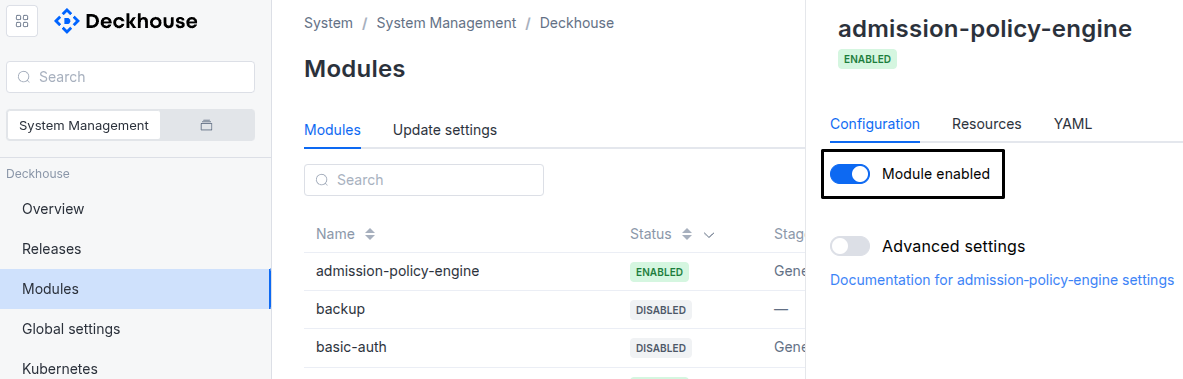
Via Deckhouse web UI. In the “System” → “System Management” → “Deckhouse” → “Modules” section, open the
development-platformmodule and enable (or disable) the “Module enabled” toggle. Save changes.Example:
-
Via Deckhouse CLI (d8).
Use the d8 system module enable command for enabling, or d8 system module disable command for disabling the module (you need Deckhouse CLI (d8), configured to work with the cluster).
Example of enabling the module:
d8 system module enable development-platform -
Using ModuleConfig
development-platform.Set
spec.enabledtotrueorfalsein ModuleConfigdevelopment-platform(create it if necessary).Example of a manifest to enable module
development-platform:apiVersion: deckhouse.io/v1alpha1 kind: ModuleConfig metadata: name: development-platform spec: enabled: true
You can configure the module in one of the following ways:
-
Via Deckhouse web UI.
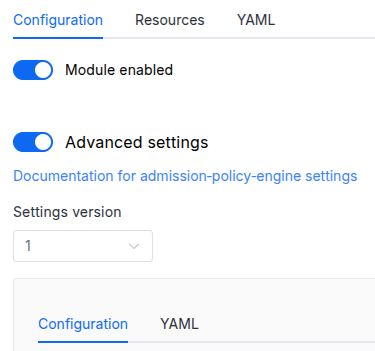
In the “System” → “System Management” → “Deckhouse” → “Modules” section, open the
development-platformmodule and enable the “Advanced Settings” toggle. Fill in the required fields in the “Configuration” tab or specify the module settings in YAML format on the “YAML” tab, without the top-levelsettingskey. Save the changes.Example:
You can also edit the ModuleConfig object
development-platformon the “YAML” tab in the module settings window (“System” → “System Management” → “Deckhouse” → “Modules”, open the moduledevelopment-platform) by specifying the schema version in thespec.versionparameter and the necessary module parameters in thespec.settingssection. -
Via Deckhouse CLI (d8) (requires Deckhouse CLI (d8) configured to work with the cluster).
Edit the existing ModuleConfig
development-platform(for more details on configuring Deckhouse Platform, see the documentation) by executing the following command:d8 k edit mc development-platformMake the necessary changes in the
spec.settingssection. If necessary, specify the schema version in thespec.versionparameter. Save the changes.You can also create a manifest file for ModuleConfig
development-platformusing the example below. Fill in thespec.settingssection with the required module parameters. If necessary, specify the schema version in thespec.versionparameter.Apply the manifest using the following command (indicate the manifest file name):
d8 k apply -f <FILENAME>Example of a manifest for ModuleConfig
development-platform:apiVersion: deckhouse.io/v1alpha1 kind: ModuleConfig metadata: name: development-platform spec: version: 2 enabled: true settings: # Module parameters from the "Parameters" section below.
Requirements
To the Deckhouse Platform version: 1.72 and above.
To the versions of other modules:
-
user-authn: any version.
Conversions
The module is configured using the ModuleConfig resource, the schema of which contains a version number. When you apply an old version of the ModuleConfig schema in a cluster, automatic transformations are performed. To manually update the ModuleConfig schema version, the following steps must be completed sequentially for each version:
-
Updates from version 1 to 2:
The
postgres.modeandredis.modeparameters are now required: set them explicitly before upgrading. If PostgreSQL and Redis previously used the default deployment mode, setpostgres.mode: internalandredis.mode: internal. ClickHouse is introduced in this release; ifclickhouse.modeis not set, the module runs without ClickHouse (clickhouse.mode: externalwith an emptyclickhouse.host).
Parameters
Schema version: 2
-
-
objectsettings.actionsAction settings.
Default:
{}-
objectsettings.actions.loggingAction logging settings.
Default:
{}-
booleansettings.actions.logging.enabledWrites action logs to stdout.
Default:
false
-
-
-
array of stringssettings.additionalImagePullSecrets
Names of additional Secrets for pulling images from private registries.
The Secrets are added after
registry-credsto the backend, workers, frontend, agent, PostgreSQL, Redis and ClickHouse pods. Create them in thed8-development-platformnamespace.Default:
[]Examples:
additionalImagePullSecrets: []additionalImagePullSecrets: - custom-registry-secretadditionalImagePullSecrets: - additional-secret-1 - additional-secret-2 -
objectsettings.aiAI agent and MCP settings.
Default:
{}-
objectsettings.ai.agentAI agent settings.
Default:
{}-
objectsettings.ai.agent.auditSettings of the AI agent run log.
Default:
{}-
integersettings.ai.agent.audit.runsRetentionDays
Minimum number of days the AI agent run log is kept.
Records are removed by whole days once a day.
Default:
30Allowed values:
1 <= XExample:
runsRetentionDays: 30
-
-
-
objectsettings.ai.mcpMCP settings.
Default:
{}-
objectsettings.ai.mcp.auditSettings of the MCP tool call log.
Default:
{}-
integersettings.ai.mcp.audit.toolCallsRetentionDays
Minimum number of days the MCP tool call log is kept.
Records are removed by whole days once a day.
Default:
30Allowed values:
1 <= XExample:
toolCallsRetentionDays: 30
-
-
-
-
objectsettings.clickhouse
ClickHouse connection settings.
ClickHouse stores the historical data of the platform, such as the history of entity property changes.
Default:
{}-
stringsettings.clickhouse.database
Name of the ClickHouse database.
DDP applies schema migrations to the database but does not create it with
mode: external. Create the database before starting the module.Default:
ddpExample:
database: ddp -
stringsettings.clickhouse.host
Hostname or IP address of the ClickHouse server. Used with
mode: external.Leave empty to run without the features that require ClickHouse.
Default:
‘’Examples:
host: ''host: clickhouse.example.comhost: 192.168.1.102 -
stringsettings.clickhouse.image
ClickHouse container image. Used with
mode: internal.The value can include the registry address, for example
registry.example.com/clickhouse/clickhouse-server:24.3.Default:
clickhouse/clickhouse-server:24.3Example:
image: clickhouse/clickhouse-server:24.3 -
objectsettings.clickhouse.instanceResources of the instance created when
mode=managed.Default:
{}-
stringsettings.clickhouse.instance.classNameName of the class of the managed module. The class defines allowed sizes and placement of the instance.
Default:
defaultExample:
className: default -
objectsettings.clickhouse.instance.cpuCPU of the instance.
Default:
{}-
stringsettings.clickhouse.instance.cpu.coreFractionGuaranteed share of each core (requests).
Default:
50%Pattern:
^[0-9]+%$Examples:
coreFraction: 50%coreFraction: 100% -
integersettings.clickhouse.instance.cpu.coresNumber of CPU cores (limit).
Default:
2Allowed values:
1 <= XExamples:
cores: 2cores: 1
-
-
objectsettings.clickhouse.instance.memoryMemory of the instance.
Default:
{}-
stringsettings.clickhouse.instance.memory.sizeMemory size.
Default:
8GiPattern:
^[+-]?([0-9]+(\.[0-9]*)?|\.[0-9]+)([KMGTPE]i|[numkMGTPE]|[eE][+-]?[0-9]+)?$Example:
size: 8Gi
-
-
objectsettings.clickhouse.instance.persistentVolumeClaimDisk of the instance.
Default:
{}-
stringsettings.clickhouse.instance.persistentVolumeClaim.sizeDisk size.
Default:
50GiPattern:
^[+-]?([0-9]+(\.[0-9]*)?|\.[0-9]+)([KMGTPE]i|[numkMGTPE]|[eE][+-]?[0-9]+)?$Example:
size: 50Gi -
stringsettings.clickhouse.instance.persistentVolumeClaim.storageClassNameStorageClass of the disk. If not set, the default StorageClass is used.
Example:
storageClassName: replicated
-
-
-
stringsettings.clickhouse.mode
Required value
ClickHouse deployment mode.
internal: The module deploys ClickHouse in the cluster.external: The module connects to an existing ClickHouse instance, or runs without ClickHouse ifhostis empty.managed: The module creates a ClickHouse instance with themanaged-clickhousemodule.
Allowed values:
internal,external,managed -
stringsettings.clickhouse.password
Password for connecting to ClickHouse.
With
mode: internal, the module creates the ClickHouse server with this password.Not used with
mode: managed.Default:
ddpExamples:
password: ddppassword: clickhouse_password -
numbersettings.clickhouse.port
ClickHouse native protocol port.
Not used with
mode: managed; the managed instance uses port9000.Default:
9000Example:
port: 9000 -
objectsettings.clickhouse.propertyHistoryStorage settings of the history of entity property changes.
Default:
{}-
stringsettings.clickhouse.propertyHistory.cleanupIntervalInterval between removals of the history past its retention period, in the Go duration format.
Default:
1hExample:
cleanupInterval: 1h -
integersettings.clickhouse.propertyHistory.retentionDays
Minimum number of days the history of entity property changes is kept.
With
0, the history is kept indefinitely.Default:
180Allowed values:
0 <= XExample:
retentionDays: 180
-
-
objectsettings.clickhouse.replicationSettings of data delivery from PostgreSQL to ClickHouse.
Default:
{}-
integersettings.clickhouse.replication.outboxBatchSizeMaximum number of records delivered in one replication batch.
Default:
10000Allowed values:
1 <= X -
stringsettings.clickhouse.replication.outboxPollIntervalInterval between checks for records waiting for delivery, in the Go duration format.
Default:
5sExamples:
outboxPollInterval: 5soutboxPollInterval: 10s -
booleansettings.clickhouse.replication.outboxReindexEnabled
Rebuilds the queue indexes in PostgreSQL after a large batch of changes is delivered and frees the disk space they occupy.
Disable it if database maintenance is managed outside DDP.
Default:
true -
stringsettings.clickhouse.replication.outboxReindexTimeout
Maximum duration of an index rebuild in the Go duration format.
A rebuild that runs longer is stopped and repeated on the next attempt.
Default:
10mExample:
outboxReindexTimeout: 10m
-
-
stringsettings.clickhouse.username
Username for connecting to ClickHouse.
With
mode: internal, the module creates the ClickHouse server with this user.Not used with
mode: managed.Default:
defaultExamples:
username: defaultusername: ddp
-
-
objectsettings.datasourcesDatasource settings.
Default:
{}-
objectsettings.datasources.loggingDatasource logging settings.
Default:
{}-
booleansettings.datasources.logging.enabledWrites datasource logs to stdout.
Default:
false
-
-
-
objectsettings.domainDomain settings of the web interface.
Default:
{}-
stringsettings.domain.customDomain
Domain of the web interface. Used when
useCustomDomainistrue.Specify the domain without
http://orhttps://.Default:
example.comExamples:
customDomain: example.comcustomDomain: ddp.example.com -
stringsettings.domain.customSecretNameName of the Secret with the TLS certificate. Used when
useCustomSecretistrue.Default:
example-tlsExamples:
customSecretName: example-tlscustomSecretName: custom-tls-secret -
stringsettings.domain.prefixPrefix of the domain generated from the
publicDomainTemplatecluster parameter. Used whenuseCustomDomainisfalse.Default:
ddpExamples:
prefix: ddpprefix: dev-platform -
booleansettings.domain.useCustomDomainUses the domain from
customDomaininstead of the domain generated fromprefixand thepublicDomainTemplatecluster parameter.Default:
false -
booleansettings.domain.useCustomSecret
Uses the TLS certificate from the Secret set in
customSecretName.The Secret must be in the
d8-development-platformnamespace.Default:
false
-
-
objectsettings.eventsSettings of platform events.
Default:
{}-
integersettings.events.streamMaxLen
Approximate maximum number of messages in each Redis event stream.
A value of
0or less removes the limit.Default:
10000Examples:
streamMaxLen: 10000streamMaxLen: 5000 -
stringsettings.events.ttl
Retention time of events in the Go duration format.
Supported units:
ns,us,ms,s,m,h. For days, use hours:24his one day.Default:
96hExamples:
ttl: 96httl: 720httl: 30m
-
-
stringsettings.extraCA
Additional CA certificates in the PEM format.
DDP trusts these certificates when it connects to other services, for example to Dex by FQDN if Dex uses a certificate issued by your own CA. The certificates are mounted to
/etc/ssl/certs/extraca.crt.Default:
‘’Examples:
extraCA: ''extraCA: | -----BEGIN CERTIFICATE----- MIIEKTCCApGgAwIBAgIRAL6BA5jjXYI52wcc3b9UftAwDQYJKoZIhvcNAQELBQAw ... -----END CERTIFICATE----- -
objectsettings.loggerLogging settings of DDP components.
Default:
{}-
stringsettings.logger.executionLevel
Minimum level of messages shown in the execution log of a process, action, datasource synchronization or health check run, in the web interface and over WebSocket.
Independent of
level, which controls only the logs DDP writes to stdout.Default:
infoAllowed values:
debug,info,warn,error -
stringsettings.logger.formatLog format.
Default:
logfmtAllowed values:
json,logfmt -
stringsettings.logger.levelLog level.
Default:
infoAllowed values:
debug,info,warn,error
-
-
objectsettings.postgresPostgreSQL connection settings.
Default:
{}-
stringsettings.postgres.database
Name of the PostgreSQL database.
With
mode: internal, the module creates the database with this name on the first start with an empty volume.Default:
ddpExamples:
database: ddpdatabase: development_platformdatabase: my_database -
stringsettings.postgres.host
Hostname or IP address of the PostgreSQL server.
With
mode: internal, keep thepostgresvalue.Not used with
mode: managed.Default:
postgresExamples:
host: postgreshost: localhosthost: 192.168.1.100host: postgres.example.com -
stringsettings.postgres.image
PostgreSQL container image. Used with
mode: internal.The value can include the registry address, for example
registry.example.com/postgres:16.3.Default:
postgres:16.3Examples:
image: postgres:16.3image: registry.example.com/postgres:18.1image: my-registry.io/postgres:16.3 -
objectsettings.postgres.instanceResources of the instance created when
mode=managed.Default:
{}-
stringsettings.postgres.instance.classNameName of the class of the managed module. The class defines allowed sizes and placement of the instance.
Default:
defaultExample:
className: default -
objectsettings.postgres.instance.cpuCPU of the instance.
Default:
{}-
integersettings.postgres.instance.cpu.coreFractionGuaranteed share of each core (requests). In percent.
Default:
50Allowed values:
1 <= X <= 100Examples:
coreFraction: 50coreFraction: 100 -
integersettings.postgres.instance.cpu.coresNumber of CPU cores (limit).
Default:
2Allowed values:
1 <= XExamples:
cores: 2cores: 4
-
-
objectsettings.postgres.instance.memoryMemory of the instance.
Default:
{}-
stringsettings.postgres.instance.memory.sizeMemory size.
Default:
4GiPattern:
^[+-]?([0-9]+(\.[0-9]*)?|\.[0-9]+)([KMGTPE]i|[numkMGTPE]|[eE][+-]?[0-9]+)?$Example:
size: 4Gi
-
-
objectsettings.postgres.instance.persistentVolumeClaimDisk of the instance.
Default:
{}-
stringsettings.postgres.instance.persistentVolumeClaim.sizeDisk size.
Default:
20GiPattern:
^[+-]?([0-9]+(\.[0-9]*)?|\.[0-9]+)([KMGTPE]i|[numkMGTPE]|[eE][+-]?[0-9]+)?$Example:
size: 20Gi -
stringsettings.postgres.instance.persistentVolumeClaim.storageClassNameStorageClass of the disk. If not set, the default StorageClass is used.
Example:
storageClassName: replicated
-
-
-
stringsettings.postgres.mode
Required value
PostgreSQL deployment mode.
internal: The module deploys PostgreSQL in the cluster.external: The module connects to an existing PostgreSQL instance.managed: The module creates a PostgreSQL instance with themanaged-postgresmodule.
Allowed values:
internal,external,managed -
stringsettings.postgres.password
Password for connecting to PostgreSQL.
With
mode: internal, the module sets the password of the user on the first start with an empty volume.Default:
ddpExamples:
password: ddppassword: secure_password_123 -
numbersettings.postgres.port
PostgreSQL port.
Not used with
mode: managed; the managed instance uses port5432.Default:
5432Examples:
port: 5432port: 35432 -
stringsettings.postgres.username
Username for connecting to PostgreSQL.
With
mode: internal, the module creates the user on the first start with an empty volume.Default:
ddpExamples:
username: ddpusername: postgresusername: db_user
-
-
objectsettings.rbacAccess control settings.
Default:
{}-
booleansettings.rbac.ownerIsAdminGives the resource owner administrator rights on the resource automatically.
Default:
true -
stringsettings.rbac.superAdminEmail
Required value
Email of the super administrator: the user with this email has full access to the platform configuration.Example:
superAdminEmail: admin@example.com
-
-
objectsettings.redisRedis connection settings.
Default:
{}-
stringsettings.redis.databaseRedis database index.
Default:
0Examples:
database: '0'database: '1'database: '15' -
stringsettings.redis.host
Hostname or IP address of the Redis server.
With
mode: internal, keep theredisvalue.Not used with
mode: managed.Default:
redisExamples:
host: redishost: localhosthost: 192.168.1.101host: redis.example.com -
stringsettings.redis.image
Redis container image. Used with
mode: internal.The value can include the registry address, for example
registry.example.com/redis:7.4.0.Default:
redis:7.4.0Examples:
image: redis:7.4.0image: registry.example.com/redis:8.4.0image: my-registry.io/redis:7.4.0 -
objectsettings.redis.instanceResources of the instance created when
mode=managed.Default:
{}-
stringsettings.redis.instance.classNameName of the class of the managed module. The class defines allowed sizes and placement of the instance.
Default:
defaultExample:
className: default -
objectsettings.redis.instance.cpuCPU of the instance.
Default:
{}-
stringsettings.redis.instance.cpu.coreFractionGuaranteed share of each core (requests).
Default:
50%Pattern:
^[0-9]+%$Examples:
coreFraction: 50%coreFraction: 100% -
integersettings.redis.instance.cpu.coresNumber of CPU cores (limit).
Default:
1Allowed values:
1 <= XExamples:
cores: 1cores: 2
-
-
objectsettings.redis.instance.memoryMemory of the instance.
Default:
{}-
stringsettings.redis.instance.memory.sizeMemory size.
Default:
2GiPattern:
^[+-]?([0-9]+(\.[0-9]*)?|\.[0-9]+)([KMGTPE]i|[numkMGTPE]|[eE][+-]?[0-9]+)?$Example:
size: 2Gi
-
-
objectsettings.redis.instance.persistentVolumeClaimDisk of the instance.
Default:
{}-
stringsettings.redis.instance.persistentVolumeClaim.sizeDisk size.
Default:
10GiPattern:
^[+-]?([0-9]+(\.[0-9]*)?|\.[0-9]+)([KMGTPE]i|[numkMGTPE]|[eE][+-]?[0-9]+)?$Example:
size: 10Gi -
stringsettings.redis.instance.persistentVolumeClaim.storageClassNameStorageClass of the disk. If not set, the default StorageClass is used.
Example:
storageClassName: replicated
-
-
-
stringsettings.redis.mode
Required value
Redis deployment mode.
internal: The module deploys Redis in the cluster.external: The module connects to an existing Redis instance.managed: The module creates a Redis instance with themanaged-valkeymodule.
Allowed values:
internal,external,managed -
stringsettings.redis.password
Password for connecting to Redis. Leave empty if Redis does not require a password.
Not used with
mode: managed.Default:
‘’Examples:
password: ''password: redis_password -
numbersettings.redis.port
Redis port.
Not used with
mode: managed; the managed instance uses port6379.Default:
6379Examples:
port: 6379port: 6380
-
-
objectsettings.securitySecurity settings.
Default:
{}-
objectsettings.security.headersSettings of HTTP security headers, such as CSP and
X-Frame-Options.Default:
{}-
objectsettings.security.headers.cspContent Security Policy (CSP) settings.
Default:
{}-
stringsettings.security.headers.csp.additionalSources
Additional CSP sources: a space-separated list of URLs or special values.
The sources are added to the
img-src,connect-src,frame-srcandframe-ancestorsdirectives.Default:
‘’Examples:
additionalSources: ''additionalSources: https://cdn.example.comadditionalSources: https://api.example.com https://cdn.example.com -
booleansettings.security.headers.csp.allowExternalImages
Allows loading images from any domain, for example icons from external CDNs.
If disabled, only images from
'self'anddata:are allowed.Default:
falseExamples:
allowExternalImages: falseallowExternalImages: true -
booleansettings.security.headers.csp.allowIframe
Allows embedding the web interface in iframes on any domain, for example for widgets.
If disabled, only embedding on the same origin is allowed.
Default:
falseExamples:
allowIframe: falseallowIframe: true
-
-
booleansettings.security.headers.enabledSends security headers in HTTP responses.
Default:
trueExamples:
enabled: trueenabled: false -
stringsettings.security.headers.xFrameOptions
Value of the
X-Frame-Optionsheader.DENY: The page cannot be displayed in a frame.SAMEORIGIN: The page can be displayed in a frame only on pages of the same origin.
Default:
SAMEORIGINAllowed values:
DENY,SAMEORIGINExamples:
xFrameOptions: DENYxFrameOptions: SAMEORIGIN
-
-
stringsettings.security.secretKey
Required value
Key that encrypts stored credentials.
The key must be 16, 24 or 32 printable ASCII characters long. DDP does not start with a key that consists of one repeated character or is a commonly used value.
To change the key without losing stored credentials, re-encrypt them in the web interface first, as described on the Getting started page.
Examples:
secretKey: mySecretKeyDefausecretKey: 16charssecretkeysecretKey: 24characterssecretkey!!xsecretKey: 32characterslongsecretkey1234xyz
-
-
objectsettings.workersSettings of the workers that process background tasks.
Default:
{}-
integersettings.workers.maxTasksMaximum number of tasks each worker processes in parallel.
Default:
10Allowed values:
1 <= XExamples:
maxTasks: 5maxTasks: 10maxTasks: 20 -
integersettings.workers.replicas
Number of worker replicas.
Workers process tasks from the queue: datasource synchronization, action execution, health checks and AI agent runs over remote A2A.
Default:
2Allowed values:
0 <= XExamples:
replicas: 1replicas: 2replicas: 3
-
-