In Deckhouse Platform (DP), Stronghold is shipped as the stronghold module. The module deploys a Stronghold cluster, initializes and unseals the storage, publishes the web UI and API through the selected inlet (Ingress by default), and, in the Automatic mode, configures login through Dex. How to enable and configure the module is described in Stronghold configuration.
Deployment layout
The diagram shows how the module is placed in a DP cluster:
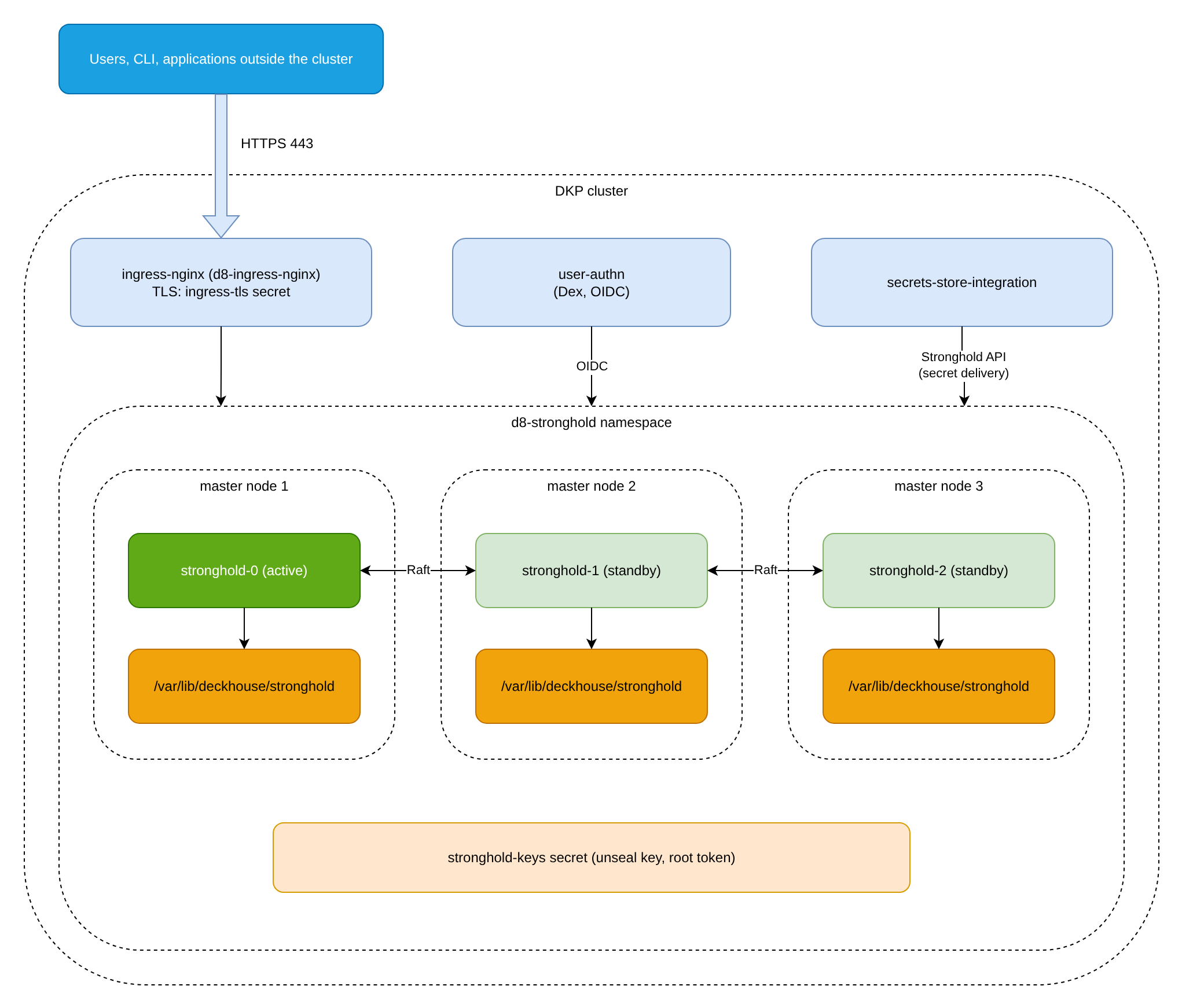
The diagram is illustrative: the active node is elected by Raft and is not necessarily stronghold-0. The Ingress, ingress-tls secret, Dex, and stronghold-keys elements correspond to the default configuration (the Ingress inlet with CertManager, and the Automatic mode).
Module components
The module creates the following components in the cluster:
d8-strongholdnamespace: all Stronghold containers run here, and the module’s service secrets are stored here.- Stronghold pods: each Stronghold node runs in its own pod. Pods are managed by a StatefulSet and spread one per node (pod anti-affinity). If
storageClassis empty, the pods run on control-plane (master) nodes and on nodes with thenode.deckhouse.io/etcd-arbiterlabel. IfstorageClassis set, the pods are placed by the module’snodeSelectorparameter (by default,node-role.kubernetes.io/control-plane=""). The number of replicas is the number of master nodes plus the number of arbiter (etcd-arbiter) nodes; if the sum is even, one more replica is added. Later it can be changed manually. - Storage: integrated Raft storage in HA mode is enabled by default. If
storageClassis empty, each node keeps its data on the local disk of its node in the/var/lib/deckhouse/strongholddirectory (a subdirectory named by the module’slocalPathUUIDmay be used). IfstorageClassis set, the data is stored in thedata-stronghold-NPersistentVolumeClaims of the StatefulSet. - Internal service: nodes reach each other by names such as
stronghold-0.stronghold-internal. The internal API listens on port8300(Raft peer addresses use8301);retry_joinbetween nodes and the inner-cluster unsealing go to port8300. The external API listens on8200. Its cluster port8201accepts replication traffic from secondary clusters only whenpublishCluster.enabledis set. For details, refer to Network ports. - Inlet: the
inletparameter sets how the service is exposed:Ingress(default),GatewayAPI,LoadBalancer,NodePort, orNone. ForLoadBalancer,NodePort, andNone, you must sethttps.mode: CustomCertificate. With theIngressinlet, the web UI and API are published at an address built from thepublicDomainTemplatetemplate by replacing%swithstronghold, for examplestronghold.mycompany.tld. - TLS certificate: the
ingress-tlssecret in thed8-strongholdnamespace. With theIngressinlet andhttps.mode: CertManager, it is issued by cert-manager using the ClusterIssuer set in the DP settings; for the other inlets, or whenhttps.mode: CustomCertificateis used, the certificate fromcustomCertificateis used. Without this secret, the pods stay inContainerCreating.
Operating mode and unsealing
The mode is set by the management.mode parameter. The default is Automatic; Manual is also supported. In the Manual mode, automatic initialization is disabled, the Dex and Kubernetes integrations are not configured, there is no stronghold-keys secret, and the management.administrators parameter is unavailable. In the Automatic mode:
- On first start, the module initializes the storage automatically.
- The unseal key and the root token are saved to the
stronghold-keyssecret in thed8-strongholdnamespace. - The Stronghold nodes are unsealed automatically after initialization and on every pod restart. In
Automaticmode the module runs thestronghold-automaticcomponent (one replica, check period 60 seconds), which unseals the nodes using the keys from thestronghold-keyssecret. In Stronghold EE, the nodes are additionally configured withseal "inner-cluster": every 5 seconds (autoUnsealPeriodparameter), each unsealed node unseals the sealed nodes of the cluster using the key it reads from its own barrier, through the internal API on port8300.
The stronghold-keys secret contains the root token and the unseal key. Anyone who can read secrets in the d8-stronghold namespace gets full access to Stronghold. Restrict access to this namespace with DP RBAC and keep a copy of the secret in a protected location: when the module is disabled, the secret is deleted, and without it access to the data cannot be restored.
HSM (seal "pkcs11") and Yandex Cloud KMS (seal "yandexcloudkms") are not supported in DP. They are available only in a standalone deployment.
User access
The module configures user access as follows:
- After initialization, the module creates the
deckhouse_administratorspolicy in Stronghold (full access to all paths), assigns it to the administrators, and enables web UI login through Dex OIDC authentication (theuser-authnmodule). - Stronghold administrators are set in ModuleConfig
strongholdin themanagement.administratorsparameter (only formanagement.mode: Automatic), as groups (Group) or individual users (User). A user must belong to at least one group, otherwise OIDC login fails. - Configure other users and their permissions with built-in Stronghold tools: auth methods and policies.
Cluster integration
The module automatically connects the current DP cluster to Stronghold for the secrets-store-integration module, which delivers secrets to application pods.
For this, the module enables the Kubernetes auth method at the kubernetes_local path (kubernetes_host is https://kubernetes.default.svc:443) and creates the deckhouse_administrators policy and a role for the stronghold-automatic ServiceAccount.
Quorum and fault tolerance
The Raft quorum is floor(n/2)+1, where n is the number of Stronghold nodes (the module’s PodDisruptionBudget uses minAvailable = replicas/2 + 1). By default, n equals the number of master nodes plus arbiter nodes, rounded up to an odd number. In a cluster with three master nodes, at least two running pods are required for reads and writes. A cluster with a single master node is not fault tolerant. What to do when quorum is lost is described in Recover from lost quorum.
Disabling the module and data
When the module is disabled, all Stronghold containers in the d8-stronghold namespace and the stronghold-keys secret are deleted. If storageClass is empty, data on the nodes in /var/lib/deckhouse/stronghold is kept. If storageClass is set, the PVCs are deleted together with the StatefulSet (persistentVolumeClaimRetentionPolicy.whenDeleted: Delete), so the data is not kept. To restore access, enable the module and put the saved copy of the stronghold-keys secret into the namespace.
Requirements
The module has the following requirements:
- Starting with Stronghold
1.19.2, deployment requires DP1.76or later. - Stronghold EE is enabled with a license key in ModuleConfig and is available only in commercial DP editions. For details, refer to Editions.