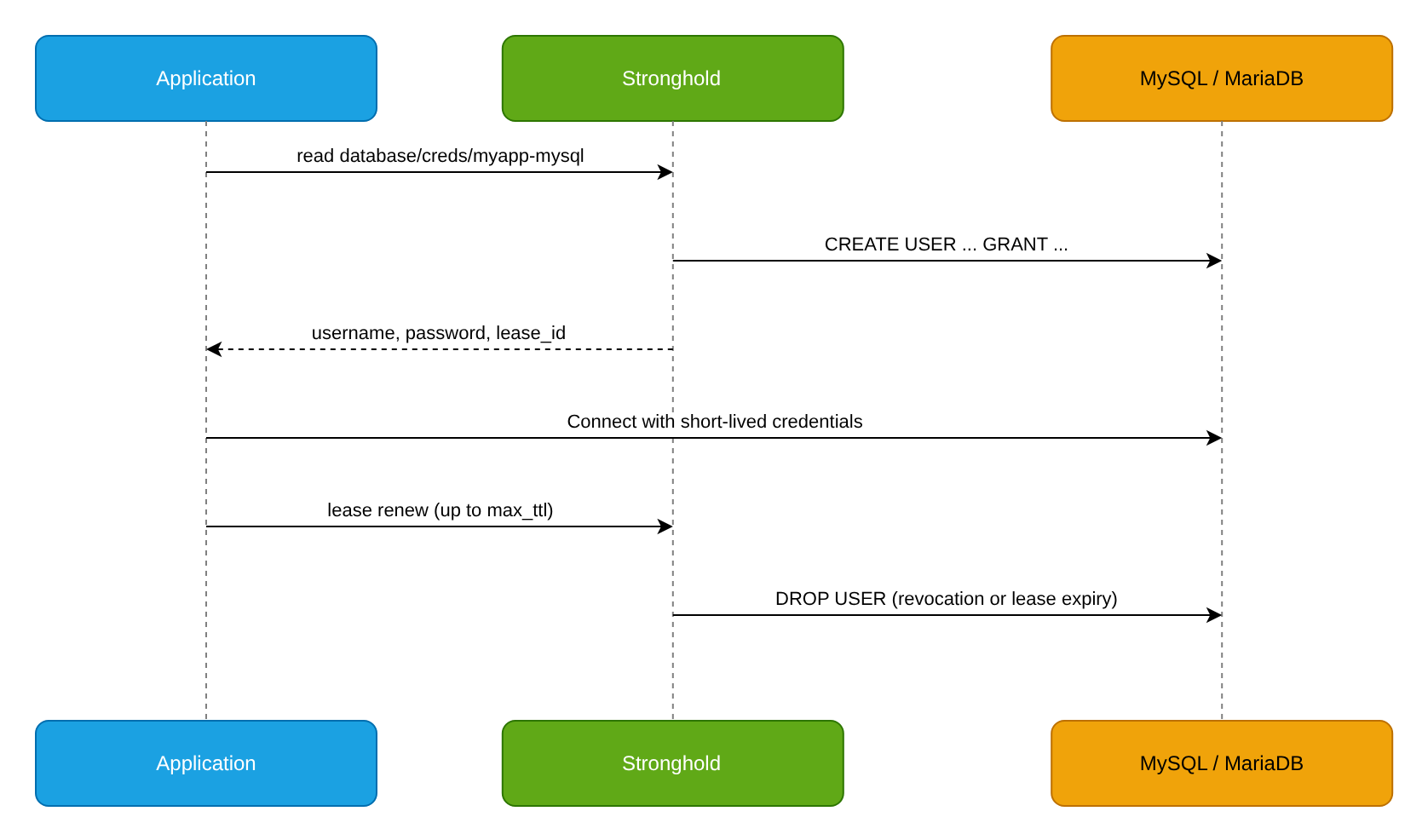
The application receives a dedicated MySQL or MariaDB user from Stronghold with privileges only on its own database. Stronghold creates the user when credentials are requested and drops it on revocation or when the lease expires. The application does not need a permanent password.
Goal
Configure issuing dynamic MySQL or MariaDB credentials to the myapp application: the user gets SELECT, INSERT, UPDATE, and DELETE on the myapp database, lives for 1 hour with renewal up to 24 hours, and is dropped after the lease is revoked.
Prerequisites
To follow this example, you need:
- Stronghold and a token with permissions to configure secrets engines and policies.
- A MySQL 5.7+ or MariaDB server reachable from Stronghold, and a
myappdatabase. - The
mysqlclient and thejqutility on your workstation for verification.
For MySQL 5.7.8 and later and for MariaDB, use mysql-database-plugin (usernames up to 32 characters); for MySQL 5.6 and earlier, use mysql-legacy-database-plugin (up to 16 characters). Set root_rotation_statements as described in MySQL.
Step 1. Prepare a service account in MySQL
Create an account that Stronghold uses to create and drop users. To grant privileges on the myapp database, the account must hold these privileges itself with GRANT OPTION:
CREATE USER 'stronghold'@'%' IDENTIFIED BY '<INITIAL_PASSWORD>';
GRANT CREATE USER ON *.* TO 'stronghold'@'%';
GRANT SELECT, INSERT, UPDATE, DELETE ON myapp.* TO 'stronghold'@'%' WITH GRANT OPTION;
<INITIAL_PASSWORD> is the initial password of the service account. In step 2, Stronghold replaces it with a generated one.
Restrict the '%' host to the addresses of Stronghold nodes when possible.
Step 2. Configure the connection
Enable the database secrets engine and connect it to MySQL:
Enable the secrets engine if it is not enabled yet:
d8 stronghold secrets enable databaseConfigure the connection to the server:
d8 stronghold write database/config/myapp-mysql plugin_name="mysql-database-plugin" connection_url="{{username}}:{{password}}@tcp(mysql.example.com:3306)/" allowed_roles="myapp-mysql" username="stronghold" password="<INITIAL_PASSWORD>"For a TLS connection, add
tls_ca=@/path/to/ca.pem; for client certificate authentication, addtls_certificate_key=@/path/to/client.pem.Rotate the service account password so that only Stronghold knows it:
d8 stronghold write -force database/rotate-root/myapp-mysql
Step 3. Create a role
The role defines the SQL statements that create and drop the user, and the credential lifetime:
d8 stronghold write database/roles/myapp-mysql db_name="myapp-mysql" creation_statements="CREATE USER '{{name}}'@'%' IDENTIFIED BY '{{password}}'; GRANT SELECT, INSERT, UPDATE, DELETE ON myapp.* TO '{{name}}'@'%';" revocation_statements="REVOKE ALL PRIVILEGES, GRANT OPTION FROM '{{name}}'@'%'; DROP USER '{{name}}'@'%';" default_ttl="1h" max_ttl="24h"creation_statements: statements Stronghold runs when issuing credentials. The{{name}}and{{password}}placeholders are replaced with generated values.revocation_statements: statements run when the lease is revoked.default_ttl: the lease duration on issue and on each renewal.max_ttl: the maximum credential lifetime; after it the user is dropped.
If the statement needs database name wildcards in backticks (for example, GRANT SELECT ON `myapp\_%`.* ...), pass creation_statements Base64-encoded as described in MySQL.
Step 4. Create a policy
Create a policy that allows reading credentials of the myapp-mysql role:
d8 stronghold policy write myapp-mysql - <<'POLICY'
path "database/creds/myapp-mysql" {
  capabilities = ["read"]
}
POLICY
Assign the policy to the auth method role the application logs in with, for example a Kubernetes auth role as in Dynamic PostgreSQL credentials. Renewing and revoking your own leases is allowed by the built-in default policy.
Step 5. Get credentials
Request credentials of the myapp-mysql role and manage their lease:
Request credentials:
d8 stronghold read database/creds/myapp-mysqlExample output:
Key                Value
---                -----
lease_id           database/creds/myapp-mysql/2f6a614c-4aa2-7b19-24b9-ad944a8d4de6
lease_duration     1h
lease_renewable    true
password           yY-57n3X5UQhxnmFRP3f
username           v-token-myapp-mysq-crBWVqVh2Hc1x
Renew the lease before
lease_durationexpires. Each renewal extends it bydefault_ttl, but not beyondmax_ttl:d8 stronghold lease renew database/creds/myapp-mysql/2f6a614c-4aa2-7b19-24b9-ad944a8d4de6When the credentials are no longer needed, revoke the lease. Stronghold runs
revocation_statementsand drops the user:d8 stronghold lease revoke database/creds/myapp-mysql/2f6a614c-4aa2-7b19-24b9-ad944a8d4de6
In production, Stronghold Agent handles renewal and re-requesting credentials. Example template for an environment file:
{{ with secret "database/creds/myapp-mysql" }}
DB_USER={{ .Data.username }}
DB_PASSWORD={{ .Data.password }}
{{ end }}
The Agent sidecar configuration is in Delivering secrets to Kubernetes pods; for virtual machines, see Application on a VM. Application requirements for credential changes are the same as in Dynamic PostgreSQL credentials.
Verification
Check the result:
Request credentials in JSON and store them in variables:
creds="$(d8 stronghold read -format=json database/creds/myapp-mysql)"
DB_USER="$(echo "$creds" | jq -r '.data.username')"
DB_PASSWORD="$(echo "$creds" | jq -r '.data.password')"
LEASE_ID="$(echo "$creds" | jq -r '.lease_id')"
Connect with the
mysqlclient and check the user’s privileges:mysql -h mysql.example.com -u "$DB_USER" -p"$DB_PASSWORD" myapp -e "SELECT CURRENT_USER(); SHOW GRANTS;"Besides
GRANT USAGE ON *.*, the output contains onlySELECT, INSERT, UPDATE, DELETEprivileges onmyapp.*.Make sure there is no access to other databases:
mysql -h mysql.example.com -u "$DB_USER" -p"$DB_PASSWORD" -e "SELECT * FROM mysql.user LIMIT 1;"The command must fail with
SELECT command denied.Revoke the lease and check that the user is dropped:
d8 stronghold lease revoke "$LEASE_ID"
mysql -h mysql.example.com -u "$DB_USER" -p"$DB_PASSWORD" -e "SELECT 1;"
The connection must fail with
Access denied.
Cleanup
Delete the objects created in this example:
Revoke all credentials issued for the role:
d8 stronghold lease revoke -prefix database/creds/myapp-mysql/Delete the role, the policy, and the connection:
d8 stronghold policy delete myapp-mysql
d8 stronghold delete database/roles/myapp-mysql
d8 stronghold delete database/config/myapp-mysql
If needed, drop the service account in MySQL:
DROP USER 'stronghold'@'%';.