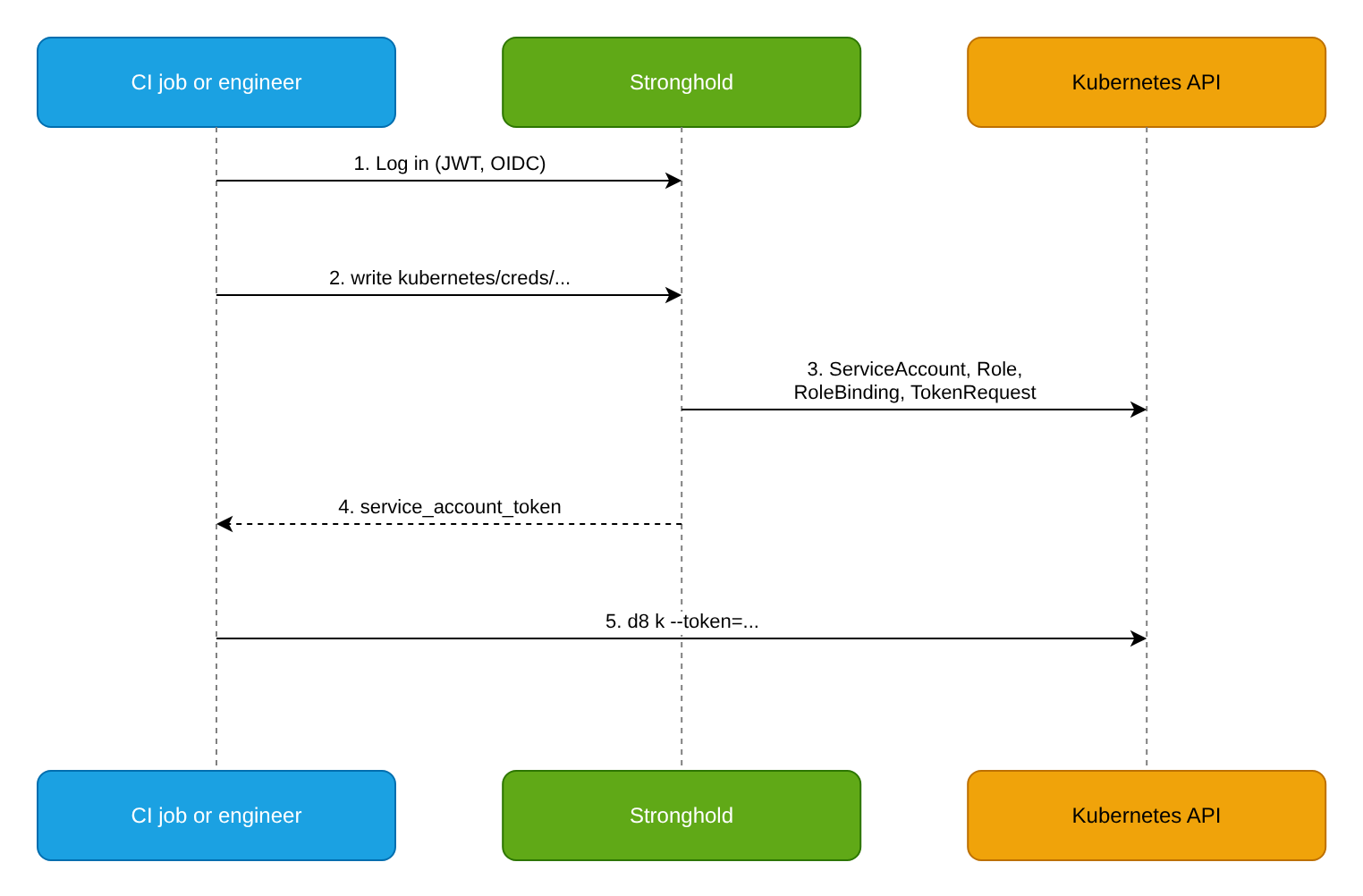
Instead of a permanent kubeconfig with broad permissions, a CI job or an engineer requests a ServiceAccount token from Stronghold for the duration of the work. Stronghold creates a service account, a role, and a role binding with the required permissions in the cluster, issues a token with a limited lifetime, and deletes the created objects when the lease expires.
Goal
Configure two roles of the Kubernetes secrets engine:
ci-deployfor CI jobs: permissions to manage Deployments, Services, and ConfigMaps in themyappnamespace; the token lives for 15 minutes.engineer-viewfor engineers: permissions of the built-inviewClusterRole in themyappandmyapp-stagenamespaces; the token lives for 1 hour, at most 8 hours.
Prerequisites
To follow this example, you need:
- Stronghold deployed in DP and a token with permissions to configure secrets engines and policies.
- Cluster access with
d8 kand permissions to create ClusterRoles and ClusterRoleBindings. - The
myappandmyapp-stagenamespaces. - A configured auth method for CI (for example, JWT as in CI/CD integration) and for engineers (for example, OIDC).
Step 1. Grant Stronghold permissions in the cluster
Stronghold creates RBAC objects on behalf of its service account. Because Kubernetes prevents privilege escalation, this account needs the bind and escalate verbs on roles.
Find the name of the Stronghold service account:
d8 k -n d8-stronghold get pod stronghold-0 -o jsonpath='{.spec.serviceAccountName}'In DP, this is the
strongholdservice account in thed8-strongholdnamespace. The module grants this ServiceAccount only thesystem:auth-delegatorClusterRole and access to Secrets and Pods in thed8-strongholdnamespace. The module does not grant it permissions to manage ServiceAccounts or RBAC objects (Roles, ClusterRoles, RoleBindings, ClusterRoleBindings) in other namespaces, so add the permissions below.Create a ClusterRole and bind it to the Stronghold service account. Replace
strongholdinsubjectswith the name from the previous step. Save the manifest tostronghold-k8s-secrets-engine.yamland apply it:apiVersion: rbac.authorization.k8s.io/v1 kind: ClusterRole metadata: name: stronghold-k8s-secrets-engine rules: - apiGroups: [""] resources: ["serviceaccounts", "serviceaccounts/token"] verbs: ["create", "update", "delete"] - apiGroups: ["rbac.authorization.k8s.io"] resources: ["rolebindings", "clusterrolebindings"] verbs: ["create", "update", "delete"] - apiGroups: ["rbac.authorization.k8s.io"] resources: ["roles", "clusterroles"] verbs: ["bind", "escalate", "create", "update", "delete"] --- apiVersion: rbac.authorization.k8s.io/v1 kind: ClusterRoleBinding metadata: name: stronghold-k8s-secrets-engine roleRef: apiGroup: rbac.authorization.k8s.io kind: ClusterRole name: stronghold-k8s-secrets-engine subjects: - kind: ServiceAccount name: stronghold namespace: d8-strongholdd8 k apply -f stronghold-k8s-secrets-engine.yaml
A Stronghold service account with these permissions is effectively a cluster administrator. Restrict access to the Kubernetes secrets engine configuration with Stronghold policies.
Step 2. Enable the secrets engine
Enable the Kubernetes secrets engine and create its configuration:
d8 stronghold secrets enable kubernetes
d8 stronghold write -f kubernetes/config
An empty configuration means that Stronghold connects to the API of the current cluster using the CA certificate and JWT of its pod. For another cluster, set kubernetes_host, kubernetes_ca_cert, and service_account_jwt.
Step 3. Create a role for CI
A role with generated_role_rules creates the whole chain of objects on each request: a ServiceAccount, a Role, and a RoleBinding.
d8 stronghold write kubernetes/roles/ci-deploy allowed_kubernetes_namespaces="myapp" token_default_ttl="15m" token_max_ttl="1h" generated_role_rules='{"rules":[
    {"apiGroups":["apps"],"resources":["deployments"],"verbs":["get","list","watch","create","update","patch"]},
    {"apiGroups":[""],"resources":["services","configmaps"],"verbs":["get","list","create","update","patch"]}
]}'allowed_kubernetes_namespaces: namespaces where a token can be requested. Instead of a list, you can set theallowed_kubernetes_namespace_selectorlabel selector; Stronghold then needsgetonnamespaces.generated_role_rules: Role rules in JSON or YAML.token_default_ttlandtoken_max_ttl: the default and maximum token lifetime.
Step 4. Create a role for engineers
A role with kubernetes_role_name binds the created service account to an existing role, here the built-in view ClusterRole:
d8 stronghold write kubernetes/roles/engineer-view allowed_kubernetes_namespaces="myapp,myapp-stage" kubernetes_role_type="ClusterRole" kubernetes_role_name="view" token_default_ttl="1h" token_max_ttl="8h"With kubernetes_role_type="ClusterRole", Stronghold creates a RoleBinding in the requested namespace by default. To grant cluster-wide permissions, pass cluster_role_binding=true when requesting credentials, and a ClusterRoleBinding is created instead. Allow this only for dedicated roles and policies.
To issue tokens for an existing service account, use service_account_name. It cannot be combined with kubernetes_role_name or generated_role_rules.
Step 5. Create policies
The creds endpoint is called with POST, so the policy needs the update capability:
d8 stronghold policy write k8s-ci-deploy - <<'POLICY'
path "kubernetes/creds/ci-deploy" {
  capabilities = ["update"]
}
POLICY

d8 stronghold policy write k8s-engineer-view - <<'POLICY'
path "kubernetes/creds/engineer-view" {
  capabilities = ["update"]
}
POLICY
Assign k8s-ci-deploy to the CI auth method role, and k8s-engineer-view to the engineers’ group in the OIDC auth method or in Identity.
Step 6. Get a token
Request tokens for CI and for an engineer:
Request a token for CI:
d8 stronghold write kubernetes/creds/ci-deploy kubernetes_namespace=myappExample output:
Key                          Value
---                          -----
lease_id                     kubernetes/creds/ci-deploy/cujRLYjKZUMQk6dkHBGGWm67
lease_duration               15m
lease_renewable              false
service_account_name         v-token-ci-deplo-1653001548-5z6hrgsxnmzncxejztml4arz
service_account_namespace    myapp
service_account_token        eyJHbGci0iJSUzI1Ni...
The lease is not renewable: when it expires, request a new token.
An engineer requests a token for the required time within
token_max_ttl:d8 stronghold write kubernetes/creds/engineer-view kubernetes_namespace=myapp-stage ttl=2hCreate a temporary kubeconfig with the token in the
tmp-kubeconfigfile:TOKEN="$(d8 stronghold write -field=service_account_token kubernetes/creds/engineer-view kubernetes_namespace=myapp-stage)" SERVER="$(d8 k config view --minify -o jsonpath='{.clusters[].cluster.server}')" d8 k config view --minify --raw -o jsonpath='{.clusters[].cluster.certificate-authority-data}' | base64 -d > ca.crt d8 k --kubeconfig=tmp-kubeconfig config set-cluster dp --server="$SERVER" --certificate-authority=ca.crt --embed-certs=true d8 k --kubeconfig=tmp-kubeconfig config set-credentials stronghold-token --token="$TOKEN" d8 k --kubeconfig=tmp-kubeconfig config set-context tmp --cluster=dp --user=stronghold-token --namespace=myapp-stage d8 k --kubeconfig=tmp-kubeconfig config use-context tmpThe commands do not change the
KUBECONFIGvariable, so otherd8 kcommands still use your administrator kubeconfig. To run a command with the issued token, pass the--kubeconfig=tmp-kubeconfigflag:d8 k --kubeconfig=tmp-kubeconfig get pods
In a CI job, get a Stronghold token with the JWT auth method as described in CI/CD integration, then request a Kubernetes token and pass it to d8 k with --token:
deploy:
  script:
    - export STRONGHOLD_TOKEN="$(d8 stronghold write -field=token auth/gitlab/login role=myproject-deploy jwt=$STRONGHOLD_ID_TOKEN)"
    - export K8S_TOKEN="$(d8 stronghold write -field=service_account_token kubernetes/creds/ci-deploy kubernetes_namespace=myapp)"
    - d8 k --server="$K8S_SERVER" --certificate-authority="$K8S_CA_FILE" --token="$K8S_TOKEN" -n myapp apply -f deploy/
Verification
Check the result:
Request a CI token and check the allowed actions:
TOKEN="$(d8 stronghold write -field=service_account_token kubernetes/creds/ci-deploy kubernetes_namespace=myapp)"
d8 k --token="$TOKEN" auth can-i create deployments -n myapp
d8 k --token="$TOKEN" auth can-i patch configmaps -n myapp
Both commands must return
yes.Check that there are no extra permissions:
d8 k --token="$TOKEN" auth can-i get secrets -n myapp
d8 k --token="$TOKEN" auth can-i create deployments -n kube-system
Both commands must return
no.If the current kubeconfig uses another authentication method (for example, a client certificate), add the
--kubeconfig=tmp-kubeconfigflag from step 6 to the commands. The--tokenflag overrides the token from this kubeconfig.Make sure a token request for a namespace that is not allowed is rejected:
d8 stronghold write kubernetes/creds/ci-deploy kubernetes_namespace=defaultList the objects Stronghold created in the namespace:
d8 k -n myapp get serviceaccounts,roles,rolebindings | grep v-tokenRevoke the lease early and make sure the token no longer works:
d8 stronghold lease revoke -prefix kubernetes/creds/ci-deploy/
d8 k --token="$TOKEN" auth can-i create deployments -n myapp
Once the service account is deleted, requests with its token fail with
Unauthorized.
For roles with service_account_name, Stronghold does not create a service account, so revoking the lease does not invalidate the token before it expires. Use a short token_default_ttl for such roles.
Cleanup
Delete the objects created in this example:
Revoke all issued tokens:
d8 stronghold lease revoke -prefix kubernetes/creds/Delete the roles, policies, and configuration:
d8 stronghold delete kubernetes/roles/ci-deploy
d8 stronghold delete kubernetes/roles/engineer-view
d8 stronghold policy delete k8s-ci-deploy
d8 stronghold policy delete k8s-engineer-view
d8 stronghold secrets disable kubernetes
Remove the Stronghold permissions in the cluster and the temporary files:
d8 k delete -f stronghold-k8s-secrets-engine.yaml
rm -f tmp-kubeconfig ca.crt