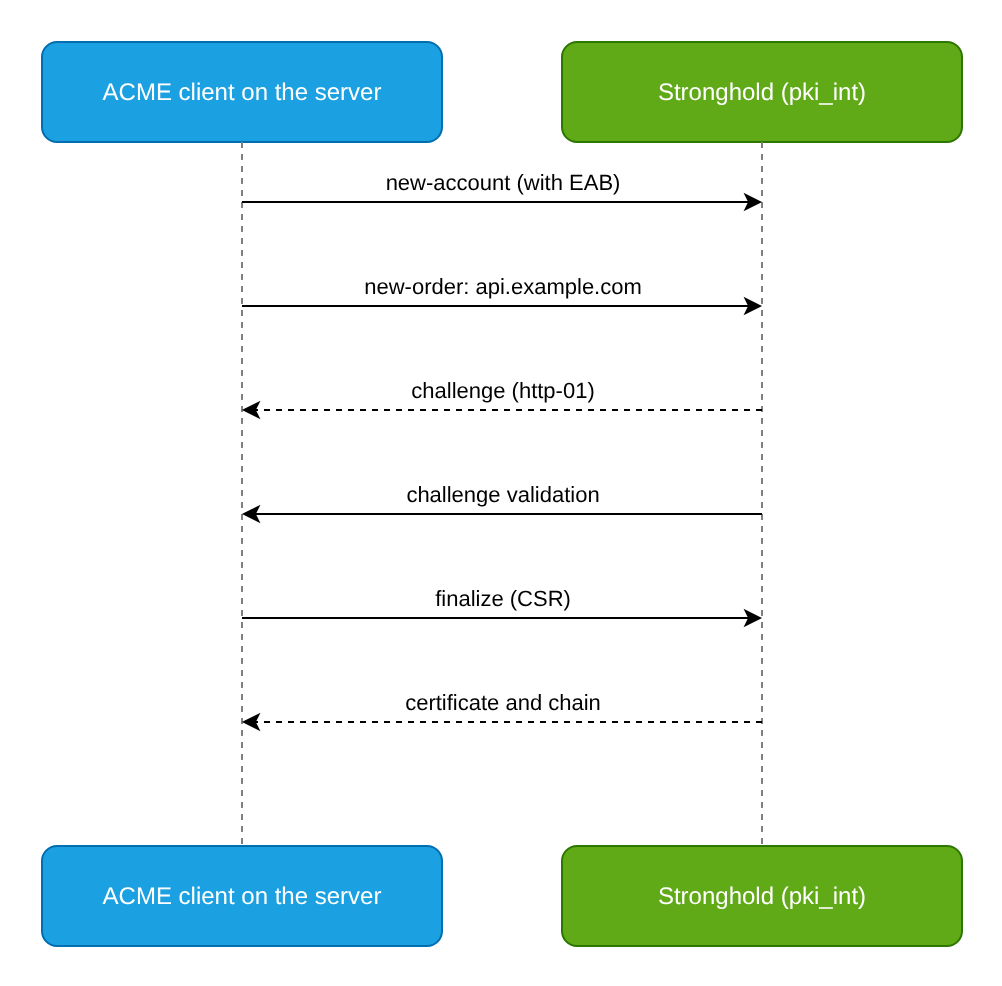
The Stronghold PKI secrets engine implements the ACME protocol (RFC 8555). Internal servers obtain and renew certificates with standard ACME clients such as certbot, lego, and Caddy, without a Stronghold token and without custom issuance scripts.
Goal
Enable ACME on the intermediate CA mount, restrict issuance to a single role, issue external account binding (EAB) keys, and set up automatic certificate issuance and renewal on a server.
Prerequisites
Before you start, prepare the following:
- The
pki_intmount with an intermediate CA and theexample-comrole, configured as in Internal PKI with Stronghold (steps 1–5). - A Stronghold token with permissions to write to
pki_int/config/*,pki_int/roles/*,pki_int/eab/*, and to tune the mount (sys/mounts/pki_int/tune). - An external Stronghold address reachable by ACME clients:
https://stronghold.example.comin the examples. - A server named
api.example.comthat runs the ACME client. Stronghold must have network access to this server to validate challenges (port80/TCP forhttp-01). Thehttp-01,dns-01, andtls-alpn-01challenge types are supported. - The certificate that protects the Stronghold API must be trusted on the client server.
Step 1. Set the external mount address
The ACME server builds directory links from the path parameter in config/cluster. Set the address clients use to reach the mount:
d8 stronghold write pki_int/config/cluster path="https://stronghold.example.com/v1/pki_int" aia_path="https://stronghold.example.com/v1/pki_int"In a multi-node cluster, set the address of the load balancer or of any node in this cluster. The address must not point to another replication cluster.
Step 2. Allow ACME headers
The ACME protocol carries service data in HTTP headers. Allow them for the mount:
d8 stronghold secrets tune -passthrough-request-headers=If-Modified-Since -allowed-response-headers=Last-Modified -allowed-response-headers=Location -allowed-response-headers=Replay-Nonce -allowed-response-headers=Link pki_intStep 3. Enable ACME
Enable ACME, allow only the example-com role, restrict the default directory, and require EAB:
d8 stronghold write pki_int/config/acme enabled=true allowed_roles="example-com" default_directory_policy="role:example-com" eab_policy="always-required" max_ttl=720hParameters:
allowed_roles: roles whose directories may issue certificates. The default value*allows all roles, includingsign-verbatim.default_directory_policy: the policy for directories without a role (pki_int/acme/directory). The default issign-verbatim: issuance without role restrictions, but a CSR with URI, email, or Other SANs is rejected, because ACME challenges verify only DNS names and IP addresses. Thesign-verbatim-unsafevalue issues such certificates with the SANs from the CSR without verification. Theforbidvalue disables the default directory. Therole:<ROLE_NAME>value applies the restrictions of the<ROLE_NAME>role; the role must be listed inallowed_roles.eab_policy: whether EAB is required to register an ACME account. Valid values:not-required,new-account-required,always-required. The default isalways-required; the example above sets it explicitly.max_ttl: the maximum validity period of certificates issued through ACME. The default is2160h(90 days).challenge_permitted_ip_ranges,challenge_excluded_ip_ranges: CIDRs Stronghold may or may not connect to when validating challenges.dns_resolver: a DNS resolver in the<HOST>:<PORT>format used to resolve names during challenge validation. Set it if internal names are not resolved by the system resolver of the Stronghold nodes.
Check the configuration:
d8 stronghold read pki_int/config/acmeThe ACME directory of the role is available without authentication at:
https://stronghold.example.com/v1/pki_int/roles/example-com/acme/directoryStep 4. Issue an EAB key
EAB ties an ACME account to a Stronghold operator: only someone who has received a key can register an account. The key is single-use and is consumed when the account is first registered.
Create an EAB key for the role directory:
d8 stronghold write -f -format=json pki_int/roles/example-com/acme/new-eab > eab.json
jq -r '.data.id, .data.key' eab.json
The response contains
id(the key identifier,kid) andkey(the HMAC key). Pass them to the server administrator over a secure channel.List unused keys:
d8 stronghold list pki_int/eabIf needed, delete an unused key:
d8 stronghold delete pki_int/eab/<KEY_ID><KEY_ID>is the key identifier from thed8 stronghold list pki_int/eaboutput.
Step 5. Configure the ACME client
Perform this step on the api.example.com server. Set the variables:
ACME_DIR="https://stronghold.example.com/v1/pki_int/roles/example-com/acme/directory"
EAB_KID="<EAB_KEY_ID>"
EAB_HMAC="<EAB_HMAC_KEY>"
Placeholders:
<EAB_KEY_ID>: theidvalue fromeab.json;<EAB_HMAC_KEY>: thekeyvalue fromeab.json.
If the Stronghold API certificate is issued by an internal CA, point the client to a file with that CA. The examples use /etc/ssl/stronghold-ca.pem.
certbot
To get a certificate with certbot, follow these steps:
Obtain a certificate. The
--standalonemode starts a temporary web server on port80forhttp-01validation:REQUESTS_CA_BUNDLE=/etc/ssl/stronghold-ca.pem certbot certonly --standalone --server "$ACME_DIR" --eab-kid "$EAB_KID" --eab-hmac-key "$EAB_HMAC" --agree-tos -m admin@example.com -d api.example.comIf a web server already runs on the host, use
--webroot -w <WEBROOT_DIR>or a web server plugin.<WEBROOT_DIR>is the root directory of the site.The certificate and key are saved to
/etc/letsencrypt/live/api.example.com/:fullchain.pemandprivkey.pem. Reference them in the service configuration.
lego
Get a certificate with lego and the http-01 challenge:
LEGO_CA_CERTIFICATES=/etc/ssl/stronghold-ca.pem lego --server "$ACME_DIR" --eab --kid "$EAB_KID" --hmac "$EAB_HMAC" --email admin@example.com --accept-tos --domains api.example.com --http runCertificates are saved to the .lego/certificates/ directory.
Caddy
Caddy obtains and renews certificates for sites in the Caddyfile on its own. Set Stronghold as the ACME server in the global options:
{
  email admin@example.com
  acme_ca https://stronghold.example.com/v1/pki_int/roles/example-com/acme/directory
  acme_ca_root /etc/ssl/stronghold-ca.pem
  acme_eab {
    key_id <EAB_KEY_ID>
    mac_key <EAB_HMAC_KEY>
  }
}

api.example.com {
  reverse_proxy 127.0.0.1:8080
}
<EAB_KEY_ID> and <EAB_HMAC_KEY> are the id and key values from eab.json.
Step 6. Configure renewal
The certificate validity is limited by the role max_ttl and by max_ttl in config/acme. Renewal is a new order through the already registered account; no new EAB key is needed.
certbot. certbot packages usually install a systemd timer or a cron job that runs
certbot renew. For short-lived certificates, set the renewal threshold in/etc/letsencrypt/renewal/api.example.com.conf, for examplerenew_before_expiry = 3 days, and reload the service with--deploy-hook:certbot renew --deploy-hook "systemctl reload nginx"The CA file for
REQUESTS_CA_BUNDLEmust also be available for scheduled runs, for example throughEnvironment=in the timer unit.lego. Run renewal on a schedule, for example daily:
LEGO_CA_CERTIFICATES=/etc/ssl/stronghold-ca.pem lego --server "$ACME_DIR" --email admin@example.com --domains api.example.com --http renew --days 7 --renew-hook "systemctl reload nginx"Caddy renews certificates automatically; no extra configuration is needed.
Verification
Check the result:
Make sure the ACME directory responds:
curl -s --cacert /etc/ssl/stronghold-ca.pem https://stronghold.example.com/v1/pki_int/roles/example-com/acme/directory | jqThe response must contain the
newNonce,newAccount, andnewOrderlinks with the address fromconfig/cluster.Check the issued certificate: issuer, name, and validity:
openssl x509 -in /etc/letsencrypt/live/api.example.com/fullchain.pem -noout -issuer -subject -datesCheck that the certificate is present in the mount storage:
d8 stronghold list pki_int/certsTest renewal without issuing a certificate:
REQUESTS_CA_BUNDLE=/etc/ssl/stronghold-ca.pem certbot renew --dry-run
Cleanup
Delete the objects created in this guide.
- Revoke the test certificate:
certbot revoke --cert-name api.example.com(withREQUESTS_CA_BUNDLE) ord8 stronghold write pki_int/revoke serial_number=<SERIAL_NUMBER>, where<SERIAL_NUMBER>is the certificate serial number. - Delete unused EAB keys:
d8 stronghold delete pki_int/eab/<KEY_ID>. - Delete the local
eab.jsonfile. - If ACME is no longer needed, disable it:
d8 stronghold write pki_int/config/acme enabled=false.