In a standalone installation, Stronghold runs as a Linux service (systemd) on dedicated servers. The administrator manages the configuration, TLS certificates, unsealing, and networking. The step-by-step installation is described in Installation, and the configuration file parameters in Configuration.
Deployment options
| Option | Composition | Storage | Purpose |
|---|---|---|---|
| Single-node server | One server prepared with stronghold bootstrap service | Raft on a single node or filesystem | Testing, development, small non-critical installations |
| HA cluster | Three or more servers: one active node, the rest standby | Integrated Raft storage | Production installations with fault tolerance |
The filesystem backend does not support HA. Use Raft for HA.
By default, stronghold bootstrap service creates a configuration with Raft storage.
The stronghold bootstrap command also generates a Helm chart and a Docker image for deployment in a third-party Kubernetes cluster. For details, refer to Bootstrap.
HA cluster layout
The diagram shows an HA cluster of a standalone installation:
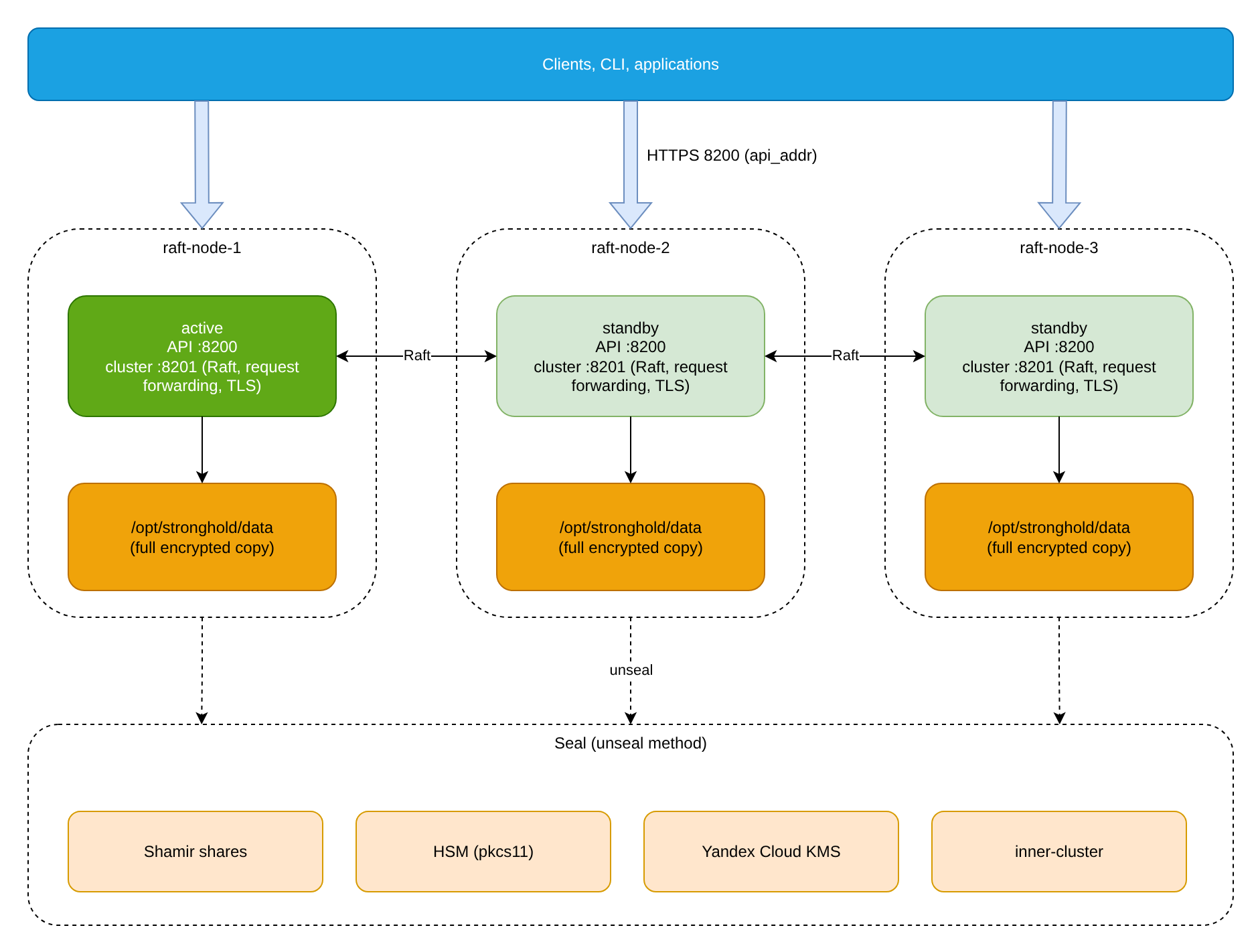
- One node acquires a lock in storage and becomes active; the others switch to standby.
- Requests that reach a standby node are forwarded to the active node, or the client is redirected to the active node’s
api_addr, depending on the configuration and cluster state. In Stronghold EE, performance standby nodes serve reads locally. For details, refer to Performance standby. - Raft replicates data between all nodes: each node keeps a full copy of the data encrypted by the barrier.
- Quorum requires at least three servers. The quorum is
floor(n/2)+1voting nodes, wherenis the number of voting nodes. Nodes joined withretry_join_as_non_voter = true(the-non-voterflag) do not vote.
Cluster node
On each server:
- binary and configuration:
/opt/stronghold/stronghold,/opt/stronghold/config.hcl; - Raft data:
/opt/stronghold/datawith0700permissions, owned by thestrongholdsystem user; - TLS: the node certificate and key and the root CA in
/opt/stronghold/tls. Each node gets its own certificate; - the systemd unit
/etc/systemd/system/stronghold.service; the service runs as thestrongholduser with theCAP_IPC_LOCKcapability.
Key node configuration parameters:
# The address for Raft and request forwarding.
cluster_addr  = "https://10.20.30.10:8201"
# The address for clients and redirects.
api_addr      = "https://10.20.30.10:8200"
disable_mlock = true

listener "tcp" {
  address       = "0.0.0.0:8200"
  tls_cert_file = "/opt/stronghold/tls/node-1-cert.pem"
  tls_key_file  = "/opt/stronghold/tls/node-1-key.pem"
}

storage "raft" {
  path    = "/opt/stronghold/data"
  node_id = "raft-node-1"

  retry_join {
    leader_api_addr     = "https://10.20.30.11:8200"
    leader_ca_cert_file = "/opt/stronghold/tls/stronghold-ca.pem"
  }
}api_addris advertised to other nodes for client redirects.cluster_addris advertised for node-to-node communication. Traffic between cluster members always uses TLS; the scheme in the address is ignored.- The
retry_joinblocks list the nodes a new node tries to join at startup. Joining is done through the leader node’s API (port8200). - With Raft, set
disable_mlock = trueand disable swap on the server. Disabled swap keeps decrypted data in memory from being written to disk. Do not declare a separateha_storagewith Raft.
Initialization and unsealing
The administrator initializes and unseals a standalone cluster as follows:
- The cluster is initialized once, on the first node. By default, the unseal key is split into 5 shares, and 3 are required to unseal (
-key-shares,-key-threshold). - With a Shamir seal, each node is unsealed separately after every restart.
- To avoid unsealing nodes manually, configure auto unseal:
- HSM via PKCS#11 (
seal "pkcs11", Stronghold EE); - Yandex Cloud KMS (
seal "yandexcloudkms", Stronghold EE); seal "inner-cluster": Stronghold EE; unsealed nodes unseal the others, without an external KMS.
- HSM via PKCS#11 (
The pkcs11 and yandexcloudkms seals are available only in a standalone installation. In Deckhouse Platform, the stronghold module configures the inner-cluster seal itself in Stronghold EE.
Backups
Two backup methods are available:
- Raft snapshots are taken manually. For details, refer to Stronghold backups.
- Stronghold EE offers scheduled automated snapshots to a local disk or S3-compatible storage. Snapshots are taken by the active node, so for production keep them in external object storage.
What to do when quorum is lost is described in Recover from lost quorum.
Cross-cluster replication
Several standalone Stronghold EE clusters can be connected with Performance or Disaster Recovery replication. The secondary cluster needs access to the primary’s cluster port. The architecture and topologies are described in “Replication architecture: Stronghold and Stronghold EE”, and the network requirements in Network ports.