Single sign-on (SSO) lets users log in to Stronghold with their corporate account and lets administrators manage access through groups in the identity provider (IdP). Stronghold supports any OpenID Connect-compatible IdP.
Goal
After the setup:
- Users log in to the Stronghold web UI and CLI through the corporate IdP.
- Policies are assigned by IdP groups through external Identity groups.
- Only members of specific groups are allowed to log in.
General flow
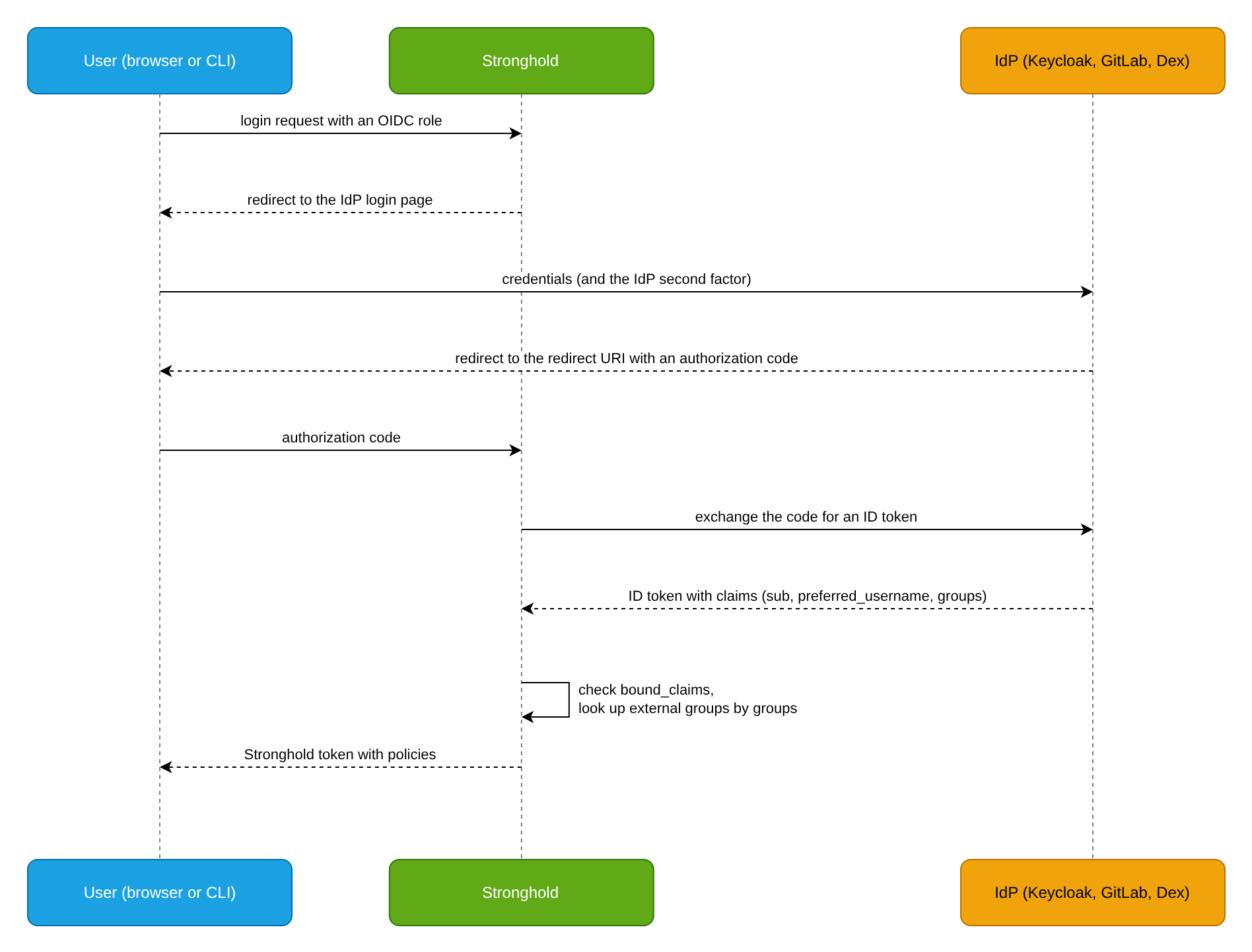
What to configure in any IdP:
- An OIDC client (application) of the
confidentialtype with a client secret. - Redirect URIs: for the web UI,
https://<STRONGHOLD_ADDRESS>/ui/stronghold/auth/<METHOD_PATH>/oidc/callback; for the CLI,http://localhost:8250/oidc/callback. Here<STRONGHOLD_ADDRESS>is the address at which users open Stronghold, and<METHOD_PATH>is the path at which the OIDC method is enabled. - A claim with the list of the user’s groups in the ID token.
Choosing a provider
Choose the provider by where user accounts are managed:
| Provider | When to use | Guide |
|---|---|---|
| Dex in DP | Stronghold is installed in DP, and users already log in to the cluster through the user-authn module | Login through Dex in DP on this page |
| Keycloak | A corporate IdP based on Keycloak, including federation from LDAP or AD | Keycloak OIDC provider, example below |
| GitLab | Developer accounts and groups are managed in GitLab | GitLab OIDC provider |
| Another OIDC provider | Any IdP with a /.well-known/openid-configuration discovery document | OIDC method |
Prerequisites
Before you start, prepare the following:
- Stronghold is available to users over HTTPS, for example
https://stronghold.example.com. - The IdP is available to Stronghold nodes over HTTPS, and its certificate is issued by a trusted CA.
- A Stronghold token with permissions to configure auth methods, policies, and Identity.
- Prepared break-glass access in case the IdP is unavailable.
Example: Keycloak
In this example, users from the Keycloak group stronghold-admins get the admin policy, and users from stronghold-users get the user-read policy.
Step 1. Configure the client in Keycloak
Create an OIDC client for Stronghold in Keycloak.
In the
corprealm, create astrongholdclient with theopenid-connectprotocol, and enable Client authentication and Standard flow.In Valid Redirect URIs, specify:
https://stronghold.example.com/ui/stronghold/auth/oidc/oidc/callback
http://localhost:8250/oidc/callback
Add a Group Membership mapper with the
groupsclaim name to the client and disable Full group path.On the Credentials tab, copy the client secret.
For details, see Keycloak OIDC provider.
Step 2. Configure the OIDC method
Enable the OIDC method in Stronghold and create a role for login.
Enable the method and configure the connection to the realm:
d8 stronghold auth enable oidc d8 stronghold write auth/oidc/config oidc_discovery_url="https://keycloak.example.com/realms/corp" oidc_client_id="stronghold" oidc_client_secret="<CLIENT_SECRET>" default_role="corp"<CLIENT_SECRET>is the client secret copied in step 1.Create a role.
bound_claimsadmits only members of the two groups, andgroups_claimpasses the groups to Identity:d8 stronghold write auth/oidc/role/corp -<<EOF { "role_type": "oidc", "allowed_redirect_uris": [ "https://stronghold.example.com/ui/stronghold/auth/oidc/oidc/callback", "http://localhost:8250/oidc/callback" ], "oidc_scopes": ["openid", "profile", "email"], "user_claim": "preferred_username", "groups_claim": "groups", "bound_claims": { "groups": ["stronghold-users", "stronghold-admins"] }, "token_policies": ["default"], "token_ttl": "1h", "token_max_ttl": "8h" } EOF
Step 3. Map groups to policies
For each group, create an external Identity group and an alias. The alias name must match the group name in the groups claim:
OIDC_ACCESSOR=$(d8 stronghold auth list -format=json | jq -r '."oidc/".accessor')

ADMINS_ID=$(d8 stronghold write -field=id identity/group name="corp-admins" type="external" policies="admin")
d8 stronghold write identity/group-alias name="stronghold-admins" mount_accessor="$OIDC_ACCESSOR" canonical_id="$ADMINS_ID"

USERS_ID=$(d8 stronghold write -field=id identity/group name="corp-users" type="external" policies="user-read")
d8 stronghold write identity/group-alias name="stronghold-users" mount_accessor="$OIDC_ACCESSOR" canonical_id="$USERS_ID"
The admin and user-read policies must exist beforehand. See Policy examples.
Step 4. Check login
Check login through the CLI and the web UI.
Log in through the CLI; a browser opens the Keycloak login page:
d8 stronghold login -method=oidc role=corpCheck the token policies:
d8 stronghold token lookupFor a member of
stronghold-admins,identity_policiesmust contain theadminpolicy.In the web UI, select the OIDC method, enter the
corprole, and log in.
Login through Dex in DP
If Stronghold is installed as a DP module in Automatic mode, after Stronghold is initialized the module itself configures login through Dex, the DP authentication provider that gets users and groups from a connected external IdP or LDAP.
- The OIDC method is enabled at the
oidc_deckhousepath, the default roledeckhouse_dex_authenticated(the groups claim isgroups) is created for login, and thedeckhouse_administratorspolicy (full access) is assigned to administrators. - Administrators are set in the
settings.management.administratorsparameter of thestrongholdModuleConfig, as groups (type: Group) or individual users (type: User). A user must belong to at least one group.
apiVersion: deckhouse.io/v1alpha1
kind: ModuleConfig
metadata:
  name: stronghold
spec:
  enabled: true
  version: 1
  settings:
    management:
      mode: Automatic
      administrators:
      - type: Group
        name: admins
User login:
d8 stronghold login -path=oidc_deckhouse -method=oidc -no-printTo grant permissions to users other than administrators, create external Identity groups with aliases on the oidc_deckhouse/ method accessor, as in step 3 of the Keycloak example. Alias names must match the group names that Dex passes.
The module re-applies the configuration periodically (every 60 seconds by default), so manual changes in auth/oidc_deckhouse are overwritten:
- the OIDC configuration of the method (discovery URL, client ID and secret, default role) and the
deckhouse_dex_authenticatedrole (audience, redirect URIs,emailandgroupsclaims, scopes) are rewritten unconditionally; make your own changes in a separate role or at a separate path; - the method description and the
unauthlisting visibility are restored if you change them; - the
deckhouse_administratorspolicy is removed from entities and groups on theoidc_deckhouse/accessor that are not listed insettings.management.administrators; other policies are not touched.
All users log in with the same deckhouse_dex_authenticated role. The module creates no other roles for them: their permissions come from policies of Identity groups (see above).
For details, see Stronghold configuration and Configuring access and first login.
Troubleshooting
Common errors and how to fix them:
| Symptom | Likely cause | What to do |
|---|---|---|
The IdP or Stronghold rejects redirect_uri | The URIs in the IdP client and in the role’s allowed_redirect_uris differ | Specify identical URIs in both places, including the method path. |
Login is denied because of bound_claims, or the group list is empty | The IdP does not include groups in the ID token | Check the group mapper in the IdP and the groups_claim value. |
| Login succeeds but group policies are missing | The alias name does not match the group name in the claim (for example, the full path /stronghold-admins is passed) | Compare groups in the ID token with the alias names. In Keycloak, disable Full group path. |
x509: certificate signed by unknown authority when writing auth/oidc/config | Stronghold does not trust the IdP certificate | Pass the CA chain in the oidc_discovery_ca_pem parameter. |
| The IdP is unavailable and nobody can log in | IdP outage or configuration error | Use break-glass access. |
Cleanup
Disable the OIDC method:
d8 stronghold auth disable oidcDelete the corp-admins and corp-users external groups via identity/group/name/<GROUP_NAME> and the stronghold client in Keycloak.