Available since 1.7.2 (SE, EE)
The Security credentials section contains personal, group, and project access tokens, bot tokens, as well as SSH and GPG keys in Deckhouse Code. An administrator can view their owners, scopes, and expiration dates, switch between credential types, filter and sort the records, revoke and delete credentials, and export their details to CSV.
Accessing security credentials via UI
To access security credentials, switch to the admin mode and select “Security credentials” in the sidebar. This opens the security credentials table. The section has the following tabs:
- Personal Access Tokens: List of tokens, which belong to real users.
- SSH Keys: List of SSH keys, which belong to real users.
- GPG Keys: List of GPG keys, which belong to real users.
- Group/Project Access Keys: List of tokens, which belong to top-level groups or projects.
- Bot Access Tokens: List of tokens, which belong to instance-level bots.
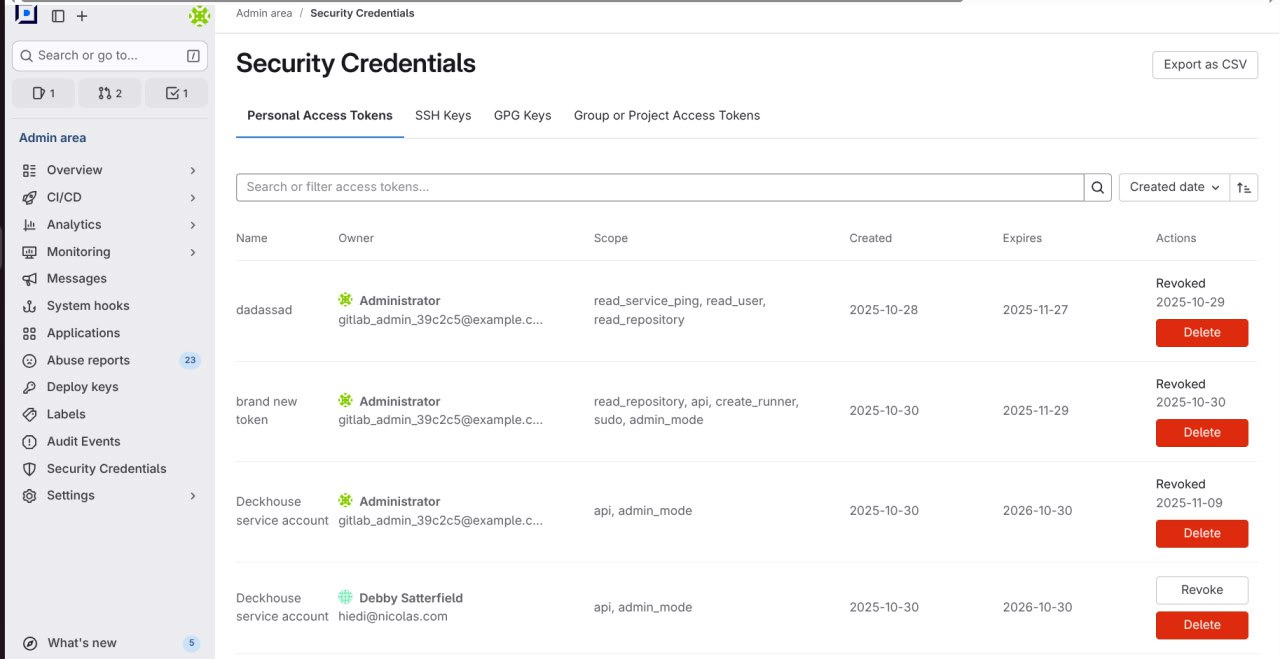
Available actions
The set of actions that can be performed on a credential depends on its type. The table shows the relationship between actions and the credential type.
| Action\Credential type | Personal Access Token | SSH Key | GPG Key | Group/Project Access Token |
|---|---|---|---|---|
| Removal | Yes | Yes | Yes | Yes |
| Revocation | Yes | No | No | Yes |