Search in Deckhouse Code helps you quickly find the information you need across projects, groups, or the entire instance. Results are ranked by relevance and allow you to jump directly to the source object.
Advanced search powered by OpenSearch allows you to:
- find code patterns across all accessible projects;
- track usage of deprecated functions and libraries;
- search comments on issues and merge requests;
- find commits by message or SHA;
- search wiki page content.
Use advanced search
- An administrator must enable advanced search (OpenSearch).
To search:
- In the top bar, select “Search”.
- Enter your search term.
- Press “Enter”.
You can also use advanced search in a project or group context.
When OpenSearch is enabled, Deckhouse Code uses it as the backend for advanced search scopes (issues, merge requests, code, and others). For REST API parameters, filters, and response format, see the “Search API” section.
Search scopes
Scopes describe the type of data you are searching.
Basic search
The following scopes are available for basic search (without OpenSearch):
| Scope | Global | Group | Project |
|---|---|---|---|
| Code | ✗ | ✗ | ✓ |
| Comments | ✗ | ✗ | ✓ |
| Commits | ✗ | ✗ | ✓ |
| Issues | ✓ | ✓ | ✓ |
| Merge requests | ✓ | ✓ | ✓ |
| Milestones | ✓ | ✓ | ✓ |
| Projects | ✓ | ✓ | ✗ |
| Users | ✓ | ✓ | ✓ |
| Wiki | ✗ | ✗ | ✓ |
Advanced search
When OpenSearch is enabled, the following scopes are available:
| Scope | Global | Group | Project |
|---|---|---|---|
| Code | ✓ | ✓ | ✓ |
| Comments | ✓ | ✓ | ✓ |
| Commits | ✓ | ✓ | ✓ |
| Issues | ✓ | ✓ | ✓ |
| Merge requests | ✓ | ✓ | ✓ |
| Milestones | ✓ | ✓ | ✓ |
| Projects | ✓ | ✓ | ✗ |
| Users | ✓ | ✓ | ✓ |
| Wiki | ✓ | ✓ | ✓ |
When OpenSearch is enabled, search for code, commits, wiki, and comments runs through OpenSearch and respects the access matrix. Users see only objects they have permission to read. Search for issues, merge requests, and other entities runs through the database.
The tables above describe search scopes in the web interface. The set of scopes in the REST API differs: there, search for code, commits, comments, and wiki is only available at the project level. For details, see “API search scopes”.
Using search
General procedure for searching in Deckhouse Code:
- Click “Search” in the top navigation bar.
- Enter a search query.
- Press “Enter” — results appear on the search page.
- Use filters to refine results by group, project, or object type.
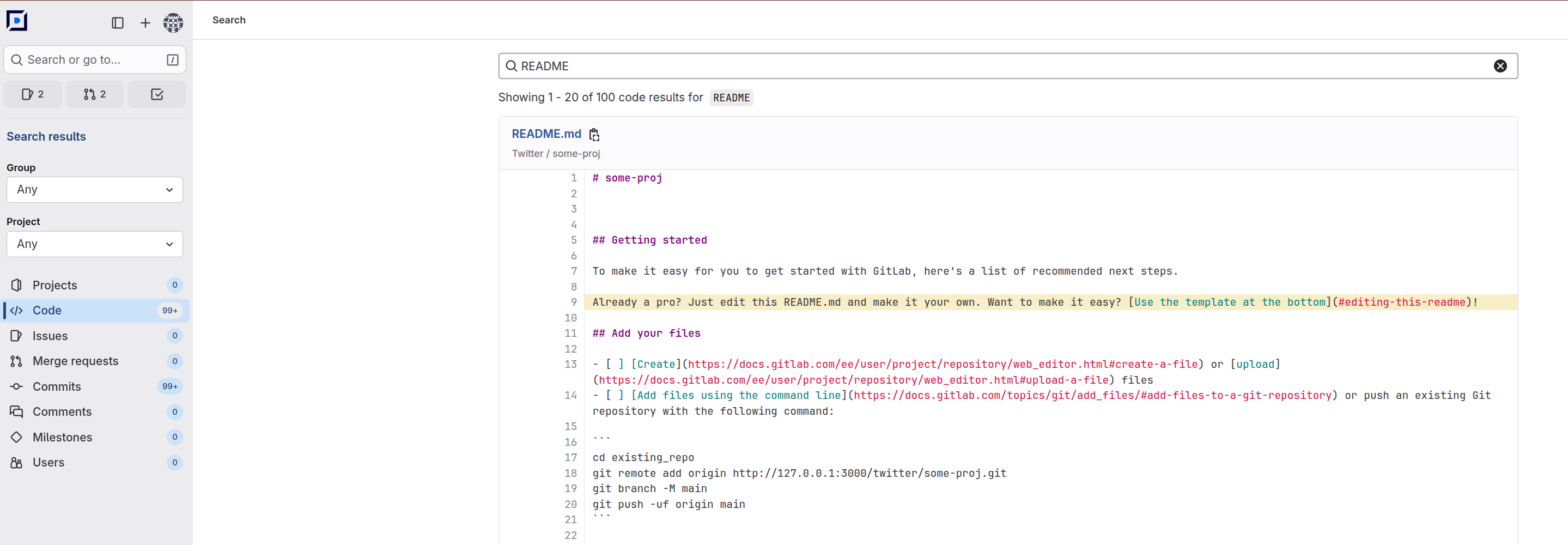
Global search
Allows searching across all projects and groups within the instance.
- In the left menu, select “Search”.
- Enter a query and press “Enter”.
Project search
- Open the target project.
- In the left menu, select “Search”.
- Enter a query and press “Enter”.
Group search
- Open the target group.
- In the left menu, select “Search”.
- Enter a query and press “Enter”.
Additional features
- Search supports query completion for projects, groups, and users.
- When advanced search is enabled, query completion also works for commit messages, filenames, code, issues, and merge requests.
- When searching, you can quickly navigate to a commit by its SHA.
Syntax
Advanced search supports extended query syntax: exact and fuzzy matching, logical operators, and filters.
| Syntax | Description | Example |
|---|---|---|
" | Exact search | "gem sidekiq" |
~ | Fuzzy search | J~ Doe |
| | Or | display | banner |
+ | And | display +banner |
- | Exclude | display -banner |
* | Partial match | bug error 50* |
\ | Escape | \*md |
# | Issue ID (in comments) | #23456 |
! | Merge request ID (in comments) | !23456 |
Code search
| Syntax | Description | Example |
|---|---|---|
filename: | Filename | filename:*spec.rb |
path: | Repository location (full or partial matches) | path:spec/workers/ |
extension: | File extension without . | extension:js |
blob: | Git object ID | blob:998707* |
The code search UI also provides a language filter.
Examples
| Query | Description |
|---|---|
rails -filename:gemfile.lock | Returns rails in all files except gemfile.lock |
RSpec.describe Resolvers -*builder | Returns RSpec.describe Resolvers excluding matches starting with builder |
bug | (display +banner) | Returns bug or both display and banner |
helper -extension:yml -extension:js | Returns helper in all files except .yml and .js files |
helper path:lib/git | Returns helper in files with a lib/git* path (for example, spec/lib/gitlab) |
Indexing settings
Project settings
A project maintainer can go to “Settings” → “Search”.
Branch regex
When Allow per-project branch regex is enabled at the instance level, the maintainer can specify a regex for additional branches. The default branch is always indexed.
Example regex: (feature|hotfix)/.*
Changing the regex triggers a full project reindex.
Reindex code and wiki
- Reindex code — full reindex of the repository code.
- Reindex wiki — full reindex of the wiki (if a wiki repository exists).
The “Index up to date” badge shows whether indexing is complete for the current repository state.
Group settings
A group owner can go to “Settings” → “Search”.
Group wiki reindexing is available: index status and the “Reindex wiki” button.
Search API
Search REST API lets you conduct a search across a Deckhouse Code instance, a specific group, or a project.
Endpoints
The following endpoints are available for searching:
GET /api/v4/search: Search across a Deckhouse Code instance.GET /api/v4/groups/:id/search(or/api/v4/groups/:id/-/search): Search in a group.GET /api/v4/projects/:id/search(or/api/v4/projects/:id/-/search): Search in a project.
All endpoints require authentication.
API search scopes
A search scope is defined via the required parameter scope. Supported values differ by endpoints:
Scope value | Instance | Group | Project | Backend when OpenSearch is enabled |
|---|---|---|---|---|
projects | ✅ | ✅ | ❌ | PostgreSQL |
users | ✅ | ✅ | ✅ | PostgreSQL |
snippet_titles | ✅ | ❌ | ❌ | PostgreSQL |
issues | ✅ | ✅ | ✅ | OpenSearch (advanced) |
work_items | ✅ | ✅ | ✅ | OpenSearch (advanced) |
merge_requests | ✅ | ✅ | ✅ | OpenSearch (advanced) |
milestones | ✅ | ✅ | ✅ | OpenSearch (advanced) |
notes | ❌ | ❌ | ✅ | OpenSearch (advanced) |
wiki_blobs | ❌ | ❌ | ✅ | OpenSearch (advanced) |
commits | ❌ | ❌ | ✅ | OpenSearch (advanced) |
blobs | ❌ | ❌ | ✅ | OpenSearch (advanced) |
The response header X-Search-Type returns the resolved search type.
The set of API scopes differs from the search scopes in the web interface: the blobs, commits, notes, and wiki_blobs values are only supported by the project endpoint, while in the interface these scopes are also searchable globally and per group.
Request parameters
Common parameters
| Parameter | Type | Required | Endpoints | Notes |
|---|---|---|---|---|
search | string | Yes | All | Search query |
scope | string | Yes | All | Search scope. See the earlier table for available values |
confidential | boolean | No | All | Passed to search service |
include_archived | boolean | No | Instance, group | Not available for searching in a project |
page / per_page | integer | No | All | Offset pagination |
ref | string | No | Project | Branch or tag for project search |
state | string | No | All | Object state: all, opened, closed, merged |
type | array[string] | No | All | Work item type filter (effective for work_items) |
Additional parameters
Support for additional parameters depends on the selected search scope.
If a parameter is submitted with invalid scope values, API returns the 400 response with the message <PARAM_NAME> is supported only for <SCOPE_LIST>.
| Parameter | Type | Applies to scope | Restrictions |
|---|---|---|---|
author_username | string | merge_requests | Author filter |
exclude_forks | boolean | work_items, issues | Only in these scope values |
fields | array[string] | work_items, issues | Only title is supported. For other values, API returns 400 |
label_name | array[string] | work_items, issues, merge_requests | Comma-separated values are supported |
language | array[string] | blobs | Comma-separated values are supported |
not_author_username | string | merge_requests | Author exclusion filter |
not_source_branch | string | merge_requests | Exclusion filter |
not_target_branch | string | merge_requests | Exclusion filter |
num_context_lines | integer | blobs | Supported range 0..20 |
source_branch | string | merge_requests | Exact branch filter |
target_branch | string | merge_requests | Exact branch filter |
Response headers
The API can return the following headers:
X-Search-Type: Resolved search type for current request.X-Search-Aggregations: Present only when OpenSearch is enabled and aggregations exist for the requested scope.
The aggregation scope depends on the scope value:
Scope value | Aggregations |
|---|---|
blobs | language |
work_items, issues | work_item_type_ids, labels |
merge_requests | labels |
Response body
The endpoint returns a JSON array of scope-specific entities:
Scope value | Entity type |
|---|---|
issues | IssueBasic |
work_items | WorkItem |
merge_requests | MergeRequestBasic |
milestones | Milestone |
notes | Note |
commits | Commit |
blobs | Blob |
wiki_blobs | Blob |
projects | BasicProjectDetails |
users | UserBasic |
snippet_titles | Snippet |
Request examples
Instance search: issues/work items with labels and fields
curl --request GET \
  --header "PRIVATE-TOKEN: <ACCESS_TOKEN>" \
  --url "https://code.example.com/api/v4/search?scope=issues&search=deploy&fields=title&label_name=team%3Aplatform&exclude_forks=true"
Group search: merge requests with filters
curl --request GET \
--header "PRIVATE-TOKEN: <ACCESS_TOKEN>" \
--url "https://code.example.com/api/v4/groups/my-group/-/search?scope=merge_requests&search=release&source_branch=release%2F1.2¬_author_username=bot"Project search: code blobs with context lines
curl --request GET \
  --header "PRIVATE-TOKEN: <ACCESS_TOKEN>" \
  --url "https://code.example.com/api/v4/projects/my-group%2Fmy-project/-/search?scope=blobs&search=deploy&num_context_lines=5&language=Ruby"