Available since 1.17.1 (EE), with the early access flag fe_pipeline_execution_policies
Preliminary version. The functionality may change, and an upgrade may require manual migration actions.
A pipeline execution policy (PEP) adds the jobs of a CI/CD file from another project to every pipeline of the projects it covers. The policy lives in a security policy project, the same kind of project that holds scan execution policies, and the covered project cannot remove or change the jobs the policy adds from its own .gitlab-ci.yml or its CI/CD settings.
Scan execution policy or pipeline execution policy?
| Scan execution policy | Pipeline execution policy | |
|---|---|---|
| What it runs | One of the built-in scanners (SAST, Trivy, secret detection, PT AI, CodeScoring), each with its own settings | Any job at all, written in ordinary GitLab CI syntax in a file you choose |
| Who controls the jobs | The product’s own scanner templates; the policy only fills in their settings | You — the policy’s content.include points at a CI/CD file you maintain |
| Typical use | Mandate the shipped scanners across every project a policy covers | Add compliance, audit or notification jobs the project cannot skip, or replace a project’s pipeline configuration entirely |
Prerequisites
Before you can create a pipeline execution policy, make sure that:
- an administrator has turned on the
fe_security_scan_policiesandfe_pipeline_execution_policiesfeature flags for the instance as described on the Early access page; - the instance has an Enterprise Edition license;
- a security policy project is linked to the project or to a group above it. If none is linked, saving your first policy creates a security policy project and links it, so you can skip this step (see “Where policies live”);
- you have the Maintainer role or above in the project, or the Owner role in the group. This role is needed to create, edit or test-run a policy and to link or change a security policy project. For a group, open “Settings” → “Security policy”. A project has no such page: go to “Secure” → “Policies” and select “Edit policy project”.
Turning the feature on
Both flags are off by default. An administrator turns them on for the instance as described on the Early access page.
With either flag off, or without an Enterprise Edition license, the “Pipeline execution policy” and “Scheduled pipeline execution policy” cards are missing from the policy type selector, the policy list shows no pipeline execution policies, no pipeline gains policy jobs, scheduled policies do not run, and the “Run new pipeline” form is not prefilled with policy variables. The policy settings in the project settings and in the Admin area are hidden too. A pipeline_execution_policy or pipeline_execution_schedule_policy already written into a policy file stays valid and is ignored until both flags are on.
Where policies live
A pipeline execution policy is stored in .deckhouse_code/execution-policies/policy.yml of a security policy project, in the pipeline_execution_policy list (or pipeline_execution_schedule_policy for a scheduled policy). Scan execution policies of the same project are stored in a separate file, .deckhouse_code/security-policies/policy.yml, so a change of one type never touches the other type’s file. Pipeline execution policies, scheduled ones included, left in .deckhouse_code/security-policies/policy.yml are ignored: they are not applied, not scheduled and not listed. To keep such a policy, move it to .deckhouse_code/execution-policies/policy.yml.
In “Settings” → “Security policy”, each file has its own “Policy YAML” field. The changes in each field are proposed as a merge request that changes only that field’s file. The pipeline execution policy field is shown only when these policies are turned on.
To open the policy editor, go to “Secure” → “Policies” of the project or group and select “New policy”, then the “Pipeline execution policy” card — or the “Scheduled pipeline execution policy” card, to create a policy that runs on its own schedule instead (see “Scheduled policies” below). Both offer a form (“Rule mode”) and a YAML view (".yaml mode") that you can switch between. When you fill in the project, the file path and the ref of the CI/CD file to include, the editor checks whether that project, ref and file exist, using your own read access, and highlights the field when the check fails — it does not block saving, except when the project or the file is left empty.
To save the policy, select “Configure with a merge request”. Saving a policy, like deleting one, opens a merge request in the security policy project. The policy applies only after that merge request is merged into the default branch of the security policy project. If no security policy project is linked yet, saving creates one and links it first.
While the policy cannot be saved, “Configure with a merge request” stays unavailable and the editor lists the reasons under it, after “Saving is unavailable:”. The list is shown in “.yaml mode” too.
Under “Configure with a merge request” the editor names the policy project the merge request goes to, or the path of the project that saving creates. When saving cannot create it, a warning says why instead:
- Only an Owner can create or link a policy project.
- A project with that path or name already exists; the warning links to the page where it can be linked.
- The administrator restricted the visibility level the project would get (the visibility of the group or project the policy belongs to).
- You have reached your personal projects limit.
- You cannot create projects in the group.
- The generated name or path is not valid; the warning adds the validation error.
- A policy project was linked after the page opened; reload the page to see it.
The button stays available while the warning is shown; the server refuses the save for the same reason.
The “Policies” list shows pipeline execution policies together with scan execution policies; each row names its type and, for a scheduled policy, its next scheduled run (see “Scheduled policies” below).
A policy adds jobs only to pipelines that come from a CI source: a push, the web UI, a schedule, the API, a trigger, a chat command, an external service, a pipeline of another project, a merge request event and an external pull request event. Child pipelines and internal pipelines (Web IDE, on-demand DAST, pipelines of scheduled policies and other pipelines the product creates itself) get no policy jobs, and neither does a CI Lint check. A scheduled run of a scan execution policy runs only its scanners and gets no policy jobs either.
A security policy project is not covered by the policies it stores itself. Policies stored in other security policy projects cover it as usual.
Syntax
pipeline_execution_policy:
  - name: Compliance jobs                    # required, 1-255 characters
    description: Runs the compliance check in every pipeline
    enabled: true                            # required
    pipeline_config_strategy: inject_policy  # required: inject_policy or override_project_ci
    suffix: on_conflict                      # optional: on_conflict (default) or never
    skip_ci:                                 # optional
      allowed: false                         # required in this key; false: [skip ci], [ci skip] and ci.skip do not skip this policy
      allowlist:
        users:
          - id: 42                           # this user may still skip
    no_pipeline:                             # optional, same shape as skip_ci; for the ci.no_pipeline push option
      allowed: false
    content:
      include:
        - project: compliance/ci
          file: policy-ci.yml
          ref: main                          # optional, the project's default branch otherwise
    variables_override:                      # optional
      allowed: false                         # only the names in exceptions pass through; true lets users' variables override the policy's
      exceptions:
        - DEPLOY_ENVIRONMENT
      dotenv: respect_policy                 # optional: respect_policy (default) or allow_override
    policy_scope: {}                         # optional, same definition as a scan execution policy
    metadata:                                # optional, free-form string annotations
      owner: compliance-team
At most 5 entries by default (an administrator can set this from 1 to 20, see Limits) are allowed in the pipeline_execution_policy list of the policy file, and the same number of pipeline execution policies apply to a single pipeline, counted across the project and its groups together, most senior level first. A more junior policy cannot push a more senior one out.
Field reference
| Field | Description |
|---|---|
name | Required. The policy’s name, 1 to 255 characters. |
description | Free text describing what the policy does. |
enabled | Required. Whether the policy is active. |
content.include | Required. Exactly one entry: project (required, the project the CI/CD file is read from), file (required, its path), ref (optional, a branch, tag or commit; the project’s default branch otherwise). |
pipeline_config_strategy | Required. inject_policy or override_project_ci (see “Strategies” below). |
suffix | on_conflict (default) or never — what happens when a job name of this policy clashes with another job (see “Job name conflicts and suffix”). |
skip_ci | Whether [skip ci], [ci skip] and ci.skip can skip this policy’s jobs: allowed (required when the key is given) and an allowlist.users list of user IDs who may still skip. Without the key, the policy refuses the skip, as with allowed: false (see “[skip ci] and push without a pipeline”). |
no_pipeline | Same shape as skip_ci, for the ci.no_pipeline push option (git push -o ci.no_pipeline). |
variables_override | Which variables a user defines reach the policy’s jobs: allowed (required inside this key), exceptions (up to 100 names, 255 characters each) and dotenv (respect_policy, the default, or allow_override). With allowed: true, variables users define override the policy’s own variables (see “Variables”). |
policy_scope | Which projects and groups the policy covers: projects.including/excluding and groups.including/excluding, each a list of {id: <ID>}. Same definition as a scan execution policy. An empty including list (including: []) means the same as no including: all projects. |
metadata | Free-form string key-value annotations; not read by the policy engine itself. |
Strategies
pipeline_config_strategy decides what happens to the covered project’s own CI/CD configuration:
inject_policy— the project’s.gitlab-ci.ymlis read and processed as usual, and the policy’s jobs are merged into it: a stage the policy needs that the project does not yet have is inserted right before the next stage of the policy’s own order that the project does have, or before.postotherwise. A policy withoutstages:uses the default orderbuild,test,deploy, so it also fails on a project whose stage order contradicts that, for examplestages: [test, build, deploy], even if its only job is intest. If the policy’s stage order contradicts the project’s (for example, the project runsbuildbeforedeployand the policy requires the opposite), the policy fails with its own error job instead of being applied (see “Errors”). The error message begins “Cyclic dependencies detected when enforcing policies.” and then names the stages of the policy and of the pipeline.A policy whose jobs are only in
.preand.postadds no jobs, like any pipeline that has only those stages. To run such jobs, give the policy at least one job in another stage,.pipeline-policy-prefor example.override_project_ci— the project’s.gitlab-ci.ymlis not read at all: the project gets an empty configuration, and only the stages.preand.post, the policies that apply (override_project_ciandinject_policyalike) and any mandated scans populate the pipeline. The pipeline’s name is taken from theworkflow:nameof the most junioroverride_project_cipolicy that sets one. If the policy is filtered out by its own rules (itsworkflow:rules, or therulesof all its jobs), it still replaces the project’s CI: the project’s.gitlab-ci.ymlis not read, and the policy adds no jobs. When no other policy adds jobs either, no pipeline is created. This way the policy’sworkflow:rulesdecide for the project, for example to stop pipelines on branches. To bring the project’s own jobs back, name the project itself in another policy’scontent.include(for example withproject: $CI_PROJECT_PATH,ref: $CI_COMMIT_SHA); those jobs then run as that policy’s own jobs, inside its stages.
Policies in merge request pipelines
A policy’s jobs follow ordinary CI rules. If the policy’s CI/CD file has no workflow:rules and its jobs have no rules, the jobs get the default only: [branches, tags], so they do not appear in merge request pipelines, and only the project’s own jobs run there. To run the policy in merge request pipelines too, give the policy’s CI/CD file workflow:rules, or give its jobs rules, that match merge request pipelines. For example:
workflow:
  rules:
    - when: always

policy-check:
  stage: .pipeline-policy-pre
  script:
    - ./check.sh
Here when: always makes the policy run in every pipeline source. To limit it to merge request pipelines, use a narrower rule such as if: $CI_PIPELINE_SOURCE == "merge_request_event" instead.
Reserved stages and the gate
A pipeline that at least one pipeline execution policy applies to — even only with a failing error job — gets two extra stages added around it: .pipeline-policy-pre first, .pipeline-policy-post last. A project job placed directly into either name is rejected, the same as a job in any stage the pipeline does not declare. The pipeline configuration is then reported as invalid with the error “<job> job: chosen stage <stage> is reserved for pipeline execution policies”. A project may declare .pipeline-policy-pre or .pipeline-policy-post in its own .gitlab-ci.yml while no policy applies to it: they are then ordinary stages and the gate does not apply. The gate turns on only when the stage holds jobs of a policy, including a policy’s error job.
Every other job in the pipeline waits for .pipeline-policy-pre to finish, including a job with needs: []. Once .pipeline-policy-pre succeeds (or fails with allow_failure: true), the rest of the pipeline runs normally. If it fails or is canceled, every other job is skipped — when: always and when: on_failure jobs included — and the pipeline fails: a project job cannot bypass a failed gate by waiting on it with when: always. The gate blocks the rest of the pipeline in the same way when all its policy jobs are skipped, for example when the policy’s only job there has when: on_failure.
To keep a failing policy job from blocking the pipeline, set allow_failure: true on that job in the policy’s CI/CD file. When such a job fails, .pipeline-policy-pre still counts as passed and the rest of the pipeline runs. Only the policy author can set this: neither the project nor an administrator can turn the gate off. The case when all policy jobs in .pipeline-policy-pre are skipped cannot be overridden either: the rest of the pipeline is always skipped then.
Errors
A policy cannot be built when its CI/CD file or project is missing or unreadable, its CI/CD configuration is invalid, or building it fails for any other reason.
Such a policy does not stop the pipeline from being created. Instead of its jobs, one error job is created in the .pipeline-policy-pre stage. Its name is chosen as follows:
<policy slug>:policy_errorif this name is free;<policy slug>-p<policy project ID>-<index>:policy_errorif the first name is taken;<policy slug>-p<policy project ID>-<index>-2:policy_error, then-3, and so on, if the second name is taken too.
The slug is made from the Latin letters and digits of the policy name; other characters, Cyrillic included, are dropped. If nothing is left, the slug is policy-<index>, where <index> is the policy’s position in its policy file, counting from 0.
The job’s log shows the policy name, its security policy project and the error message, then the job fails. Every other applicable policy, and the project’s own jobs, are unaffected.
The error job has no tags and no image: it does not take them from the project’s default: or variables, so a project cannot make it pass. It needs a runner that accepts untagged jobs and runs a POSIX shell, such as a shell executor or a Docker executor whose default image has sh. If no such runner exists, the job stays pending and the pipeline is blocked instead of passing.
Job name conflicts and suffix
Job names are compared ignoring the parallel marker (job 1/2, job: [a]). The project’s own job names always count as taken. All policies are processed in one pass in merge order: the project’s own jobs, the policies of the project, then the policies of its groups from the nearest group up, with the top-level group last. Within one policy file, the order is the order of the entries in the file. The first job to take a name keeps it, whatever its suffix setting is.
suffix: on_conflict(default) — a job whose name is already taken by the project or by an earlier policy in merge order is renamed to<name>:policy-<policy project ID>-<index>, keeping theparallelmarker at the end. If the renamed job’s name is also taken, by a project job or another policy, a counter is appended:<name>:policy-<policy project ID>-<index>-2, then-3, and so on. The renamed job’s references within the same policy follow the new name: theneedsanddependenciesof the policy’s other jobs, and thejobof atrigger:include:artifactentry of the policy’s trigger job.suffix: never— the job keeps its name. If any name of this policy is already taken by a project job or by an earlier policy in merge order, this policy gets a failing error job instead (see “Errors”). The error names only the job whose name is taken, not the other policy: “The job nameXis already used in the pipeline, and the policy does not allow a suffix (suffix: never).”
For example, a group, its subgroup and the project each have a policy with a job dup, and the project’s own pipeline has no such job. The project’s policy keeps dup, and the jobs of the subgroup’s and the group’s policies become dup:policy-<ID>-<index>.
The order of policies within one policy file matters. In a group’s policy file with the policies [A (on_conflict), B (never)], both with a job dup, A keeps dup, and the jobs of B are replaced with its error job, which fails. With the order reversed, [B (never), A (on_conflict)], B keeps dup and A’s job gets the suffix.
Use suffix: never only when something outside the policy — another job’s needs, for example — refers to the job by its exact name.
[skip ci] and push without a pipeline
By default, a policy refuses to let its jobs be skipped. A commit pushed with [skip ci] or [ci skip] in its message, or with the ci.skip push option, normally creates no pipeline at all. If any applicable policy refuses the skip, the pipeline is created in full anyway — the project’s own jobs, any mandated scans and the policy’s own jobs together. A policy refuses when its skip_ci.allowed is false, or the key is absent, and the pushing user is not in its allowlist.users.
The no_pipeline key works the same way, but only for the ci.no_pipeline push option (git push -o ci.no_pipeline). A push without that option is not affected by it.
A project without CI/CD configuration is a separate case. A pipeline execution policy that applies to such a project still creates a pipeline with the policy’s jobs, and no setting is needed for that.
A policy whose own rules filtered out its pipeline (its workflow:rules, or the rules of all its jobs) has nothing to run, so it refuses nothing.
Set allowed: true, or list specific users under allowlist.users (by id), to let that policy be skipped as usual. When every applicable pipeline execution policy allows the skip and only a scan execution policy’s own settings refuse it, the pipeline keeps only the mandated scans, with none of this policy’s jobs added.
Variables
Inside a policy’s own CI/CD file, a job’s declared variables win by default: over every CI/CD variable a user defines (instance, group and project variables, and the variables of a manual pipeline run, a schedule, a trigger or a manual job) and over dotenv variables from the job’s own dependencies, unless dotenv: allow_override is set (see below). The exception is variables_override with allowed: true, described next. Predefined CI_* variables are never affected.
variables_override controls which user-defined variables reach the policy’s job in the first place, before the job’s own variables are added on top. The same rule applies to the user-defined variables that the rules of the policy’s jobs, its workflow:rules and its include:rules can read:
variables_override | What reaches the job | On a name clash with a policy variable |
|---|---|---|
Absent (default for inject_policy and override_project_ci) | Every user-defined variable | The policy variable wins |
allowed: false | Only the names listed in exceptions | The policy variable wins, an exception included |
allowed: true | Every user-defined variable except the names listed in exceptions | The user-defined variable wins |
With allowed: true, the variables users define that are not in exceptions override the policy’s own variables of the same name. With allowed: false, only the names in exceptions pass through, and the policy’s variables still win. The rules of the policy’s jobs see the same variables as the job.
For a scheduled policy (pipeline_execution_schedule_policy), an absent variables_override instead defaults to allowed: false: a scheduled pipeline is created by the security policy bot, not by a project member, so no user-defined variable reaches its jobs unless its name is listed in exceptions.
dotenv decides how dotenv variables from a policy job’s own dependencies are treated: respect_policy (default) filters them through the same rule as user-defined variables; allow_override passes them through unfiltered, and they then override the policy’s own variables too. Without allow_override, dotenv variables do not override the policy’s variables, even with allowed: true. This covers dotenv variables that come from other jobs of the same policy pipeline through dependencies or needs.
Without variables_override, a user can switch off a policy with a variable set for a pipeline run when the policy’s workflow:rules (or a job’s rules) depend on that variable. Set variables_override: {allowed: false}, with only the names the policy really needs in exceptions, to close this.
The root-level variables: and default: of the covered project’s own .gitlab-ci.yml never reach a policy’s jobs, with or without variables_override: a policy pipeline is built from the policy’s own CI/CD content only.
On the “Run new pipeline” page, the form is also prefilled with the variables that the CI/CD files of the policies applying to the project declare with description in the root-level variables:. Only variables that a value from the form can actually change are prefilled: the policy has variables_override with allowed: true and the name is not in exceptions. Without variables_override, or with allowed: false, the policy’s own variables win, so none of its variables are prefilled.
A variable of the project’s own .gitlab-ci.yml with the same name keeps the project’s value and description. The form sends every prefilled value to the whole pipeline, so a variable is left out when the policies whose values the form can override set it to different values, at the root or in a job’s variables:, including a job of the same policy whose value differs from the root one. A variable with the same value everywhere is prefilled.
The policy file is read with the access of the user who opens the page, as for pipeline creation: a file the user cannot read, or an invalid one, adds nothing. This also works for a project without a .gitlab-ci.yml. The list is cached like the project’s own prefill, so a change to a policy shows after the cache refreshes.
For a job that a policy added, GitLab sends the runner the policy name and its variables_override settings (allowed and exceptions), and a runner that supports them prints them at the start of the job log. Other runners ignore them. If an injected or overriding policy has no variables_override, only the policy name is sent; for a scheduled policy, allowed: false is sent too.
Access to the CI file and security
A pipeline execution policy’s own content.include reads the CI/CD file regardless of the pipeline author’s own access to the project only when content.include.project is the security policy project itself. Whether this is allowed is the spp_repository_pipeline_access setting, read from the security policy project itself and resolved in this order, the first one that is set winning:
- a locked instance-wide value;
- the value of the locked group nearest the root;
- the security policy project’s own value;
- the value of the nearest group above the security policy project that sets one;
- the instance default.
A new project has its own value, and it is on. Access to the security policy project stays on unless the project turns it off, or the instance or a group locks the setting. The group and instance values apply only to a project that has no value of its own.
To change the value of a security policy project, go to its “Settings” → “General” → “Visibility, project features, permissions”, find the “Pipeline execution policies” section and use the checkbox “Grant access to the CI/CD configurations for projects linked to this security policy project as the source for security policies.” The checkbox is disabled when the instance or a group locks the setting.
For a CI/CD file from any other project, like compliance/ci in the syntax example, this access does not apply. The user who creates the pipeline needs read access to that project, or that project must opt in to bot access, as described next.
A policy’s CI/CD file can also include:project a file from a project other than its security policy project, or fetch a CI/CD component template, without the pipeline author needing read access there. This works only when the owner of that other project has opted in, in its own “Settings” → “General” → “Visibility, project features, permissions”, block “Pipeline execution policy file access”, and these conditions hold:
- “Allow access to CI/CD configuration files in this project.” (
pipeline_execution_policy_bot_access_enabled) is on; - the requested path matches one of up to 20 glob patterns, 255 characters each, listed there (
pipeline_execution_policy_bot_access_file_patterns), for exampleci/**/*.yml. The wildcards*,**,?and[...]are supported. Braces such as{a,b}are not expanded and are matched literally. A path with a.or..segment is refused; - the covered project is inside the group named there (
pipeline_execution_policy_bot_access_group_id), or, if none is named, inside that other project’s own top-level group. Even when a group is named, the covered project must be in the same top-level group as that other project; - a policy that applies to the covered project names that other project in its own
content.include.
The last condition means that a nested include:project, or a component from a third project that no policy names in its own content.include, is refused.
Protect the default branch of the security policy project, and of every project whose CI/CD files a policy includes, so that only trusted maintainers can push to it: anyone who can push a policy’s CI/CD file controls jobs that run across every project the policy covers, outside that project’s own review. Never store secrets in a policy’s CI/CD file — use protected or masked CI/CD variables instead.
Scheduled policies
A pipeline_execution_schedule_policy does not inject jobs into a covered project’s own pipeline: it creates its own pipeline, built only from its CI/CD content and run by the security policy bot, on a cron-like schedule. It has no pipeline_config_strategy, suffix, skip_ci or no_pipeline, since it never merges with a project’s pipeline.
The “Scheduled pipeline execution policy” card’s form (“Rule mode”) lays out the policy in sections: “Pipeline configuration” (the CI/CD file to include), “Schedule”, “Pause scheduled runs” (the snooze settings), “User-defined variables” (variables_override) and, for a group-level policy, “Policy scope”. Once the policy has been saved, a “Test run” section appears too (see “Test runs” below).
In the “Schedule” section, “Time window” takes a number and a unit (“Minutes”, “Hours” or “Days”). A value outside the allowed range is replaced at once with the nearest allowed one, so entering 5 minutes shows 10 minutes. A policy without time_window shows the field empty, with “This field is required”.
At most 5 entries are allowed per policy file, and each one has exactly one schedules entry:
pipeline_execution_schedule_policy:
  - name: Nightly compliance audit
    enabled: true
    content:
      include:
        - project: compliance/ci
          file: scheduled-audit.yml
    schedules:
      - type: daily                 # daily, weekly or monthly
        start_time: '02:00'         # HH:MM
        timezone: UTC                # optional, default UTC
        time_window:                 # required
          value: 3600                # required, seconds, spread window
          distribution: random       # required, only random is accepted
        branches: [main, release]    # optional, up to 5 explicit names; default branch otherwise
        snooze:                      # optional
          until: '2026-11-01T00:00:00Z'
          reason: Paused during the migration
policy_scope: {}start_timemust be quoted (start_time: "06:00"). YAML reads an unquoted06:00as a number, and the policy becomes invalid.typesets the cadence:dailyneeds nothing more;weeklyrequiresdays, a list of weekday names (Monday, …,Sunday);monthlyrequiresdays_of_month, a list of integers from 1 to 31.timezonedefaults toUTC— unlike a scan execution policy’s own schedules, which fall back to the server’s own time zone when none is set. It must be an IANA time zone name, for exampleEurope/Moscow; a Rails time zone name such asMoscowis accepted too. An unknown time zone makes the policy invalid.time_windowis required, with bothvalueanddistribution.distributionaccepts onlyrandom.time_window.valuespreads the pipelines of every covered project at random across that many seconds (600 to 2,629,746, about ten minutes to a month), instead of starting them all at the same instant; the actual spread is also capped to the time left until the next scheduled run.branchesnames up to 5 branches explicitly — no patterns. A branch that no longer exists is skipped. If none of the listed branches exists in a project, or the list is empty or missing, the project’s default branch is used. A project with an empty repository is skipped.- When the clocks go back for daylight saving time, a local slot time can occur twice, so a schedule can run twice that day.
snooze.until(an ISO 8601 date and time) and the optionalsnooze.reason(up to 256 characters) skip every run due before that time, without disabling the policy; the first run due afteruntilhappens as usual.
When the policy changes, is disabled, is removed, or a covered project leaves policy_scope, every pipeline that policy had already started and that has not finished yet is canceled. The same happens when the security policy project of a project or group is unlinked or replaced with another one: the unfinished pipelines its scheduled policies started for that project or group are canceled.
Changes to a schedule, snooze and the cancellation of started pipelines take effect at the next sync. The sync runs every 5 minutes. Unlinking the security policy project cancels the started pipelines right away.
variables_override defaults to allowed: false for a scheduled policy (see “Variables” above): list the variables a scheduled run needs under exceptions explicitly. In the “User-defined variables” section of the form, picking “Allow all user-defined variables” does not simply leave the field blank, as it would for an injected or overriding policy: because an absent variables_override denies every variable here, picking it instead writes variables_override: {allowed: true} into the policy.
The “Policies” list shows a “Next run” column for a scheduled policy.
Test runs
Open an already saved scheduled policy in the editor to see its “Test run” section — a policy that has never been saved has nothing to test-run yet. Select the “Test run” button to open a dialog, choose up to 5 projects (a project-level policy has only its own project to run on, so there is nothing to choose), and select “Run”: this starts the policy’s pipeline on each chosen project right away, without waiting for its schedule. The policy does not need to be enabled to be test-run.
A test run differs from a scheduled run in these ways:
- It runs on the default branch of each chosen project. The
brancheslist is ignored. - It uses the policy as saved on the default branch of the security policy project, not the version open in the editor. Save the policy and merge its merge request first.
- Snooze is ignored.
- Each chosen project must be in the policy scope, and you must be allowed to create pipelines there. Otherwise nothing runs and you get the error “You cannot test-run this policy on:
.”
Below the button, the same section lists the policy’s last 20 test runs. The columns are “Project”, “Pipeline status” (the live status of the pipeline the run created, linked to it), “Started”, “Ran by” and “Error”, which shows why a run failed. A run that is still not finished a day after it started gets the status “Stale”, and its pipeline is canceled if it is still active. Test runs older than 30 days are deleted.
The list shows only runs on projects you can read. The pipeline link and the error message of a run are shown only if you can view the pipelines of its project; otherwise “Pipeline status” shows the run’s own status (“Created”, “Running”, “Finished”, “Failed” or “Stale”) and “Error” shows a dash.
Limits
| Limit | Value |
|---|---|
pipeline_execution_policy entries per policy file | 5 by default, configurable from 1 to 20 |
pipeline_execution_schedule_policy entries per policy file | 5 |
| Pipeline execution policies applied to one pipeline (project and its groups together) | 5 by default, configurable from 1 to 20 |
content.include entries | Exactly 1 |
name length | 1-255 characters |
variables_override.exceptions entries | 100, 255 characters each |
schedules entries per scheduled policy | Exactly 1 |
time_window.value | 600 to 2,629,746 seconds |
branches entries (scheduled policy) | 5 |
days_of_month values | 1 to 31 |
snooze.reason length | Up to 256 characters |
| Bot access file patterns per project | 20, 255 characters each |
| Projects per test run | 5 |
| Test runs kept in the list | Last 20 per policy, no older than 30 days |
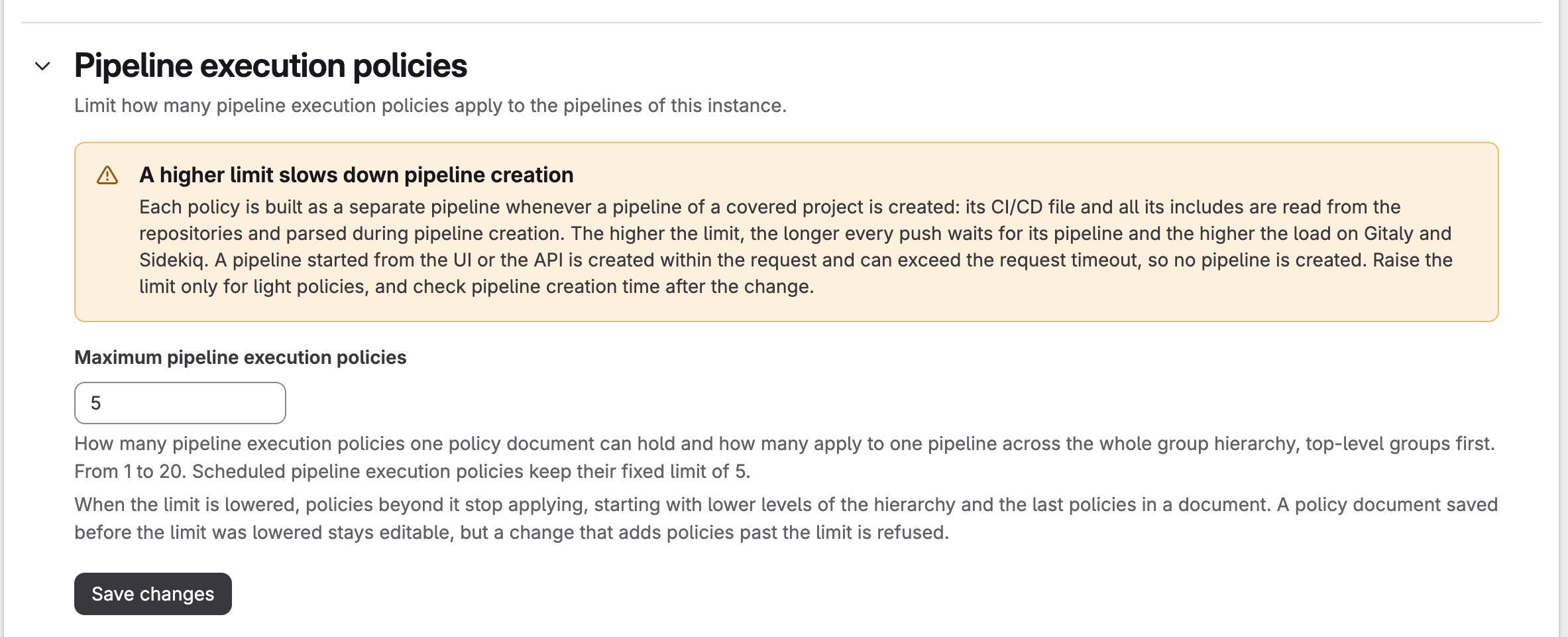
Change the pipeline execution policy limit
An administrator can change the limit:
- In the Admin area, go to “Settings” → “CI/CD”.
- Expand “Pipeline execution policies”.
- Set “Maximum pipeline execution policies”.
- Select “Save changes”.
You can also set the limit through the REST API. Send PUT /api/v4/application/settings with the fe_application_settings_attributes[pipeline_execution_policy_limit] parameter, a value from 1 to 20:
curl --request PUT --header "PRIVATE-TOKEN: $ADMIN_TOKEN" \
  --header "Content-Type: application/json" \
  --data '{"fe_application_settings_attributes": {"pipeline_execution_policy_limit": 10}}' \
  "<INSTANCE_URL>/api/v4/application/settings"
GET /api/v4/application/settings returns the current value in fe_application_settings_attributes.
The section is visible only when pipeline execution policies are turned on. One value applies both to the number of entries in a policy file and to the number of policies applied to one pipeline. The limit for scheduled policies stays at 5.
Each policy is built as a separate pipeline during the creation of every pipeline of a covered project: its CI/CD file and includes are read and the YAML is parsed. The higher the limit, the longer each push waits for its pipeline, and the higher the load on Gitaly and Sidekiq. A pipeline started from the UI or API is created within the request, so it can exceed the request timeout and not be created. Raise the limit only for light policies and check the pipeline creation time afterwards.
When you lower the limit, the extra policies stop applying, lower levels of the hierarchy first and, within a policy file, the last ones first. A policy file saved before the limit was lowered stays editable: you can edit or remove its policies, but a change that adds policies past the limit is refused.