The Trivy scan (trivy) checks a project with Trivy, an open-source security scanner.
The scan is mandated: a scan execution policy adds its jobs to the project’s pipelines, and the scanned project cannot switch it off or change its settings.
The policy lives in .deckhouse_code/security-policies/policy.yml of a separate policy project; the scanned project’s .gitlab-ci.yml stays unchanged.
The scan runs as separate jobs of these modules: dependency scanning, license scanning, secret detection and container image scanning.
All Trivy settings live in the policy; the scan has no integration under “Settings” → “Integrations”.
What the scan does
The modules, their jobs and reports:
| Module | Job | Reports | What fails the job |
|---|---|---|---|
| “Dependency scanning” | trivy_sca | dependency_scanning, cyclonedx, junit | A finding that reaches the common blocking threshold |
| “License scanning” | trivy_license | cyclonedx, junit | A finding that reaches the common blocking threshold |
| “Secret detection” | trivy_secrets | secret_detection, junit | Any secret (see “Secret detection”) |
| “Container image scanning” | trivy_container, one job per image | container_scanning, junit | A finding that reaches the common blocking threshold |
The following holds for every module and every job it runs:
- All jobs run in the
fe-security-scannerstage, added after the project’s own stages. The jobs declare noneeds, so they run after every job of the project and receive the artifacts of the earlier stages. - A job’s name starts with the job name from the table above; the rest of the name identifies the policy that added it, and, for the container module, the image line. For example,
trivy_sca:trivy-everywhere-p42is the dependency scanning job of the policy namedTrivy everywherefrom the policy project with ID42. - The first line of every job log names the policy that added the job:
This scan runs because the security policy "<name>" mandates it. Policies: <URL>. - Every job uploads its artifacts with
when: always, so a failed job still carries its reports. - The job clears every
TRIVY_*variable from its environment before running Trivy, and says so in the log:Trivy: <NAME> is set in this job's environment and is ignored. - The server writes every setting of the policy directly into the job, so the scanned project’s CI/CD variables of the same names do not change them.
- The jobs are interruptible: when the project has “Auto-cancel redundant pipelines” on, a newer pipeline of the same branch cancels them.
- The jobs always scan the pushed commit, whatever Git settings the scanned project has: they fetch the full history (
GIT_STRATEGY=fetch,GIT_DEPTH=0) and remove every untracked file from the checkout (GIT_CLEAN_FLAGS=-ffdx). A large repository therefore takes longer on its first fetch. A policy can set other values in the action’svariables.
Prerequisites
Before the scan can run, make sure that:
- a policy project is linked to the project or to a group above it;
- a GitLab Runner with the
dockerexecutor is available to the project, it can pull the scan image (see “Scan image and vulnerability databases”), and it allows thealwayspull policy (see “Pull policy on the runner”); - the runner runs
linux/amd64, or the policy names a scan image built for the runner’s architecture; - for the container module, the image to scan exists when the scan runs: a build job pushes it to a registry or saves it as an artifact in an earlier stage.
Turning the scan on
The policy can be built in the policy editor or written in YAML.
- Rule mode
- .yaml mode
- Open the project or group and go to “Secure” → “Policies”.
- Select “New policy”, then select the button on the “Scan execution policy” card.
- In the “Name” field, enter a name for the policy, for example
Trivy everywhere. - Under “When to run scans”, tick the pipelines to scan, for example “Any pipeline”.
- If the policy should run Trivy alone, clear “Enable this scanner” of the “Secret Detection (embedded Gitleaks)” scan under “Security scans”.
- Expand “Trivy (embedded)” and tick the modules to turn on, for example “Dependency scanning” and “Secret detection”.
- Select “Configure with a merge request”.
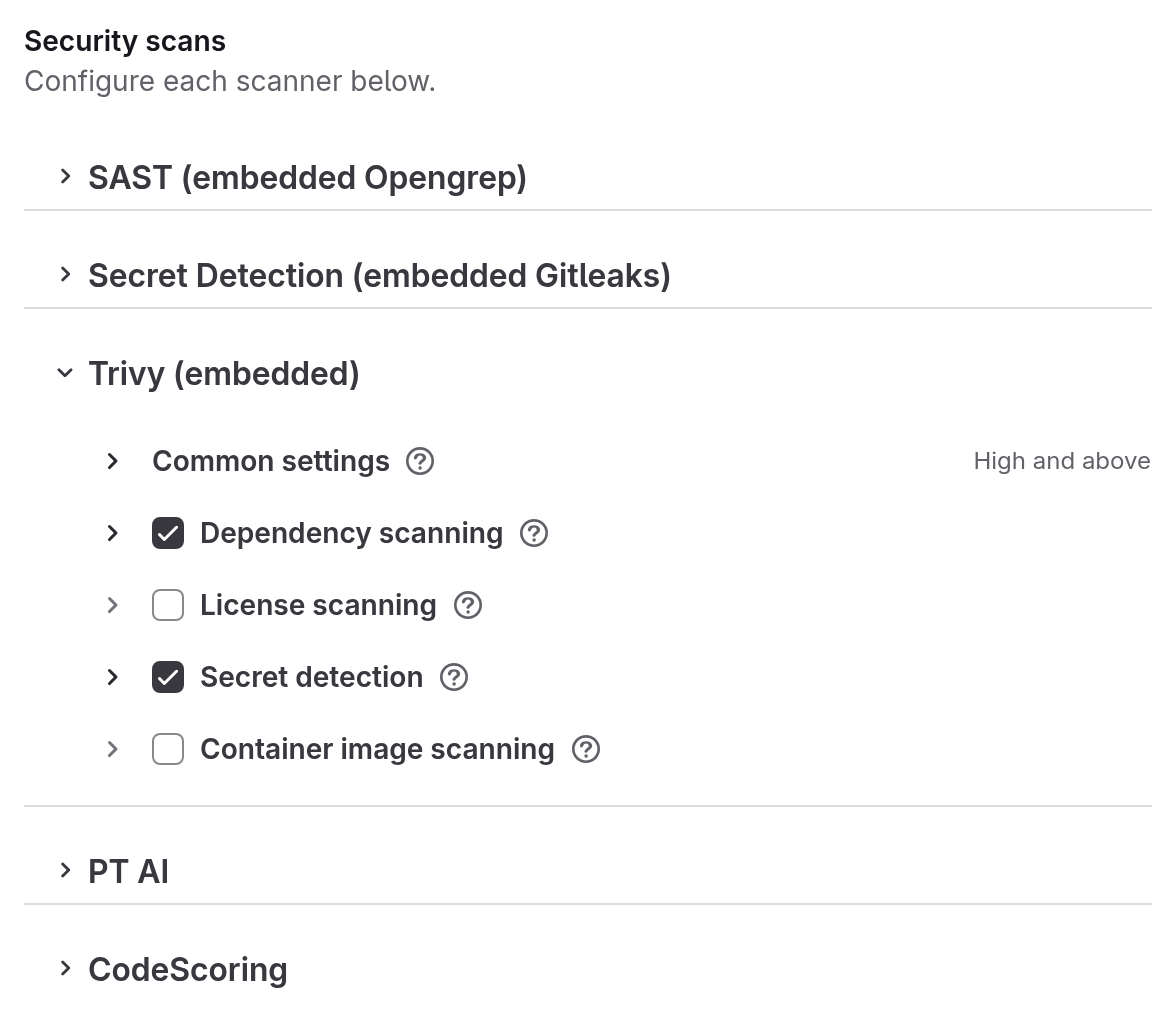
A new policy opens with the “Merge requests” and “Default branch” conditions ticked and with the “Secret Detection (embedded Gitleaks)” scan on. Ticking “Any pipeline” clears and disables “Merge requests”, “Default branch” and “By branch name”. The “.yaml preview” beside the form shows the policy the editor is going to write.
If no policy project is linked yet, the editor creates and links one on save: <project-path>-security-policy-project in the same group for a project, <group-path>-security-policy-project inside the group for a group.
The editor then opens a merge request with the policy in the policy project; the policy takes effect when that merge request is merged.
Switch the editor to “.yaml mode” above the form, or edit the .deckhouse_code/security-policies/policy.yml file in the policy project directly.
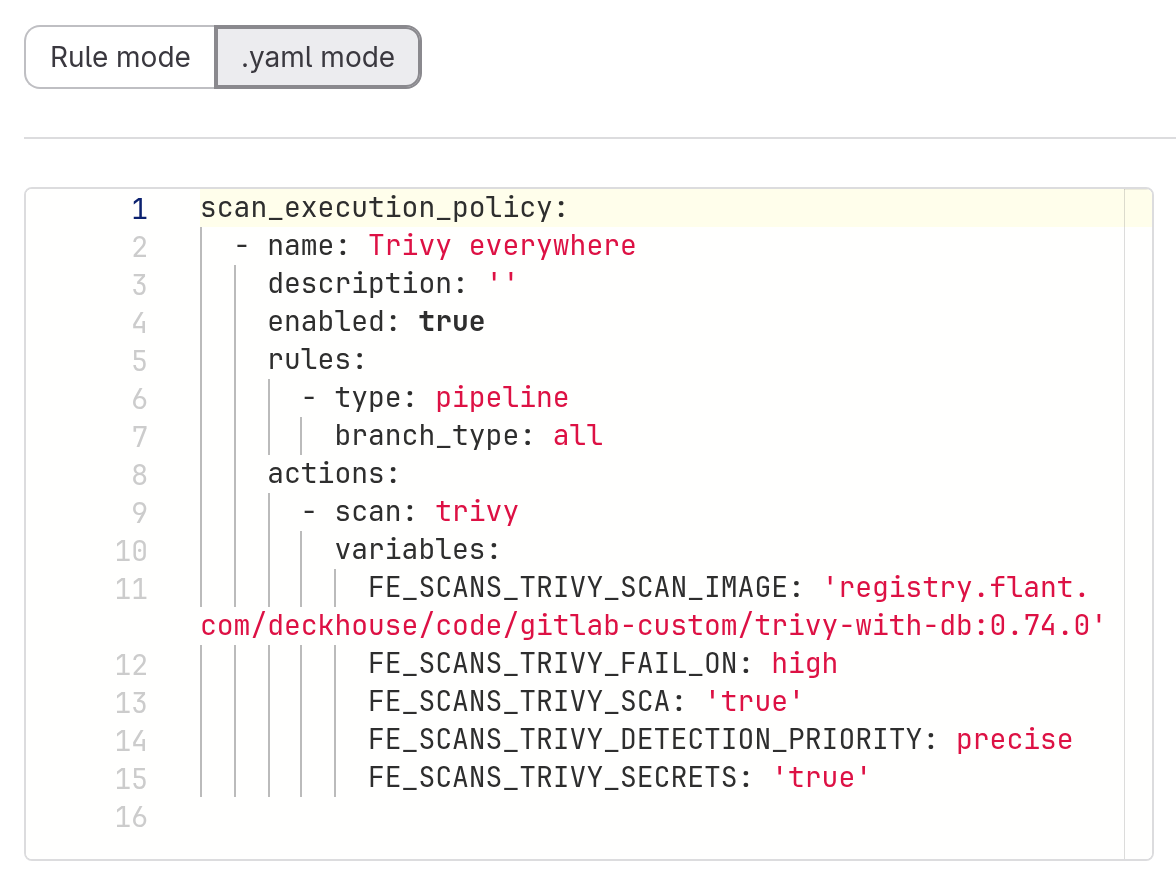
Add the scan: trivy action. Each module is turned on by its own variable with the value 'true': FE_SCANS_TRIVY_SCA, FE_SCANS_TRIVY_LICENSE, FE_SCANS_TRIVY_SECRETS, FE_SCANS_TRIVY_CONTAINER. The policy schema refuses a trivy action that names none of them.
scan_execution_policy:
  - name: Trivy everywhere
    enabled: true
    rules:
      - type: pipeline
        branch_type: all
    actions:
      - scan: trivy
        variables:
          FE_SCANS_TRIVY_SCAN_IMAGE: 'registry.example.com/trivy-with-db:0.74.0'
          FE_SCANS_TRIVY_FAIL_ON: high
          FE_SCANS_TRIVY_SCA: 'true'
          FE_SCANS_TRIVY_DETECTION_PRIORITY: precise
          FE_SCANS_TRIVY_SECRETS: 'true'
A hand-written policy can leave out FE_SCANS_TRIVY_SCAN_IMAGE, FE_SCANS_TRIVY_FAIL_ON and FE_SCANS_TRIVY_DETECTION_PRIORITY: the scan then runs in the image of the installed release, with the high threshold and the precise priority.
A policy you commit to the policy project yourself takes effect only once that policy project is linked: to a project with “Edit policy project” under “Secure” → “Policies”, to a group under “Settings” → “Security policy”.
Every pipeline that matches the policy rules gets the jobs of the enabled modules; in the example above, trivy_sca and trivy_secrets.
Ticking a module writes into the policy the variable that turns the module on, along with default values:
| Checkbox | What it writes into the policy |
|---|---|
| “Dependency scanning” | FE_SCANS_TRIVY_SCA: 'true', FE_SCANS_TRIVY_DETECTION_PRIORITY: precise |
| “License scanning” | FE_SCANS_TRIVY_LICENSE: 'true' |
| “Secret detection” | FE_SCANS_TRIVY_SECRETS: 'true' |
| “Container image scanning” | FE_SCANS_TRIVY_CONTAINER: 'true', FE_SCANS_TRIVY_CONTAINER_IMAGES: $CI_APPLICATION_REPOSITORY:$CI_APPLICATION_TAG, FE_SCANS_TRIVY_CONTAINER_DETECTION_PRIORITY: precise |
Ticking the first enabled module also fills in the “Scan image” field of the “Common settings” block with the image of the current release, and writes FE_SCANS_TRIVY_FAIL_ON: high.
A ticked module opens its own settings block.
Each block has a hint beside its title.
Common settings
The “Common settings” block applies to every module that is on, and has no checkbox of its own.
- Rule mode
- .yaml mode
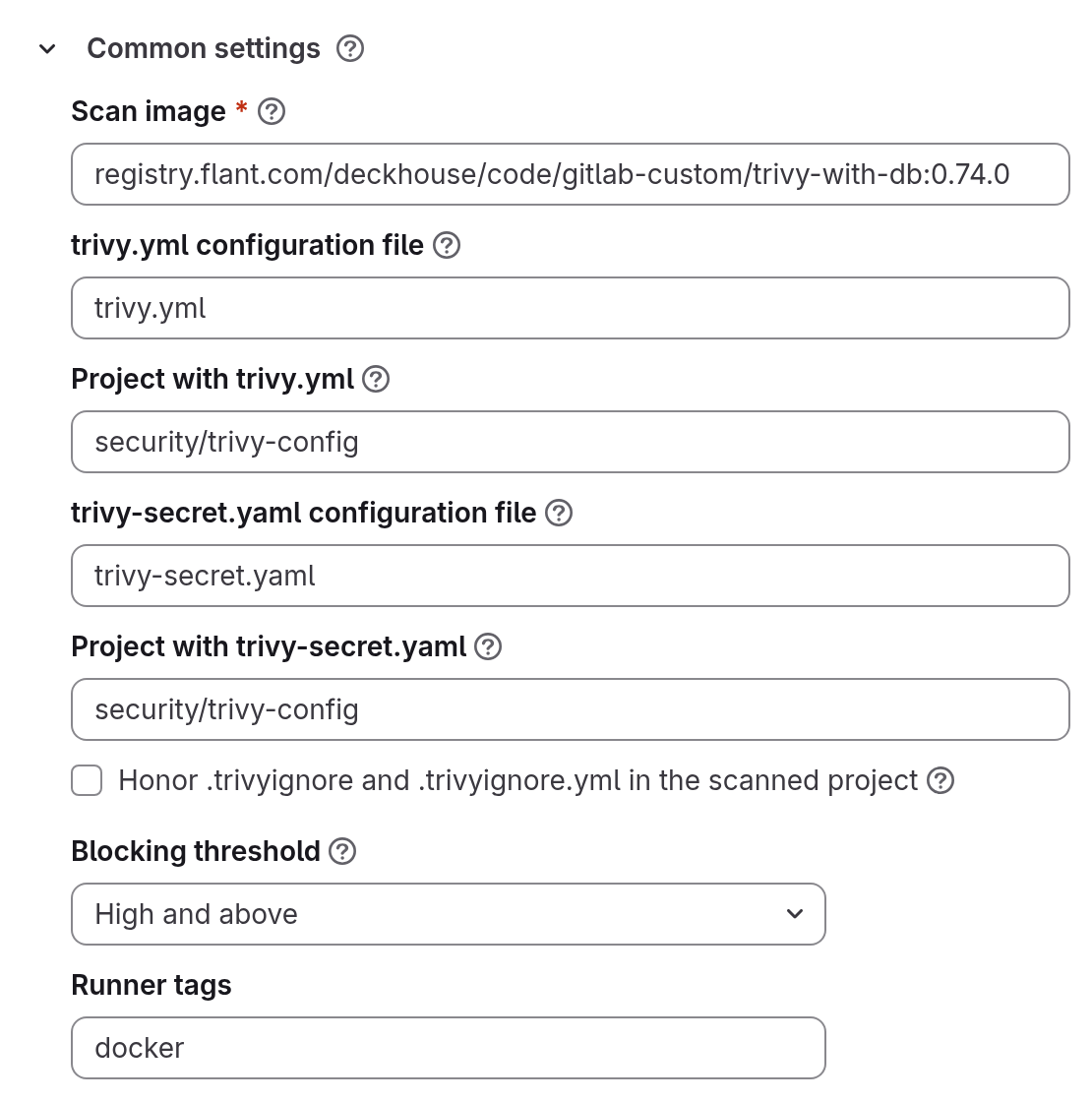
The “Project with trivy.yml” and “Project with trivy-secret.yaml” fields appear only once the file field above each is filled in; clearing the file field removes the project from the policy.
These fields are variables of the trivy action, and “Runner tags” is that action’s tags list:
actions:
  - scan: trivy
    variables:
      FE_SCANS_TRIVY_SCAN_IMAGE: 'registry.example.com/trivy-with-db:0.74.0'
      FE_SCANS_TRIVY_CONFIG_FILE: trivy.yml
      FE_SCANS_TRIVY_CONFIG_PROJECT: security/trivy-config
      FE_SCANS_TRIVY_SECRET_CONFIG: trivy-secret.yaml
      FE_SCANS_TRIVY_SECRETS_RULES_PROJECT: security/trivy-config
      FE_SCANS_TRIVY_FAIL_ON: high
      FE_SCANS_TRIVY_SCA: 'true'
    tags:
- docker| Field | Variable | What it sets |
|---|---|---|
| “Scan image” | FE_SCANS_TRIVY_SCAN_IMAGE | The image every module’s job runs in, with the vulnerability databases baked in |
| “trivy.yml configuration file” | FE_SCANS_TRIVY_CONFIG_FILE | Path to Trivy’s own configuration file, common to all modules. Empty: no file is passed |
| “Project with trivy.yml” | FE_SCANS_TRIVY_CONFIG_PROJECT | The project trivy.yml is read from, as group/project. Empty: the file is read from the scanned repository |
| “trivy-secret.yaml configuration file” | FE_SCANS_TRIVY_SECRET_CONFIG | Path to the rules and allow-lists of the secret search. Empty: Trivy’s built-in rules |
| “Project with trivy-secret.yaml” | FE_SCANS_TRIVY_SECRETS_RULES_PROJECT | The project trivy-secret.yaml is read from. Empty: the file is read from the scanned repository |
| “Honor .trivyignore and .trivyignore.yml in the scanned project” | FE_SCANS_TRIVY_USE_IGNOREFILE | Off by default. See below |
| “Blocking threshold” | FE_SCANS_TRIVY_FAIL_ON | The threshold of the dependency, license and container jobs, default “High and above” (see “Blocking”) |
| “Runner tags” | the action’s tags | Comma-separated runner tags; they apply to the job of every module |
The editor fills “Scan image” in with the image of the current release, trivy-with-db:0.74.0 from the product registry, and the policy keeps using that image after a product upgrade, until someone edits the field.
A policy written by hand without FE_SCANS_TRIVY_SCAN_IMAGE runs the image of the installed release.
While any module is on, the field is required, and the form cannot be saved with it empty.
The value is a complete image reference with a tag, such as registry.example.com/trivy-scan:0.74.0, or with a digest (@sha256: followed by 64 hexadecimal characters).
A reference without a tag or digest, and one containing $, are refused.
The server writes the image into the job, so the scanned project cannot change it.
With “Honor .trivyignore and .trivyignore.yml in the scanned project” off, the default, the job passes an empty ignore list, so the scanned project’s .trivyignore cannot hide a finding.
With it on, the job looks in the root of the repository for .trivyignore.yml, then .trivyignore.yaml, and applies the first it finds; if neither exists, Trivy reads .trivyignore on its own.
The job log names the file it applied, and says when .trivyignore is skipped because a YAML file is in use.
The container module too reads the ignore file from the repository, never from the image.
Turning the checkbox on lets a developer of the scanned project hide a finding without the policy author knowing.
The format is documented in Trivy’s ignore file reference.
Settings of every module
Each module block carries its own “Skip directories”, “Skip files” and “Additional arguments” fields; a value applies only to that module’s job, because the modules run as separate jobs.
In the variable names, <MODULE> stands for SCA, LICENSE, SECRETS or CONTAINER, matching the module the field belongs to:
| Field | Variable | What it sets |
|---|---|---|
| “Skip directories” | FE_SCANS_TRIVY_<MODULE>_SKIP_DIRS | One directory or glob pattern per line. For the container module, paths inside the image’s file system |
| “Skip files” | FE_SCANS_TRIVY_<MODULE>_SKIP_FILES | One file or glob pattern per line. For the container module, paths inside the image |
| “Additional arguments” | FE_SCANS_TRIVY_<MODULE>_EXTRA_ARGS | Flags passed to this module’s Trivy run as written, for flags the form does not name |
Trivy receives “Additional arguments” before the flags the form sets, so a form field wins over the same flag written here.
The configuration file is passed last, so “Additional arguments” cannot point the scan at another configuration file.
A flag that narrows the report, for example --severity, makes the scan report less than it found.
A flag set by the form replaces the key of the same name in trivy.yml entirely: scan.skip-files in trivy.yml has no effect when “Skip files” is filled in.
The timeout of a module is set with the --timeout flag in “Additional arguments”, for example --timeout 15m; the field’s hint gives it as an example.
The timeout key in the common trivy.yml sets it for all modules, and --timeout overrides that key.
With neither, Trivy’s own default applies, 5 minutes, which a large repository can outlive.
An invalid value is checked by neither the form nor the policy schema: Trivy rejects it when the job starts, and the job fails (see “Trivy rejects the timeout”).
The examples in the module sections below show these fields filled in.
Dependency scanning
The module finds known-vulnerable operating system packages and application dependencies in the repository checkout. Its own fields:
| Field | Variable | What it sets |
|---|---|---|
| “Package relationships” | FE_SCANS_TRIVY_PKG_RELATIONSHIPS | Which dependency relationships are reported, comma-separated from root, workspace, direct, indirect. Empty: all of them |
| “Detection priority” | FE_SCANS_TRIVY_DETECTION_PRIORITY | precise (Trivy’s default) reports only what Trivy attributes confidently; comprehensive reports more, with more false positives |
In the block, the root, workspace, direct and indirect checkboxes have no “Package relationships” caption: they come first, right under the block title.
Each value has a hint:
| Value | Meaning |
|---|---|
root | The target being scanned itself |
workspace | Declared by a workspace member’s own manifest, as happens when several packages share one repository |
direct | Declared by the project’s own manifest |
indirect | Pulled in by another package |
Several values are written comma-separated, for example direct,indirect.
- Rule mode
- .yaml mode
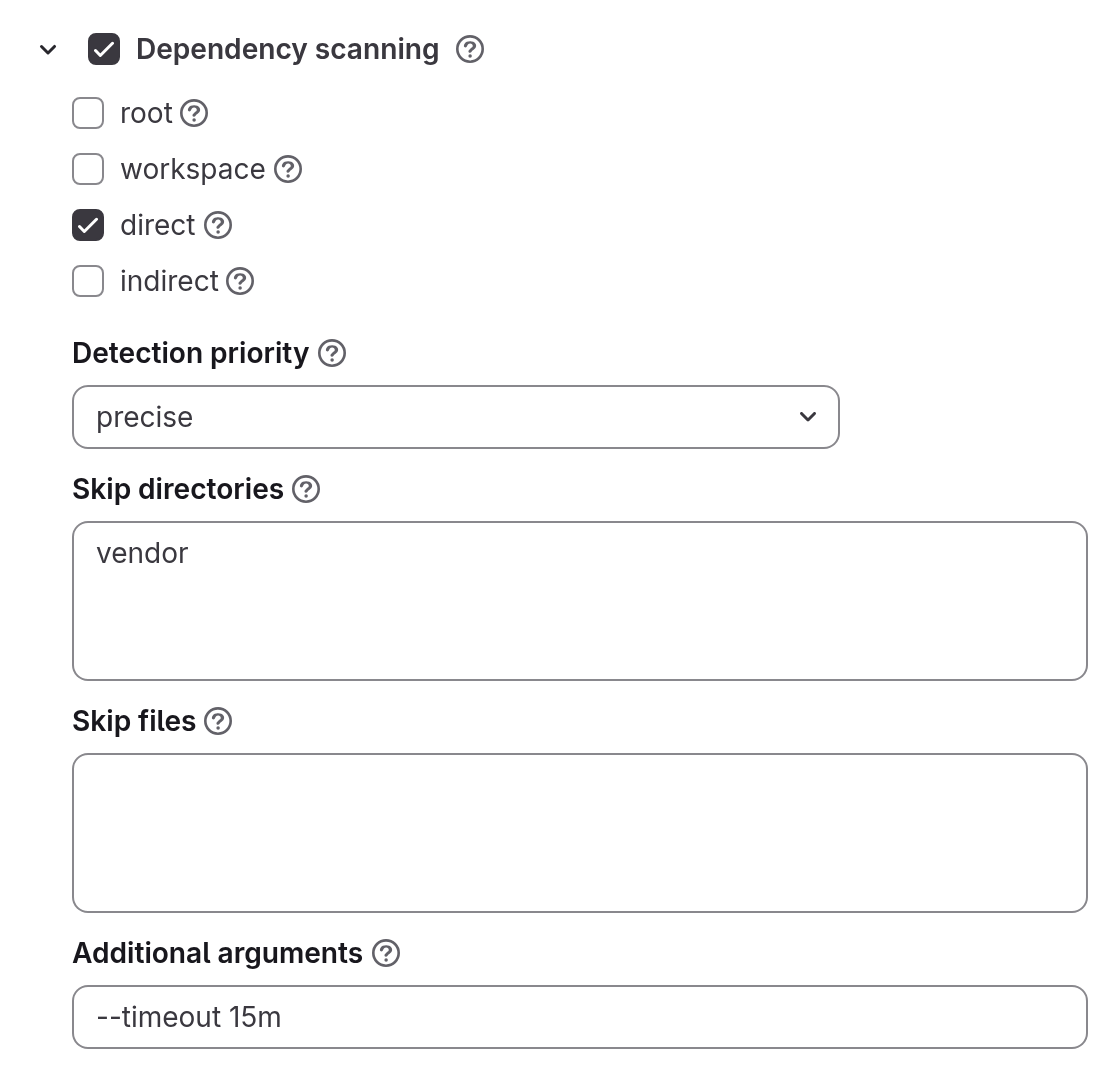
The example reports only direct dependencies, skips the vendor directory, and raises the timeout to 15 minutes.
actions:
  - scan: trivy
    variables:
      FE_SCANS_TRIVY_SCA: 'true'
      FE_SCANS_TRIVY_PKG_RELATIONSHIPS: direct
      FE_SCANS_TRIVY_DETECTION_PRIORITY: precise
      FE_SCANS_TRIVY_SCA_SKIP_DIRS: vendor
      FE_SCANS_TRIVY_SCA_EXTRA_ARGS: '--timeout 15m'
A multi-line field, such as “Skip directories” with several directories, is written in YAML as a block with one value per line (|-).
The job runs Trivy twice: once to write the software bill of materials (SBOM) in CycloneDX format, gl-sbom.cdx.json, and once more to find the vulnerabilities.
The “Dependency list” and “License compliance” pages use the SBOM.
“Package relationships” and “Detection priority” apply to the vulnerability run only, so the SBOM always holds the whole dependency tree, and a package filtered out of the vulnerability report still appears in the dependency list.
A failed SBOM run only prints a warning and does not affect the vulnerability findings.
Findings below the blocking threshold stay in the report: the threshold decides only the job’s outcome.
The scan downloads nothing and reads the vulnerability databases baked into the scan image.
If either database is missing from the image, the job stops before scanning (see “Troubleshooting”).
Dependencies that a build job of the project passed on through cache: or artifacts: are in the job’s working directory and are scanned too.
License scanning
The module classifies the licenses of the packages Trivy finds. Its own fields:
| Field | Variable | What it sets |
|---|---|---|
| “Full scan” | FE_SCANS_TRIVY_LICENSE_FULL | Off by default. On: Trivy reads the license texts and file headers of the source tree instead of the package metadata. Slower, and it reports more, false matches included |
| “Ignored licenses” | FE_SCANS_TRIVY_LICENSE_IGNORED | One SPDX identifier per line, such as MIT or Apache-2.0, whose findings are dropped |
| “Match confidence” | FE_SCANS_TRIVY_LICENSE_CONFIDENCE | A number from 0 to 1: how close a license text has to match in a full scan. Trivy’s default is 0.9; a lower value reports weaker matches |
- Rule mode
- .yaml mode
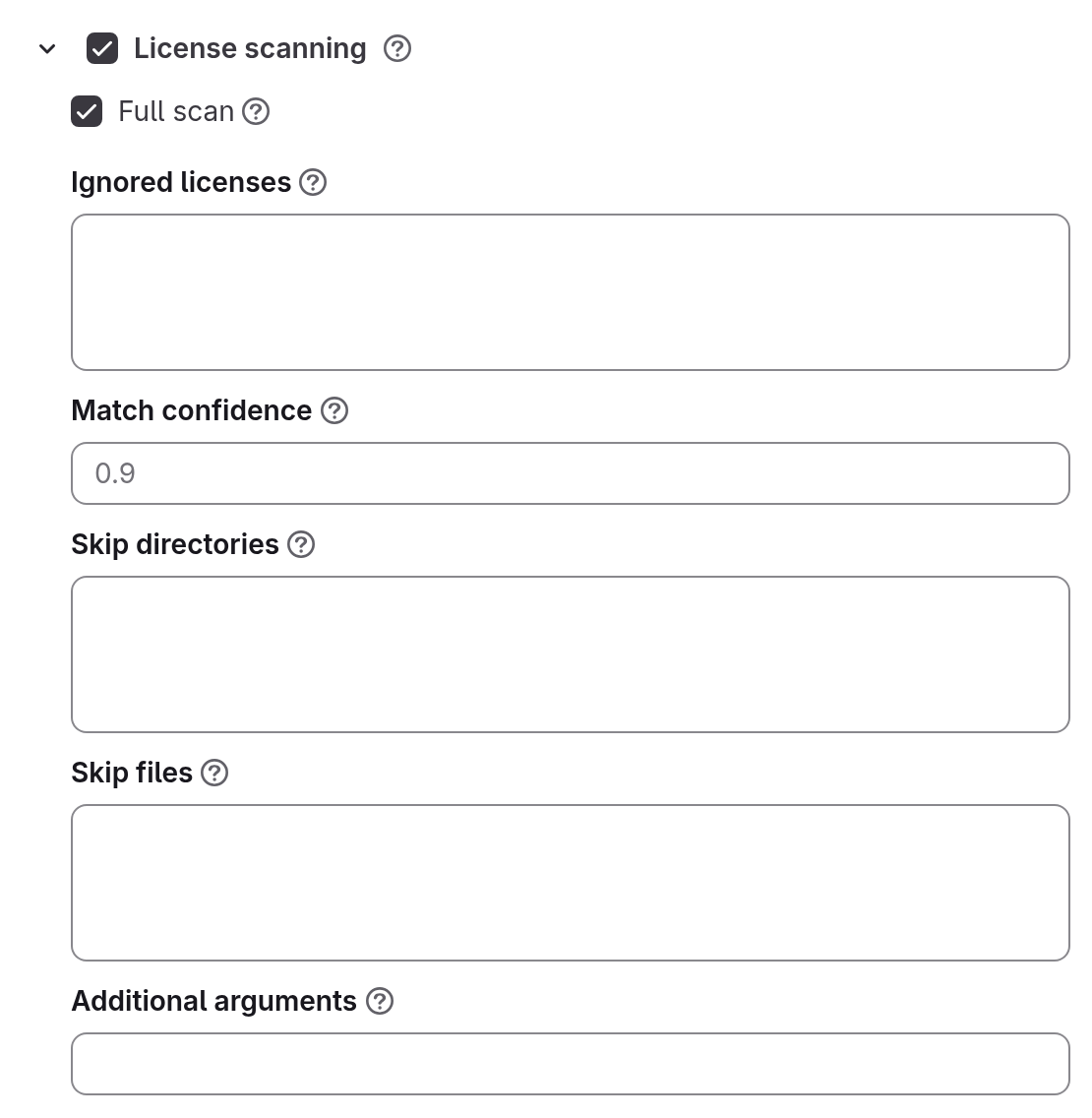
The example turns on “Full scan”.
actions:
  - scan: trivy
    variables:
      FE_SCANS_TRIVY_LICENSE: 'true'
      FE_SCANS_TRIVY_LICENSE_FULL: 'true'
Each license falls into a category, and each category carries a severity:
| Category | Severity |
|---|---|
forbidden | Critical |
restricted | High |
reciprocal | Medium |
notice, permissive, unencumbered | Low |
A license Trivy does not recognize is unknown, and an unknown license never fails the job at any threshold.
At the default threshold “High and above”, a license in the forbidden or restricted category fails the job.
Which category a license falls into is set in trivy.yml (see “License categories in trivy.yml”) and documented in Trivy’s license scanner reference.
The job uploads a JUnit report and the SBOM gl-sbom-license.cdx.json.
It uploads no security report: a license check is reported as a test result, so license findings appear in the “Tests” tab only.
The “License compliance” page and the “License” column of the “Dependency list” page combine the licenses that both SBOMs report for a component: the dependency module’s SBOM takes them from the package metadata, and in this module’s SBOM “Full scan” adds the licenses found in the source texts.
The license module’s SBOM therefore can only add licenses to what the pages show.
The license module does not use the vulnerability databases.
Licenses of dependencies that are not installed
Whether Trivy finds a dependency’s license without installing packages depends on the lock file format.
Some lock files carry the license of each package; the others carry only the name and version, and then Trivy reads the license from the installed package metadata: node_modules/<package>/package.json for npm, .dist-info/METADATA for Python, the installed gemspec for Ruby.
Go licenses always come from the module cache.
| Lock file | License without installing packages |
|---|---|
package-lock.json with lockfileVersion 2 or 3 | Yes |
composer.lock | Yes |
package-lock.json with lockfileVersion 1 | No |
yarn.lock v1 | No |
Cargo.lock | No |
Gemfile.lock | No |
poetry.lock | No |
The same applies to the licenses in the SBOM the dependency module writes: where the lock file carries no license and the packages are not installed, the “License” column of the dependency list stays empty.
The scan job does not install the project’s dependencies.
Install them in an earlier stage of the scanned project’s own .gitlab-ci.yml, in its own image, and pass them on through cache: or artifacts::
install:
  stage: build
  image: node:20
  script:
    - npm ci
  cache:
    key:
      files: [package-lock.json]
    paths:
      - node_modules/
A project with no build stage can turn on “Full scan”: it reads license texts and file headers in the source tree without installing anything. The report then shows the licenses of the repository itself and of third-party code copied into the tree, while the licenses of dependencies that the lock file only names stay unknown.
License categories in trivy.yml
Categories are forbidden, restricted, reciprocal, notice, permissive and unencumbered; every license Trivy recognizes has a built-in category (MIT is notice).
Listing a license under a category in trivy.yml adds it to that category and does not remove it from its built-in one.
The license is then in two categories, and Trivy picks one of them anew on every run, whether or not the code or the configuration changed.
So the license check passes or fails at random on unchanged code: with the default threshold “High and above”, a run that picks forbidden (critical) fails the job, and a run that picks notice (low) passes it.
To fix this, also override the built-in category the license belongs to. Then the license stays in exactly one category. For example, for MIT:
license:
  forbidden:
    - MIT
  notice: []
The result is stable when a license is listed under its own built-in category (license.notice: [MIT]), or when no scanned package has that license.
Secret detection
The module searches the repository for committed secrets. Its own field:
| Field | Variable | What it sets |
|---|---|---|
| “Do not block on findings” | FE_SCANS_TRIVY_SECRETS_REPORT_ONLY | Off by default. On: findings are reported and the job passes |
- Rule mode
- .yaml mode
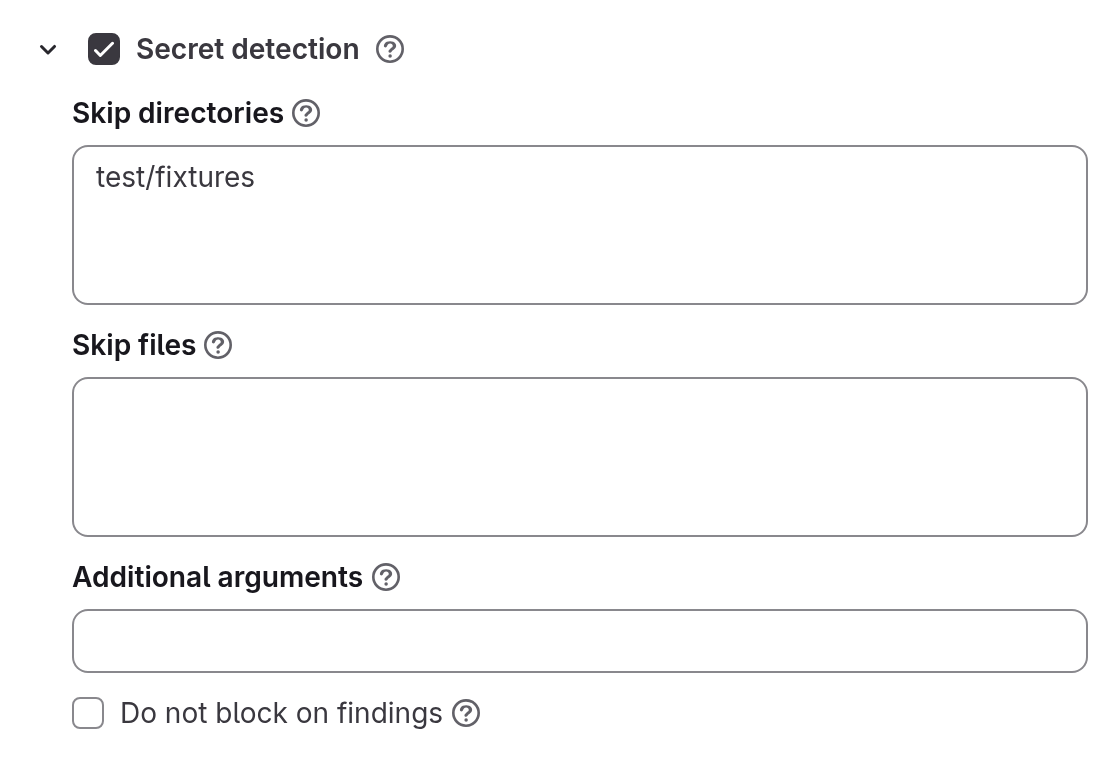
The example skips the test/fixtures directory, where test keys would otherwise be reported as leaked secrets.
actions:
  - scan: trivy
    variables:
      FE_SCANS_TRIVY_SECRETS: 'true'
      FE_SCANS_TRIVY_SECRETS_SKIP_DIRS: test/fixtures
Any secret fails the job, whatever its severity.
“Do not block on findings” gives the job the report_only threshold instead.
The module reads only the files of the checked-out commit and does not search the git history, so a secret added in one commit and removed in the next is not found.
The log says so: Trivy: searching the checked-out tree for secrets; git history is not read.
The module does not use the vulnerability databases and works on a runner with no access to the internet.
The module reads the trivy.yml and trivy-secret.yaml named in “Common settings” (see “Configuration files”).
Container image scanning
The module scans an image the pipeline built: the operating system packages of its base image and everything added to it during the build. The findings reach the vulnerability report as a container scan. Its own fields:
| Field | Variable | What it sets |
|---|---|---|
| “List of images to scan” | FE_SCANS_TRIVY_CONTAINER_IMAGES | Required. One image per line, up to 20 lines (see “List of images to scan”) |
| “Also scan the application dependencies inside the image” | FE_SCANS_TRIVY_CONTAINER_APP_DEPS | Off by default: only the operating system packages of the image are scanned |
| “Do not fail when there is no image at the address” | FE_SCANS_TRIVY_CONTAINER_ALLOW_MISSING | Off by default: a missing image fails the job |
| “Detection priority” | FE_SCANS_TRIVY_CONTAINER_DETECTION_PRIORITY | precise or comprehensive, as in the dependency module |
- Rule mode
- .yaml mode
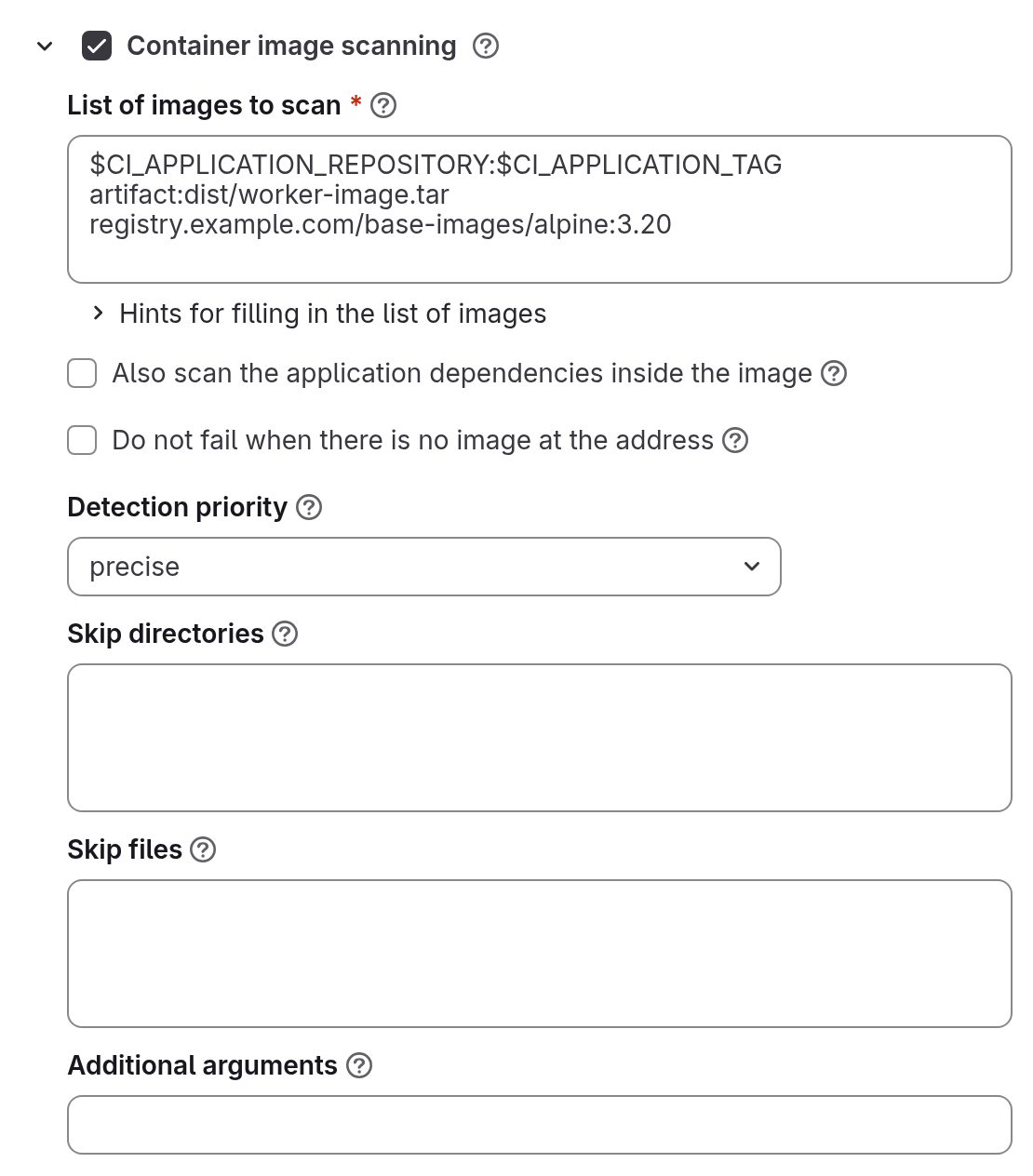
The example names an image the pipeline pushed, an image a build job saved as an artifact, and a base image from another registry. “Hints for filling in the list of images” under the field explains the line forms and the allowed variables.
actions:
  - scan: trivy
    variables:
      FE_SCANS_TRIVY_CONTAINER: 'true'
      FE_SCANS_TRIVY_CONTAINER_DETECTION_PRIORITY: precise
      FE_SCANS_TRIVY_CONTAINER_IMAGES: |-
        $CI_APPLICATION_REPOSITORY:$CI_APPLICATION_TAG
        artifact:dist/worker-image.tar
        registry.example.com/base-images/alpine:3.20
The job pulls the image from its registry, never from the runner’s local Docker daemon: it runs trivy image --image-src remote.
An image built on the runner and pushed nowhere is not found: push it to a registry or save it as an artifact.
Every line of “List of images to scan” is scanned by a job of its own, with its own status.
The job name is trivy_container:<line number>-<target> followed by the policy suffix: <line number> counts from 1, and <target> is the line as written in the policy, with variables not substituted, lowercased, with other characters replaced by -, cut to 40 characters.
The name stays the same from commit to commit, so the “Test summary” of a merge request pairs the suites of the base and the change.
The job searches the image for vulnerabilities and for secrets, whether or not the secret detection module is on. A secret baked into an image is gated by the common blocking threshold, like the image’s vulnerabilities (see “Blocking”).
“Also scan the application dependencies inside the image” is off by default: the dependency module already reports the application dependencies from the repository, and scanning both would report one vulnerability twice. Turn it on to catch what reached the image without going through the repository.
“Do not fail when there is no image at the address” covers a missing image only: the registry answered MANIFEST_UNKNOWN or NAME_UNKNOWN, or the artifact: file is not on disk.
A refused login, an unreachable registry, a timeout or any other error still fails the job.
Turn it on for branches that build no image, such as documentation changes.
The job log names the image that was actually read, with its digest: trivy_container: scanned <image>, digest sha256:…, <OS>.
For an artifact it prints the file path and the image ID instead.
For this module, “Skip directories” and “Skip files” are paths inside the image, while trivy.yml, trivy-secret.yaml and the ignore file come from a repository: the named project or the scanned one.
A vulnerability that the image’s distribution marked not_affected, will_not_fix, end_of_life or fix_deferred is reported as skipped and does not count against the threshold; the same holds for the dependency module (see “Blocking”).
A vulnerable package of the base image is fixed by rebuilding the image on a newer base, and the job says so when it fails.
List of images to scan
A line of “List of images to scan” takes one of these forms:
| Form | Details |
|---|---|
| An address built from the variables below | For example, $CI_APPLICATION_REPOSITORY:$CI_APPLICATION_TAG |
artifact:<path> | An image a build job saved as an artifact: a path inside the checkout, relative, without .. and without patterns. A line starting with artifact: is always read as a path, so an image really named artifact must be written in full, docker.io/library/artifact:1.0 |
| A full image reference with a tag or digest | From any registry, such as postgres:15-alpine or registry.example.com/group/project@sha256:<DIGEST> |
A line without a tag or digest is refused when the policy is saved; so is $CI_REGISTRY_IMAGE alone.
Ticking the module writes the line $CI_APPLICATION_REPOSITORY:$CI_APPLICATION_TAG into the field: the address an Auto DevOps build pushes to.
The editor shows the same information as this section under the field, in “Hints for filling in the list of images”.
The editor flags more than 20 lines and holds the save: At most 20 lines; this field has <N>.
Only the variables below are allowed in an address; any other $VARIABLE is refused when the policy is saved.
| Variable | Value |
|---|---|
$CI_REGISTRY_IMAGE | The container registry of the scanned project, such as registry.example.com/group/project |
$CI_COMMIT_REF_SLUG | The branch or tag as an image tag: feature/foo becomes feature-foo. For builds that tag the image after the branch |
$CI_COMMIT_SHA | The full commit SHA of the pipeline. For builds that tag the image after the commit |
$CI_COMMIT_TAG | The Git tag of the pipeline. A line using it is skipped in a branch pipeline |
$CI_APPLICATION_REPOSITORY | The standard image path: $CI_REGISTRY_IMAGE/$CI_COMMIT_REF_SLUG for a branch, $CI_REGISTRY_IMAGE for a tag. A project that overrides the variable for its own Auto DevOps build is not followed here. Its image has to be named in full |
$CI_APPLICATION_TAG | The standard image tag: $CI_COMMIT_SHA for a branch, $CI_COMMIT_TAG for a tag |
The server fills in the values of these variables for the job from the project, branch and commit of the pipeline, over any CI/CD variable of the same name in the scanned project, so the project cannot point the mandated scan at another image.
A line is left out of a pipeline that cannot fill it in: a line with $CI_COMMIT_TAG in a branch pipeline, or a line with $CI_REGISTRY_IMAGE or $CI_APPLICATION_REPOSITORY where the container registry is switched off for the project or the installation.
The remaining jobs print each skipped line in their log: Trivy container: line <N> skipped (<reason>): <line>.
When no line applies to the pipeline, or the field is empty, one job named trivy_container (plus the policy suffix) runs: it fails, or, with “Do not fail when there is no image at the address” ticked, passes with a log message.
An example of the field with several lines is in “Container image scanning” above.
Registry credentials
Reading the image needs credentials that depend on where it is hosted. Do not put registry credentials into the policy: it stores its values in plain text.
An image in the container registry of this installation, where the address matches CI_REGISTRY, is read with the job’s own CI/CD job token and nothing else; the job never sends that token to another registry.
An image from another, private project of the installation is read only when that project allows access to the scanned project’s job token: in the image’s project, open “Settings” → “CI/CD” → “Job token permissions” and add the scanned project.
Otherwise the job fails with UNAUTHORIZED and DENIED: access forbidden.
Credentials in the scanned project’s variables do not help here: for the installation’s own registry the job does not read them.
An image in another registry is read with DOCKER_AUTH_CONFIG, or the pair CS_REGISTRY_USER and CS_REGISTRY_PASSWORD, from the CI/CD variables of the scanned project.
DOCKER_AUTH_CONFIG is JSON in the ~/.docker/config.json format:
{"auths": {"registry.example.com": {"auth": "<BASE64_USER_PASSWORD>"}}}<BASE64_USER_PASSWORD> is user:password encoded in Base64.
The password is passed to Trivy through standard input and does not reach the job log, even when the variable is not masked.
The job prints the Trivy command it runs, without the password.
An image saved as an artifact
artifact:dist/image.tar reads $CI_PROJECT_DIR/dist/image.tar, and a build job of the same pipeline has to leave it there:
- the build job runs in a stage before
fe-security-scanner, since the scan job has noneedsand downloads the artifacts of all earlier stages; - the file is listed in
artifacts:pathsand has not expired when the scan runs; - the image is saved with its tag, for example
docker save myapp:1.2 -o dist/image.tar: the finding takes the image name from the tag inside the archive, sodocker save <image ID>without a tag gives findings with no image name; - for the scan to run in merge request pipelines, the build job needs
rules: a job withoutrulesoronlyis not added to a merge request pipeline, while the policy jobs are, and the job of theartifact:line then fails there.
For example, in the scanned project’s own .gitlab-ci.yml:
build-image:
  stage: build
  rules:
    - when: on_success
  script:
    - docker build -t myapp:$CI_COMMIT_SHORT_SHA .
    - mkdir -p dist
    - docker save myapp:$CI_COMMIT_SHORT_SHA -o dist/image.tar
  artifacts:
    paths: [dist/image.tar]
    expire_in: 1 day
An artifact needs no registry and no credentials.
Pipelines that build no image
Policy jobs are added to pipelines of every type, merge request pipelines included, and they bypass the project’s workflow:rules:
- a project with no jobs for merge request pipelines still gets a merge request pipeline, with only the scans in it;
- the “merge request pipeline instead of a branch pipeline” setup through
workflow:rulesdoes not remove the duplicate: the branch pipeline stays, with only the scans in it; - a project with no
.gitlab-ci.ymlof its own still gets pipelines with only the scan jobs in them.
In a pipeline where the build did not run, the jobs of artifact: lines and of the addresses that build should have pushed to fail.
For example, in a pipeline that a type: schedule rule of the policy starts, only the scan jobs run, so the jobs of artifact: lines fail there, while a registry address still works if the image is already there.
A policy that does not need the scan on every push can limit its rule to pipeline sources.
- Rule mode
- .yaml mode
Untick “Any pipeline” and tick “Merge requests” and “Default branch”: the scan then runs in merge request pipelines that target the default branch and in push pipelines of the default branch.
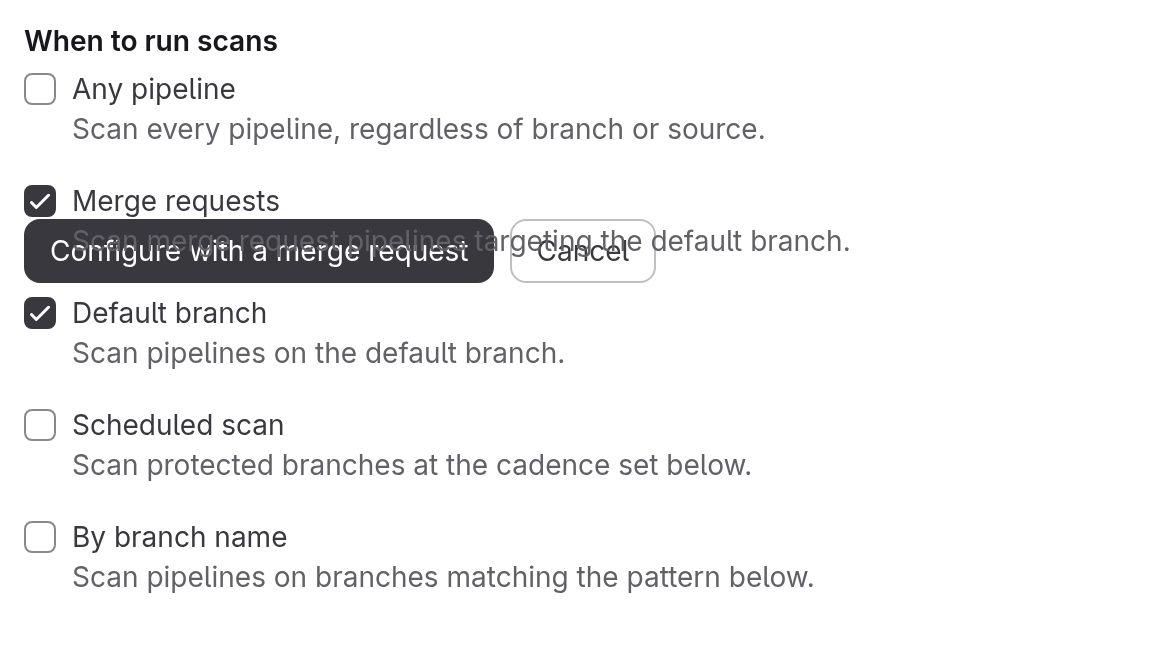
These checkboxes write the rules below.
pipeline_sources.including also accepts api, chat, external, external_pull_request_event, merge_request_event, pipeline, push, schedule, trigger and web.
A hand-written rule can add sources the checkboxes do not offer, such as web.
rules:
  - type: pipeline
    branch_type: target_default
    pipeline_sources:
      including:
        - merge_request_event
  - type: pipeline
    branch_type: default
    pipeline_sources:
      including:
        - push
Or tick “Do not fail when there is no image at the address” for the branches that build nothing.
Configuration files
Trivy reads part of its settings from files named in “Common settings”: trivy.yml, its own configuration file, and trivy-secret.yaml, the rules and allow-lists of the secret search.
In the example in “Common settings”, both files are read from the security/trivy-config project.
The jobs of all modules read the one trivy.yml named in the common fields: with a project, from the default branch of that project; without a project, from the scanned repository; with no file, no configuration is passed.
One trivy.yml works for the repository modules and for the container module alike: Trivy silently skips the keys a run does not use.
The trivy-secret.yaml pair is read by the secret detection module and by the container module.
With the pair empty, both use Trivy’s built-in rules.
The container module never picks up a trivy-secret.yaml from the repository on its own.
Secret rules written directly into trivy.yml are ignored by Trivy without a warning: those rules belong in trivy-secret.yaml.
Do not set the threshold in trivy.yml: its severity key cuts the findings below it out of the report, so they never reach the vulnerability report either.
The blocking threshold of the policy is what decides what fails the job.
Relative paths inside trivy.yml, and the files Trivy looks for by default (trivy.yaml, trivy-secret.yaml, .trivyignore), are resolved against the job’s working directory — the checkout of the scanned project, not the scan target.
For the container module this means paths in trivy.yml refer to the repository, not to the image.
With a file field empty, the job passes no configuration file, and Trivy does not fall back to its own defaults either.
Each pair, trivy.yml and trivy-secret.yaml, works the same way. An empty project field means the scanned repository: the job reads the file from the checkout of the commit being scanned, and the scanned project then controls the configuration of the scan that checks it. A policy that must not let the scanned project change the configuration names a project explicitly. A named project is read by the job with its own CI/CD job token, always from the project’s default branch. The token carries the rights of whoever started the pipeline: if that user has no access to the project, the job fails. Open access in one of these ways: make the project with the files internal or public; add the scanned project, or its group, to the CI/CD job token allowlist of the project with the files; make whoever starts the pipelines a member of the project with the files. When the policy is saved, the named project is checked only for existing and having a repository. Access rights are not checked, because the reader of the file is whoever starts the pipeline later.
The editor shows a project field only while its file field is filled in; clearing the file removes the project from the policy. A policy written by hand with a project and no file cannot be saved: the error names the field to fill in. A policy already in effect with a project and no file makes the job stop before scanning, naming the empty field. A file without a project is read from the scanned repository.
The job stops when the named project could not be read, the file is not in the source, the file is empty, or the path is absolute or contains .. (the policy schema refuses such paths too).
The job log always says where the file came from, and for a named project, the commit it was read at: Trivy: configuration read from <project> at <commit SHA>. and Trivy: <VARIABLE> applied from <source> (<file>).
That commit is the one place that shows which rules the scan applied.
Trivy’s own configuration file format is documented in its configuration file reference, and the format of trivy-secret.yaml in Trivy’s secret scanner reference.
Blocking
The trivy_sca, trivy_license and trivy_container jobs fail when a finding reaches the blocking threshold.
All three read the common “Blocking threshold”, FE_SCANS_TRIVY_FAIL_ON, and pass when no finding reaches it.
The trivy_secrets job does not read the common threshold: any secret fails it, whatever its severity.
“Do not block on findings” gives it the report_only threshold instead.
Findings below the threshold still reach the reports and the “Tests” tab: the threshold decides only the job’s outcome.
| Caption | Policy value | What fails the job |
|---|---|---|
| “Critical only” | critical | A critical finding |
| “High and above” (the default for the dependency, license and container modules) | high | High and critical |
| “Medium and above” | medium | Medium and above |
| “Low and above” | low | Low and above |
| “Any finding” | info | A finding of any recognized severity |
| “Block nothing” | report_only | Nothing; findings are still reported |
A finding of unknown severity (UNKNOWN) never fails the job, at any threshold, “Any finding” included.
A vulnerability the distribution marked not_affected, will_not_fix, end_of_life or fix_deferred shows as skipped in the “Tests” tab and never fails the job.
In the “Tests” tab, a finding at or above the threshold is a failed test, one below it a passed test, a set-aside one a skipped test.
A scan with no findings reports one test, “No findings”.
In the Trivy version the image ships, secrets have different severities: an AWS access key and a GitHub token are critical, a private key is high, a JWT and a Slack webhook are medium, and a Stripe publishable key is low. Secrets found inside an image are gated by the common threshold, like the image’s vulnerabilities: at the default “High and above”, a medium secret baked into an image, such as a JWT, is reported but does not fail the container job (see “Container image scanning”).
FE_SECURITY_FAIL_ON written directly in the variables of a trivy action is ignored.
The job also fails when Trivy itself did not complete, whatever the threshold: the log then shows ERROR: the scan itself did not complete, so this pipeline scanned nothing.
The failing job prints how many findings reached the threshold, for example ERROR: 3 finding(s) at or above high. (the license job says licence(s), the secret job secret(s)).
Where the results appear
Findings and reports surface in different places depending on their kind.
| Where | What appears there |
|---|---|
| “Tests” tab of the pipeline | One JUnit suite per job that ran: findings above the threshold as failed tests, below it as passed, set-aside ones as skipped |
| “Test summary” of a merge request | The same suites, compared with the target branch |
| “Vulnerability report” of the project | Findings of trivy_sca (dependency scanning), trivy_secrets (secret detection) and every trivy_container job (container scanning). License findings do not appear here |
| “Dependency list” and “License compliance” pages | The SBOMs of trivy_sca and trivy_license, from the latest pipeline of the default branch. See Dependency list and license compliance |
| DefectDojo | The dependency, secret and container scanning reports, when the DefectDojo integration is configured |
When the “Vulnerability report” page is available in a project, and how to work with it, is described on the Vulnerability report page. In the vulnerability report, the tool of these findings is named Trivy, whichever module found them.
Scan image and vulnerability databases
Trivy runs in its own image, tagged with the Trivy version it carries: the default is trivy-with-db:0.74.0 from the product registry (see “Common settings”).
The image carries Trivy, both Trivy databases — the vulnerability database and the Java database — at /var/cache/trivy (db/trivy.db, java-db/trivy-java.db), Ruby with the json and csv libraries to build the reports, and git to read configuration files from a project.
The published default image is built for linux/amd64 only: a runner of another architecture, such as arm64, needs a scan image built for its architecture (see “A scan image of your own”).
The jobs run Trivy with the database update and the version check switched off, so a scan downloads nothing and needs no route to the internet; the databases stay as fresh as the image build.
trivy --version at the start of every job log prints the build date of the database (UpdatedAt) and NextUpdate; this is where to see how old a baked-in database is.
Anonymous pulls of the default image are refused by its registry.
A runner pulls the scan image like any job image: it needs access to that registry, or a copy of the image in a registry it can reach, named in “Scan image”.
Pull policy on the runner
The databases are refreshed by rebuilding the image under the same tag, so every Trivy job asks the runner for pull_policy: [always, if-not-present]: pull the image on every run, and use the local copy when the registry cannot be reached.
The runner applies the policies that the job asks for and that it also allows: the intersection of the job’s list with the runner’s allowed_pull_policies, or, when that is not set, with the runner’s own pull_policy.
The pull_policy of the Docker executor defaults to always; for the databases to be refreshed, the runner has to allow always.
A runner whose pull_policy is if-not-present and that sets no allowed_pull_policies pulls the image once and scans against the same databases from then on.
| The runner allows | What happens |
|---|---|
always and if-not-present | The image is pulled on every run; if the registry cannot be reached, the local copy is used |
always only | The image is pulled on every run; if the registry cannot be reached, the job fails |
if-not-present only | The image is pulled once; fresh databases never arrive |
Neither, for example never only | The job fails before it starts, with the runner’s pull policy error |
Configure the Docker executor to allow both policies for the Trivy jobs without changing the runner’s default for other jobs, in the runner’s config.toml:
[[runners]]
  executor = "docker"
  [runners.docker]
    pull_policy = ["if-not-present"]
    allowed_pull_policies = ["always", "if-not-present"]
Jobs that name no pull policy keep using if-not-present; the Trivy jobs get both.
The runner’s pull_policy has to contain at least one of the allowed policies.
The Kubernetes executor takes the same keys under [runners.kubernetes].
A runner that restricts job images with allowed_images has to allow the scan image.
Installations with no route to the internet
The scan itself needs no internet: the databases are in the image. An installation with no route to the internet needs the scan image in a registry it can reach: copy the image into your own registry and name the copy in the policy’s “Scan image” field. A policy made in the editor keeps the image it names after a product upgrade; update “Scan image” to move the policy to a new image.
A scan image of your own
Build a scan image of your own for a runner of another CPU architecture, or to decide yourself when the databases are refreshed.
Bake the databases at the same path, /var/cache/trivy/db/trivy.db and /var/cache/trivy/java-db/trivy-java.db, writable by the job user.
The image also carries git, to read configuration files from a project, and Ruby with the json and csv libraries, to build the reports.
A job whose image has no Ruby installs it with apk or apt-get when the image has one of them, and fails otherwise.
A way to bake the databases: trivy --cache-dir /var/cache/trivy image --download-db-only and trivy --cache-dir /var/cache/trivy image --download-java-db-only.
Rebuild the image under the same tag to refresh the databases; runners on the always pull policy pick up the rebuild automatically (see “Pull policy on the runner”).
A runner of another architecture than linux/amd64, such as arm64, needs such an image too, built for its architecture, for example with docker buildx build --platform linux/arm64.
Troubleshooting
A failed or missing Trivy job names its cause in the pipeline or in the job log.
The scan does not appear in the pipeline
Check that:
- a policy project is linked to the project or to a group above it, and its
policy.ymlhas ascan: trivyaction, named “Trivy (embedded)” in the policy editor; - the action turns on at least one module with
'true'; - the rules of the policy match the pipeline: its branch and its source;
- the merge request with the policy is merged in the policy project;
- a GitLab Runner with the
dockerexecutor is available.
The job fails with “turns no module on”
The job is trivy_no_module: the trivy action names module variables, but none of them is 'true'.
ERROR: this policy mandates a Trivy scan but turns no module on.
  Nothing was scanned. Open the policy and enable the dependency scan, the licence scan, the secret search, the container image scan, or any of them --
  in the editor, or by naming FE_SCANS_TRIVY_SCA / FE_SCANS_TRIVY_LICENSE / FE_SCANS_TRIVY_SECRETS / FE_SCANS_TRIVY_CONTAINER in the policy.
Tick a module block in the editor, or set one of these variables to 'true' in the policy.
The job stops because a project is named without a file
The job stops before scanning because a common “Project with trivy.yml” or “Project with trivy-secret.yaml” field is set while its own file field is empty. The log names the empty field.
Fill in the file field, or clear the project field.
The job fails with “carries no vulnerability database”
The job is trivy_sca or trivy_container, and “Scan image” names an image without the baked-in databases, such as the public aquasec/trivy image.
ERROR: this scan image carries no vulnerability database at /var/cache/trivy/db/trivy.db.The message names java-db/trivy-java.db instead when the Java database is the one missing.
The job stops and downloads no database.
Name an image with the databases at /var/cache/trivy (see “A scan image of your own”).
The runner refuses the pull policy of the job
The job fails before its script runs, with an error of the form the configured PullPolicies (…) are not allowed by AllowedPullPolicies (…).
The runner allows neither always nor if-not-present.
Allow both on the runner (see “Pull policy on the runner”).
The scan misses a recently published vulnerability
The databases in the image the runner used for the scan are older than the advisory.
Check UpdatedAt in the trivy --version output at the start of the job log.
If that date is old while the published image is newer, the runner does not pull the image on every run: allow the always pull policy (see “Pull policy on the runner”).
If the published image itself is old, name a newer image in “Scan image”, or rebuild your own (see “A scan image of your own”).
The job fails with “no image applies here”
The job fails because no line of “List of images to scan” applies to this pipeline.
ERROR: this policy mandates a container image scan and no image applies here.Every line was skipped, and the log lists each skipped line with the reason, or the field is empty. Add a line this pipeline can fill in, or tick “Do not fail when there is no image at the address” for the branches that build nothing.
The job fails with “it does not exist”
The job fails because the image or the artifact file named in the policy could not be found when the scan ran.
ERROR: this policy mandates a scan of <image> and it does not exist.The registry answered that the image or tag is unknown, or the artifact: file is not on disk.
For an address, make a build that pushes the image run in a stage before fe-security-scanner, or name the address the project really pushes to.
For an artifact, see “An image saved as an artifact”.
For a merge request pipeline, give the build job rules.
The job fails with UNAUTHORIZED or DENIED
For an image in the registry of this installation, the job fails with UNAUTHORIZED and DENIED: access forbidden because the image’s project does not allow access to the scanned project’s job token.
Open “Settings” → “CI/CD” → “Job token permissions” on the image’s project, and add the scanned project.
For an image in another registry, set DOCKER_AUTH_CONFIG or CS_REGISTRY_USER and CS_REGISTRY_PASSWORD in the scanned project’s CI/CD variables.
When the scan fails for a reason other than a missing image, the log also shows ERROR: the scan itself did not complete, so this pipeline scanned no image.
The job fails with “private or link-local address”
The log shows realm host "10.0.0.5" is a private or link-local address when the registry sends Trivy for a token to an IP address from a private or loopback range, for example realm="http://10.0.0.5/jwt/auth".
Trivy refuses such an address, and no flag turns this check off.
The registry has to give the token realm a host name: set the installation’s external_url to a DNS name.
The job fails with “could not be read”
The job fails because it could not read the named configuration project.
ERROR: the Trivy configuration project <project> could not be read.The job token of whoever started the pipeline has no access to the named project, or the project does not exist. Open access the way “Configuration files” describes.
Neighbouring messages: ERROR: <VARIABLE> names "<file>", which <source> does not have. for a missing file, ... and that file is empty. for an empty file, and ... which is not a path inside a repository. for an absolute path or a path containing ...
Trivy rejects the timeout
The --timeout value written into a module’s “Additional arguments” is not a duration Trivy accepts.
Trivy stops at start, and the job fails.
Write the value as a duration, such as 90s, 15m or 1h30m.
The license job passes and fails on unchanged code
A license is listed under a category in trivy.yml other than its built-in one, so Trivy picks one of the two categories anew on every run. See “License categories in trivy.yml” for the fix.
The job log asks to run npm install
[npm] Run "npm install" to collect the license information of packages is a hint Trivy prints whenever node_modules is missing.
The report can still be complete when the lock file itself carries the licenses.
See “Licenses of dependencies that are not installed”.