The “Contribution analytics” report shows how many pushes, issues and merge requests each member of a group produced within the selected period. It covers the group, its subgroups and all their projects. The report is available for a group.
Report availability
The report is available to members of a group with the “Reporter” role and above, and to users of the “Auditor” type. Members with the “Guest” or “Planner” role do not see the “Contribution analytics” item in the group menu, and the direct address answers with 404.
The visibility level of the group does not extend this access: with the “Public” or “Internal” level, a user who is not a member of the group does not see the report.
Viewing the report
To view the report:
- In the top bar, select “Search or go to…” and pick the group.
- In the group menu, go to “Analyze” → “Contribution analytics”.
The report is also available at a direct address:
| Report | Address |
|---|---|
| Group | https://<HOST>/groups/<GROUP>/-/analytics/contribution_analytics |
Reporting period
The tabs above the report set the period: “Past week”, “Past month” and “Past 3 months”. The period ends today and starts one week, one month or three months earlier; both boundary days are included in full. Days are counted in the time zone of the server, UTC by default. The line under the tabs names the start date: Issue, merge request and push activity since 2026-09-21.
The period is kept in the address of the page as the start_date parameter, so a configured report can be shared as a link:
https://<HOST>/groups/<GROUP>/-/analytics/contribution_analytics?start_date=2026-09-01The parameter takes a date, for example 2026-09-01. A date earlier than three months ago is brought to three months ago, a date in the future — to today, and a value that is not a date — to one week ago. The report never covers more than three months.
What counts as a contribution
The report counts the events of the members within the period across the group, its subgroups and all their projects, including archived ones:
- a push — one
git pushis one push, whatever the number of commits or branches in it; - an issue — created or closed, including work items created directly in a group or a subgroup;
- a merge request — created, closed, merged or approved.
“Total contributions” is the sum of these events for the member. Other events are left out: comments, reopening an issue or a merge request, joining the group, creating a project.
The numbers count events, so one object can add several contributions: an issue created and closed within the period gives one issue opened and one issue closed.
Users whose account is not active (blocked, deactivated or banned) and the internal system accounts are left out of the report together with their events, so the totals of the report can be lower than the activity of the group. Bot users of project and group access tokens are listed like other members.
A new event appears in the report within a minute: the numbers are cached for one minute per group and period.
The report reads up to 20,000 members with events in the period; past that, it shows the members it has read.
Pushes chart
The “Pushes” chart holds one column per member with at least one push in the period, from the most pushes to the fewest. The horizontal axis is “User”, the vertical one is “Pushes”. The line above the chart sums up the period: 12 pushes by 3 contributors.
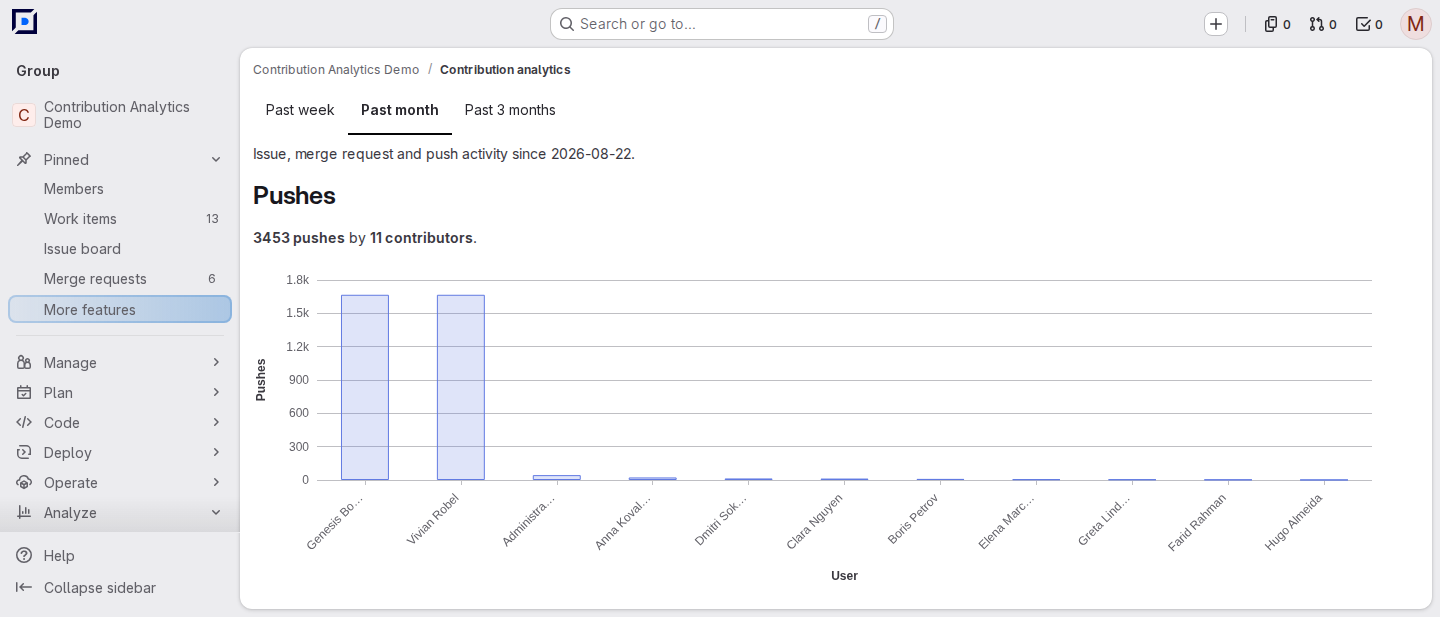
When two members have the same display name, the axis label adds the username: John Smith (@jsmith).
Without pushes in the period, the chart is replaced by the text “No pushes in the selected period.”
Merge requests chart
The “Merge requests” chart holds one group of columns per member with at least one created, merged or closed merge request in the period, ordered by the sum of these three counts, split into series:
- “Created” — merge requests the member created;
- “Merged” — merge requests the member merged;
- “Closed” — merge requests the member closed.
Approvals are counted in the table only: a member whose merge request activity consists of approvals alone is absent from the chart.
The line above the chart sums up the period: Merge requests: 8 created, 5 merged, 2 closed. Without merge request events in the period, the chart is replaced by the text “No merge request activity in the selected period.”
Issues chart
The “Issues” chart holds one group of columns per member with at least one created or closed issue in the period, ordered by the sum of these two counts, split into series:
- “Created” — issues the member created;
- “Closed” — issues the member closed.
The line above the chart sums up the period: Issues: 10 created, 6 closed. Without issue events in the period, the chart is replaced by the text “No issue activity in the selected period.”
Contributions table
The “Contributions by group member” table lists every member with at least one counted event in the period, sorted by the “Member” column. Selecting a column header sorts the table by that column.
| Column | Content |
|---|---|
| “Member” | Name of the member with a link to the profile |
| “Repository pushes” | Number of pushes |
| “Issues opened” | Number of issues the member created |
| “Issues closed” | Number of issues the member closed |
| “MRs opened” | Number of merge requests the member created |
| “MRs approved” | Number of merge requests the member approved |
| “MRs merged” | Number of merge requests the member merged |
| “MRs closed” | Number of merge requests the member closed |
| “Total contributions” | Sum of the other columns |